screen resolution

More
2 years 10 months ago #289069 by Serg452
Replied by Serg452 on topic screen resolution

If you are using 2.9, Gmoccapy has a new feature to modify the GUI by a user command file: linuxcnc.org/docs/2.9/html/gui/gmoccapy.html#_user_command_file
The advantage is that you don't have to replace that file after every update.
 
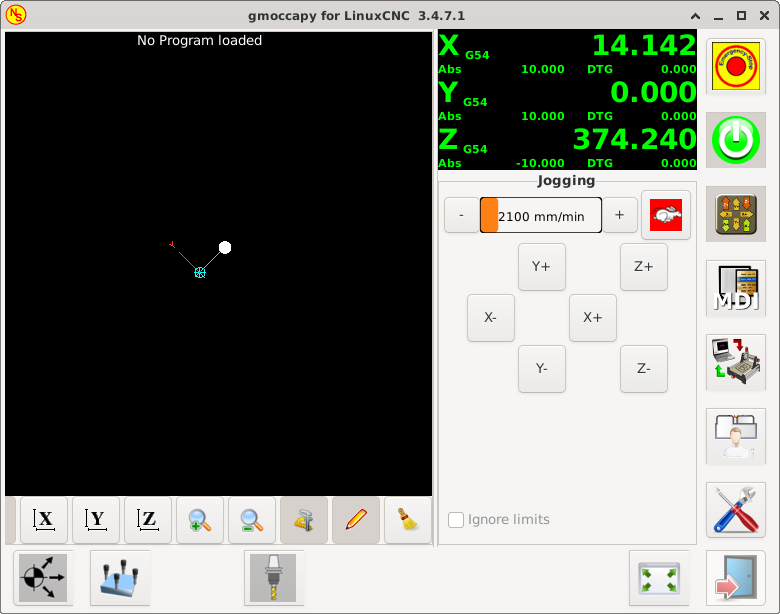
Tell me, this increases the size of the buttons, but not the pictures on them. How do I increase the image display size? Increasing the size of the picture from 48 * 48 to 66 * 66 does not give any result...

Please Log in or Create an account to join the conversation.
More
2 years 10 months ago - 2 years 10 months ago #289302 by HansU
Replied by HansU on topic screen resolution

If you are using 2.9, Gmoccapy has a new feature to modify the GUI by a user command file: linuxcnc.org/docs/2.9/html/gui/gmoccapy.html#_user_command_file
The advantage is that you don't have to replace that file after every update.
 
Tell me, this increases the size of the buttons, but not the pictures on them. How do I increase the image display size? Increasing the size of the picture from 48 * 48 to 66 * 66 does not give any result...


You can achieve that by adding the following code in the user command file.
Here an example for the auto mode buttons:
Code:
icon_configs = [ # widget, named_icon, size # auto mode buttons ("img_open", "open_file", 64), ("img_reload1", "refresh", 64), ("img_run", "play", 64), ("img_stop", "stop", 64), ("img_pause", "pause", 64), ("img_pause_active", "pause_active", 64), ("img_step", "step", 64), ("img_run_from", "run_from_line", 64), ("img_editor", "edit_code", 64), ("img_skip_optional_active", "skip_optional_active", 64), ("img_skip_optional_inactive", "skip_optional_inactive", 64), # fullscreen ("img_fullsize_preview1_open", "fullscreen_open", 64), ("img_fullsize_preview1_close", "fullscreen_close", 64), ] # default style context see TODO below default_style = Gtk.Button().get_style_context() failed_icons = 0 for widget_name, icon_name, size in icon_configs: try: image = self.widgets[widget_name] pixbuf = icon_theme_helper.load_symbolic_from_icon_theme(self.icon_theme, icon_name, size, default_style) image.set_from_pixbuf(pixbuf) image.set_size_request(size, size) except BaseException as err: LOG.warning(f"Failed to change icon for <{widget_name}> to '{icon_name}': {str(err)}")

For the other images, see here: github.com/LinuxCNC/linuxcnc/blob/2.9/sr...py/gmoccapy.py#L4413
Last edit: 2 years 10 months ago by HansU.
The following user(s) said Thank You: Serg452

Please Log in or Create an account to join the conversation.

More
2 years 9 months ago #289955 by HansU
Replied by HansU on topic screen resolution
I created a configuration which should work for a 800x600 screen. See here: github.com/LinuxCNC/linuxcnc/pull/2837
Please test this and let me know if it works for you.
 

Please Log in or Create an account to join the conversation.

Moderators: newbynobi, HansU
Time to create page: 0.332 seconds
Powered by Kunena Forum
