
- Posts: 147
- Thank you received: 12
keystroke as a hal pin?
- jtc
- Offline
- Premium Member
-

Less
More
11 years 4 weeks ago #63325
by jtc
keystroke as a hal pin? was created by jtc
Hi,
I'm wondering if is possible to assign a keyboard keystroke as an HAL pin? My objective is to use 3 keys, witch one will call a subroutine.
the first will open a log file, the second to log the X and Y coordinates, and finally the third to close the log file. If I can use this with the present keyboard keys it will be great.
Thanks
I'm wondering if is possible to assign a keyboard keystroke as an HAL pin? My objective is to use 3 keys, witch one will call a subroutine.
the first will open a log file, the second to log the X and Y coordinates, and finally the third to close the log file. If I can use this with the present keyboard keys it will be great.
Thanks
- cmorley
- Offline
- Moderator
-

Less
More
- Posts: 7368
- Thank you received: 2181
11 years 4 weeks ago #63326
by cmorley
Replied by cmorley on topic keystroke as a hal pin?
What screen are you using?
Gmoccapy or Gscreen are easier to add this to then AXIS
Chris M
Gmoccapy or Gscreen are easier to add this to then AXIS
Chris M
- jtc
- Offline
- Premium Member
-
Less
More
- Posts: 147
- Thank you received: 12
11 years 4 weeks ago #63327
by jtc
Replied by jtc on topic keystroke as a hal pin?
I'm using Axis screen.
I prefer a solution that don't depends on the screen. The machine has already a custom panel on axis, and do the complete migration will involve some work...
I prefer a solution that don't depends on the screen. The machine has already a custom panel on axis, and do the complete migration will involve some work...
- cmorley
- Offline
- Moderator
-
Less
More
- Posts: 7368
- Thank you received: 2181
11 years 4 weeks ago #63329
by cmorley
Replied by cmorley on topic keystroke as a hal pin?
The solution will always depend on the screen, if you wish to use the standard keyboard.
If you wish to use some other external buttons then it can be outside of the running screen.
That being said it is not impossible with AXIS it's just not many people know it well enough - including me.
Chris M
If you wish to use some other external buttons then it can be outside of the running screen.
That being said it is not impossible with AXIS it's just not many people know it well enough - including me.
Chris M
- jtc
- Offline
- Premium Member
-
Less
More
- Posts: 147
- Thank you received: 12
11 years 4 weeks ago #63352
by jtc
Replied by jtc on topic keystroke as a hal pin?
with thios post help :
www.linuxcnc.org/index.php/english/forum...gging?start=10#62208
and seeing the axis.py file
I add to my ini file configuration on the display area:
and the keystroke.py contains this code:
so, at this point, if I have some mdi command on the "buffer"
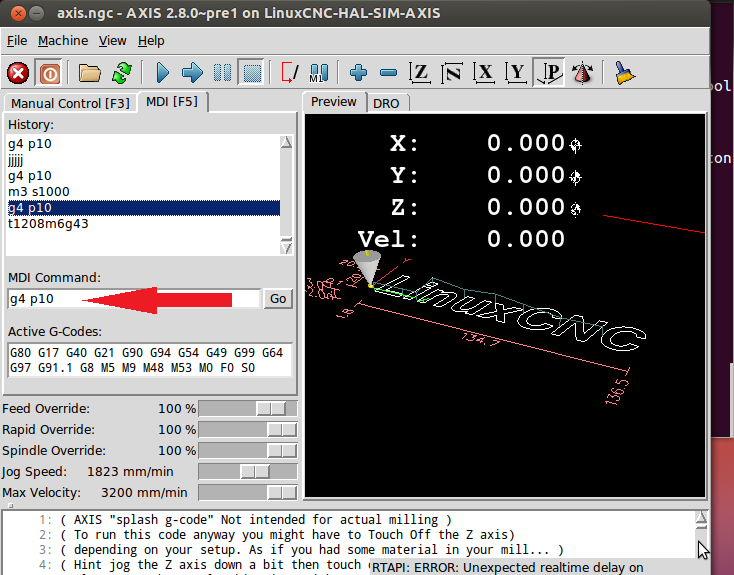
but I cant find any "commands.send_mdi" that have a string as an argument. or a way to write on the "buffer".
João
www.linuxcnc.org/index.php/english/forum...gging?start=10#62208
and seeing the axis.py file
I add to my ini file configuration on the display area:
Code:
[DISPLAY]
USER_COMMAND_FILE = keystroke.py
and the keystroke.py contains this code:
Code:
root_window.bind("<KeyPress-j>",commands.send_mdi )
so, at this point, if I have some mdi command on the "buffer"
but I cant find any "commands.send_mdi" that have a string as an argument. or a way to write on the "buffer".
João
- andypugh
- Offline
- Moderator
-
Less
More
- Posts: 19899
- Thank you received: 4655
11 years 3 weeks ago #63490
by andypugh
Does this help?
www.linuxcnc.org/docs/html/config/python-interface.html
Replied by andypugh on topic keystroke as a hal pin?
jtc wrote: but I cant find any "commands.send_mdi" that have a string as an argument. or a way to write on the "buffer".
Does this help?
www.linuxcnc.org/docs/html/config/python-interface.html
Time to create page: 0.593 seconds