
- Posts: 44
- Thank you received: 8
Can't run first job with qtdragon_hd
- ucancallmebob89
- Offline
- Senior Member
-

Less
More
4 years 10 months ago - 4 years 10 months ago #229814
by ucancallmebob89
Replied by ucancallmebob89 on topic Can't run first job with qtdragon_hd
Progress! It has to do with my toolchange operation. I started commenting out one line at a time in my gcode file and it was able to run after I commented out "T3 M6".
Now I just have to figure out why that's causing a problem.
Here are my toolchange related config settings. I'm using a manual toolchange operation. I want the machine to go to G53 X100 Y100 Z0. I have TOOL_CHANGE_QUILL_UP = 1 because I want it to raise Z all the way up before moving to the toolchange position.
In my INI, here's my EMCIO section:
In my postgui file, here's my tool change info. I've tried it with the unlinkp lines commented and uncommented, and it hasn't changed the behavior.
According to this , I expected a little message box to appear showing to facilitate the manual toolchange, but that never happened.
Now I just have to figure out why that's causing a problem.
Here are my toolchange related config settings. I'm using a manual toolchange operation. I want the machine to go to G53 X100 Y100 Z0. I have TOOL_CHANGE_QUILL_UP = 1 because I want it to raise Z all the way up before moving to the toolchange position.
In my INI, here's my EMCIO section:
Code:
[EMCIO]
EMCIO = io
CYCLE_TIME = 0.100
TOOL_TABLE = tool.tbl
TOOL_CHANGE_WITH_SPINDLE_ON = 0
TOOL_CHANGE_QUILL_UP = 1
TOOL_CHANGE_POSITION = 200 100 0
In my postgui file, here's my tool change info. I've tried it with the unlinkp lines commented and uncommented, and it hasn't changed the behavior.
Code:
# the unlink pin commands are only used, because they are connected
# in core_sim.hal and we use this file to simulate
# unlinkp iocontrol.0.tool-change
# unlinkp iocontrol.0.tool-changed
# unlinkp iocontrol.0.tool-prep-number
net tool-change hal_manualtoolchange.change <= iocontrol.0.tool-change
net tool-changed hal_manualtoolchange.changed <= iocontrol.0.tool-changed
net tool-prep-number hal_manualtoolchange.number <= iocontrol.0.tool-prep-number
According to this , I expected a little message box to appear showing to facilitate the manual toolchange, but that never happened.
Last edit: 4 years 10 months ago by ucancallmebob89.
Please Log in or Create an account to join the conversation.
- hottabich
- Offline
- Platinum Member
-

Less
More
- Posts: 574
- Thank you received: 96
4 years 10 months ago #229820
by hottabich
Replied by hottabich on topic Can't run first job with qtdragon_hd
Try replacing the Tool.tbl file to the attached and everything will work.
Please Log in or Create an account to join the conversation.
- ucancallmebob89
- Offline
- Senior Member
-
Less
More
- Posts: 44
- Thank you received: 8
4 years 10 months ago - 4 years 10 months ago #229821
by ucancallmebob89
Replied by ucancallmebob89 on topic Can't run first job with qtdragon_hd
It looks like my linuxcnc instance can't find the M6 tool change procedure.
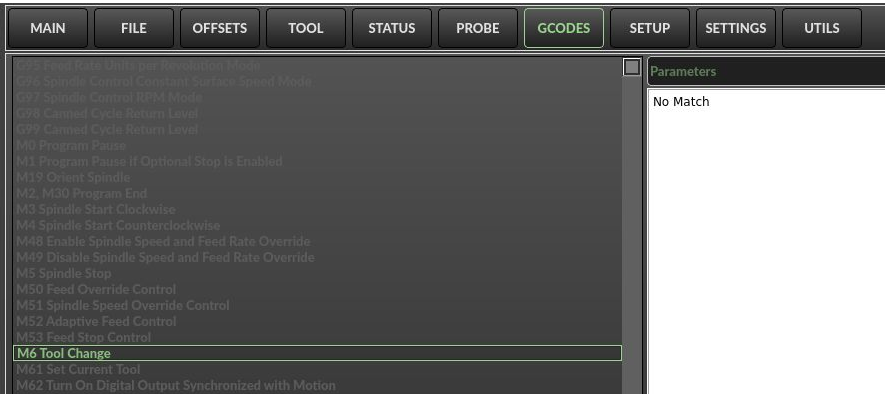
In my INI, I set PROGRAM_PREFIX like this:
Looking in that directory, there are a couple of tool change demo g-code files. Do I need to write one and name it "M6.ngc"?

In my INI, I set PROGRAM_PREFIX like this:
Code:
PROGRAM_PREFIX = ~/linuxcnc-dev/nc-files
Looking in that directory, there are a couple of tool change demo g-code files. Do I need to write one and name it "M6.ngc"?
Last edit: 4 years 10 months ago by ucancallmebob89.
Please Log in or Create an account to join the conversation.
- ucancallmebob89
- Offline
- Senior Member
-
Less
More
- Posts: 44
- Thank you received: 8
4 years 10 months ago #229823
by ucancallmebob89
Replied by ucancallmebob89 on topic Can't run first job with qtdragon_hd
Ok so my previous post isn't right, that tab is just displaying descriptions of various gcodes from ~/linuxcnc-dev/lib/python/qtvcp/lib/mdi_text.py.
But I'm still pretty sure it has something to do with my toolchange configuration.
But I'm still pretty sure it has something to do with my toolchange configuration.
Please Log in or Create an account to join the conversation.
- ucancallmebob89
- Offline
- Senior Member
-
Less
More
- Posts: 44
- Thank you received: 8
4 years 10 months ago #229827
by ucancallmebob89
Replied by ucancallmebob89 on topic Can't run first job with qtdragon_hd
www.forum.linuxcnc.org/21-axis/42888-how...axis?start=10#213214
This fixed it. Looks like it was a problem with the dialog. This is the tool change section in my postgui file now:

Troubleshooting this only took 3 days, but hey, that's linux for you I guess.
This fixed it. Looks like it was a problem with the dialog. This is the tool change section in my postgui file now:
Troubleshooting this only took 3 days, but hey, that's linux for you I guess.
The following user(s) said Thank You: hottabich
Please Log in or Create an account to join the conversation.
- cmorley
- Offline
- Moderator
-

Less
More
- Posts: 7368
- Thank you received: 2181
4 years 10 months ago #229851
by cmorley
Replied by cmorley on topic Can't run first job with qtdragon_hd
So loading the tool_dialog is not necessary - it's included in the screen code.
I seem to remember you have multiple entries for tool change - some commented out.
I also fixed the LED color problem - the limits were like that too.
I seem to remember you have multiple entries for tool change - some commented out.
I also fixed the LED color problem - the limits were like that too.
The following user(s) said Thank You: ucancallmebob89
Please Log in or Create an account to join the conversation.
Moderators: cmorley
Time to create page: 0.287 seconds