
USB activity causes network error

More
1 year 5 days ago #337301 by mariusl
Hi,
I have seen the following issue occur on three machines that Range from 2.9.3 to 2.9.6. 
The hardware is all cases are Lenovo i5 mini PC's running MX Linux 23.x Bookworm. The WiFi dongle is a USB type

What seems to happen is that when there is USB activity the network to the Mesa 7i96S will get a read error. It means that the network message could not be compete in one cycle. It typically happens when the USB stick is removed or inserted, especially if the machine is busy executing a program. It will also happen if the WiFi is active like when a file is uploaded to the nc_files directory from a laptop on the network.

Is there anyone else that has maybe seen this or know of a solution?
 

Regards
Marius


www.bluearccnc.com

Please Log in or Create an account to join the conversation.

More
1 year 5 days ago #337310 by tommylight
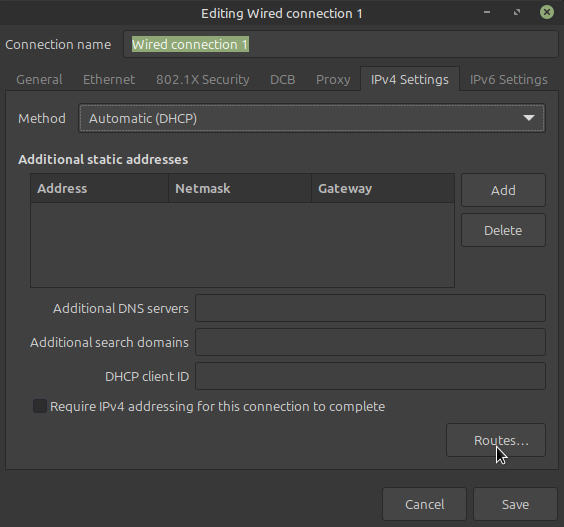
How is the network for Mesa card set up, using network manager or by editing the /etc/network/interfaces file?

Please Log in or Create an account to join the conversation.

More
1 year 5 days ago - 1 year 5 days ago #337312 by PCW
Also what USB dongle?

I have a rtl8192cu based USB WIFI dongle on this test machine
and it seem to have no effect on latency when plugged/unplugged

Have you done the usual optimizations?

DKMS driver for RealTek Ethernet chips

Turn off IRQ coalescing on Intel Ethernet chips

in grub file isolcpus = last processor

pin Ethernet IRQ to last processor


 It means that the network message could not be compete in one cycle.

Actually it's worse than that, with default settings, it means 5 read requests in a row timed out
so usually means multi-ms latency...
 
Last edit: 1 year 5 days ago by PCW.

Please Log in or Create an account to join the conversation.

More
1 year 2 days ago #337567 by mariusl
Tommy I usually make use of nmtui or the network manager
Regards
Marius


www.bluearccnc.com

Please Log in or Create an account to join the conversation.

More
1 year 2 days ago #337568 by mariusl

Also what USB dongle?

I have a rtl8192cu based USB WIFI dongle on this test machine
and it seem to have no effect on latency when plugged/unplugged

Have you done the usual optimizations?

DKMS driver for RealTek Ethernet chips

Turn off IRQ coalescing on Intel Ethernet chips

in grub file isolcpus = last processor

pin Ethernet IRQ to last processor


 It means that the network message could not be compete in one cycle.

Actually it's worse than that, with default settings, it means 5 read requests in a row timed out
so usually means multi-ms latency...
 

I use the TP=Link TL-WN823N WiFi dongle.
The Ethernet chip is Intel on the PC.
I have not turned of IRQ coalescing (don't know how)
I did isolcpus but I am not sure that I did it correctly. It has 4 processors.
Pin Ethernet IRQ to last processor - I have not heard about that so no I have not done that either.

Seem like I have a lot of things that could contribute to the problem

I did do latency tests on the PC's and they all seemed to perform very well with no noticable peaks at all

Regards
Marius


www.bluearccnc.com

Please Log in or Create an account to join the conversation.

More
1 year 1 day ago #337584 by tommylight

Tommy I usually make use of nmtui or the network manager
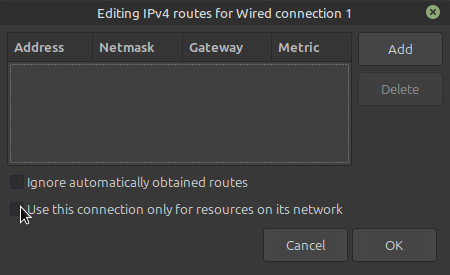
Is that the included Network Manager ?
If yes, then make sure the below is selected:


Please Log in or Create an account to join the conversation.

Moderators: snowgoer540
Time to create page: 0.066 seconds
Powered by Kunena Forum