
- Posts: 71
- Thank you received: 4
Probe Basic Help
- natholego11
- Offline
- Senior Member
-

Less
More
4 years 9 months ago - 4 years 9 months ago #232807
by natholego11
Replied by natholego11 on topic Probe Basic Help
wow, ok that was way easier than it should have been. all I ended up doing was deleting all the HAL files I had under [HAL] in the ini file, except the postgui_halfile and the one from my axis file. and it fired right up.
Thank you everybody!
EDIT:
After getting it running I noticed there are so many features. Thanks to everybody who worked on this GUI it really does enhance the linuxCNC experience.
a few questions.
1. after changing to incremental jog mode, how do you get back to continuous jog mode?
2. how do I connect the spindle encoder to the "DRO" on the GUI? my pins are all there in the HAL file, but im sure there is another file that needs one or more of the hal pins
3. when I am setting up my tool table and touching tools off, I have seen many people use the spindle nose as the reference, that being the case - Why do they do this? does my G59.3 have to be the machine home coordinates, otherwise itll miss the probe? what is the purpose of having the nose being the first thing you touch off?
Thank you everybody!
EDIT:
After getting it running I noticed there are so many features. Thanks to everybody who worked on this GUI it really does enhance the linuxCNC experience.
a few questions.
1. after changing to incremental jog mode, how do you get back to continuous jog mode?
2. how do I connect the spindle encoder to the "DRO" on the GUI? my pins are all there in the HAL file, but im sure there is another file that needs one or more of the hal pins
3. when I am setting up my tool table and touching tools off, I have seen many people use the spindle nose as the reference, that being the case - Why do they do this? does my G59.3 have to be the machine home coordinates, otherwise itll miss the probe? what is the purpose of having the nose being the first thing you touch off?
Last edit: 4 years 9 months ago by natholego11.
The following user(s) said Thank You: Lcvette
Please Log in or Create an account to join the conversation.
- Lcvette
- Offline
- Moderator
-

Less
More
- Posts: 1682
- Thank you received: 784
4 years 9 months ago #233243
by Lcvette
Replied by Lcvette on topic Probe Basic Help
a few questions.
1. after changing to incremental jog mode, how do you get back to continuous jog mode?
in the ini:
INCREMENTS = JOG .1in .01in .001in .0001in
having the JOG entry in the increments ini line adds a jog button that is built into the increments widget. see the below thread for anything else you may have missed!
forum.linuxcnc.org/qtpyvcp/44889-probe-b...onfig-conversion-doc
2. how do I connect the spindle encoder to the "DRO" on the GUI? my pins are all there in the HAL file, but im sure there is another file that needs one or more of the hal pins.
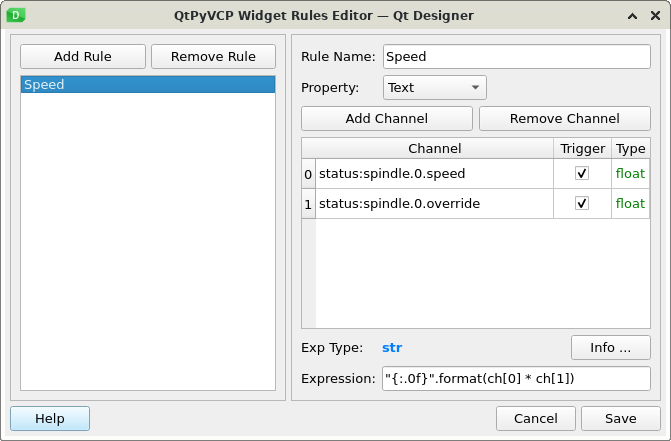
The darker (left side) spindle rpm dro in the lower main panel is the actual spindle speed taken from linuxcnc "speed" status. in the gui it is pulling data from linuxcnc STATUS: spindle.0.speed and is a float value. you should be able to connect your hal to feed this. you can see the dro widget rule for the readout below as well as the docs link to set you on the path on how to accomplish this:
linuxcnc.org/docs/html/config/python-int...spindle_dictionary_a
3. when I am setting up my tool table and touching tools off, I have seen many people use the spindle nose as the reference, that being the case - Why do they do this? does my G59.3 have to be the machine home coordinates, otherwise itll miss the probe? what is the purpose of having the nose being the first thing you touch off?
The spindle nose creates a repeatable gage line that all tools are offset against. because this never changes it ensures that all the stores offsets remain accurate. once the height has been established and stored in the touch off settings on the offsets page as (SPINDLE ZERO), you should be ok providing your tool setter is permanently mounted and your home switches are accurate. if they are not, you should remeasure the spindle zero height and enter prior to measuring new tools all while in the same running instance of linuxcnc. G59.3 is where the tool touch off position is stored. this is done so the user can see and verify the stored position in the offsets table.
the purpose for using the spindle gage line verse using the probe as a master tool, is to avoid those with large tool libraries having to remeasure all tools if the probe is crashed and a new tip installed which will effect its new tool length and as such any tools measured against the previous length offset of the probe. by the probe being a single tool with its own offset against the spindle nose, if it is changed and updated the new offset will still be accurate in relation to all other stored tools. this is the best way "in my opinion at least" to accomplish keeping everything consistent and compartmentalized to eliminate globally impacting the tool library in the event of a mishap. if this isn't the way you would like to have the touch off, the macros i wrote are in the subroutines folder and can be rewritten to suit. the button is tied to the macros file name and the other entries can be manipulated in the subroutine as you desire.
hope this helps!
Chris Polanski
1. after changing to incremental jog mode, how do you get back to continuous jog mode?
in the ini:
INCREMENTS = JOG .1in .01in .001in .0001in
having the JOG entry in the increments ini line adds a jog button that is built into the increments widget. see the below thread for anything else you may have missed!
forum.linuxcnc.org/qtpyvcp/44889-probe-b...onfig-conversion-doc
2. how do I connect the spindle encoder to the "DRO" on the GUI? my pins are all there in the HAL file, but im sure there is another file that needs one or more of the hal pins.
The darker (left side) spindle rpm dro in the lower main panel is the actual spindle speed taken from linuxcnc "speed" status. in the gui it is pulling data from linuxcnc STATUS: spindle.0.speed and is a float value. you should be able to connect your hal to feed this. you can see the dro widget rule for the readout below as well as the docs link to set you on the path on how to accomplish this:
linuxcnc.org/docs/html/config/python-int...spindle_dictionary_a
3. when I am setting up my tool table and touching tools off, I have seen many people use the spindle nose as the reference, that being the case - Why do they do this? does my G59.3 have to be the machine home coordinates, otherwise itll miss the probe? what is the purpose of having the nose being the first thing you touch off?
The spindle nose creates a repeatable gage line that all tools are offset against. because this never changes it ensures that all the stores offsets remain accurate. once the height has been established and stored in the touch off settings on the offsets page as (SPINDLE ZERO), you should be ok providing your tool setter is permanently mounted and your home switches are accurate. if they are not, you should remeasure the spindle zero height and enter prior to measuring new tools all while in the same running instance of linuxcnc. G59.3 is where the tool touch off position is stored. this is done so the user can see and verify the stored position in the offsets table.
the purpose for using the spindle gage line verse using the probe as a master tool, is to avoid those with large tool libraries having to remeasure all tools if the probe is crashed and a new tip installed which will effect its new tool length and as such any tools measured against the previous length offset of the probe. by the probe being a single tool with its own offset against the spindle nose, if it is changed and updated the new offset will still be accurate in relation to all other stored tools. this is the best way "in my opinion at least" to accomplish keeping everything consistent and compartmentalized to eliminate globally impacting the tool library in the event of a mishap. if this isn't the way you would like to have the touch off, the macros i wrote are in the subroutines folder and can be rewritten to suit. the button is tied to the macros file name and the other entries can be manipulated in the subroutine as you desire.
hope this helps!
Chris Polanski
Please Log in or Create an account to join the conversation.
- natholego11
- Offline
- Senior Member
-
Less
More
- Posts: 71
- Thank you received: 4
4 years 9 months ago #233479
by natholego11
im not exactly following what youre saying here, in the pyVCP on a normal Axis GUI the hal pins
"net spindle-vel-fb-rps => abs.0.in
net spindle-vel-fb-rps-abs abs.0.out"
are assigned to
" spindle-fb-rpm-abs-filtered => pyvcp.spindle-speed
net spindle-at-speed => pyvcp.spindle-at-speed-led"
and that shows up in the VCP.
do I use these same pins and just assign them to different values? or am i missing this completely?
Replied by natholego11 on topic Probe Basic Help
2. how do I connect the spindle encoder to the "DRO" on the GUI? my pins are all there in the HAL file, but im sure there is another file that needs one or more of the hal pins.
The darker (left side) spindle rpm dro in the lower main panel is the actual spindle speed taken from linuxcnc "speed" status. in the gui it is pulling data from linuxcnc STATUS: spindle.0.speed and is a float value. you should be able to connect your hal to feed this. you can see the dro widget rule for the readout below as well as the docs link to set you on the path on how to accomplish this:
linuxcnc.org/docs/html/config/python-int...spindle_dictionary_a
im not exactly following what youre saying here, in the pyVCP on a normal Axis GUI the hal pins
"net spindle-vel-fb-rps => abs.0.in
net spindle-vel-fb-rps-abs abs.0.out"
are assigned to
" spindle-fb-rpm-abs-filtered => pyvcp.spindle-speed
net spindle-at-speed => pyvcp.spindle-at-speed-led"
and that shows up in the VCP.
do I use these same pins and just assign them to different values? or am i missing this completely?
Please Log in or Create an account to join the conversation.
- Lcvette
- Offline
- Moderator
-
Less
More
- Posts: 1682
- Thank you received: 784
4 years 9 months ago - 4 years 9 months ago #233485
by Lcvette
Replied by Lcvette on topic Probe Basic Help
sorry misunderstood, thought you were editing the gui itself for your desired needs.. here is an example of the spindle section hal from my machine, should help!
loadrt abs names=abs.spindle
loadrt lowpass names=lowpass.spindle
loadrt scale names=scale.spindle
loadrt near
addf scale.spindle servo-thread
addf abs.spindle servo-thread
addf lowpass.spindle servo-thread
addf near.0 servo-thread
#*******************
# SPINDLE S
#*******************
setp pid.s.Pgain [SPINDLE_9]P
setp pid.s.Igain [SPINDLE_9]I
setp pid.s.Dgain [SPINDLE_9]D
setp pid.s.bias [SPINDLE_9]BIAS
setp pid.s.FF0 [SPINDLE_9]FF0
setp pid.s.FF1 [SPINDLE_9]FF1
setp pid.s.FF2 [SPINDLE_9]FF2
setp pid.s.deadband [SPINDLE_9]DEADBAND
setp pid.s.maxoutput [SPINDLE_9]MAX_OUTPUT
setp pid.s.error-previous-target true
net spindle-index-enable <=> pid.s.index-enable
net spindle-enable => pid.s.enable
net spindle-vel-cmd-rpm => pid.s.command
net spindle-vel-fb-rpm-abs => pid.s.feedback
net spindle-output <= pid.s.output
# ---PWM Generator signals/setup---
setp hm2_7i92.0.7i77.0.1.analogout0-scalemax [SPINDLE_9]OUTPUT_SCALE
setp hm2_7i92.0.7i77.0.1.analogout0-minlim [SPINDLE_9]OUTPUT_MIN_LIMIT
setp hm2_7i92.0.7i77.0.1.analogout0-maxlim [SPINDLE_9]OUTPUT_MAX_LIMIT
net spindle-output => hm2_7i92.0.7i77.0.1.analogout0
net spindle-enable hm2_7i92.0.7i77.0.1.analogena
# ---Encoder feedback signals/setup---
setp hm2_7i92.0.encoder.00.counter-mode 0
setp hm2_7i92.0.encoder.00.filter 1
setp hm2_7i92.0.encoder.00.index-invert 0
setp hm2_7i92.0.encoder.00.index-mask 0
setp hm2_7i92.0.encoder.00.index-mask-invert 0
setp hm2_7i92.0.encoder.00.scale [SPINDLE_9]ENCODER_SCALE
net spindle-revs <= hm2_7i92.0.encoder.00.position
net spindle-vel-fb-rps <= hm2_7i92.0.encoder.00.velocity
net spindle-index-enable <=> hm2_7i92.0.encoder.00.index-enable
# ---setup spindle control signals---
net spindle-vel-cmd-rps <= spindle.0.speed-out-rps
net spindle-vel-cmd-rps-abs <= spindle.0.speed-out-rps-abs
net spindle-vel-cmd-rpm <= spindle.0.speed-out
net spindle-vel-cmd-rpm-abs <= spindle.0.speed-out-abs
net spindle-enable <= spindle.0.on
net spindle-cw <= spindle.0.forward
net spindle-ccw <= spindle.0.reverse
net spindle-brake <= spindle.0.brake
net spindle-revs => spindle.0.revs
net spindle-at-speed => spindle.0.at-speed
net spindle-vel-fb-rps => spindle.0.speed-in
net spindle-index-enable <=> spindle.0.index-enable
# ---Setup spindle at speed signals---
net spindle-vel-cmd-rps => near.0.in1
net spindle-vel-fb-rps => near.0.in2
##########################
net spindle-at-speed <= near.0.out
##########################
setp near.0.scale 1.000000
##########################
setp near.0.difference 5
##sets spindle-at-speed true
# Use ACTUAL spindle velocity from spindle encoder
# spindle-velocity bounces around so we filter it with lowpass
# spindle-velocity is signed so we use absolute component to remove sign
# ACTUAL velocity is in RPS not RPM so we scale it.
setp scale.spindle.gain 60
setp lowpass.spindle.gain 1.000000
net spindle-vel-fb-rps => scale.spindle.in
net spindle-fb-rpm scale.spindle.out => abs.spindle.in
net spindle-fb-rpm-abs abs.spindle.out => lowpass.spindle.in
net spindle-fb-rpm-abs-filtered lowpass.spindle.out
loadrt abs names=abs.spindle
loadrt lowpass names=lowpass.spindle
loadrt scale names=scale.spindle
loadrt near
addf scale.spindle servo-thread
addf abs.spindle servo-thread
addf lowpass.spindle servo-thread
addf near.0 servo-thread
#*******************
# SPINDLE S
#*******************
setp pid.s.Pgain [SPINDLE_9]P
setp pid.s.Igain [SPINDLE_9]I
setp pid.s.Dgain [SPINDLE_9]D
setp pid.s.bias [SPINDLE_9]BIAS
setp pid.s.FF0 [SPINDLE_9]FF0
setp pid.s.FF1 [SPINDLE_9]FF1
setp pid.s.FF2 [SPINDLE_9]FF2
setp pid.s.deadband [SPINDLE_9]DEADBAND
setp pid.s.maxoutput [SPINDLE_9]MAX_OUTPUT
setp pid.s.error-previous-target true
net spindle-index-enable <=> pid.s.index-enable
net spindle-enable => pid.s.enable
net spindle-vel-cmd-rpm => pid.s.command
net spindle-vel-fb-rpm-abs => pid.s.feedback
net spindle-output <= pid.s.output
# ---PWM Generator signals/setup---
setp hm2_7i92.0.7i77.0.1.analogout0-scalemax [SPINDLE_9]OUTPUT_SCALE
setp hm2_7i92.0.7i77.0.1.analogout0-minlim [SPINDLE_9]OUTPUT_MIN_LIMIT
setp hm2_7i92.0.7i77.0.1.analogout0-maxlim [SPINDLE_9]OUTPUT_MAX_LIMIT
net spindle-output => hm2_7i92.0.7i77.0.1.analogout0
net spindle-enable hm2_7i92.0.7i77.0.1.analogena
# ---Encoder feedback signals/setup---
setp hm2_7i92.0.encoder.00.counter-mode 0
setp hm2_7i92.0.encoder.00.filter 1
setp hm2_7i92.0.encoder.00.index-invert 0
setp hm2_7i92.0.encoder.00.index-mask 0
setp hm2_7i92.0.encoder.00.index-mask-invert 0
setp hm2_7i92.0.encoder.00.scale [SPINDLE_9]ENCODER_SCALE
net spindle-revs <= hm2_7i92.0.encoder.00.position
net spindle-vel-fb-rps <= hm2_7i92.0.encoder.00.velocity
net spindle-index-enable <=> hm2_7i92.0.encoder.00.index-enable
# ---setup spindle control signals---
net spindle-vel-cmd-rps <= spindle.0.speed-out-rps
net spindle-vel-cmd-rps-abs <= spindle.0.speed-out-rps-abs
net spindle-vel-cmd-rpm <= spindle.0.speed-out
net spindle-vel-cmd-rpm-abs <= spindle.0.speed-out-abs
net spindle-enable <= spindle.0.on
net spindle-cw <= spindle.0.forward
net spindle-ccw <= spindle.0.reverse
net spindle-brake <= spindle.0.brake
net spindle-revs => spindle.0.revs
net spindle-at-speed => spindle.0.at-speed
net spindle-vel-fb-rps => spindle.0.speed-in
net spindle-index-enable <=> spindle.0.index-enable
# ---Setup spindle at speed signals---
net spindle-vel-cmd-rps => near.0.in1
net spindle-vel-fb-rps => near.0.in2
##########################
net spindle-at-speed <= near.0.out
##########################
setp near.0.scale 1.000000
##########################
setp near.0.difference 5
##sets spindle-at-speed true
# Use ACTUAL spindle velocity from spindle encoder
# spindle-velocity bounces around so we filter it with lowpass
# spindle-velocity is signed so we use absolute component to remove sign
# ACTUAL velocity is in RPS not RPM so we scale it.
setp scale.spindle.gain 60
setp lowpass.spindle.gain 1.000000
net spindle-vel-fb-rps => scale.spindle.in
net spindle-fb-rpm scale.spindle.out => abs.spindle.in
net spindle-fb-rpm-abs abs.spindle.out => lowpass.spindle.in
net spindle-fb-rpm-abs-filtered lowpass.spindle.out
Last edit: 4 years 9 months ago by Lcvette.
Please Log in or Create an account to join the conversation.
- natholego11
- Offline
- Senior Member
-
Less
More
- Posts: 71
- Thank you received: 4
4 years 9 months ago - 4 years 9 months ago #233490
by natholego11
Replied by natholego11 on topic Probe Basic Help
our hal files look to be almost identical but im still not getting and data to the Probe_basic DRO for the spindle.
i feel like my connection between the correct hal pins and what you showed me earlier is not correct.
here is my hal and ini file.
i feel like my connection between the correct hal pins and what you showed me earlier is not correct.
here is my hal and ini file.
Last edit: 4 years 9 months ago by natholego11.
Please Log in or Create an account to join the conversation.
- Lcvette
- Offline
- Moderator
-
Less
More
- Posts: 1682
- Thank you received: 784
4 years 9 months ago #233500
by Lcvette
Replied by Lcvette on topic Probe Basic Help
#==================
# SPINDLE
#==================
[SPINDLE_9]
P = 0.0
I = 0.0
D = 0.0
FF0 = 1.0
FF1 = 0.0
FF2 = 0.0
BIAS = 0.0
DEADBAND = 0.0
MAX_OUTPUT = 6225
ENCODER_SCALE = -4096
OUTPUT_SCALE = 6225
OUTPUT_MIN_LIMIT = -6225
OUTPUT_MAX_LIMIT = 6225
# SPINDLE
#==================
[SPINDLE_9]
P = 0.0
I = 0.0
D = 0.0
FF0 = 1.0
FF1 = 0.0
FF2 = 0.0
BIAS = 0.0
DEADBAND = 0.0
MAX_OUTPUT = 6225
ENCODER_SCALE = -4096
OUTPUT_SCALE = 6225
OUTPUT_MIN_LIMIT = -6225
OUTPUT_MAX_LIMIT = 6225
Please Log in or Create an account to join the conversation.
Moderators: KCJ, Lcvette
Time to create page: 4.136 seconds