Probe Basic probing without Z-Axis?

More
3 years 9 months ago #262140 by spumco
YAY!!!!

Thank you VERY much.
The following user(s) said Thank You: Lcvette

Please Log in or Create an account to join the conversation.

More
3 years 9 months ago #262168 by Lcvette

spumco post=262140 userid=28776YAY!!!!

Thank you VERY much.

welcome!  its a good probe function to have, i like having the probe above the work personally because im always nervous of jogging into something with the probe,  also (and the biggest reason for me is that) I like to probe all 3 axes one and done single push, this way i don't inadvertently forget to probe z before or after probing x/y and cause a crash on program start.  seems if i ever crash it is because im getting fancy with where im probing the z axis.  

Please Log in or Create an account to join the conversation.

More
3 years 9 months ago #262184 by spumco
I agree - automating the Z-probe is a useful way to avoid the "forgot to set Z" crash.

But I remember last year when I got my probe installed and was fiddling around.. the first thing i needed to probe was a hole in something shaped like a doughnut - no flat top surface.  I really wished for a "Include Z-Probe" checkbox I could de-select for all the edge/boss/pocket routines.

Please Log in or Create an account to join the conversation.

More
3 years 9 months ago #262213 by Lcvette
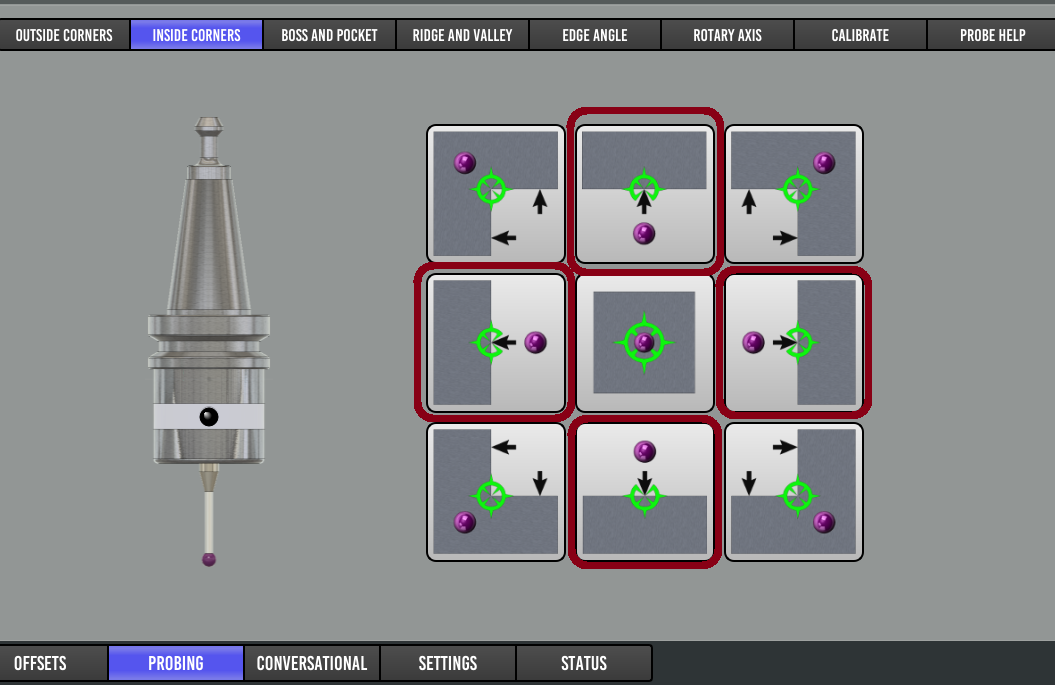
all the edge probes are available without z, they are on the second page, they are just straight probe moves in a direction x, y, x-, y-

trying to traverse a boss when it has no idea where it is in space in relation to the work piece top is a crash waiting to happen. the z probe in those situation defines the traverse plane. simple probing in one direction is easy and safe enough and probing inside something where it needs no z move such as what was just added is also fairly safe. i'm not keen on adding anything where the user can forget or enter a bad parameter and potentially cause a probe crash.  

I have been using a variation of these probe routines now for almost 10 years and can say without doubt they will do about anything you need for 2.5D probing. once you use the machine for a while you will find your go to probe setups that you use the most often and will setup your work in fusion or whatever cam software you use for those scenarios and it become old hat and is very efficient.  for me it is typically back left corner, rect boss, circle boss, hole center, and the valleys.  those are used probably 99% of the time for work coordinate offsetting.  the hint method allows for really fast probing so its not moving around blind at 6ipm having to find points to make safe moves and taking 3 or more minutes to complete a routine.  it really shows when you are loading large stock and using the center probe routines.  try it on a ui that has to carefully find its way around a part when your part is 20" x 10" and you will fall asleep waiting for it to finish.  here is an example:


and the alternative on a much larger parts:


for the straight probes, they are on this page:
 

If you want to change the routines to suit your specific requirements, they are all there in the subroutine folder, I am happy to help guide, but i think what is there will do just about everything conveniently you could want to do.  just let me know when your at the point you find you need something different and i can walk you through the flow of the macros.  once it clicks it is really pretty easy.  modifying the ones macros i updated for the new routine added too about 5 minutes, the graphics to 30..lol

Chris


The following user(s) said Thank You: Roguish, figure_of_disguise, spumco

Please Log in or Create an account to join the conversation.

More
3 years 6 months ago - 3 years 6 months ago #269132 by figure_of_disguise
Hello,

i didn't read in the forum for a long time, sorry for that Chris!
Awsome work you did - i'm very thankful for that, love it!
I thought noone cares about that - but sometimes it's useful.....

I will try to update Probe Basic tomorrow - didn't get the Updater to run yet.
....something is wrong - i check tomorrow.

Thank you very much Chris!

Martin
Last edit: 3 years 6 months ago by figure_of_disguise.
The following user(s) said Thank You: tommylight

Please Log in or Create an account to join the conversation.

More
3 years 6 months ago #269186 by Lcvette
The updater no longer works, anything pre linuxcnc 2.9 is no longer being supported, you will want to update by going to Debian 12 and using the .deb installation method in the sticky section. Also be sure to update your configs with the py3 config doc also in the sticky section.

Thanks!

Chris
The following user(s) said Thank You: figure_of_disguise

Please Log in or Create an account to join the conversation.

Moderators: KCJ, Lcvette
Time to create page: 0.061 seconds
Powered by Kunena Forum