Probe Basic Configuration

More
4 years 3 months ago #247739 by Lcvette
Replied by Lcvette on topic Probe Basic Configuration

Thanks for the help. I think I'm going to use the Qtdragon UI. I tested it yesterday and looks like it has everything I need plus there is a lot of documentation for it.
not a bad idea if youre fairly new and just looking to get setup, there isn't yet alot of documentation for probe basic.

Please Log in or Create an account to join the conversation.
More
4 years 3 months ago #247740 by spumco
Replied by spumco on topic Probe Basic Configuration

they automatically set the gui display based on the ini file, if you have only xyz in the ini, only xyz will display in the gui, if you have xyza configured in the gui, then you get xyza in the gui etc.. we made it fairly simple to display only what is needed via the already required configuration for linuxcnc.
 

His INI file had the right values to trigger the 4-axis display in PB. i.e GEOMETRY = XYZA, but was still getting a 3-axis display.

Thats why this was curious... PB wasn't acting as expected.

Please Log in or Create an account to join the conversation.

More
4 years 3 months ago - 4 years 3 months ago #247802 by Lcvette
Replied by Lcvette on topic Probe Basic Configuration
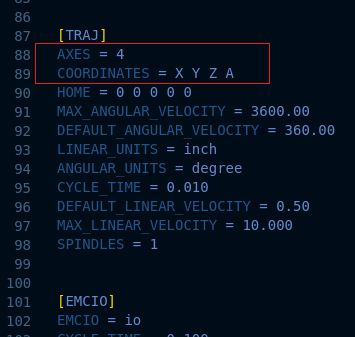
I just looked over the ini file posted above and it would need the same ini entry as the sim has in order to command the axis display as desired: 

Last edit: 4 years 3 months ago by Lcvette.
The following user(s) said Thank You: spumco

Please Log in or Create an account to join the conversation.

More
4 years 3 months ago #247804 by spumco
Replied by spumco on topic Probe Basic Configuration
That makes much more sense now.  Noted for future reference -  [TRAJECTORY] and not [DISPLAY] that triggers the axis dros.

I'm interested, as I've got my 4th axis turned off/disabled right now, but will eventually be re-enabling it and with my luck I'd be chasing the same problem.

Please Log in or Create an account to join the conversation.

More
4 years 3 months ago #247805 by Lcvette
Replied by Lcvette on topic Probe Basic Configuration
It is done via a widget rule which pols status:axes from the ini at start up. So be sure to add the AXES = 3 or 4 or 5
The following user(s) said Thank You: spumco

Please Log in or Create an account to join the conversation.

More
4 years 3 months ago #247981 by charleyann
I spent a LOT of time trying to get the 4th axis to display. I looked at several config files and never saw the "AXIS =" entry
I went with QTdragon due to this issue.
If we had some kind of getting started doc for using Probe Basic it could save a lot of frustration.

Please Log in or Create an account to join the conversation.

Moderators: KCJ, Lcvette
Time to create page: 0.217 seconds
Powered by Kunena Forum
