Probe basic—Help with a few issues

More
2 years 11 months ago #286751 by Mayberry Customs
Yes I am referring to the arrow keys on the keyboard…can you point me to a post or info about modifying the key binding for this?

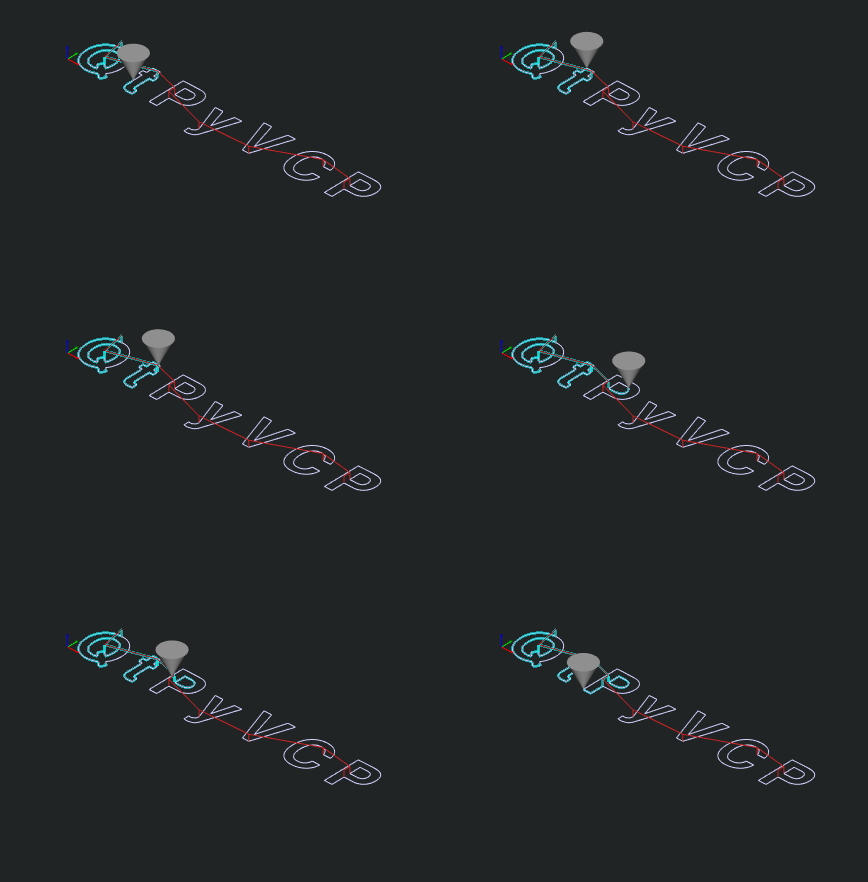
Another issue I have is that the “cone” that represents the tool does not follow the toolpath displayed in the gui…the tool path works correctly and the work coordinates correlates to the location of the toolpath correctly, but the representative cone just kind of moves around out in space on the screen not following the graphical tool path…is this a known issue as well?

Please Log in or Create an account to join the conversation.
More
2 years 11 months ago #286752 by Lcvette
Not that i am aware of, i do not see any of this behavior, do you have any offsets set? maybe take a shot of your offsets page or try clearing the offsets, then setting a new wcs then load the program? 


Please Log in or Create an account to join the conversation.

More
2 years 11 months ago #286753 by Lcvette

Yes I am referring to the arrow keys on the keyboard…can you point me to a post or info about modifying the key binding for this?
 
i have not played with that myself, just know it is something others have used for such things, you will need to find someone who has posted about it maybe to help there.

Please Log in or Create an account to join the conversation.

More
2 years 11 months ago #286813 by spumco

Yes I am referring to the arrow keys on the keyboard…can you point me to a post or info about modifying the key binding for this?
 
i have not played with that myself, just know it is something others have used for such things, you will need to find someone who has posted about it maybe to help there.

OP - A few of us have been discussing keyboard controls lately, both in PB and LCNC in general.

Specific to PB & QtPyVCP, this was the most promising post I've seen recently:

forum.linuxcnc.org/qtpyvcp/47976-probe-b...ging?start=10#286244

If you are capable of editing python files you can probably accomplish what you want. (keyboard jog - yes, keyboard screen tabs - no)

Failing that, I think the next step is to raise an issue on GitHub so we can all figure out how to add a way to manage keyboard controls more easily.  I'm thinking checkbox(s) on a settings page... not user-editing some python gibberish.

It may take some significant work as there are keybinding functions throughout the various GUI's.  Given what little I can comprehend QtPyVCP appears to be based on qtvcp - or at least uses some libraries or other components (I don't know the jargon, forgive me).  When I see stuff like this:
Code:
from qtpy.QtCore import Property, Slot from qtpy.QtWidgets import QPushButton

in QtPyVCP base_widget.py, it makes me think there was some code-sharing at some point.  So maybe a solid fix means work both in Qtvcp and QtPyVCP.

Nor do I know what the end scheme would look like.  Maybe a new widget which will override all keybinding or key events?  Or will any change/feature need to be added to each particular GUI - and not just the GUI framework application.

Please Log in or Create an account to join the conversation.

More
2 years 11 months ago #286833 by Mayberry Customs
Ahh now that you say that I am using auto tool measurement to tool set every tool which is done by remapping the M6. Something I carried over from gmocappy. I have a proper bt30 spindle now but I continue to use the auto tool measurement method because it works so well. So what’s going on i think is a z offset is created when it sets the difference between the “reference” tool which in my case is a probe to the tool doing the cutting. So this method works perfectly in reality but the display just doesn’t correlate because of that offset I guess.

Please Log in or Create an account to join the conversation.

More
2 years 11 months ago #286834 by Mayberry Customs
Yeah that would be great to have some options like that…I guess I’ve kind of given up on the arrow key thing, good reason to buy a proper jog pendant and get that set up I guess!

Please Log in or Create an account to join the conversation.

Moderators: KCJ, Lcvette
Time to create page: 0.282 seconds
Powered by Kunena Forum
