New Probe Basic install - error during install.

More
1 year 2 weeks ago - 1 year 2 weeks ago #336685 by DavidR8
Well I tried again with a fresh LCNC install and I got almost all the way through the Probe Basic install.

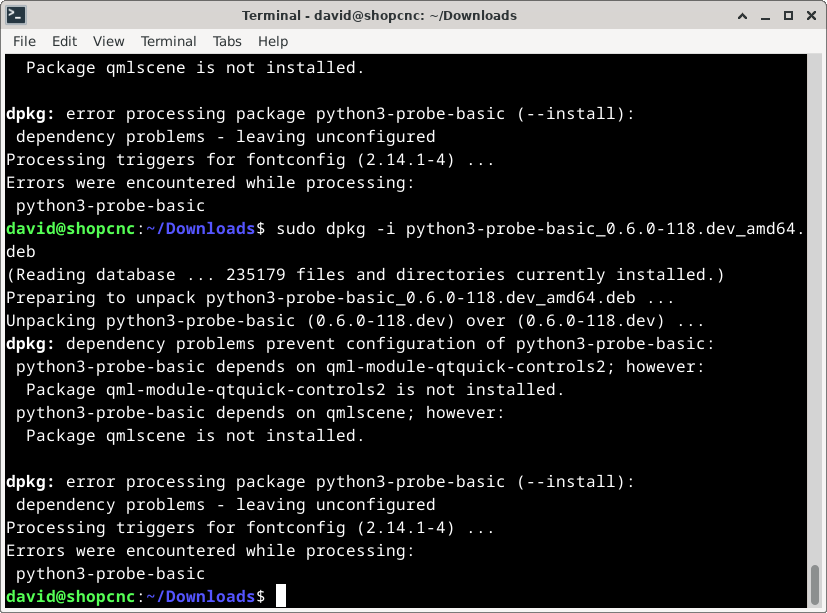
Got this error on the last installation command: sudo dpkg -i python3-probe-basic_0.6.0-118.dev_amd64.deb

I looked for the application and found it but not a debian version.
Surely something is wrong with the instructions if I'm having this many issues. 
 
Last edit: 1 year 2 weeks ago by DavidR8. Reason: clarity

Please Log in or Create an account to join the conversation.
More
1 year 1 week ago #336688 by rodw
probe basic is not part of the linuxCNC project. You could look at qtdragon which is well documented and is part of the project. But as Tommy said, get a working system that uses axis first.
The following user(s) said Thank You: tommylight, DavidR8

Please Log in or Create an account to join the conversation.

More
1 year 1 week ago #336712 by Lcvette
Are you trying to install a dev work station or just a machine control? If a machine control, use the apt installation.

kcjengr.github.io/probe_basic/stable_quick_start_apt.html
The following user(s) said Thank You: DavidR8

Please Log in or Create an account to join the conversation.

More
1 year 1 week ago - 1 year 1 week ago #336714 by Lcvette
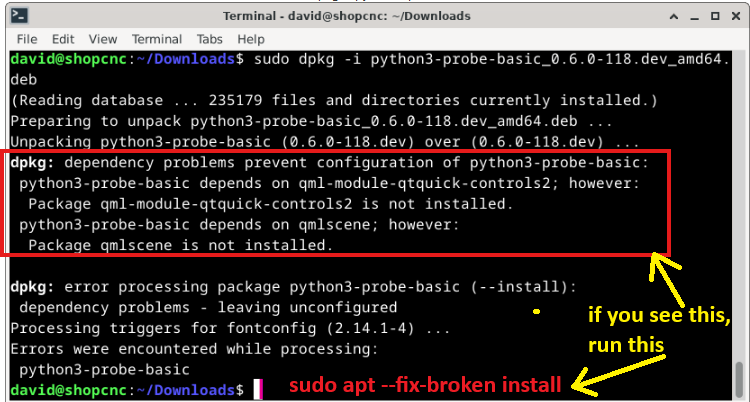
When you see errors like the missing dependency shown in the top line of your screen shot, those are what stop the installation from proceeding. While installing, if you encounter those, you can auto install them by running:

sudo apt --fix-broken install

which will gather all of the missing dependencies on your system and install them.
Last edit: 1 year 1 week ago by Lcvette.

Please Log in or Create an account to join the conversation.

More
1 year 1 week ago #336716 by DavidR8
Just machine control. I'll try the apt install.

Please Log in or Create an account to join the conversation.

More
1 year 1 week ago #336717 by Lcvette
just for clarification, in Linux with any program when installing in terminal, if dependencies are missing they will cause an installation error, you need to read the terminal after each command to verify if the installation was successful or if there was a complication that needs to be addressed, it will give you any clues as to what is wrong very clearly.  so in your example, there are missing dependencies as shown in the terminal boxed in red outline.  the solution is to immediately run after that installation command the following command shows in red text.  that should resolve and then the previous installation will continue automatically and complete.  now if you ignored any of the dependency errors in previous installation lines for linuxcnc, hiyapyco, qtpyvcp, you would need to go back and rerun those in the correct order from the docs and running the dependency fix directly after each.  the order is important because each item is a dependency of the previously installed component.

linuxcnc > hiyapyco > qtpyvcp > probe-basic


Please Log in or Create an account to join the conversation.

Moderators: KCJ, Lcvette
Time to create page: 0.384 seconds
Powered by Kunena Forum