
Probe Basic Stable error
- ncf250sd
- Offline
- Junior Member
-

Less
More
- Posts: 35
- Thank you received: 2
21 Jan 2026 22:54 #341672
by ncf250sd
Probe Basic Stable error was created by ncf250sd
I just updated to the stable version of probe basic, installed using the APT stable install and running Linuxcnc 2.9.8. During testing I have most functions working; however, I get the following error when I click on the "go to home" and the "go to zero" buttons. "Named parameter #<geomery> not defined" The error message is the same for both buttons. Any suggestions on this error?
Please Log in or Create an account to join the conversation.
- Lcvette
-

- Offline
- Moderator
-

Less
More
- Posts: 1681
- Thank you received: 783
21 Jan 2026 23:07 #341673
by Lcvette
Replied by Lcvette on topic Probe Basic Stable error
It's telling you that you have not defined everything required for that function in the initial file.
kcjengr.github.io/probe_basic/machine_config.html


kcjengr.github.io/probe_basic/machine_config.html
Attachments:
Please Log in or Create an account to join the conversation.
- ncf250sd
- Offline
- Junior Member
-
Less
More
- Posts: 35
- Thank you received: 2
21 Jan 2026 23:21 #341674
by ncf250sd
Replied by ncf250sd on topic Probe Basic Stable error
Yep, that was it, thank you. Somehow I missed the AXES=3. Another question, my E stop button stays bright red the entire time, it still works. It just never changes from red to shaded.
Please Log in or Create an account to join the conversation.
- Lcvette
-
- Offline
- Moderator
-
Less
More
- Posts: 1681
- Thank you received: 783
22 Jan 2026 00:06 #341676
by Lcvette
Replied by Lcvette on topic Probe Basic Stable error
Check you hardware estop configuration
Please Log in or Create an account to join the conversation.
- ncf250sd
- Offline
- Junior Member
-
Less
More
- Posts: 35
- Thank you received: 2
24 Jan 2026 01:49 #341811
by ncf250sd
Replied by ncf250sd on topic Probe Basic Stable error
a quick follow-up on the E stop. I checked everything on my side that I could think of and the light stays on. I just upgraded from the original PB where the E stop button worked as it should. Maybe I was not clear with my issue. When I activate my e stop on my pendant the screen E stop light goes off. However if i push the screen E stop button the machine stops but the button stays on. You think its still on my side?
Please Log in or Create an account to join the conversation.
- Lcvette
-
- Offline
- Moderator
-
Less
More
- Posts: 1681
- Thank you received: 783
25 Jan 2026 18:07 #341911
by Lcvette
Replied by Lcvette on topic Probe Basic Stable error
the on screen button and physical button cannot remain synchronized as the screen cannot physically change the mushroom buttons state. so you will need to add in some hal NOT allowing the UI estop button in probe basic to be in a state different from the physical mushroom button.
Please Log in or Create an account to join the conversation.
- ncf250sd
- Offline
- Junior Member
-
Less
More
- Posts: 35
- Thank you received: 2
27 Jan 2026 01:31 #341977
by ncf250sd
Replied by ncf250sd on topic Probe Basic Stable error
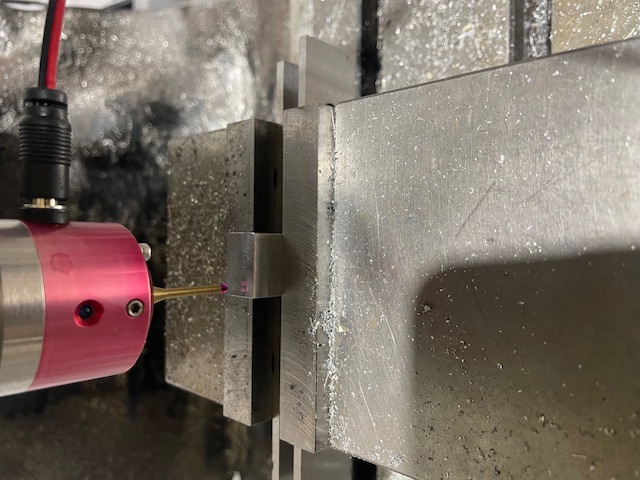
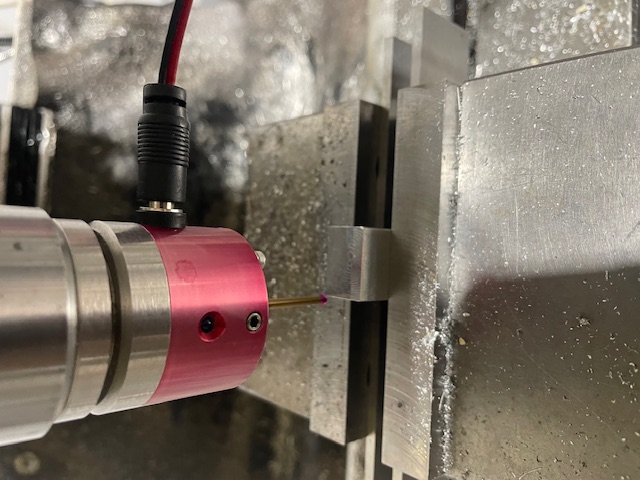
Thank you I got it working. Today I attempted to probe a top left outside corner and noticed that when the routine went to probe the "Y" side the probe does not move over enough to the positive X to probe the material. It does like it should when it probes the X. It does the same on all outside corners. It probes the center position just fine. I attached a pic of the probe start position and where it fails to move over enough. Any ides on what to look for?
Please Log in or Create an account to join the conversation.
- Lcvette
-
- Offline
- Moderator
-
Less
More
- Posts: 1681
- Thank you received: 783
27 Jan 2026 01:37 #341978
by Lcvette
Replied by Lcvette on topic Probe Basic Stable error
Step off width.
Read the probe help on the probing page for explanations on how probing settings works.
Read the probe help on the probing page for explanations on how probing settings works.
Please Log in or Create an account to join the conversation.
- ncf250sd
- Offline
- Junior Member
-
Less
More
- Posts: 35
- Thank you received: 2
27 Jan 2026 02:05 - 27 Jan 2026 02:13 #341980
by ncf250sd
Replied by ncf250sd on topic Probe Basic Stable error
pretty sure i have all the setting correct as that was my first suspicion. I have already calibrated the probe and used it to find the center and z height of the stock.. I don't think that would have been possible with bad values? Or am i wrong? I will check again tomorrow. I used the original PB for several years so I am pretty familiar. Also, the pictures are confusing; the second pic the probe had already completed the x measurement and moved into position for the Y. the probe did step off the correct .3" in the x direction.
Last edit: 27 Jan 2026 02:13 by ncf250sd.
Please Log in or Create an account to join the conversation.
- Lcvette
-
- Offline
- Moderator
-
Less
More
- Posts: 1681
- Thank you received: 783
27 Jan 2026 02:17 - 27 Jan 2026 02:18 #341981
by Lcvette
Replied by Lcvette on topic Probe Basic Stable error
.3 pretty small unless you have it real close to the corner when you start. Do you have the probe tip diameter set in the tool table?
Do the other corners behave the same?
Do the other corners behave the same?
Last edit: 27 Jan 2026 02:18 by Lcvette.
Please Log in or Create an account to join the conversation.
Moderators: KCJ, Lcvette
Time to create page: 0.801 seconds