
Some problems with probe basic lathe
- Ismacr63
- Offline
- Elite Member
-

Less
More
- Posts: 174
- Thank you received: 11
11 Feb 2026 21:06 #342815
by Ismacr63
Some problems with probe basic lathe was created by Ismacr63
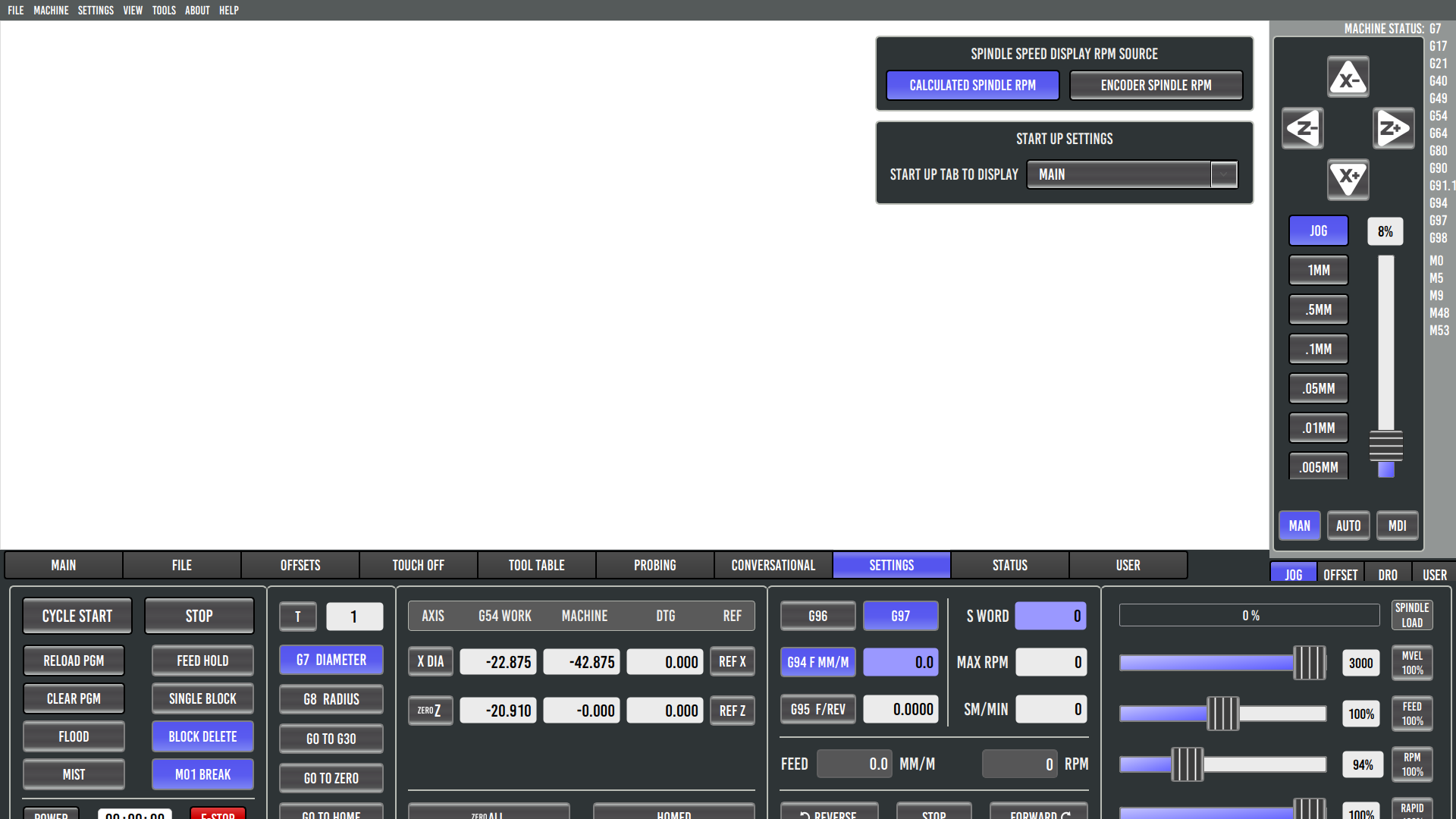
The Probe Basic Lathe screen in full-screen mode is cut off and doesn’t display completely, which is a bit annoying.
Another issue I’m seeing is that the on-screen keys stop working after referencing the machine, and I have to home it again to get them working.
Also, the arrow keys only respond when clicking with the mouse in certain specific areas.To have the spindle rotate at a default speed of X RPM, I set, but without success. When I press the Forward button, it spins by default at a very low RPM.
Finally, for some reason, the subroutines don’t work at all.I’m running the latest update and have replaced the Probe Basic Lathe folders.
Another issue I’m seeing is that the on-screen keys stop working after referencing the machine, and I have to home it again to get them working.
Also, the arrow keys only respond when clicking with the mouse in certain specific areas.To have the spindle rotate at a default speed of X RPM, I set
RS274NGC_STARTUP_CODE = S500Finally, for some reason, the subroutines don’t work at all.I’m running the latest update and have replaced the Probe Basic Lathe folders.
Please Log in or Create an account to join the conversation.
- Lcvette
-

- Offline
- Moderator
-

Less
More
- Posts: 1682
- Thank you received: 784
11 Feb 2026 21:16 #342817
by Lcvette
Replied by Lcvette on topic Some problems with probe basic lathe
how about in sim mode?
The following user(s) said Thank You: Ismacr63
Please Log in or Create an account to join the conversation.
- Ismacr63
- Offline
- Elite Member
-
Less
More
- Posts: 174
- Thank you received: 11
11 Feb 2026 21:34 #342819
by Ismacr63
Replied by Ismacr63 on topic Some problems with probe basic lathe
In simulation mode, the screen looks the same, the subroutines don’t work, and I honestly haven’t tried the movement with the arrow keys.
Please Log in or Create an account to join the conversation.
- Lcvette
-
- Offline
- Moderator
-
Less
More
- Posts: 1682
- Thank you received: 784
11 Feb 2026 21:56 #342820
by Lcvette
Replied by Lcvette on topic Some problems with probe basic lathe
what subroutines?
for reference i just installed the latest version on my test pc clean and everything is working as expected in all of the sims. which tells me the build is good. so this is likely a configuration error. but i would want some verification in the sims from you before we discount an installation error.
as for the screen size mode, probe basic is designed to be run full screen only to take advantage of every square mm or screen space for machine use. that will not change in the main branch as that is how i use my machines in their dedicated form and how i setup PB to be used. you could modify it but that will mean you are on your own or will have to remodify things any time you run an update.
for reference i just installed the latest version on my test pc clean and everything is working as expected in all of the sims. which tells me the build is good. so this is likely a configuration error. but i would want some verification in the sims from you before we discount an installation error.
as for the screen size mode, probe basic is designed to be run full screen only to take advantage of every square mm or screen space for machine use. that will not change in the main branch as that is how i use my machines in their dedicated form and how i setup PB to be used. you could modify it but that will mean you are on your own or will have to remodify things any time you run an update.
Please Log in or Create an account to join the conversation.
- Ismacr63
- Offline
- Elite Member
-
Less
More
- Posts: 174
- Thank you received: 11
11 Feb 2026 22:09 #342822
by Ismacr63
Replied by Ismacr63 on topic Some problems with probe basic lathe
Any conversational subroutine, such as Turning. I enter the parameters, and when I press the Turning button, nothing happens.
I always use the screen in full-screen mode, but if you look at the image I uploaded, the bottom part is cut off. This doesn’t happen in Probe Basic Mill.
Tomorrow I’m going to uninstall and reinstall the latest version and replace the files again.
I always use the screen in full-screen mode, but if you look at the image I uploaded, the bottom part is cut off. This doesn’t happen in Probe Basic Mill.
Tomorrow I’m going to uninstall and reinstall the latest version and replace the files again.
Please Log in or Create an account to join the conversation.
- Lcvette
-
- Offline
- Moderator
-
Less
More
- Posts: 1682
- Thank you received: 784
11 Feb 2026 22:14 #342823
by Lcvette
Replied by Lcvette on topic Some problems with probe basic lathe
ah yes you have a slightly older version i did notice that after an edit and resolved it already, if you are apt installed a simple sudo apt update sudo apt upgrade will install the latest fixes, no need to reinstall everything.
The following user(s) said Thank You: Ismacr63
Please Log in or Create an account to join the conversation.
- Ismacr63
- Offline
- Elite Member
-
Less
More
- Posts: 174
- Thank you received: 11
12 Feb 2026 20:35 #342859
by Ismacr63
Replied by Ismacr63 on topic Some problems with probe basic lathe
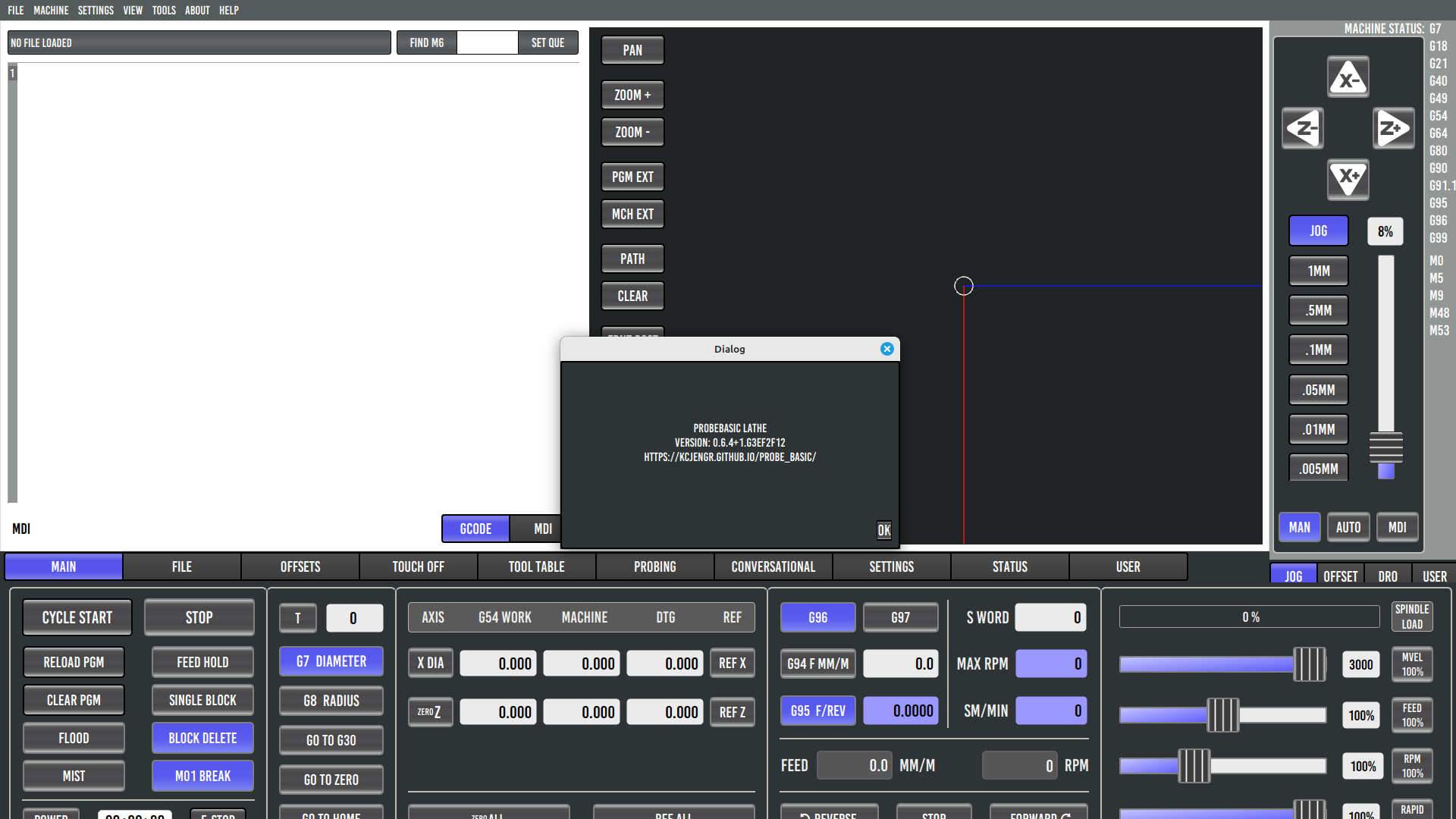
I’ve updated and replaced all the Probe Basic Lathe files and copied my configuration into the folder (HAL file, INI, and postgui). Everything is still the same. The bottom part of the screen is cut off (in PB Mill it displays correctly), the on-screen movement arrows don’t work unless I perform a home after referencing the machine, The conversational section doesn’t work, and the default RPM isn’t shown (for example, S500 in the INI file). It’s the same in simulation mode.
Please Log in or Create an account to join the conversation.
- Lcvette
-
- Offline
- Moderator
-
Less
More
- Posts: 1682
- Thank you received: 784
14 Feb 2026 01:41 #342920
by Lcvette
Replied by Lcvette on topic Some problems with probe basic lathe
What is your screen resolution?
Please Log in or Create an account to join the conversation.
- Lcvette
-
- Offline
- Moderator
-
Less
More
- Posts: 1682
- Thank you received: 784
14 Feb 2026 15:31 #342942
by Lcvette
Replied by Lcvette on topic Some problems with probe basic lathe
ok i found the resolution issue again it was another rogue widget with an expanding policy. I have capped max height for all tab widget pages now so that shoud never happen again and the height will display correctly . I am getting ready to push the latest changes.
as for buttons working im not sure, the machine must be out of estop (estop button showing red is out of estop ( so its easy to find if you need to hit it).
power button must be on Green lit
and the machine must be homed in order for buttons to be available in the sim
report back on those.
as for buttons working im not sure, the machine must be out of estop (estop button showing red is out of estop ( so its easy to find if you need to hit it).
power button must be on Green lit
and the machine must be homed in order for buttons to be available in the sim
report back on those.
The following user(s) said Thank You: Ismacr63
Please Log in or Create an account to join the conversation.
- Ismacr63
- Offline
- Elite Member
-
Less
More
- Posts: 174
- Thank you received: 11
14 Feb 2026 17:06 #342951
by Ismacr63
Replied by Ismacr63 on topic Some problems with probe basic lathe
1920x1080
Please Log in or Create an account to join the conversation.
Moderators: KCJ, Lcvette
Time to create page: 0.226 seconds