How to enable wait for spindle-at-speed in QTDragon

More
4 years 1 month ago - 4 years 1 month ago #252069 by kas1kas
My spindle has analog input and output. So I am using the digital potmeter on my MESA card for spindle-output.
I use an analogin for feedback and scale it to show the correct value for RPM.
See the Spindle section of the hal file.

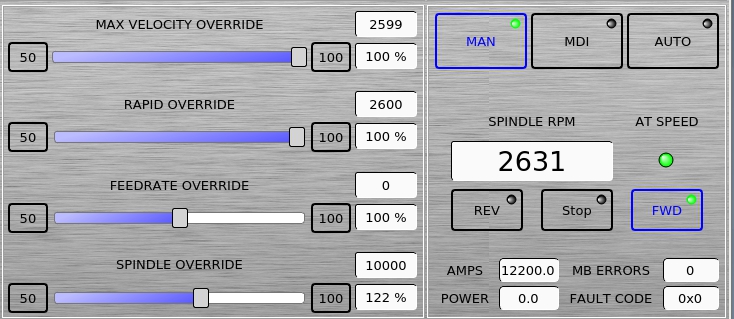
QTDragon correctly updates its display for SPINDLE RPM as it slowly increases to the demand value. The LED  AT SPEED flashes until the speed is at the demand value. This all seems totally OK to me.

However: The spindle starts moving immediately. It does not wait at all until the spindle is at speed. 

How can this be made to work correctly? What is the setting I need to change? I cannot find any pin or signal that controls this LED either.
The screenshot was made in manual mode for illustration, but the problem happens of course when I load a program and go into auto. 

thanks!
 
Last edit: 4 years 1 month ago by kas1kas.

Please Log in or Create an account to join the conversation.
More
4 years 1 month ago - 4 years 1 month ago #252076 by cmorley
is the signal spindle-at-speed connected to anything besides what shows in the HAL file you posted?
Last edit: 4 years 1 month ago by cmorley.

Please Log in or Create an account to join the conversation.

More
4 years 1 month ago #252083 by kas1kas
No, everything with spindle is in that one file

Please Log in or Create an account to join the conversation.

More
4 years 1 month ago - 4 years 1 month ago #252088 by persei8
Your spindle.0.at-speed pin isn't connected to anything. As an example, this is how mine is connected. I use a 7i96 board but the concept is the same.
Code:
net at_speed         and2.0.in0                <= hm2_7i96.0.gpio.006.in net spindle-forward  spindle.0.forward => and2.0.in1 net at_speed_fwd     spindle.0.at-speed <= and2.0.out net at_speed_fwd     qtdragon.hal_led_atspeed [code]The AND component is not necessary, I use it to ensure the spindle can only go forward. If your system doesn't have an external signal that you can connect to an input pin of your mesa card, you can use the NEAR HAL component. [url=http://linuxcnc.org/docs/2.7/html/man/man9/near.9.html]NEAR[/url]
[/code]
Last edit: 4 years 1 month ago by persei8. Reason: Forgot the LED pin

Please Log in or Create an account to join the conversation.

More
4 years 1 month ago #252089 by persei8
Trying to fix a message just makes it worse.

Please Log in or Create an account to join the conversation.

More
4 years 1 month ago #252100 by kas1kas
Thanks!
I see now that the the spindle.0.at-speed is not connected.
So, I'm setting it up now to compare the voltage that I get back from the VFD with the output voltage from the 7i76e.

I still don't understand how this QTDragon LED gets it's information.
BTW, the line: net at_speed_fwd qtdragon.hal_led_atspeed
gives an error message:
Pin 'qtdragon.hal_led_atspeed' does not exist.
What is the name of that LED?

Please Log in or Create an account to join the conversation.

Moderators: cmorley
Time to create page: 0.114 seconds
Powered by Kunena Forum
