
Qtvcp GUI and hal pins
- COFHAL
- Offline
- Platinum Member
-

Less
More
- Posts: 461
- Thank you received: 62
07 May 2026 14:53 #346250
by COFHAL
Replied by COFHAL on topic Qtvcp GUI and hal pins
I did that; I installed the latest version of LNC from buildbot2.highlab.com/debian/bookworm master, and the problems persist. To execute a command with an external button, MDI must first be selected, which doesn't happen with the buttons on the screen. Regarding running O Word, both with external buttons and those on the screen, it now appears that the O Word file path cannot be found, and the error "Error Oword XXXX.ngc path not found" and "File not open" appear. And when executed manually from MDI, the error is "File not open."
Please Log in or Create an account to join the conversation.
- cmorley
- Offline
- Moderator
-

Less
More
- Posts: 7368
- Thank you received: 2181
08 May 2026 01:21 #346266
by cmorley
Replied by cmorley on topic Qtvcp GUI and hal pins
Does the settings page look like this?
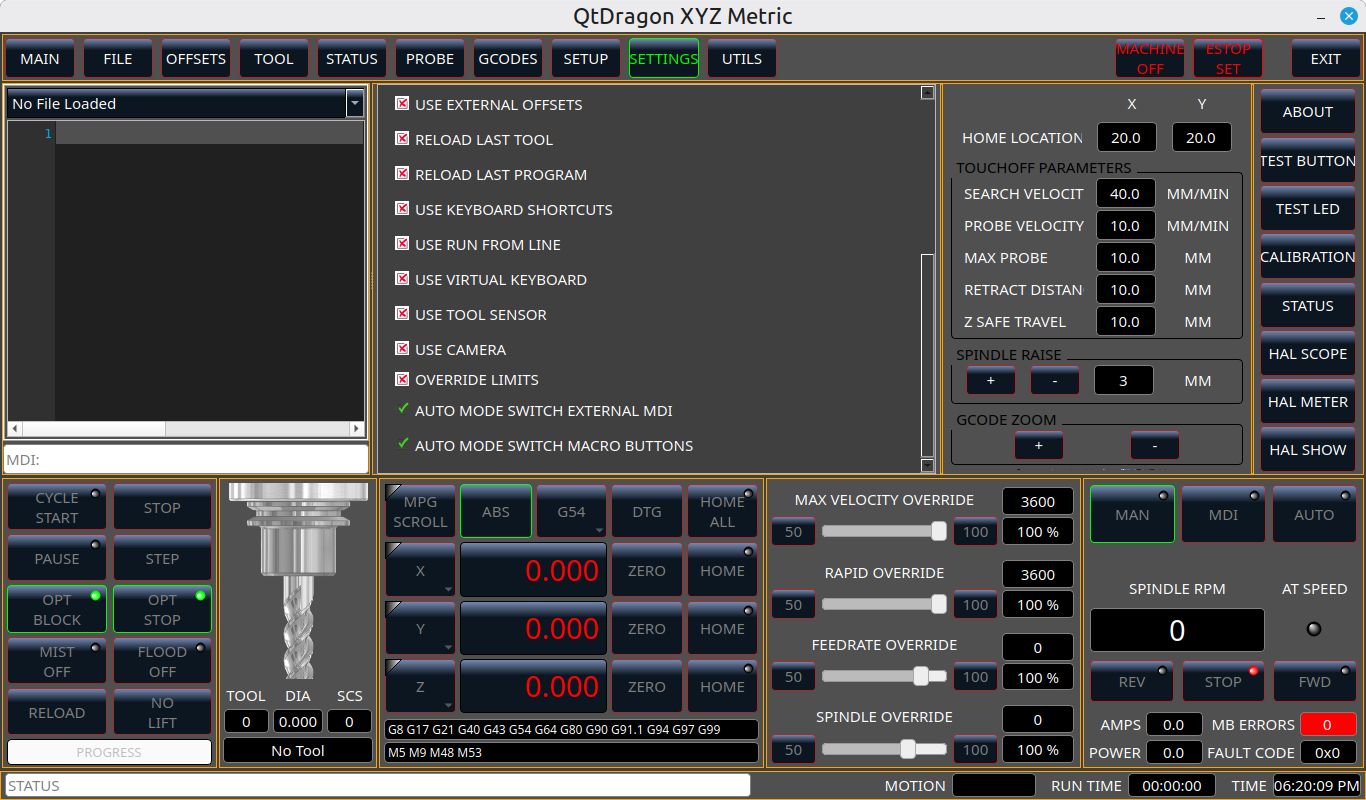
The following user(s) said Thank You: COFHAL
Please Log in or Create an account to join the conversation.
- rodw
-

- Offline
- Platinum Member
-
Less
More
- Posts: 12156
- Thank you received: 4149
08 May 2026 03:55 #346267
by rodw
Replied by rodw on topic Qtvcp GUI and hal pins
Sometimes if you have to run master branch, its so much easier to learn to build from source. The docs are now pretty good with this.
a run in place version can be updated to todays latest just by doing
git pull
make
sudo make setuid
and it often only takes a few seconds
a run in place version can be updated to todays latest just by doing
git pull
make
sudo make setuid
and it often only takes a few seconds
The following user(s) said Thank You: COFHAL
Please Log in or Create an account to join the conversation.
- COFHAL
- Offline
- Platinum Member
-
Less
More
- Posts: 461
- Thank you received: 62
08 May 2026 10:24 #346268
by COFHAL
Replied by COFHAL on topic Qtvcp GUI and hal pins
There seems to be a misunderstanding; I don't think I've been clear. I'm using a QTDragon HD, and this screen is also from QTDragon. I don't know if that has anything to do with the problem.
Please Log in or Create an account to join the conversation.
- COFHAL
- Offline
- Platinum Member
-
Less
More
- Posts: 461
- Thank you received: 62
08 May 2026 16:30 #346272
by COFHAL
Replied by COFHAL on topic Qtvcp GUI and hal pins
Indeed, those functions do appear in the Qtdragon version, and it also automatically switches from Manual to MDI, but the problem of not finding the Oword route persists. This was also updated in Qtdragon HD, but not in Qtdragon HD. I thought they were the same, but now I realize they are different projects.
Please Log in or Create an account to join the conversation.
- cmorley
- Offline
- Moderator
-
Less
More
- Posts: 7368
- Thank you received: 2181
09 May 2026 01:52 #346279
by cmorley
Replied by cmorley on topic Qtvcp GUI and hal pins
Yes I didn't update qtdragon_hd yet. I didn't realize that is what you were using.
The following user(s) said Thank You: COFHAL
Please Log in or Create an account to join the conversation.
- COFHAL
- Offline
- Platinum Member
-
Less
More
- Posts: 461
- Thank you received: 62
10 May 2026 01:27 #346296
by COFHAL
Replied by COFHAL on topic Qtvcp GUI and hal pins
What I still haven't been able to understand is why QTDragon in neither of its two versions can execute subroutines from MDI with o<XXXXX> call, while with AXIS it does execute them. I think, and I'm not wrong, that it's because QTDragon looks for those subroutines in some specific directory different from the one set in the INI in SUBRUTINE_PATH.
Please Log in or Create an account to join the conversation.
- cmorley
- Offline
- Moderator
-
Less
More
- Posts: 7368
- Thank you received: 2181
10 May 2026 02:13 #346297
by cmorley
Replied by cmorley on topic Qtvcp GUI and hal pins
If you run qtdragon in debugging mode (-d) and run from a terminal or use debugging mode and look at the system log on the status page you should get more info on where qtdragon is looking to do it's checks when the INI MDI button fails.
The following user(s) said Thank You: COFHAL
Please Log in or Create an account to join the conversation.
- COFHAL
- Offline
- Platinum Member
-
Less
More
- Posts: 461
- Thank you received: 62
10 May 2026 14:35 - 10 May 2026 14:44 #346309
by COFHAL
Replied by COFHAL on topic Qtvcp GUI and hal pins
Indeed, QTdragon defaults to the linuxcnc/nc_files folder, regardless of the path set in SUBRUTINES_PATH.
Sometimes more information is needed about this, because unlike other GUIs, the path for these subroutines in QTdragon is always the same.
It would also be good to add information on how to use Bridge_HAL and how to connect these new pins to external buttons, thus expanding their use and not limiting them only to inputs that can be controlled through the HALUI pins.
In fact, no online documentation for QTdragon clearly includes this feature.
This might seem very simple to someone experienced with LNC, but from what I constantly read on the forum, there are many people, like myself, who initially don't know how to use these features.
Sometimes more information is needed about this, because unlike other GUIs, the path for these subroutines in QTdragon is always the same.
It would also be good to add information on how to use Bridge_HAL and how to connect these new pins to external buttons, thus expanding their use and not limiting them only to inputs that can be controlled through the HALUI pins.
In fact, no online documentation for QTdragon clearly includes this feature.
This might seem very simple to someone experienced with LNC, but from what I constantly read on the forum, there are many people, like myself, who initially don't know how to use these features.
Last edit: 10 May 2026 14:44 by COFHAL.
Please Log in or Create an account to join the conversation.
- cmorley
- Offline
- Moderator
-
Less
More
- Posts: 7368
- Thank you received: 2181
11 May 2026 01:45 #346322
by cmorley
Replied by cmorley on topic Qtvcp GUI and hal pins
QtDragon doesn't steer the oword/mdi path searches.
It does a check to see if the oword is path is valid from the info in the INI.
But even if the path isn't valid, it still passes it to linuxcnc's motion controller.
linuxcnc searches in this order:
[DISPLAY] PROGRAM_PREFIX
[RS274]SUBROUTINE_PATH
[RS274]USER_M_PATH
The 'File not open' error is from the motion controller not Qtdragon.
Maybe Qtdragon is polluting the command, but i can't know that without more information - like the debugging code I spoke about above.
As for docs...
What do you suggest I could add to this?:
linuxcnc.org/docs/devel/html/gui/qtdragon.html#sec:bridge
Chris
It does a check to see if the oword is path is valid from the info in the INI.
But even if the path isn't valid, it still passes it to linuxcnc's motion controller.
linuxcnc searches in this order:
[DISPLAY] PROGRAM_PREFIX
[RS274]SUBROUTINE_PATH
[RS274]USER_M_PATH
The 'File not open' error is from the motion controller not Qtdragon.
Maybe Qtdragon is polluting the command, but i can't know that without more information - like the debugging code I spoke about above.
As for docs...
What do you suggest I could add to this?:
linuxcnc.org/docs/devel/html/gui/qtdragon.html#sec:bridge
Chris
The following user(s) said Thank You: COFHAL
Please Log in or Create an account to join the conversation.
Moderators: cmorley
Time to create page: 0.360 seconds