
LatheEasyStep – experimental QtVCP macro for step-by-step lathe programming
- aDm1N
-
 Topic Author
- Offline
- Senior Member
-

Less
More
- Posts: 53
- Thank you received: 24
26 Dec 2025 19:41 #340541
by aDm1N
Replied by aDm1N on topic LatheEasyStep – experimental QtVCP macro for step-by-step lathe programming
I know the macros, and I think they are useful. But my goal is something more holistic, closer to the way I’m used to working.I want to create a program, work through it step by step, and be able to go back at any time to change something or reuse individual steps. That’s how I’ve always worked on industrial machines. At work, I actually always wanted to use Heidenhain controls, but in reality I mostly ended up with Siemens. Both are good systems, but they offer a structured, process-oriented way of programming that goes beyond single, isolated macros.As far as I know, LinuxCNC doesn’t really offer something like this out of the box. That’s why I started writing it myself, and I will continue developing it until it reaches a level where I’m satisfied with the result – no matter how long that takes.The existing macros are good, but they usually solve only one small task at a time. For me, that’s not enough. I’m looking for a workflow-oriented solution, not just individual helpers.I’m primarily writing this for myself, because I plan to actually work with it later. I do think other people could benefit from it as well, but that’s just my personal opinion. For that reason, I’ve already made the current state partially functional and public. It is clearly not finished.If there is a better, complete solution available, I’m happy to look at it. If not, I will carry this project through to the end, because in the end I need a tool that fits my way of working.If you know of existing concepts, examples, or similar approaches, feel free to point them out. I’m always open to ideas.
The following user(s) said Thank You: besriworld
Please Log in or Create an account to join the conversation.
- Surmetall
-

- Offline
- Senior Member
-
Less
More
- Posts: 54
- Thank you received: 36
26 Dec 2025 22:39 #340551
by Surmetall
Replied by Surmetall on topic LatheEasyStep – experimental QtVCP macro for step-by-step lathe programming
@Mark
Andys Marcos are great, but i think its something different. you only can do one task at a time as far as i know, right?
@aDm1N
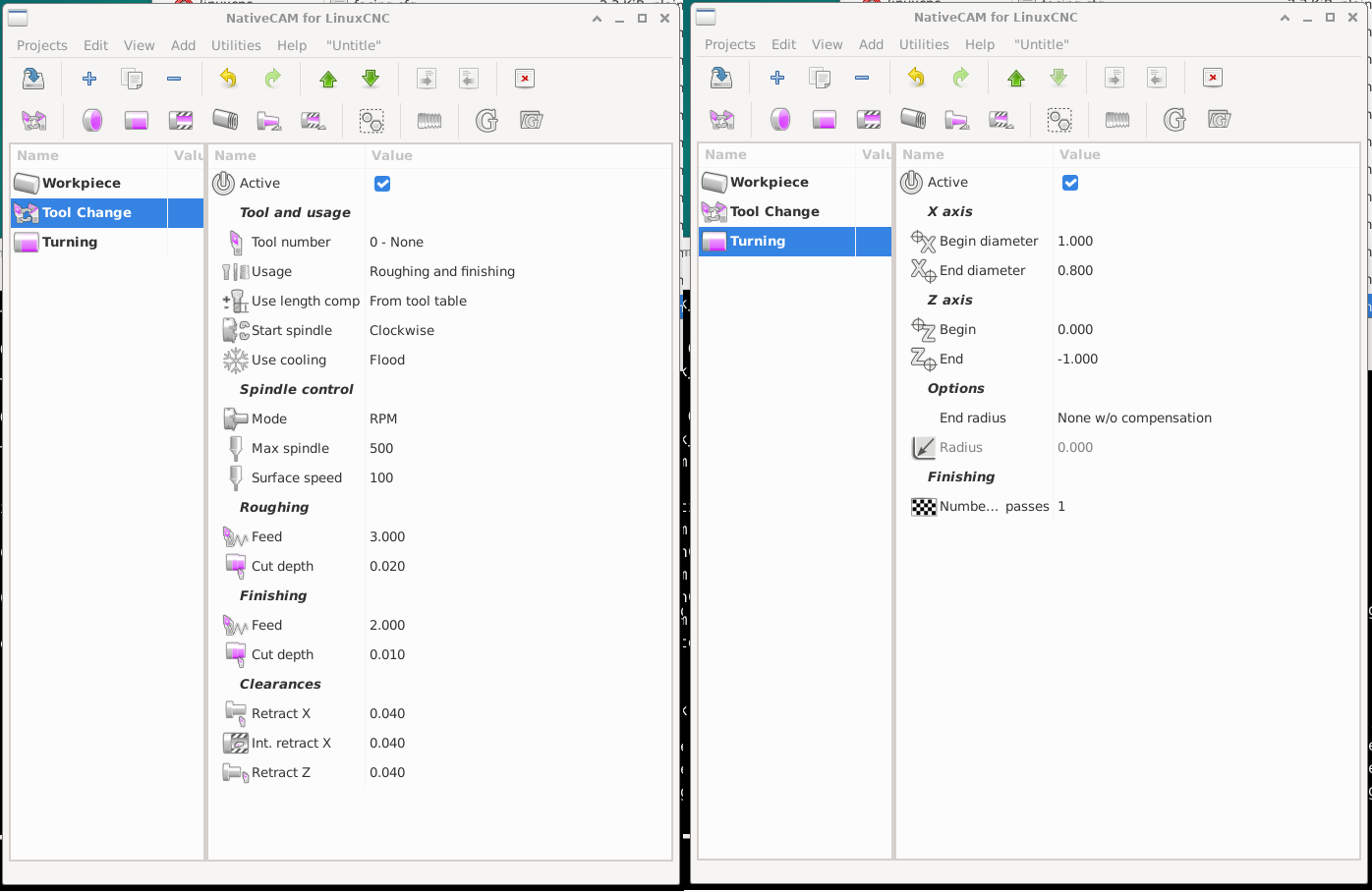
You said in your last post "as far as I know, LinuxCNC doesn’t really offer something like this out of the box." That confuses me, because I already wrote about NativeCAM on the previous page. You didn’t respond to it specifically, but I simply assumed that you were already familiar with it. It’s possible that you overlooked it or that you just don’t like the tool. both are perfectly fine. However, if you simply missed it:NativeCAM does exactly what SIEMENS ShopTurn does. You write your program directly on the machine, editable and with a preview.The only thing is that the contour function was never fully completed back then and would need to be added by someone who can program. It’s called “Polyline” and already exists in milling, where it works perfectly. It just hasn’t been implemented for turning yet:
Andys Marcos are great, but i think its something different. you only can do one task at a time as far as i know, right?
@aDm1N
You said in your last post "as far as I know, LinuxCNC doesn’t really offer something like this out of the box." That confuses me, because I already wrote about NativeCAM on the previous page. You didn’t respond to it specifically, but I simply assumed that you were already familiar with it. It’s possible that you overlooked it or that you just don’t like the tool. both are perfectly fine. However, if you simply missed it:NativeCAM does exactly what SIEMENS ShopTurn does. You write your program directly on the machine, editable and with a preview.The only thing is that the contour function was never fully completed back then and would need to be added by someone who can program. It’s called “Polyline” and already exists in milling, where it works perfectly. It just hasn’t been implemented for turning yet:
Attachments:
Please Log in or Create an account to join the conversation.
- aDm1N
-
Topic Author
- Offline
- Senior Member
-
Less
More
- Posts: 53
- Thank you received: 24
28 Dec 2025 15:38 #340622
by aDm1N
Replied by aDm1N on topic LatheEasyStep – experimental QtVCP macro for step-by-step lathe programming
NativeCAM is an interesting project, but it has a fundamental issue today:the codebase is very old (Python 2, GTK2/PyGTK) and has not been actively maintained for quite some time. I have taken a closer look at the project locally and am currently trying to get it running on a modern system (Debian 13, Python 3, LinuxCNC 2.10). At the moment it already fails at the basic dependency level, since Python 2 and PyGTK are essentially unavailable on current distributions. Before discussing any functional extensions, a significant porting effort is required (Python 3, GTK3/gi).Only if NativeCAM can be made stable on a modern system does it make sense to consider whether and how the lathe functionality could be extended or reimplemented. For now, my focus is not on new features, but solely on determining whether the project is still technically viable as a future foundation.
Please Log in or Create an account to join the conversation.
- cmorley
- Offline
- Moderator
-

Less
More
- Posts: 7362
- Thank you received: 2175
28 Dec 2025 18:17 #340626
by cmorley
Replied by cmorley on topic LatheEasyStep – experimental QtVCP macro for step-by-step lathe programming
There is a version of nativecam in a linuxcnc branch that mostly works.
It's a work in very slow progress. It's based on Qt.
github.com/LinuxCNC/linuxcnc/tree/qt_ncam
There is also another project I've seem on the forum that keeps it gtk based and just updates it to python3 and whatever pygtk is called now.
But I would suggest you just finish what you have built, as it seems you are pretty far along.
You could always convert it to another platform later.
It's a work in very slow progress. It's based on Qt.
github.com/LinuxCNC/linuxcnc/tree/qt_ncam
There is also another project I've seem on the forum that keeps it gtk based and just updates it to python3 and whatever pygtk is called now.
But I would suggest you just finish what you have built, as it seems you are pretty far along.
You could always convert it to another platform later.
Please Log in or Create an account to join the conversation.
- aDm1N
-
Topic Author
- Offline
- Senior Member
-
Less
More
- Posts: 53
- Thank you received: 24
03 Jan 2026 19:46 #340928
by aDm1N
Replied by aDm1N on topic LatheEasyStep – experimental QtVCP macro for step-by-step lathe programming
Hi everyone,
I’d like to give a short status update on LatheEasyStep, mainly to clarify what has changed recently and what my current focus is.
What has changed
1. Interactive legend in the preview
The preview now includes an interactive legend.
The title “Legend” is always visible and acts as a permanent click area.
Clicking on it toggles the legend collapsed / expanded.
When collapsed, only the header remains visible so the legend can always be reopened.
The legend affects visualization only, not geometry calculation or toolpath logic.
2. Improved preview with safety areas
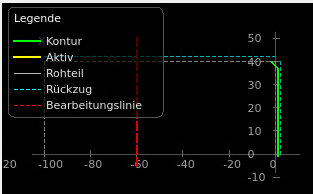
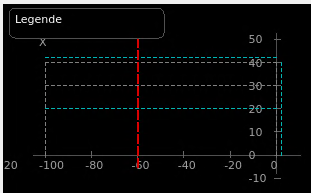
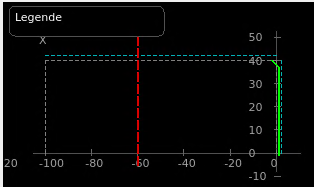
The preview now clearly distinguishes different geometry and safety elements:
Green (solid): contour / target geometry
Yellow (solid): active machining path
Grey (dashed): stock outline
Cyan (dashed): retract planes (XRA/XRI/ZRA/ZRI)
Red (dashed): machining / safety limit (e.g. ZB)
Safety limit violations are highlighted visually.
Stock and retract planes are drawn based on the actual configured parameters, not approximations.
3. Facing – chamfer or radius at the end
In the Facing tab it is now possible to define an optional chamfer or radius at the outer end of the facing operation.
Supported options:
None
Chamfer
Radius
This affects both the preview geometry and the generated toolpath.
All of these changes are documented in the README, in both German and English.
Current focus: the preview
Right now, my main focus is the preview system.
The goal is to make sure that:
geometry is displayed correctly,
safety and retract areas are clearly understandable,
and the preview can be trusted as a visual plausibility and collision-check aid.
Once the preview side is solid and stable, I’ll move on to the fine-tuning of the actual machining / stock removal functions and further logic improvements.
Next steps
Further testing and stabilization of the preview
Real-world test cases with complete programs
UI adjustments if needed
After that: refinement and extension of machining features
I’d like to give a short status update on LatheEasyStep, mainly to clarify what has changed recently and what my current focus is.
What has changed
1. Interactive legend in the preview
The preview now includes an interactive legend.
The title “Legend” is always visible and acts as a permanent click area.
Clicking on it toggles the legend collapsed / expanded.
When collapsed, only the header remains visible so the legend can always be reopened.
The legend affects visualization only, not geometry calculation or toolpath logic.
2. Improved preview with safety areas
The preview now clearly distinguishes different geometry and safety elements:
Green (solid): contour / target geometry
Yellow (solid): active machining path
Grey (dashed): stock outline
Cyan (dashed): retract planes (XRA/XRI/ZRA/ZRI)
Red (dashed): machining / safety limit (e.g. ZB)
Safety limit violations are highlighted visually.
Stock and retract planes are drawn based on the actual configured parameters, not approximations.
3. Facing – chamfer or radius at the end
In the Facing tab it is now possible to define an optional chamfer or radius at the outer end of the facing operation.
Supported options:
None
Chamfer
Radius
This affects both the preview geometry and the generated toolpath.
All of these changes are documented in the README, in both German and English.
Current focus: the preview
Right now, my main focus is the preview system.
The goal is to make sure that:
geometry is displayed correctly,
safety and retract areas are clearly understandable,
and the preview can be trusted as a visual plausibility and collision-check aid.
Once the preview side is solid and stable, I’ll move on to the fine-tuning of the actual machining / stock removal functions and further logic improvements.
Next steps
Further testing and stabilization of the preview
Real-world test cases with complete programs
UI adjustments if needed
After that: refinement and extension of machining features
The following user(s) said Thank You: Surmetall
Please Log in or Create an account to join the conversation.
- Surmetall
-
- Offline
- Senior Member
-
Less
More
- Posts: 54
- Thank you received: 36
03 Jan 2026 20:14 - 03 Jan 2026 20:15 #340931
by Surmetall
Replied by Surmetall on topic LatheEasyStep – experimental QtVCP macro for step-by-step lathe programming
Hi,
thanks a lot for the update. I’m always happy to see new progress in this thread!
Also thanks for the screenshots, everything is looking very promising.I noticed that you’re writing the manual in German as well, so I assume you’re German too.
If you’re interested in chatting "in real time" in German with like-minded people, there’s a German-speaking Discord from Peter aka Talla83. You’ll find many LinuxCNC users there, including quite a few lathe users. If you’re ever looking for feedback or beta testers, that could be a good place to connect.
Of course, this is only meant as an addition, please definitely keep posting updates here as well. If you are interested, here is a Discord server invite link: discord.gg/dPBgNR3t
Best regards
Tom
thanks a lot for the update. I’m always happy to see new progress in this thread!
Also thanks for the screenshots, everything is looking very promising.I noticed that you’re writing the manual in German as well, so I assume you’re German too.
If you’re interested in chatting "in real time" in German with like-minded people, there’s a German-speaking Discord from Peter aka Talla83. You’ll find many LinuxCNC users there, including quite a few lathe users. If you’re ever looking for feedback or beta testers, that could be a good place to connect.
Of course, this is only meant as an addition, please definitely keep posting updates here as well. If you are interested, here is a Discord server invite link: discord.gg/dPBgNR3t
Best regards
Tom
Last edit: 03 Jan 2026 20:15 by Surmetall.
Please Log in or Create an account to join the conversation.
- aDm1N
-
Topic Author
- Offline
- Senior Member
-
Less
More
- Posts: 53
- Thank you received: 24
30 Jan 2026 22:55 - 30 Jan 2026 22:58 #342226
by aDm1N
Replied by aDm1N on topic LatheEasyStep – experimental QtVCP macro for step-by-step lathe programming
The current state focuses on contour machining and the related LinuxCNC cycles.Contour (CONTOUR) is defined purely as geometry (lines, chamfers, radii, inner/outer).
Different operations can then be derived from this geometry, independent of their order in the workflow.Currently implemented:
Screenshots will follow in the next few days.
The current state will also be published on GitHub in the coming days.Additionally, a test file () is attached, reflecting the current state of the generated G-code.
Different operations can then be derived from this geometry, independent of their order in the workflow.Currently implemented:
- Drilling using LinuxCNC cycles G81–G84 (including G82 with dwell, G83/G73 peck drilling, G84 tapping)
- cycle-specific parameters are shown dynamically
- internal correct switching to, followed by
G17
and back toG80
G18
- Roughing of contours
- use of G71/G72 if the contour is monotonic
- automatic fallback to move-based machining for non-suitable contours
- Finishing of the same contour as a separate step
- Before every tool change, the machine always moves to a defined G53 tool change position
- Definition of an explicit safe area (,
X_safe
) derived from stock geometry and retract planesZ_safe
- After each cutting step:
- retract in X first
- then retract in Z (no combined retract moves)
- Approach from the safe area may be diagonal
- Coolant () is set explicitly per operation
M7/M8/M9
- Comments are sanitized (no nested parentheses)
- true arcs for radii
- separate visualization of contour, stock, toolpaths, retract planes, and safety limits
- visual highlighting when machining or safety limits are exceeded
Screenshots will follow in the next few days.
The current state will also be published on GitHub in the coming days.Additionally, a test file (
Test.ngc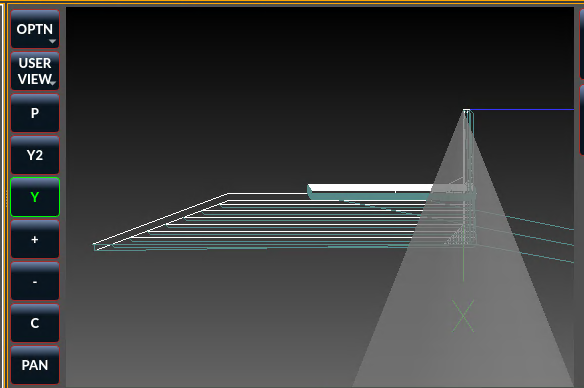
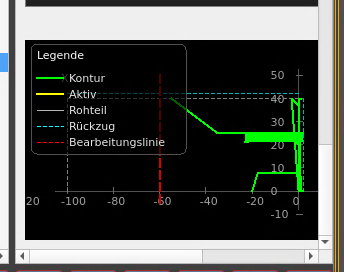
Last edit: 30 Jan 2026 22:58 by aDm1N. Reason: datei fehlte
The following user(s) said Thank You: Surmetall
Please Log in or Create an account to join the conversation.
- cmorley
- Offline
- Moderator
-
Less
More
- Posts: 7362
- Thank you received: 2175
01 Feb 2026 04:23 - 01 Feb 2026 04:24 #342268
by cmorley
Replied by cmorley on topic LatheEasyStep – experimental QtVCP macro for step-by-step lathe programming
I tried loading this in master and came up with an error message.
[QTvcp.QTVCP.QT_MAKEGUI][ERROR] Easystep: Trouble looking for handlers in 'lathe_easystep_handler': (qt_makegui.py:469)
Traceback (most recent call last):
File "/home/chris/emc/lib/python/qtvcp/qt_makegui.py", line 446, in _load_handlers
objlist = h(halcomp, widgets, self.PATHS) # this sets the handler class signature
File "/home/chris/emc/configs/sim/qtdragon_lathe/easy_lathe/qtvcp/panels/lathe_easystep/lathe_easystep_handler.py", line 7101, in get_handlers
return [HandlerClass(halcomp, widgets, paths)]
File "/home/chris/emc/configs/sim/qtdragon_lathe/easy_lathe/qtvcp/panels/lathe_easystep/lathe_easystep_handler.py", line 3038, in __init__
self._connect_signals()
File "/home/chris/emc/configs/sim/qtdragon_lathe/easy_lathe/qtvcp/panels/lathe_easystep/lathe_easystep_handler.py", line 4468, in _connect_signals
self.list_ops.currentRowChanged.connect(self._handle_selection_change)
AttributeError: 'QWidget' object has no attribute 'currentRowChanged'
I didn't look into why.
I did switch to 2.9 and it seems to work, but I haven't figured out how to use it yet
[QTvcp.QTVCP.QT_MAKEGUI][ERROR] Easystep: Trouble looking for handlers in 'lathe_easystep_handler': (qt_makegui.py:469)
Traceback (most recent call last):
File "/home/chris/emc/lib/python/qtvcp/qt_makegui.py", line 446, in _load_handlers
objlist = h(halcomp, widgets, self.PATHS) # this sets the handler class signature
File "/home/chris/emc/configs/sim/qtdragon_lathe/easy_lathe/qtvcp/panels/lathe_easystep/lathe_easystep_handler.py", line 7101, in get_handlers
return [HandlerClass(halcomp, widgets, paths)]
File "/home/chris/emc/configs/sim/qtdragon_lathe/easy_lathe/qtvcp/panels/lathe_easystep/lathe_easystep_handler.py", line 3038, in __init__
self._connect_signals()
File "/home/chris/emc/configs/sim/qtdragon_lathe/easy_lathe/qtvcp/panels/lathe_easystep/lathe_easystep_handler.py", line 4468, in _connect_signals
self.list_ops.currentRowChanged.connect(self._handle_selection_change)
AttributeError: 'QWidget' object has no attribute 'currentRowChanged'
I didn't look into why.
I did switch to 2.9 and it seems to work, but I haven't figured out how to use it yet
Last edit: 01 Feb 2026 04:24 by cmorley.
Please Log in or Create an account to join the conversation.
- aDm1N
-
Topic Author
- Offline
- Senior Member
-
Less
More
- Posts: 53
- Thank you received: 24
01 Feb 2026 13:44 #342280
by aDm1N
Replied by aDm1N on topic LatheEasyStep – experimental QtVCP macro for step-by-step lathe programming
I have adjusted the code accordingly.
With a bit of luck, this fixes the reported issue.In addition, I have extended the README with a basic usage guide to better explain the workflow and operation.There is now an integrated grooving cycle, which is written into the program automatically when required.Feedback on whether this resolves the issue would be appreciated.
With a bit of luck, this fixes the reported issue.In addition, I have extended the README with a basic usage guide to better explain the workflow and operation.There is now an integrated grooving cycle, which is written into the program automatically when required.Feedback on whether this resolves the issue would be appreciated.
The following user(s) said Thank You: tommylight, COFHAL, Surmetall
Please Log in or Create an account to join the conversation.
- cmorley
- Offline
- Moderator
-
Less
More
- Posts: 7362
- Thank you received: 2175
02 Feb 2026 04:44 #342306
by cmorley
Replied by cmorley on topic LatheEasyStep – experimental QtVCP macro for step-by-step lathe programming
It does load in master now, but it takes a long time to get Qtdragon to show.
Lots of messages about un found widgets:
I'll now look at work flow to see what I can produce
Lots of messages about un found widgets:
[LatheEasyStep] shape combo candidate styleSheetCombo: ['as loaded', 'none', 'argentium.qss', 'qtdragon_lathe_ncam.qss', 'brushed_metal_color.qss', 'qtdragon_lathe.qss']
[LatheEasyStep] shape combo candidate : ['grayscale depth image', 'python script', 'all (*)']
[LatheEasyStep] shape combo candidate : ['grayscale depth image', 'python script', 'all (*)']
[LatheEasyStep] shape combo candidate cmb_gcode_history: []
[LatheEasyStep] shape combo candidate jogincrements_linear: []
[LatheEasyStep] shape combo candidate jogincrements_angular: []
[LatheEasyStep] no shape combo found in tree
[WidgetResolver][WARNING] Widget 'btnAdd' (QPushButton) not found. root=VCPWindow
[WidgetResolver][WARNING] Widget 'btnDelete' (QPushButton) not found. root=VCPWindow
[WidgetResolver][WARNING] Widget 'btnMoveUp' (QPushButton) not found. root=VCPWindow
[WidgetResolver][WARNING] Widget 'btnMoveDown' (QPushButton) not found. root=VCPWindow
[WidgetResolver][WARNING] Widget 'btnNewProgram' (QPushButton) not found. root=VCPWindow
[WidgetResolver][WARNING] Widget 'btnGenerate' (QPushButton) not found. root=VCPWindow
[WidgetResolver][WARNING] Widget 'btnSaveStep' (QPushButton) not found. root=VCPWindow
[WidgetResolver][WARNING] Widget 'btnLoadStep' (QPushButton) not found. root=VCPWindow
etc
I'll now look at work flow to see what I can produce
Please Log in or Create an account to join the conversation.
Moderators: cmorley
Time to create page: 0.148 seconds