
Generating a own Popup
- DemonClaW
- Offline
- Junior Member
-

Less
More
- Posts: 33
- Thank you received: 7
22 Jan 2026 19:21 #341721
by DemonClaW
Replied by DemonClaW on topic Generating a own Popup
OK this worked and we got rid of the type error, if i start i now i get a attribute error: object has no attribute 'PREFS_' , i hope you dont get frustraded with me its all very new for me. I really appreciate your work with me. And it means a lot.
Please Log in or Create an account to join the conversation.
- cmorley
- Offline
- Moderator
-

Less
More
- Posts: 7347
- Thank you received: 2167
22 Jan 2026 19:32 #341723
by cmorley
Replied by cmorley on topic Generating a own Popup
Ok I edited your handler file - I should have explained how to combine the code.
I didn't remove your popup code but it's not used.
I used your modified qtdragon_hd.ui file
I made a sample vacuum panel based as a mainwindow with just an LED in it.
I confirmed this works on my system
I didn't remove your popup code but it's not used.
I used your modified qtdragon_hd.ui file
I made a sample vacuum panel based as a mainwindow with just an LED in it.
I confirmed this works on my system
Please Log in or Create an account to join the conversation.
- DemonClaW
- Offline
- Junior Member
-
Less
More
- Posts: 33
- Thank you received: 7
22 Jan 2026 19:41 #341724
by DemonClaW
Replied by DemonClaW on topic Generating a own Popup
This is interresting with your files i still get the error message:
AttributeError: 'MainPage' object has no attribute 'PREFS_'
AttributeError: 'MainPage' object has no attribute 'PREFS_'
Please Log in or Create an account to join the conversation.
- cmorley
- Offline
- Moderator
-
Less
More
- Posts: 7347
- Thank you received: 2167
22 Jan 2026 19:47 #341725
by cmorley
Replied by cmorley on topic Generating a own Popup
If you run linuxcnc from a terminal then there should be more information on that error.
it's not enough for me to track it down
it's not enough for me to track it down
The following user(s) said Thank You: DemonClaW
Please Log in or Create an account to join the conversation.
- DemonClaW
- Offline
- Junior Member
-
Less
More
- Posts: 33
- Thank you received: 7
22 Jan 2026 20:14 #341726
by DemonClaW
Replied by DemonClaW on topic Generating a own Popup
It worked, i forgot the handler in the /share/ path the Terminallog showed it wanted to load it. After deleting it started with the Button and i can Open the Pop-up too. Thank you very much for your Help and stamina with me
Please Log in or Create an account to join the conversation.
- cmorley
- Offline
- Moderator
-
Less
More
- Posts: 7347
- Thank you received: 2167
22 Jan 2026 20:21 #341727
by cmorley
Replied by cmorley on topic Generating a own Popup
Excellent! Thanks for not giving up.
In this kind of trouble shooting details really matter.
qtdragon is not the same as qtdragon_hd, error messages need to be quoted exactly etc.
When you get everything finished I hope you post a pic of your creation.
In this kind of trouble shooting details really matter.
qtdragon is not the same as qtdragon_hd, error messages need to be quoted exactly etc.
When you get everything finished I hope you post a pic of your creation.
The following user(s) said Thank You: tommylight, DemonClaW
Please Log in or Create an account to join the conversation.
- DemonClaW
- Offline
- Junior Member
-
Less
More
- Posts: 33
- Thank you received: 7
22 Jan 2026 20:24 #341728
by DemonClaW
Replied by DemonClaW on topic Generating a own Popup
Sure I will let you know about the finished Project
The following user(s) said Thank You: tommylight
Please Log in or Create an account to join the conversation.
- DemonClaW
- Offline
- Junior Member
-
Less
More
- Posts: 33
- Thank you received: 7
27 Jan 2026 21:11 #342022
by DemonClaW
Replied by DemonClaW on topic Generating a own Popup
Hey Guys,
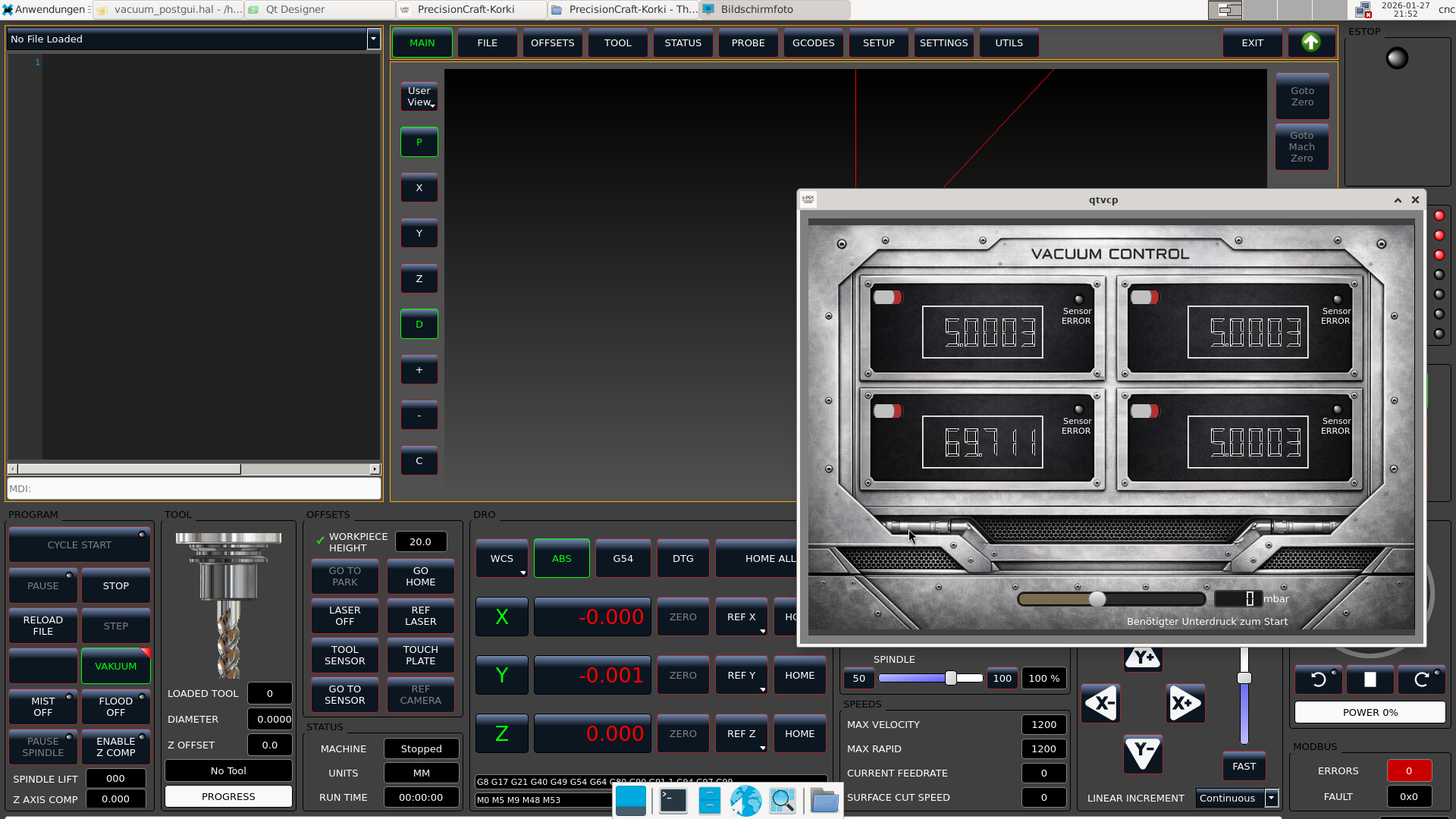
I was quite busy that week so i didnt get much work into it but here is what i got at this point.
On left down corner you can find a Vakuum button that allows you to switch Clamping variant between a vice or something like that and vacuum clamping. It opens the PopUp on the right side, there you find 4 displays for 4 vacuum plates, your able to switch them on or off depending on how large your workpiece is you can work with 1 or with all 4. The Main Slider down in the middle allows you to set the needed pressure. Every plade is moitored by a single Pressure sensor on a beckhoff EL3124. If the pressure gets lower then the main slider value the system goes immediately in E-Stop mode to provide serios accidents. The main slider may gets removed after i made some experience with the system.
I was quite busy that week so i didnt get much work into it but here is what i got at this point.
On left down corner you can find a Vakuum button that allows you to switch Clamping variant between a vice or something like that and vacuum clamping. It opens the PopUp on the right side, there you find 4 displays for 4 vacuum plates, your able to switch them on or off depending on how large your workpiece is you can work with 1 or with all 4. The Main Slider down in the middle allows you to set the needed pressure. Every plade is moitored by a single Pressure sensor on a beckhoff EL3124. If the pressure gets lower then the main slider value the system goes immediately in E-Stop mode to provide serios accidents. The main slider may gets removed after i made some experience with the system.
The following user(s) said Thank You: rodw
Please Log in or Create an account to join the conversation.
- tommylight
-

- Offline
- Moderator
-
Less
More
- Posts: 21783
- Thank you received: 7445
27 Jan 2026 22:11 #342032
by tommylight
Replied by tommylight on topic Generating a own Popup
We need a GUI with that industrial design !!! 
Looks very ... industrial..
I like it.
Looks very ... industrial..
I like it.
The following user(s) said Thank You: DemonClaW
Please Log in or Create an account to join the conversation.
- DemonClaW
- Offline
- Junior Member
-
Less
More
- Posts: 33
- Thank you received: 7
27 Jan 2026 22:51 #342038
by DemonClaW
Replied by DemonClaW on topic Generating a own Popup
I will post some updates when i finished the next steps
Always nice to hear that someone likes the work, Thanks
Always nice to hear that someone likes the work, Thanks
The following user(s) said Thank You: tommylight
Please Log in or Create an account to join the conversation.
Moderators: cmorley
Time to create page: 0.272 seconds