Search Results (Searched for: 7i76e)

24 Feb 2026 22:42
Replied by tommylight on topic 7i76EU+7i85+7i84U

I drew up my own pin out diagram converting the wire colours to be correct and my 7i73 woke up!
Did it sleep well ?
:)
24 Feb 2026 22:40
Replied by rodw on topic 7i76EU+7i85+7i84U
Take care here, Network cabling comes in two different flavours T568B and T568A. Google for the difference
In my case, Mesa's serial port manual describes one of these standards but in my country the normal standard was the other!
I drew up my own pin out diagram converting the wire colours to be correct and my 7i73 woke up!
24 Feb 2026 18:37
Replied by PCW on topic 7i76EU+7i85+7i84U
I'll test this setup later today.

 
24 Feb 2026 17:38
Replied by Todd Zuercher on topic 7i76EU+7i85+7i84U
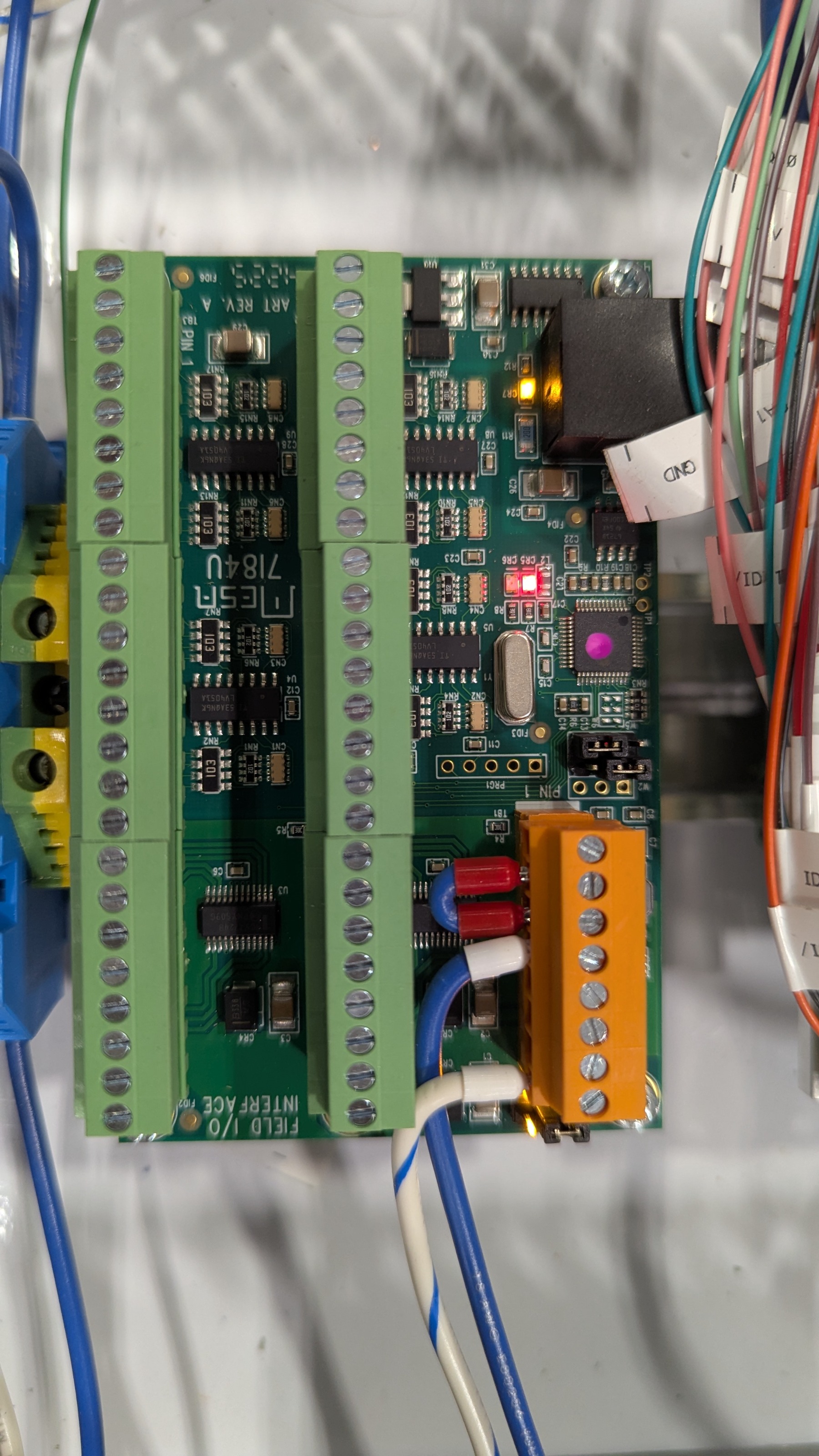
Here's the power connector 
 
24 Feb 2026 17:15
Replied by Todd Zuercher on topic 7i76EU+7i85+7i84U
Yes both A and B.
24 Feb 2026 16:56
Replied by tommylight on topic 7i76EU+7i85+7i84U

(A and B)?
 
Should be
( A and B )?
-
B with ) is translated to smiley face with glasses ...
24 Feb 2026 16:43 - 24 Feb 2026 17:13
Replied by PCW on topic 7i76EU+7i85+7i84U
Might be cable wiring (if you never even get a green blink  from the 7I84U, there is no communication)

As tommylight asked, do you have both field powers applied ( A and B )?


24 Feb 2026 16:26
Replied by Todd Zuercher on topic 7i76EU+7i85+7i84U
Yes, the field power is connected.

I have this for the config line in hal
Code:
loadrt hm2_eth board_ip="10.10.10.10" config="num_encoders=5 num_pwmgens=0 num_stepgens=5 sserial_port_0=0000000x"

Here's the output from mesaflash;
Code:
twincnc@twincnc:~$ mesaflash --device 7i76eu --addr 10.10.10.10 --dbname2 7i85 --readhmid Configuration Name: HOSTMOT2 General configuration information: BoardName : MESA7I76 FPGA Size: 20 KGates FPGA Pins: 256 Number of IO Ports: 3 Width of one I/O port: 17 Clock Low frequency: 100.0000 MHz Clock High frequency: 160.0000 MHz IDROM Type: 3 Instance Stride 0: 4 Instance Stride 1: 64 Register Stride 0: 256 Register Stride 1: 256 Modules in configuration: Module: DPLL There are 1 of DPLL in configuration Version: 0 Registers: 7 BaseAddress: 7000 ClockFrequency: 100.000 MHz Register Stride: 256 bytes Instance Stride: 4 bytes Module: WatchDog There are 1 of WatchDog in configuration Version: 0 Registers: 3 BaseAddress: 0C00 ClockFrequency: 100.000 MHz Register Stride: 256 bytes Instance Stride: 4 bytes Module: IOPort There are 3 of IOPort in configuration Version: 0 Registers: 5 BaseAddress: 1000 ClockFrequency: 100.000 MHz Register Stride: 256 bytes Instance Stride: 4 bytes Module: StepGen There are 5 of StepGen in configuration Version: 2 Registers: 10 BaseAddress: 2000 ClockFrequency: 100.000 MHz Register Stride: 256 bytes Instance Stride: 4 bytes Module: MuxedQCount There are 6 of MuxedQCount in configuration Version: 4 Registers: 5 BaseAddress: 3600 ClockFrequency: 100.000 MHz Register Stride: 256 bytes Instance Stride: 4 bytes Module: MuxedQCountSel There are 1 of MuxedQCountSel in configuration Version: 0 Registers: 0 BaseAddress: 0000 ClockFrequency: 100.000 MHz Register Stride: 256 bytes Instance Stride: 4 bytes Module: SSerial There are 1 of SSerial in configuration Version: 0 Registers: 6 BaseAddress: 5B00 ClockFrequency: 100.000 MHz Register Stride: 256 bytes Instance Stride: 64 bytes Module: LED There are 1 of LED in configuration Version: 0 Registers: 1 BaseAddress: 0200 ClockFrequency: 100.000 MHz Register Stride: 256 bytes Instance Stride: 4 bytes Configuration pin-out: IO Connections for on-card -> 7I76 Pin# I/O Pri. func Sec. func Chan Sec. Pin func Sec. Pin Dir TB2-4,5 0 IOPort StepGen 0 Dir/Table2 (Out) TB2-2,3 1 IOPort StepGen 0 Step/Table1 (Out) TB2-10,11 2 IOPort StepGen 1 Dir/Table2 (Out) TB2-8,9 3 IOPort StepGen 1 Step/Table1 (Out) TB2-16,17 4 IOPort StepGen 2 Dir/Table2 (Out) TB2-14,15 5 IOPort StepGen 2 Step/Table1 (Out) TB2-22,23 6 IOPort StepGen 3 Dir/Table2 (Out) TB2-20,21 7 IOPort StepGen 3 Step/Table1 (Out) TB3-4,5 8 IOPort StepGen 4 Dir/Table2 (Out) TB3-2,3 9 IOPort StepGen 4 Step/Table1 (Out) Internal-Field-IO 10 IOPort SSerial 0 TXData0 (Out) Internal-Field-IO 11 IOPort SSerial 0 RXData0 (In) TB3-18,19 12 IOPort SSerial 0 TXData1 (Out) TB3-16,17 13 IOPort SSerial 0 RXData1 (In) TB3-13,14 14 IOPort MuxedQCount 2 MuxQ-IDX (In) TB3-10,11 15 IOPort MuxedQCount 2 MuxQ-B (In) TB3-7,8 16 IOPort MuxedQCount 2 MuxQ-A (In) IO Connections for P1 -> 7I85 Pin# I/O Pri. func Sec. func Chan Sec. Pin func Sec. Pin Dir TB1-19,20 17 IOPort SSerial 0 RXData6 (In) TB1-21,22 18 IOPort SSerial 0 TXData6 (Out) TB1-11,12 19 IOPort SSerial 0 RXData5 (In) TB1-13,14 20 IOPort SSerial 0 TXData5 (Out) TB1-3,4 21 IOPort SSerial 0 RXData4 (In) TB1-5,6 22 IOPort SSerial 0 TXData4 (Out) TB2-19,20 23 IOPort SSerial 0 RXData3 (In) TB2-21,22 24 IOPort SSerial 0 TXData3 (Out) TB2-11,12 25 IOPort SSerial 0 RXData2 (In) TB2-13,14 26 IOPort SSerial 0 TXData2 (Out) Internal-EncMux 27 IOPort MuxedQCountSel 0 MuxSel0 (Out) TB3-1,2,9,10 28 IOPort MuxedQCount 0 MuxQ-A (In) TB3-4,5,12,13 29 IOPort MuxedQCount 0 MuxQ-B (In) TB3-7,8,12,13 30 IOPort MuxedQCount 0 MuxQ-IDX (In) TB3-17,18,TB2-1,2 31 IOPort MuxedQCount 1 MuxQ-A (In) TB3-20,21,TB2-4,5 32 IOPort MuxedQCount 1 MuxQ-B (In) TB3-23,24,TB2-7,8 33 IOPort MuxedQCount 1 MuxQ-IDX (In) IO Connections for P2 DB25 pin# I/O Pri. func Sec. func Chan Sec. Pin func Sec. Pin Dir 1 34 IOPort None 14 35 IOPort None 2 36 IOPort None 15 37 IOPort None 3 38 IOPort None 16 39 IOPort None 4 40 IOPort None 17 41 IOPort None 5 42 IOPort None 6 43 IOPort None 7 44 IOPort None 8 45 IOPort None 9 46 IOPort None 10 47 IOPort None 11 48 IOPort None 12 49 IOPort None 13 50 IOPort None twincnc@twincnc:~$

24 Feb 2026 16:11 - 24 Feb 2026 16:17
Replied by PCW on topic 7i76EU+7i85+7i84U
Is sserial channel 2 enabled in the hal file?

(something like : "sserial_port_0=000xxxxx" in the driver command line)

Also

mesaflash --device 7i76eu  --addr 10.10.10.10  --dbname2  7i85 --readhmid

would list the 7I85 pins, not DB25 pins
24 Feb 2026 16:09
Replied by tommylight on topic 7i76EU+7i85+7i84U
7i84 requires having field power on both section for all IO to show up, not sure about the 7i84U.
Is the field power applied to the 7i84U?
24 Feb 2026 16:02
First time using a Mesa Ethernet board and I'm trying to set up a new install.  I think I've flashed the right firmware to the 7i76eu.  But I can't seem to see the 7i84u card that I have plugged into the first serial connector on the 7i85.  The encoders seem to be working on the 7i85, but I can't seem to make the 7i84u work.  On the 7i85u CR2 and CR7 are on yellow and CR5 is on red.  Not sure what I'm doing/have done wrong.

Here's the output of mesaflash --device 7i76eu  --addr 10.10.10.10  --readhmid
Code:
twincnc@twincnc:~$ mesaflash --device 7i76eu  --addr 10.10.10.10  --readhmid Configuration Name: HOSTMOT2 General configuration information:   BoardName : MESA7I76   FPGA Size: 20 KGates   FPGA Pins: 256   Number of IO Ports: 3   Width of one I/O port: 17   Clock Low frequency: 100.0000 MHz   Clock High frequency: 160.0000 MHz   IDROM Type: 3   Instance Stride 0: 4   Instance Stride 1: 64   Register Stride 0: 256   Register Stride 1: 256 Modules in configuration:   Module: DPLL   There are 1 of DPLL in configuration   Version: 0   Registers: 7   BaseAddress: 7000   ClockFrequency: 100.000 MHz   Register Stride: 256 bytes   Instance Stride: 4 bytes   Module: WatchDog   There are 1 of WatchDog in configuration   Version: 0   Registers: 3   BaseAddress: 0C00   ClockFrequency: 100.000 MHz   Register Stride: 256 bytes   Instance Stride: 4 bytes   Module: IOPort   There are 3 of IOPort in configuration   Version: 0   Registers: 5   BaseAddress: 1000   ClockFrequency: 100.000 MHz   Register Stride: 256 bytes   Instance Stride: 4 bytes   Module: StepGen   There are 5 of StepGen in configuration   Version: 2   Registers: 10   BaseAddress: 2000   ClockFrequency: 100.000 MHz   Register Stride: 256 bytes   Instance Stride: 4 bytes   Module: MuxedQCount   There are 6 of MuxedQCount in configuration   Version: 4   Registers: 5   BaseAddress: 3600   ClockFrequency: 100.000 MHz   Register Stride: 256 bytes   Instance Stride: 4 bytes   Module: MuxedQCountSel   There are 1 of MuxedQCountSel in configuration   Version: 0   Registers: 0   BaseAddress: 0000   ClockFrequency: 100.000 MHz   Register Stride: 256 bytes   Instance Stride: 4 bytes   Module: SSerial   There are 1 of SSerial in configuration   Version: 0   Registers: 6   BaseAddress: 5B00   ClockFrequency: 100.000 MHz   Register Stride: 256 bytes   Instance Stride: 64 bytes   Module: LED   There are 1 of LED in configuration   Version: 0   Registers: 1   BaseAddress: 0200   ClockFrequency: 100.000 MHz   Register Stride: 256 bytes   Instance Stride: 4 bytes Configuration pin-out: IO Connections for on-card -> 7I76 Pin#                  I/O   Pri. func    Sec. func        Chan     Sec. Pin func   Sec. Pin Dir TB2-4,5                 0   IOPort       StepGen          0        Dir/Table2      (Out) TB2-2,3                 1   IOPort       StepGen          0        Step/Table1     (Out) TB2-10,11               2   IOPort       StepGen          1        Dir/Table2      (Out) TB2-8,9                 3   IOPort       StepGen          1        Step/Table1     (Out) TB2-16,17               4   IOPort       StepGen          2        Dir/Table2      (Out) TB2-14,15               5   IOPort       StepGen          2        Step/Table1     (Out) TB2-22,23               6   IOPort       StepGen          3        Dir/Table2      (Out) TB2-20,21               7   IOPort       StepGen          3        Step/Table1     (Out) TB3-4,5                 8   IOPort       StepGen          4        Dir/Table2      (Out) TB3-2,3                 9   IOPort       StepGen          4        Step/Table1     (Out) Internal-Field-IO      10   IOPort       SSerial          0        TXData0         (Out) Internal-Field-IO      11   IOPort       SSerial          0        RXData0         (In) TB3-18,19              12   IOPort       SSerial          0        TXData1         (Out) TB3-16,17              13   IOPort       SSerial          0        RXData1         (In) TB3-13,14              14   IOPort       MuxedQCount      2        MuxQ-IDX        (In) TB3-10,11              15   IOPort       MuxedQCount      2        MuxQ-B          (In) TB3-7,8                16   IOPort       MuxedQCount      2        MuxQ-A          (In) IO Connections for P1 DB25 pin#             I/O   Pri. func    Sec. func        Chan     Sec. Pin func   Sec. Pin Dir  1                     17   IOPort       SSerial          0        RXData6         (In) 14                     18   IOPort       SSerial          0        TXData6         (Out)  2                     19   IOPort       SSerial          0        RXData5         (In) 15                     20   IOPort       SSerial          0        TXData5         (Out)  3                     21   IOPort       SSerial          0        RXData4         (In) 16                     22   IOPort       SSerial          0        TXData4         (Out)  4                     23   IOPort       SSerial          0        RXData3         (In) 17                     24   IOPort       SSerial          0        TXData3         (Out)  5                     25   IOPort       SSerial          0        RXData2         (In)  6                     26   IOPort       SSerial          0        TXData2         (Out)  7                     27   IOPort       MuxedQCountSel   0        MuxSel0         (Out)  8                     28   IOPort       MuxedQCount      0        MuxQ-A          (In)  9                     29   IOPort       MuxedQCount      0        MuxQ-B          (In) 10                     30   IOPort       MuxedQCount      0        MuxQ-IDX        (In) 11                     31   IOPort       MuxedQCount      1        MuxQ-A          (In) 12                     32   IOPort       MuxedQCount      1        MuxQ-B          (In) 13                     33   IOPort       MuxedQCount      1        MuxQ-IDX        (In) IO Connections for P2 DB25 pin#             I/O   Pri. func    Sec. func        Chan     Sec. Pin func   Sec. Pin Dir  1                     34   IOPort       None            14                     35   IOPort       None             2                     36   IOPort       None            15                     37   IOPort       None             3                     38   IOPort       None            16                     39   IOPort       None             4                     40   IOPort       None            17                     41   IOPort       None             5                     42   IOPort       None             6                     43   IOPort       None             7                     44   IOPort       None             8                     45   IOPort       None             9                     46   IOPort       None            10                     47   IOPort       None            11                     48   IOPort       None            12                     49   IOPort       None            13                     50   IOPort       None      
23 Feb 2026 13:49
I have one unused, never connected, bought from Mesa in California in 2017, been sitting in a drawer in my desk ever since. Oxford, UK for £150 please
21 Feb 2026 12:20
Hello everyone,
First of all, thanks to PCW for pointing out that `sserial_port_0=20000000` in the driver config **should enable Mode 2**:

> In the driver config string will set the mode to 2 which will enable both the MPG encoder inputs and analog inputs.  
> Note that the encoder inputs are intended for MPG use and are fairly slow and do not support index.  
> You would normally use the 7I76EU high speed encoder input for the spindle (TB3 pins 7..15).

I have a **brand new Mesa 7I76EU** for my Maho MH400 mill and I want to use **Mode 2**:
- Inputs 16–19 for an **MPG handwheel (ABZ encoder)**  
- Inputs 00–03 as **analog inputs** for feedrate and spindle override

**What I have tried so far:**  
- In the `.ini` under `[HOSTMOT2]` I set:

[HOSTMOT2]
DRIVER=hm2_eth
BOARD=7i76eu
CONFIG="num_encoders=1 num_pwmgens=0 num_stepgens=5 sserial_port_0=20000000"


- In the HAL, the card is loaded like this:

loadrt hm2_eth board_ip="192.168.1.121" config="num_encoders=1 num_pwmgens=0 num_stepgens=5 sserial_port_0=20000000"
setp [HMOT](CARD0).watchdog.timeout_ns 5000000


- LinuxCNC detects the card correctly:

hm2_eth: discovered 7I76EU
hm2/hm2_7i76e.0: Smart Serial Firmware Version 43
Board hm2_7i76e.0.7i76.0.0 Hardware Mode 0 = standard
Board hm2_7i76e.0.7i76.0.0 Software Mode 0 = io_spin
Board hm2_7i76e.0.7i76.0.0 Software Mode 1 = io_ana_spin
Board hm2_7i76e.0.7i76.0.0 Software Mode 2 = io_enc_ana_spin_fv


**Problem / Open Questions:**  
- Despite this configuration, the card **does not automatically operate in Mode 2**.  
- I want to use the analog inputs and the MPG handwheel simultaneously, and monitor the spindle with an ABZ encoder, but the Mode 2 functionality does not seem active yet.  
- Is it possible that the mode must be **physically set via jumpers**, or is there another driver/firmware parameter I am missing?  
- Attempts to flash a Bitfile did **not work**.

Any advice on how to reliably activate Mode 2 without LinuxCNC entering a fault state would be greatly appreciated.

Thanks in advance!  
Christian
21 Feb 2026 12:09 - 21 Feb 2026 12:51
Replied by DerKlotz on topic Add Buttons in Probe Basic
You mean that led at the attached photo? I can´t find a probe section in QT Designer or do i need to be in Probe Basic Development modus instaed of stable?

And can you help me here -> 
However, I don't know how to link the light switch to the output of my Mesa 7i76e. I tried to implement "net light => hm2_7i76e.0.7i76e.0.0.output-02 <= qtpyvcp.light" in my postgui_hal. Unfortunately, that didn't work.

 
20 Feb 2026 11:45 - 20 Feb 2026 14:41
Replied by DerKlotz on topic Add Buttons in Probe Basic
Hello,I've been working on this for the last few days and now understand how to add switches graphically under user_buttons/template_main/template_main.ui (see attached photo).However, I don't know how to link the light switch to the output of my Mesa 7i76e, for example. I tried to implement net light => hm2_7i76e.0.7i76e.0.0.output-02 <= qtpyvcp.light in my postgui_hal. Unfortunately, that didn't work. What am I overlooking as a newbie? 
And in addition i´d like to have a nice looking Led right to the button. Red = off, green = on. I could not find one in QT Designer. Alternatively, the button itself could change from red to green.

Translated with DeepL.com (free version)
Displaying 241 - 255 out of 373 results.
Time to create page: 1.146 seconds
Powered by Kunena Forum