Search Results (Searched for: )

  • endian
10 Jan 2026 18:09
Replied by endian on topic LinuxCNC S-Curve Accelerations
I can not upload the file because it exceeds 1.6mb ... I need to upload it over external source  www.uschovna.cz/sk/zasilka/UA4I4N3SK2XGF2W6-TNV/

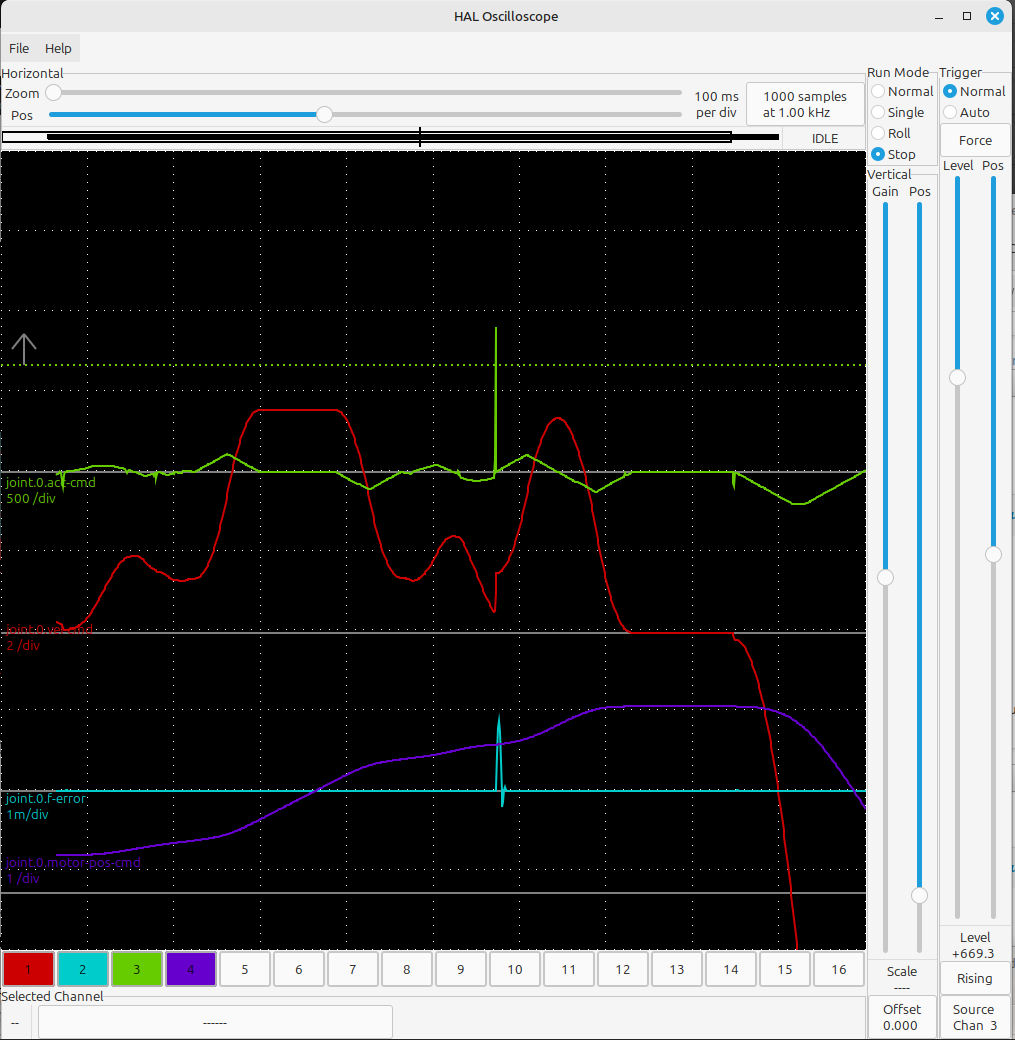
I checked the @ruediger123 codes and there are another spikes in the ramps... 
  • dusa09
10 Jan 2026 17:54 - 10 Jan 2026 17:54

Thanks for tackling the NVMPG display issue!
I've updated to 3.1.3 and the NVMPG display is now updating correctly.
I have encountered a possible bug:
While jogging with the NVMPG It sometimes changes the axis suddenly and overruns the NVMPG display value, leaving a digit to the extreme left in the X and Y position fields, partially outside the field. 
The NVMPG continues to work, but on the new axis and the extra digits remain until power cycled.
Attached is an example of the corrupted display.

I'm observing the same behavior. When moving, it suddenly switches to another axis. Is there a fix? Thank you.

 
  • Surmetall
10 Jan 2026 17:16
Hello Steve, I just wanted to say Deckard is awesome. Really great work and thanks for sharing it to the world. The HAL-first approach is exactly what I was looking for.I’m currently installing it and starting to test it on a lathe, I see a lot of potential in it.Are you still actively working on Deckard, or planning to continue? I’m especially interested in multi-page / page switching, because that would be the killer feature for a Stream Deck in LinuxCNC. Being able to switch layouts automatically between Jog, MDI, Auto, tool offsets and touch-off and so on would make it unbeatable compared to fixed physical buttons.If you have any thoughts on where this is going, or a recommended workaround in the meantime, I’d love to hear it.
 
 greetings,
Tom
  • PCW
10 Jan 2026 16:18
Replied by PCW on topic LinuxCNC S-Curve Accelerations
I still get acceleration violations but the magnitude seems less


ini values:


File Attachment:

File Name: ini_2026-01-10.txt
File Size:5.34 KB
  • PCW
10 Jan 2026 15:46
MB2HAL would need the USB----> RS-485 adapter

hm2-modbus would use PKTUART firmware on the 7I80

For the 7I84 and hm2-modbus you would need a TTL --> RS-485
(for Modbus) and a TTL --> RS-422 adapter (for the 7I84)

These adapters are really just a single driver chip on a small PCB
  • grandixximo
10 Jan 2026 15:17
Replied by grandixximo on topic LinuxCNC S-Curve Accelerations
Both need to be taken into consideration, calculation speed and joints movements, will try to cap to max
  • freemoore
10 Jan 2026 15:17
Hi,

I'm looking to check that this combination is viable, and if so for the relevant firmware: 7i80HD-16 or 25, 7i48, 7i42TA, 7i84, and pktUART for MB2HAL. 
7i48 is for 5x analogue +/-10v servo amps and 1x analogue VFD. 
I need quite a lot of 24V I/O, some of which can be non-realtime, some of which will need to be realtime. Intending to use the cheap Geroosaty  Modbus 16i/16o boards for the non-realtime and the 7i84 for realtime; maybe a relay board via the  
Is it possible to use some pins on the 7i42TA as a smart serial port for the 7i84, and some as a A+/B- (single ended) for MB2HAL? 
If not I can probably get away with level converters 5V-24V on the 7i42TA and the USB RS485 converter for the modbus stuff, but not having to buy additional boards would be great at this point - already have the above mesa boards on hand. 

Many thanks,
Andy
 
  • ruediger123
10 Jan 2026 15:07 - 10 Jan 2026 15:13
Replied by ruediger123 on topic LinuxCNC S-Curve Accelerations
@grandixximo

when I initiate the jerk, you should stick to that.
Does interpolation refer to the movement of the axes or the speed of the calculation?
If the movement of the axes is meant, I can specify a higher jerk.

If I have a stiff machine, I can apply a high jerk and the axles will move smoothly (no overshooting or anything like that). With a soft machine, I have to set a small jerk, otherwise the axles will move erratically (overshooting or anything like that).
Acceleration also plays a role, of course.

If the jerk is maintained, I can adjust the axles properly.
For example, a small jerk and high acceleration.
If the jerk is not maintained, I have to specify a lower acceleration so that the axles run smoothly.
  • tommylight
10 Jan 2026 13:57
Replied by tommylight on topic New and Working RTAI debs for 2.9

... I can't currently view them. 
 
+1
  • amanker
10 Jan 2026 13:26 - 10 Jan 2026 14:28
Code:
eating a std module Remora PRU - Programmable Realtime Unit   Mbed-OS6   Remora-spi Driver  ## Entering SETUP state 1. Reading json configuration file OK Opening "/fs/config.txt"... OK Json config file lenght = 3836 Closing "/fs/config.txt"...  2. Setting up DMA and threads Initialising SPI1 slave Initialising DMA for SPI 3. Parsing json configuration file Config deserialisation - Deserialization succeeded 4. Config threads Creating thread 40000 Creating thread 1000 Creating thread 57600 5. Loading modules Servo thread object Reset pin Make Reset Pin at pin PC_15 Creating a std module Creating Pin @   port = GPIOC   pin = 15 Base thread object X - Joint 0 step generator Creating a std module Creating Pin @   port = GPIOF   pin = 14 Creating Pin @   port = GPIOF  pin = 13 Creating Pin @   port = GPIOF   pin = 12 Base thread object Y - Joint 1 step generator Creating a std module Creating Pin @   port = GPIOF   pin = 15 Creating Pin @   port = GPIOG   pin = 0 Creating Pin @   port = GPIOG   pin = 1 Base thread object Z - Joint 2 step generator Creating a std module Creating Pin @   port = GPIOG   pin = 5 Creating Pin @   port = GPIOF   pin = 11 Creating Pin @   port = GPIOG   pin = 3 Base thread object E0 - Joint 3 step generator Creating a std module Creating Pin @   port = GPIOA   pin = 0 Creating Pin @   port = GPIOG   pin = 4 Creating Pin @   port = GPIOC   pin = 1 Base thread object E1 - Joint 4 step generator Creating a std module Creating Pin @   port = GPIOG   pin = 2 Creating Pin @   port = GPIOF   pin = 9 Creating Pin @   port = GPIOF   pin = 10 Servo thread object X min Make Digital Input at pin PG_6 Creating a std module   Setting pin as No Pull Creating Pin @   port = GPIOG   pin = 6 Servo thread object X max Make Digital Input at pin PG_9 Creating a std module   Setting pin as No Pull Creating Pin @   port = GPIOG   pin = 9 Servo thread object Y min Make Digital Input at pin PG_10 Creating a std module   Setting pin as No Pull Creating Pin @   port = GPIOG   pin = 10 Servo thread object Y max Make Digital Input at pin PG_11 Creating a std module   Setting pin as No Pull Creating Pin @   port = GPIOG   pin = 11 Servo thread object Z min Make Digital Input at pin PG_12 Creating a std module   Setting pin as No Pull Creating Pin @   port = GPIOG   pin = 12 Servo thread object Z max Make Digital Input at pin PG_13 Creating a std module   Setting pin as No Pull Creating Pin @   port = GPIOG   pin = 13 Servo thread object Probe Make Digital Input at pin PC_5 Creating a std module   Setting pin as No Pull Creating Pin @   port = GPIOC   pin = 5 Servo thread object Estop pin Make eStop at pin PE_11 Creating a std module Creating Pin @   port = GPIOE   pin = 11 Servo thread object Make Blink at pin PA_8 Creating a std module Creating Pin @   port = GPIOA   pin = 8 Servo thread object Spindle PWM 0 Make PWM at pin PB_0 Creating a std module Creating Hardware PWM at pin PB_0 Creating Pin @   port = GPIOB   pin = 0 ## Entering START state Starting the BASE thread Registering interrupt for interrupt number = 24     power on Timer 9 Starting the SERVO thread Registering interrupt for interrupt number = 25     power on Timer 10 ## Entering IDLE state Here is output on UART from remora firmware Edit: Launched linuxcnc on terminal, getting "bad spi payload" (Bad SPI payload = 32393a38)
  • grandixximo
10 Jan 2026 12:29 - 10 Jan 2026 12:31
Replied by grandixximo on topic LinuxCNC S-Curve Accelerations
@ruediger123

at the moment jerk-cmd are debug pins, they are not to be used for machine control, because the current calculations try and do best we can to calculate and blend quickly in realtime, there are knowm spikes in the jerk-cmd, please look at vel-cmd and acc-cmd everything looks very good to me there, there are no violations there, if we were to respect jerk cmd strictly the interpolation would not be able to run as fast as it does, but we could look at making a stricter mode viable as an alternative, or possibly the default if that's what the community needs.
  • grandixximo
10 Jan 2026 11:44
Replied by grandixximo on topic LinuxCNC S-Curve Accelerations
@PCW

try with

setp ini.traj_max_jerk 3000
and
setp ini.traj_default_jerk 3000

I do not get acc violation with these values, can you confirm?
  • meister
10 Jan 2026 11:01
this tool is embedded into the AXIS gui:

Menu -> Machine -> Calibration
  • Dave3891
10 Jan 2026 06:18
Thanks! That was the problem.
I also set the P value back to 250 and FF1 to 0 and max output to 300.
The other settings were causing a following error, but now everything is working great and milling round circles now.

What is the program you were using to change the joint values in the video? Looks like you can change them without restarting linuxcnc?
Displaying 8836 - 8850 out of 11906 results.
Time to create page: 0.259 seconds
Powered by Kunena Forum