
- Hardware & Machines
- Computers and Hardware
- LinuxCNC-RIO - RealtimeIO for LinuxCNC based on FPGA (ICE40 / ECP5)
LinuxCNC-RIO - RealtimeIO for LinuxCNC based on FPGA (ICE40 / ECP5)
- meister
- Offline
- Platinum Member
-

Less
More
- Posts: 805
- Thank you received: 502
04 Jan 2026 17:56 #340976
by meister
Replied by meister on topic LinuxCNC-RIO - RealtimeIO for LinuxCNC based on FPGA (ICE40 / ECP5)
Uii, 60 steps, wo hast du denn den her 
Mal davpn abgesehen, ich frei mich immer über bilder eurer konstuktionen.
So, hmm, jaaa, deine rechnung passt, allerdings befürschte ich das LinuxCNC, bzw der PID regler da einfach keinen spielraum hat um irgendwas zu regeln.
Ich werde das morgen mal am simulator ausprobieren.
Kannst amber mal versuchen den Min-Ferror auf z.b. 1.0 zu setzen und den P-Wert vom PID auf 25 oder so, um zu sehen ob es besser wird.
Vielleicht auch mal beim PID die deadband auf 1 setzen.
Aber wo bitte bekommt man einen stepper mit 60 steps auflösung her
kannst du nicht am treiber die microsteps höher stellen ?
Mal davpn abgesehen, ich frei mich immer über bilder eurer konstuktionen.
So, hmm, jaaa, deine rechnung passt, allerdings befürschte ich das LinuxCNC, bzw der PID regler da einfach keinen spielraum hat um irgendwas zu regeln.
Ich werde das morgen mal am simulator ausprobieren.
Kannst amber mal versuchen den Min-Ferror auf z.b. 1.0 zu setzen und den P-Wert vom PID auf 25 oder so, um zu sehen ob es besser wird.
Vielleicht auch mal beim PID die deadband auf 1 setzen.
Aber wo bitte bekommt man einen stepper mit 60 steps auflösung her
kannst du nicht am treiber die microsteps höher stellen ?
Please Log in or Create an account to join the conversation.
- meister
- Offline
- Platinum Member
-
Less
More
- Posts: 805
- Thank you received: 502
05 Jan 2026 11:42 #341004
by meister
Replied by meister on topic LinuxCNC-RIO - RealtimeIO for LinuxCNC based on FPGA (ICE40 / ECP5)
The following user(s) said Thank You: Dave3891
Please Log in or Create an account to join the conversation.
- freylax
- Offline
- New Member
-

Less
More
- Posts: 5
- Thank you received: 3
05 Jan 2026 13:11 #341007
by freylax
Replied by freylax on topic LinuxCNC-RIO - RealtimeIO for LinuxCNC based on FPGA (ICE40 / ECP5)
Es ist gar nicht so einfach Bilder hier hochzuladen, ich habe es jedenfalls nicht geschafft (waren auh nicht zu gross).
Ich habe die Bilder unter github.com/freylax/riocfg/img eingestellt. Es ist ein alter selbstbau Plotter aus DDR Zeiten den ich als CNC Testobjekt verwenden moechte bevor ich mich an die richtige Maschine bei meinem Freund ranwage.
Raspberry PI5, Olimex ICE40 EVB, Adapter und CNC Breakout Board, Stepper Driver.
Ich kann die Mikrosteps einstellen, allerdings scheint das nicht ganz zum Erfolg zu fuehren. In der rio-test app kann ich den
Motor schrittweise steuern, das klappt. Aber wenn ich in der axis app Manuell zb 5mm anfahre und auch eine geringe Geschwindigkeit einstelle, dann vibriert der Motor nur und es werden keine richtigen Schritte daraus. Was mach rio-test anders?
Ich studiere auch den Code um das zu verstehen.
liebe Gruesse,
Robert
Ich habe die Bilder unter github.com/freylax/riocfg/img eingestellt. Es ist ein alter selbstbau Plotter aus DDR Zeiten den ich als CNC Testobjekt verwenden moechte bevor ich mich an die richtige Maschine bei meinem Freund ranwage.
Raspberry PI5, Olimex ICE40 EVB, Adapter und CNC Breakout Board, Stepper Driver.
Ich kann die Mikrosteps einstellen, allerdings scheint das nicht ganz zum Erfolg zu fuehren. In der rio-test app kann ich den
Motor schrittweise steuern, das klappt. Aber wenn ich in der axis app Manuell zb 5mm anfahre und auch eine geringe Geschwindigkeit einstelle, dann vibriert der Motor nur und es werden keine richtigen Schritte daraus. Was mach rio-test anders?
Ich studiere auch den Code um das zu verstehen.
liebe Gruesse,
Robert
The following user(s) said Thank You: meister
Please Log in or Create an account to join the conversation.
- meister
- Offline
- Platinum Member
-
Less
More
- Posts: 805
- Thank you received: 502
05 Jan 2026 13:31 #341008
by meister
Replied by meister on topic LinuxCNC-RIO - RealtimeIO for LinuxCNC based on FPGA (ICE40 / ECP5)
der plotter ist cool
der unterschied ist, das im test gui nur gesagt wird das der pulsgenerator (FPGA->Stepdir) eine bestimmte frequesnz erzeugen soll, also die steps (velocity mode).
in linuxcnc hängt der pid-regler drin, der schaut wieviele steps schon erzeugt wurden und passt entsprechend die velocity/frequenz im step-generator an.
Bin leider auch kein mathematiker, aber ich denke
wenn LinuxCNC nun auf 0.01mm genau fahren will, der stepper aber nur 1/12 mm genau kann, dann spingt der PID regler als am ziel vorbei.
der unterschied ist, das im test gui nur gesagt wird das der pulsgenerator (FPGA->Stepdir) eine bestimmte frequesnz erzeugen soll, also die steps (velocity mode).
in linuxcnc hängt der pid-regler drin, der schaut wieviele steps schon erzeugt wurden und passt entsprechend die velocity/frequenz im step-generator an.
Bin leider auch kein mathematiker, aber ich denke
wenn LinuxCNC nun auf 0.01mm genau fahren will, der stepper aber nur 1/12 mm genau kann, dann spingt der PID regler als am ziel vorbei.
Please Log in or Create an account to join the conversation.
- Dave3891
- Offline
- Senior Member
-

Less
More
- Posts: 56
- Thank you received: 7
09 Jan 2026 06:03 #341194
by Dave3891
Replied by Dave3891 on topic LinuxCNC-RIO - RealtimeIO for LinuxCNC based on FPGA (ICE40 / ECP5)
Does RIO have any additional backlash comp that isn't set in the HAL file?
I seem to be getting a consistent 0.038" of extra steps when changing direction, but it isn't an instant amount as you can see with this logging with a dial indicator.
I also checked my machine with larger repeated moves to see if something was slipping, but it hit the exact same spot repeatedly.
Here is the motion vs dial log:
g1 x0.000 = x0.000
g1 x0.100 = x0.100
g1 x0.150 = x0.150
g1 x0.200 = x0.200
--- Change direction
g1 x0.100 = x0.060
g1 x0.050 = x0.010
g1 x0.000 = x-0.038
--- Change direction
g1 x0.050 = 0.050
g1 x0.200 = x0.200
--- Change direction
g1 x0.000 = -0.038
g1 x0.010 = x-0.019
g1 x0.015 = x-0.009
g1 x0.020 = x0.000
g1 x0.025 = x0.010
g1 x0.030 = x0.021
g1 x0.035 = x0.030
g1 x0.040 = x0.040
g1 x0.100 = x0.100
g1 x0.200 = x0.200
--- Change direction
g1 0.190 = 0.179
g1 0.180 = 0.160
g1 0.170 = 0.140
g1 0.160 = 0.120
g1 0.150 = 0.110
g1 0.140 = 0.100
g1 0.130 = 0.090
g1 0.120 = 0.080
g1 0.000 = -0.038
I seem to be getting a consistent 0.038" of extra steps when changing direction, but it isn't an instant amount as you can see with this logging with a dial indicator.
I also checked my machine with larger repeated moves to see if something was slipping, but it hit the exact same spot repeatedly.
Here is the motion vs dial log:
g1 x0.000 = x0.000
g1 x0.100 = x0.100
g1 x0.150 = x0.150
g1 x0.200 = x0.200
--- Change direction
g1 x0.100 = x0.060
g1 x0.050 = x0.010
g1 x0.000 = x-0.038
--- Change direction
g1 x0.050 = 0.050
g1 x0.200 = x0.200
--- Change direction
g1 x0.000 = -0.038
g1 x0.010 = x-0.019
g1 x0.015 = x-0.009
g1 x0.020 = x0.000
g1 x0.025 = x0.010
g1 x0.030 = x0.021
g1 x0.035 = x0.030
g1 x0.040 = x0.040
g1 x0.100 = x0.100
g1 x0.200 = x0.200
--- Change direction
g1 0.190 = 0.179
g1 0.180 = 0.160
g1 0.170 = 0.140
g1 0.160 = 0.120
g1 0.150 = 0.110
g1 0.140 = 0.100
g1 0.130 = 0.090
g1 0.120 = 0.080
g1 0.000 = -0.038
Please Log in or Create an account to join the conversation.
- meister
- Offline
- Platinum Member
-
Less
More
- Posts: 805
- Thank you received: 502
09 Jan 2026 07:59 #341198
by meister
Replied by meister on topic LinuxCNC-RIO - RealtimeIO for LinuxCNC based on FPGA (ICE40 / ECP5)
no, the problem are the default PID values,
please try to set your DEADBAND to 0.0005
please try to set your DEADBAND to 0.0005
The following user(s) said Thank You: Dave3891
Please Log in or Create an account to join the conversation.
- Dave3891
- Offline
- Senior Member
-
Less
More
- Posts: 56
- Thank you received: 7
10 Jan 2026 06:18 #341229
by Dave3891
Replied by Dave3891 on topic LinuxCNC-RIO - RealtimeIO for LinuxCNC based on FPGA (ICE40 / ECP5)
Thanks! That was the problem.
I also set the P value back to 250 and FF1 to 0 and max output to 300.
The other settings were causing a following error, but now everything is working great and milling round circles now.
What is the program you were using to change the joint values in the video? Looks like you can change them without restarting linuxcnc?
I also set the P value back to 250 and FF1 to 0 and max output to 300.
The other settings were causing a following error, but now everything is working great and milling round circles now.
What is the program you were using to change the joint values in the video? Looks like you can change them without restarting linuxcnc?
Please Log in or Create an account to join the conversation.
- meister
- Offline
- Platinum Member
-
Less
More
- Posts: 805
- Thank you received: 502
10 Jan 2026 11:01 #341230
by meister
Replied by meister on topic LinuxCNC-RIO - RealtimeIO for LinuxCNC based on FPGA (ICE40 / ECP5)
this tool is embedded into the AXIS gui:
Menu -> Machine -> Calibration
Menu -> Machine -> Calibration
Please Log in or Create an account to join the conversation.
- meister
- Offline
- Platinum Member
-
Less
More
- Posts: 805
- Thank you received: 502
29 Jan 2026 07:06 - 29 Jan 2026 07:08 #342144
by meister
Replied by meister on topic LinuxCNC-RIO - RealtimeIO for LinuxCNC based on FPGA (ICE40 / ECP5)
A little bit off topic, but a cool experiment with multihead touchscreen
the camjog plugin:
youtube.com/shorts/pnibjyDy1ZI
the camjog plugin:
youtube.com/shorts/pnibjyDy1ZI
Last edit: 29 Jan 2026 07:08 by meister.
The following user(s) said Thank You: tommylight
Please Log in or Create an account to join the conversation.
- meister
- Offline
- Platinum Member
-
Less
More
- Posts: 805
- Thank you received: 502
16 Feb 2026 20:22 #343068
by meister
Replied by meister on topic LinuxCNC-RIO - RealtimeIO for LinuxCNC based on FPGA (ICE40 / ECP5)
I'm currently revising the Modbus part so that it also includes individual plugins,
and I've expanded the flow frontend a bit.
Okay, maybe I'm overdoing it a bit, but who cares, it's fun ;P
This way, you can also use your configuration as documentation.
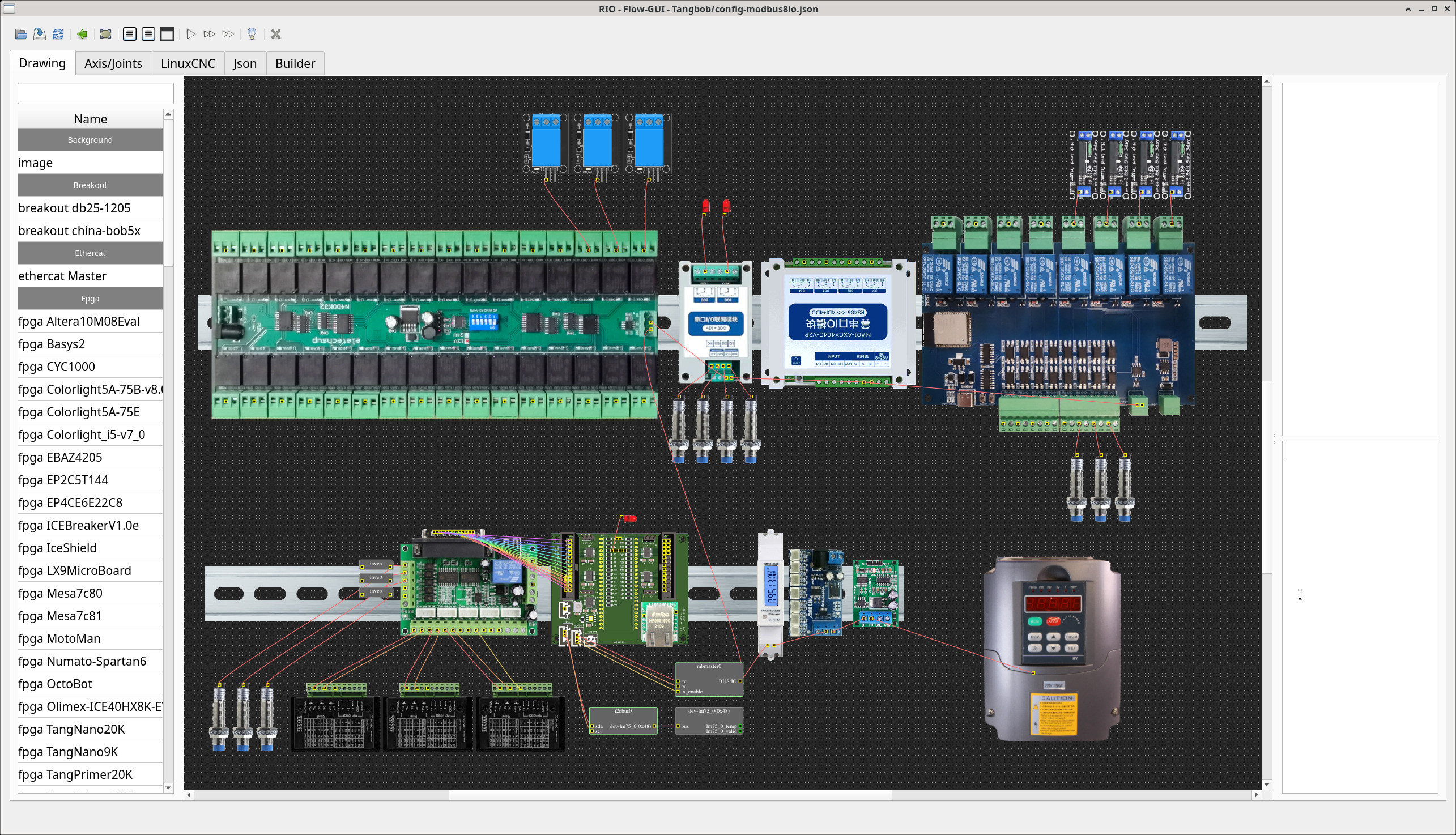
The coolest thing about it is that it generates a working configuration
and I've expanded the flow frontend a bit.
Okay, maybe I'm overdoing it a bit, but who cares, it's fun ;P
This way, you can also use your configuration as documentation.
The coolest thing about it is that it generates a working configuration
Attachments:
The following user(s) said Thank You: tommylight, kzali
Please Log in or Create an account to join the conversation.
- Hardware & Machines
- Computers and Hardware
- LinuxCNC-RIO - RealtimeIO for LinuxCNC based on FPGA (ICE40 / ECP5)
Time to create page: 0.312 seconds