Search Results (Searched for: )

  • rodw
19 May 2026 22:17
I'll just mention it here as after all its only taken me 6 years to get it into master branch as of this morning. You guys might like to think about how you could use these new pins (taken from man motion) in plasma cutting enhancements.Interpreter Metadata PinsThese pins provide geometric intent and interpreter state for the segment of motion currently being executed. Unlike standard position feedback, these values are synchronized with the trajectory planner’s execution point.Interpreter Status Pins
  • Code:
    motion.interp.line-number
     (s32, out)
    The current G-code line number being executed.
  • Code:
    motion.interp.motion-type
     (s32, out)
    The type of motion currently in progress:
    • 0: None
    • 1: Rapid (G0)
    • 2: Feed (G1)
    • 3: Arc (G2, G3)
    • 4: Tool Change/Other
  • Code:
    motion.interp.feedrate
     (float, out)
    The interpreted feedrate for the current segment in units per minute.
Interpreter Geometric Pins
  • Code:
    motion.interp.heading
     (float, out)
    The XY plane heading of the current linear move in degrees. Measured counter-clockwise from the +X axis (0 to 360). This could be used to control a tangential knife.
  • Code:
    motion.interp.arc-radius
     (float, out)
    The radius of the current circular move. This value is 0.0 during linear moves. This could be used to modify plasma cutting parameters based on the arc radius and when hole cutting.
  • Code:
    motion.interp.arc-center-x
     (float, out)
    The absolute X-coordinate of the center point for the current arc. 0 if in YZ plane
  • Code:
    motion.interp.arc-center-y
     (float, out)
    The absolute Y-coordinate of the center point for the current arc. 0 if in XZ plane
  • Code:
    motion.interp.arc-center-z
     (float, out)
    The absolute Y-coordinate of the center point for the current arc if in XZ or YZ plane.
  • Code:
    motion.interp.normal-heading
     (float, out)
    the heading from the current point back to the arc centre for the current arc.
  • Code:
    motion.interp.iscircle
     (bit, out)
    True if the current arc is a full circle and not a helix.
NoteThese pins represent the commanded geometric intent from the interpreter and are updated in real-time as each motion segment is consumed by the trajectory planner.
  • rodw
19 May 2026 22:06
Replied by rodw on topic Schaublin 125-CNC retrofit.
my eyes glazed over looking at all the options but if its pneumatically actuated, why not a pressure switch? Cheap as chips!

 
  • rodw
19 May 2026 21:59
  • my1987toyota
19 May 2026 19:36
Replied by my1987toyota on topic Brilliant Bambu Lab
And furthermore 

  • my1987toyota
19 May 2026 19:31
Replied by my1987toyota on topic Brilliant Bambu Lab
And there's more

  • markder13
19 May 2026 18:30
Replied by markder13 on topic Schaublin 125-CNC retrofit.
My immediate reaction when I saw your problem was a cascade PID loop. These are two PID loops: fast and slow.
The fast loop is a normal encoder to VFD loop.
The second loop controls the CVT. That controller tries only to keep the output of the first loop at 6V (= 50Hz). I think you do not have to calculate the gear ratio, etc. Maybe it would work without any additional hardware.If the output of the fast controller (VFD) is below 5V, the CVT turns on until it hits the limit or the controller output is above 5V and below 7V. Above 7V, the CVT turns on in the other direction.

If this does not work and feedback from the CVT is needed, a Waterproof Wire Encoder (Aliexpress) can be considered. Then, the PV (actual position of the CVT) can be used to calculate / adjust the $K_p$, $K_i$, and $K_d$ of the fast VFD loop. Mark
  • robert0423
19 May 2026 18:03
Replied by robert0423 on topic hm2_eth Connection refused
That solved the issue.
  1. Configured the jumpers on the MESA 7i96S (FPGA card) to Down/Up which set the IP address to 10.10.10.10. This placed it on a separate subnet isolated from my 192.168.1.x main network.
  2. Set the IP address of the RPi wired ethernet (ETH0) (Settings/Advanced networking) to the static manual address 10.10.10.1. This placed the RPi ethernet on the same subnet as the MESA.
  3. Set the IP address for the WIFI on the RPi to use DHCP. This received an IP address for the main network (192.168.1.110).
  4. In Pncconf, set the IP address for the Card (i.e. the MESA FPGA 7i96S) to match the IP address set by the jumper configuration, 10.10.10.10.
Everything now works as expected.

Thanks
Bob
  • andypugh
19 May 2026 11:44 - 19 May 2026 11:45
As these are both step-dir I think you could simply set the scales the same in the drives and send them both the same step and direction pulses (at the hardware level)

I feel that I am missing something, though, why are the two parts driven separately if they always rotate as-one?
  • PCW
19 May 2026 05:01
Replied by PCW on topic hm2_eth Connection refused
It looks like you  have set the card IP address in the hal file to the host address
rather than the FPGA card address:

hm2_eth: ERROR: Could not retrieve hardware address (MAC) of 10.10.10.1: Connection refused
 
  • PCW
19 May 2026 04:58
Replied by PCW on topic Mill Retrofit with Fanuc DC Drives
The runaway suggests that possibly  one of the feedback loops is reversed.
  • fully_defined
19 May 2026 03:23
Replied by fully_defined on topic ELO touchscreen driver and interface install.
I vibecoded it with Claude Code. Works a treat!
  • kb9ydn
19 May 2026 02:21
Replied by kb9ydn on topic Remora for RP2040

I had a quick look at the PortingPlan.md. Am I right to presume that this was AI assisted coding? It's insane how this thing is a game changer for non coder; I have some understanding of coding, read a lot of source code, but am not able to write more than a couple of functions to adapt an existing code (and even that part is mainly copy-pasting form existing libraries). Yet, within three days had a CANopen motor connected to a RPi spinning smoothly in CSP mode. I wouldn't say with Claude-code's help, but rather than Claude-code had it working with some of my contribution for hradware connection and debugging. image missing /media/kunena/emoticons/smile.png

It is AI assisted, Claude in fact!  And yes, Claude did basically all of the actual coding based on existing work.  I did have to do a fair bit of flashing binaries and scoping pins for voltages and timing.  And it does need some guidance for how to fix issues that come up.  It seems very good at writing code given enough direction.  But it doesn't necessarily know which way to do things when there are multiple options available.  It can also go off on tangents when troubleshooting complex problems.  That said, it saves an unbelievable amount of time.  I do have quite a few years of hobby programming experience in a number of contexts, but I've never been a professional programmer.  I'm more into hardware hacking.  So indeed, AI assisted coding is literally game changing for less than great programmers!

C|
  • tbrasselle
19 May 2026 01:38
Replied by tbrasselle on topic Mill Retrofit with Fanuc DC Drives
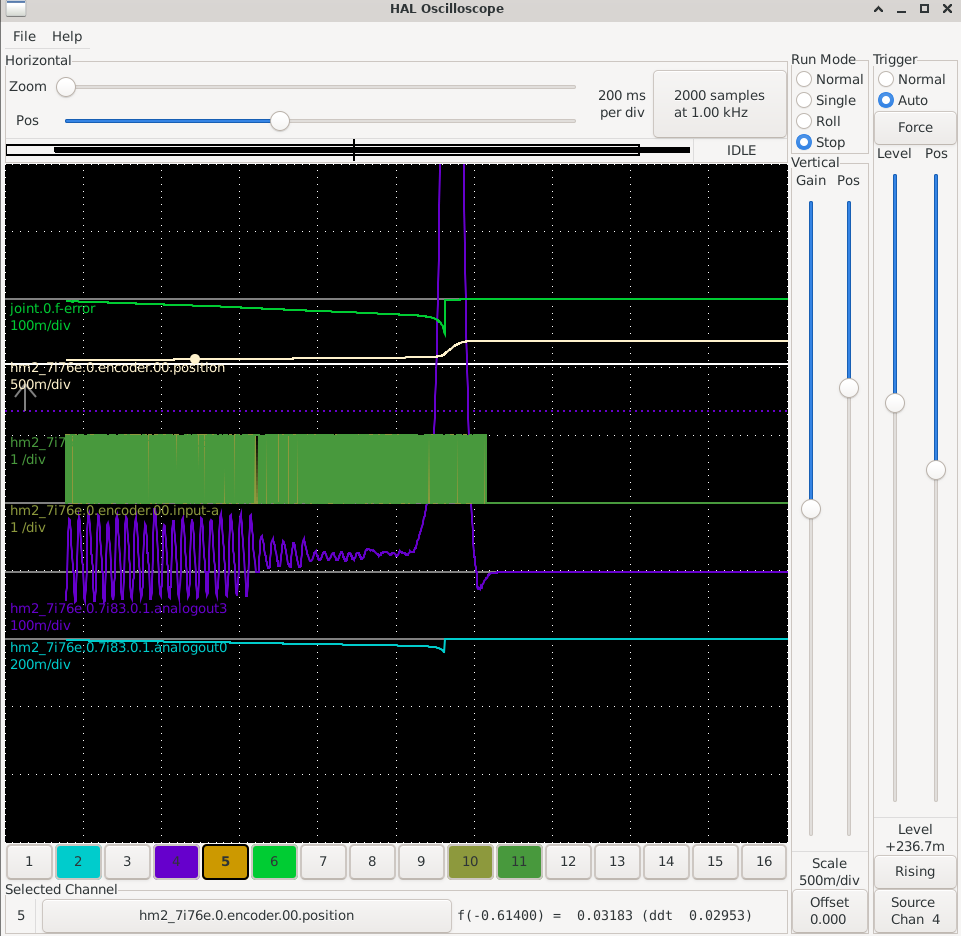
I did have the motor disconnected from the ballscrew initially. I've now connected it back and the problem has not gone away. I've attached a halscope screenshot showing the current status. when i enable the drive it oscillates, starts to smooth out, then runs away. 

I can adjust the velocity loop gain on the drive but i have been hesitant to do that. the drive and motor were working as is with the Fanuc controller before I disconnected them. 
  • robert0423
19 May 2026 00:20
hm2_eth Connection refused was created by robert0423
I get a 'Connection refused' error shown below when I try to start linuxcnc using a Raspberry Pi 4B and a new MESA 7i96S card.
I can successfully ping the MESA card from the RPi
  • I can get card information using mesaflash --readhmid
  • iptables is configured to accept all packets and not drop any.
  • The yellow and green LEDs are on for both the RPi and the MESA.
I've tried multiple RPis, MESA cards (both are new), power supplies, network cables, Linuxcnc versions, RPi imagers, ip configurations, disabling WIFI and setting the IP address on the MESA to both 10.10.10.10 and 192.168.1.121.  
The results are the same; Connection refused.

Any thoughts or information on how to resolve this issue is greatly appreciated.

Found file(REL): ./cncmill.hal
Shutting down and cleaning up LinuxCNC...
Running HAL shutdown script
hm2: loading Mesa HostMot2 driver version 0.15
hm2_eth: loading Mesa AnyIO HostMot2 ethernet driver version 0.2
hm2_eth: ERROR: Could not retrieve hardware address (MAC) of 10.10.10.1: Connection refused
hm2: unloading
Removing HAL_LIB, RTAPI, and Real Time OS modules
Removing NML shared memory segments

Debug file information:
Note: Using POSIX realtime
hm2_eth: rtapi_app_main: Connection refused (-111)
./cncmill.hal:9: waitpid failed /usr/bin/rtapi_app hm2_eth
./cncmill.hal:9: /usr/bin/rtapi_app exited without becoming ready
./cncmill.hal:9: insmod for hm2_eth failed, returned -1
1509
Stopping realtime threads
Unloading hal components
Note: Using POSIX realtime


  • COFHAL
18 May 2026 22:29
Replied by COFHAL on topic Qtvcp GUI and hal pins
Yes, I already tested it and those new HAL pins work.Thanks.
Displaying 3811 - 3825 out of 11907 results.
Time to create page: 0.824 seconds
Powered by Kunena Forum