
Search Results (Searched for: )
- ihavenofish
08 Jan 2026 02:20
Replied by ihavenofish on topic LinuxCNC S-Curve Accelerations
O_o
o_O
o_O
- andypugh
08 Jan 2026 01:41
Replied by andypugh on topic A new finite-jerk (S-curve) trajectory planner for testing.
They all work for me. I will have to try them at work tomorrow as the other-me to maybe see what is going on.
Can you see: github.com/LinuxCNC/linuxcnc/actions/run...1121/job/59737821393 ?
Can you see: github.com/LinuxCNC/linuxcnc/actions/run...1121/job/59737821393 ?
- tommylight
-

08 Jan 2026 00:26
Replied by tommylight on topic A new finite-jerk (S-curve) trajectory planner for testing.
404 on all links on GitHub and 403 on the guinea pig.
- andypugh
08 Jan 2026 00:05 - 08 Jan 2026 00:09
A new finite-jerk (S-curve) trajectory planner for testing. was created by andypugh
With many thanks to Grandixximo and 杨阳 we now have an experimental
S-curve / finite-jerk trajectory planner for testing.
For those that build from source just look for the new v2.10.0-pre1 tag.
Others can download debs from github for the next 90 days:
x86 / bookworm
x86 / trixie
ARM64 / bookworm
ARM64 / trixie
Make no mistake, this is experimental, there are no guarantees that
these won't break your machines. The first user already hit the hard
stops when homing (too-low max jerk setting)
With the jerk setting it is probably best to start high and reduce, as
infinite jerk is closer to current behavior.
If you run these you are volunteering to be a guinea-pig.
The docs have been updated, but here is the README original pull-request.
================================================================================
LINUXCNC S-CURVE MOTION PLANNING - QUICK REFERENCE
================================================================================
OVERVIEW
S-curve motion planning provides smoother acceleration by limiting jerk
(the rate of change of acceleration). This can reduce machine vibration,
improve surface finish, and extend machine life.
STATUS: Optional feature, disabled by default for backward compatibility
ENABLING S-CURVE PLANNING
Add to [TRAJ] section of your INI file:
PLANNER_TYPE = 1 # 0=trapezoidal (default), 1=S-curve
MAX_LINEAR_JERK = 1000.0 # Units: machine-units/s^3
DEFAULT_LINEAR_JERK = 500.0 # Default jerk for moves
Add to [JOINT_n] sections:
MAX_JERK = 1000.0 # Per-joint jerk limit
Add to [AXIS_l] sections:
MAX_JERK = 1000.0 # Per-axis jerk limit
CONSTANTS DEFINED
File: src/emc/nml_intf/emccfg.h
DEFAULT_TRAJ_DEFAULT_JERK = 0.0 (disabled)
DEFAULT_TRAJ_MAX_JERK = 0.0 (disabled)
DEFAULT_TRAJ_PLANNER_TYPE = 0 (trapezoidal)
DEFAULT_JOINT_MAX_JERK = 0.0 (disabled)
DEFAULT_AXIS_MAX_JERK = 0.0 (disabled)
BEHAVIOR
S-curve planning is ACTIVE when:
- PLANNER_TYPE = 1, AND
- MAX_LINEAR_JERK > 0
Trapezoidal planning is used when:
- PLANNER_TYPE = 0, OR
- MAX_LINEAR_JERK = 0 (or not specified)
Note: Setting MAX_JERK=0 with PLANNER_TYPE=1 reverts to trapezoidal
for backward compatibility and easy testing.
HAL PINS ADDED
*** IMPORTANT: All trajectory-level HAL pins support RUNTIME changes! ***
You can switch between trapezoidal and S-curve planning on-the-fly
by connecting HAL signals to these pins.
Trajectory level (all support runtime modification):
- ini.traj_default_jerk (IN, float) - Can change while running
- ini.traj_max_jerk (IN, float) - Can change while running
- ini.traj_planner_type (IN, s32) - Can change while running (0 or 1)
Joint level (for each joint N):
- ini.N.jerk (IN, float) - Joint jerk limit
- joint.N.jerk-cmd (OUT, float) - Current commanded jerk
Axis level (for each axis L):
- ini.L.jerk (IN, float) - Axis jerk limit
TYPICAL VALUES
Units depend on your LINEAR_UNITS setting (mm or inch)
Light/rigid machines: 1,000 - 10,000 units/s^3
Medium machines: 100 - 1,000 units/s^3
Heavy/flexible machines: 100 - 500 units/s^3
Very rigid machines: 10,000 - 100,000 units/s^3
Rule of thumb: MAX_JERK ≈ 10-100 × MAX_ACCELERATION
TUNING PROCEDURE
1. Start with PLANNER_TYPE=0 (verify machine works normally)
2. Set PLANNER_TYPE=1, MAX_LINEAR_JERK=100 (very conservative)
3. Test simple moves (jog, MDI commands)
4. Gradually increase MAX_LINEAR_JERK by 2-3x steps
5. Monitor motor current, following errors, vibration
6. Find sweet spot: smooth motion without sluggishness
7. Test coordinated motion (G2/G3 arcs, 3D paths)
RUNTIME SWITCHING (Advanced Feature)
All trajectory jerk parameters can be changed while LinuxCNC is running!
This allows dynamic switching between planning modes.
EXAMPLE 1: Toggle button to switch planners
In your HAL file:
# Create a toggle button
net planner-toggle-btn pyvcp.scurve-enable => ini.traj_planner_type
# When button=0: Trapezoidal
# When button=1: S-curve
EXAMPLE 2: Automatic switching based on feedrate
In your HAL file:
# Use motion.current-vel to switch planners
# High speed = trapezoidal (faster), Low speed = S-curve (smoother)
loadrt comp names=vel-compare
addf vel-compare servo-thread
setp vel-compare.in0 150.0 # Switch threshold (units/sec)
net current-vel motion.current-vel => vel-compare.in1
net use-scurve vel-compare.out => ini.traj_planner_type
EXAMPLE 3: MDI commands to change jerk on-the-fly
You can use halcmd in MDI or scripts:
halcmd setp ini.traj_max_jerk 2000.0
halcmd setp ini.traj_planner_type 1
EXAMPLE 4: Material-specific jerk settings
In PyVCP or custom GUI:
<pyvcp>
<labelframe text="Motion Profile">
<radiobutton>
<choices>["Wood (500)", "Aluminum (1500)", "Steel (2500)"]</choices>
<halpin>"material-jerk"</halpin>
</radiobutton>
</labelframe>
</pyvcp>
# In HAL, use mux component to select jerk value
# and connect to ini.traj_max_jerk
NOTES:
- Changes take effect on the NEXT motion command
- Safe to change during idle or between moves
- Existing queued moves use old parameters
- Great for A/B testing different jerk values
TROUBLESHOOTING
Q: No difference between PLANNER_TYPE=0 and PLANNER_TYPE=1?
A: Verify MAX_LINEAR_JERK > 0 and all joint/axis MAX_JERK > 0
Q: Motion is slower with S-curve?
A: Increase MAX_LINEAR_JERK value
Q: Following errors increased?
A: Decrease MAX_LINEAR_JERK or tune PID parameters
Q: Want to disable S-curve temporarily?
A: Set PLANNER_TYPE=0 (no need to change jerk values)
FILES MODIFIED
Core implementation:
- src/emc/tp/sp_scurve.c (NEW - S-curve algorithm)
- src/emc/tp/sp_scurve.h (NEW - S-curve header)
- src/emc/motion/simple_tp.c (dispatch to S-curve planner)
- src/emc/motion/simple_tp.h (add jerk support)
Motion control:
- src/emc/motion/motion.h (add jerk commands/status)
- src/emc/motion/command.c (handle jerk commands)
- src/emc/motion/control.c (jerk limiting in motion loop)
- src/emc/motion/axis.c (axis jerk limits)
INI file parsing:
- src/emc/ini/initraj.cc (parse TRAJ jerk params)
- src/emc/ini/inijoint.cc (parse JOINT jerk params)
- src/emc/ini/iniaxis.cc (parse AXIS jerk params)
- src/emc/ini/inihal.cc (HAL pin creation & updates)
- src/emc/ini/inihal.hh (HAL data structures)
Configuration:
- src/emc/nml_intf/emccfg.h (default constants)
- lib/hallib/check_config.tcl (INI validation)
Build system:
- src/Makefile (add sp_scurve.o to build)
- src/emc/motion-logger/Submakefile
EXAMPLE CONFIGURATIONS
See: configs/scurve_example.ini for complete examples
TESTING RECOMMENDATIONS
1. Air cut test programs with known good results
2. Compare surface finish: trapezoidal vs S-curve
3. Monitor following errors during complex paths
4. Check motor temperature (shouldn't increase significantly)
5. Listen for unusual vibrations or resonances
6. Measure cycle time differences
FOR DEVELOPERS
S-curve algorithm location: src/emc/tp/sp_scurve.c
Key function: simple_scurve_tp_update()
- Called from simple_tp_update() when jerk > 0
- Implements 7-segment S-curve profile
- Updates position, velocity, acceleration, jerk
Integration points:
- simple_tp.c: Planner selection based on max_jerk
- axis.c: Apply axis jerk limits
- control.c: Apply joint jerk limits
- command.c: Process EMCMOT_SET_JERK commands
COMMUNITY TESTING
This feature is new and needs community testing. Please report:
- Machine configuration (type, size, rigidity)
- Jerk values that worked well
- Any issues or unexpected behavior
- Comparison to trapezoidal planning
Report to: LinuxCNC mailing list, forum or Discord
S-curve / finite-jerk trajectory planner for testing.
For those that build from source just look for the new v2.10.0-pre1 tag.
Others can download debs from github for the next 90 days:
x86 / bookworm
x86 / trixie
ARM64 / bookworm
ARM64 / trixie
Make no mistake, this is experimental, there are no guarantees that
these won't break your machines. The first user already hit the hard
stops when homing (too-low max jerk setting)
With the jerk setting it is probably best to start high and reduce, as
infinite jerk is closer to current behavior.
If you run these you are volunteering to be a guinea-pig.
The docs have been updated, but here is the README original pull-request.
================================================================================
LINUXCNC S-CURVE MOTION PLANNING - QUICK REFERENCE
================================================================================
OVERVIEW
S-curve motion planning provides smoother acceleration by limiting jerk
(the rate of change of acceleration). This can reduce machine vibration,
improve surface finish, and extend machine life.
STATUS: Optional feature, disabled by default for backward compatibility
ENABLING S-CURVE PLANNING
Add to [TRAJ] section of your INI file:
PLANNER_TYPE = 1 # 0=trapezoidal (default), 1=S-curve
MAX_LINEAR_JERK = 1000.0 # Units: machine-units/s^3
DEFAULT_LINEAR_JERK = 500.0 # Default jerk for moves
Add to [JOINT_n] sections:
MAX_JERK = 1000.0 # Per-joint jerk limit
Add to [AXIS_l] sections:
MAX_JERK = 1000.0 # Per-axis jerk limit
CONSTANTS DEFINED
File: src/emc/nml_intf/emccfg.h
DEFAULT_TRAJ_DEFAULT_JERK = 0.0 (disabled)
DEFAULT_TRAJ_MAX_JERK = 0.0 (disabled)
DEFAULT_TRAJ_PLANNER_TYPE = 0 (trapezoidal)
DEFAULT_JOINT_MAX_JERK = 0.0 (disabled)
DEFAULT_AXIS_MAX_JERK = 0.0 (disabled)
BEHAVIOR
S-curve planning is ACTIVE when:
- PLANNER_TYPE = 1, AND
- MAX_LINEAR_JERK > 0
Trapezoidal planning is used when:
- PLANNER_TYPE = 0, OR
- MAX_LINEAR_JERK = 0 (or not specified)
Note: Setting MAX_JERK=0 with PLANNER_TYPE=1 reverts to trapezoidal
for backward compatibility and easy testing.
HAL PINS ADDED
*** IMPORTANT: All trajectory-level HAL pins support RUNTIME changes! ***
You can switch between trapezoidal and S-curve planning on-the-fly
by connecting HAL signals to these pins.
Trajectory level (all support runtime modification):
- ini.traj_default_jerk (IN, float) - Can change while running
- ini.traj_max_jerk (IN, float) - Can change while running
- ini.traj_planner_type (IN, s32) - Can change while running (0 or 1)
Joint level (for each joint N):
- ini.N.jerk (IN, float) - Joint jerk limit
- joint.N.jerk-cmd (OUT, float) - Current commanded jerk
Axis level (for each axis L):
- ini.L.jerk (IN, float) - Axis jerk limit
TYPICAL VALUES
Units depend on your LINEAR_UNITS setting (mm or inch)
Light/rigid machines: 1,000 - 10,000 units/s^3
Medium machines: 100 - 1,000 units/s^3
Heavy/flexible machines: 100 - 500 units/s^3
Very rigid machines: 10,000 - 100,000 units/s^3
Rule of thumb: MAX_JERK ≈ 10-100 × MAX_ACCELERATION
TUNING PROCEDURE
1. Start with PLANNER_TYPE=0 (verify machine works normally)
2. Set PLANNER_TYPE=1, MAX_LINEAR_JERK=100 (very conservative)
3. Test simple moves (jog, MDI commands)
4. Gradually increase MAX_LINEAR_JERK by 2-3x steps
5. Monitor motor current, following errors, vibration
6. Find sweet spot: smooth motion without sluggishness
7. Test coordinated motion (G2/G3 arcs, 3D paths)
RUNTIME SWITCHING (Advanced Feature)
All trajectory jerk parameters can be changed while LinuxCNC is running!
This allows dynamic switching between planning modes.
EXAMPLE 1: Toggle button to switch planners
In your HAL file:
# Create a toggle button
net planner-toggle-btn pyvcp.scurve-enable => ini.traj_planner_type
# When button=0: Trapezoidal
# When button=1: S-curve
EXAMPLE 2: Automatic switching based on feedrate
In your HAL file:
# Use motion.current-vel to switch planners
# High speed = trapezoidal (faster), Low speed = S-curve (smoother)
loadrt comp names=vel-compare
addf vel-compare servo-thread
setp vel-compare.in0 150.0 # Switch threshold (units/sec)
net current-vel motion.current-vel => vel-compare.in1
net use-scurve vel-compare.out => ini.traj_planner_type
EXAMPLE 3: MDI commands to change jerk on-the-fly
You can use halcmd in MDI or scripts:
halcmd setp ini.traj_max_jerk 2000.0
halcmd setp ini.traj_planner_type 1
EXAMPLE 4: Material-specific jerk settings
In PyVCP or custom GUI:
<pyvcp>
<labelframe text="Motion Profile">
<radiobutton>
<choices>["Wood (500)", "Aluminum (1500)", "Steel (2500)"]</choices>
<halpin>"material-jerk"</halpin>
</radiobutton>
</labelframe>
</pyvcp>
# In HAL, use mux component to select jerk value
# and connect to ini.traj_max_jerk
NOTES:
- Changes take effect on the NEXT motion command
- Safe to change during idle or between moves
- Existing queued moves use old parameters
- Great for A/B testing different jerk values
TROUBLESHOOTING
Q: No difference between PLANNER_TYPE=0 and PLANNER_TYPE=1?
A: Verify MAX_LINEAR_JERK > 0 and all joint/axis MAX_JERK > 0
Q: Motion is slower with S-curve?
A: Increase MAX_LINEAR_JERK value
Q: Following errors increased?
A: Decrease MAX_LINEAR_JERK or tune PID parameters
Q: Want to disable S-curve temporarily?
A: Set PLANNER_TYPE=0 (no need to change jerk values)
FILES MODIFIED
Core implementation:
- src/emc/tp/sp_scurve.c (NEW - S-curve algorithm)
- src/emc/tp/sp_scurve.h (NEW - S-curve header)
- src/emc/motion/simple_tp.c (dispatch to S-curve planner)
- src/emc/motion/simple_tp.h (add jerk support)
Motion control:
- src/emc/motion/motion.h (add jerk commands/status)
- src/emc/motion/command.c (handle jerk commands)
- src/emc/motion/control.c (jerk limiting in motion loop)
- src/emc/motion/axis.c (axis jerk limits)
INI file parsing:
- src/emc/ini/initraj.cc (parse TRAJ jerk params)
- src/emc/ini/inijoint.cc (parse JOINT jerk params)
- src/emc/ini/iniaxis.cc (parse AXIS jerk params)
- src/emc/ini/inihal.cc (HAL pin creation & updates)
- src/emc/ini/inihal.hh (HAL data structures)
Configuration:
- src/emc/nml_intf/emccfg.h (default constants)
- lib/hallib/check_config.tcl (INI validation)
Build system:
- src/Makefile (add sp_scurve.o to build)
- src/emc/motion-logger/Submakefile
EXAMPLE CONFIGURATIONS
See: configs/scurve_example.ini for complete examples
TESTING RECOMMENDATIONS
1. Air cut test programs with known good results
2. Compare surface finish: trapezoidal vs S-curve
3. Monitor following errors during complex paths
4. Check motor temperature (shouldn't increase significantly)
5. Listen for unusual vibrations or resonances
6. Measure cycle time differences
FOR DEVELOPERS
S-curve algorithm location: src/emc/tp/sp_scurve.c
Key function: simple_scurve_tp_update()
- Called from simple_tp_update() when jerk > 0
- Implements 7-segment S-curve profile
- Updates position, velocity, acceleration, jerk
Integration points:
- simple_tp.c: Planner selection based on max_jerk
- axis.c: Apply axis jerk limits
- control.c: Apply joint jerk limits
- command.c: Process EMCMOT_SET_JERK commands
COMMUNITY TESTING
This feature is new and needs community testing. Please report:
- Machine configuration (type, size, rigidity)
- Jerk values that worked well
- Any issues or unexpected behavior
- Comparison to trapezoidal planning
Report to: LinuxCNC mailing list, forum or Discord
- rodw
-

07 Jan 2026 22:50
Replied by rodw on topic Installing ethercat repositories
There are still some reasons why its necessary to build the Ethercat master from source which is pretty easy anyway. In that case, go to the etherlab site, get their source and read their instructions in the PDF instructions
etherlab.org/en_GB/ethercat
@NIckH, the Etherlab repository also hosts the latest Ethercat hal driver thanks to Scott Laird. So it is possible to install everything without building anything!
etherlab.org/en_GB/ethercat
@NIckH, the Etherlab repository also hosts the latest Ethercat hal driver thanks to Scott Laird. So it is possible to install everything without building anything!
- unknown
07 Jan 2026 21:51
Replied by unknown on topic RPi GPIO .hal and .ini from scratch, without hardware, should the GUI open?
First thing I'd do is disable SPi if you haven't already.
Qtdragon and software step generation may not be the best combination, the RPi4 is not the most powerful.
For some reason you are missing a library as per "can not open shared library".
WORKINGDIRECTORY may not be correct either.
If you go to the big thread regarding the image, it's a sticky, there is a basic working config, that uses axis as the GUI. I would try working with that to begin with.
This a link to an index to the big thread.
forum.linuxcnc.org/38-general-linuxcnc-q...official-images-only
Qtdragon and software step generation may not be the best combination, the RPi4 is not the most powerful.
For some reason you are missing a library as per "can not open shared library".
WORKINGDIRECTORY may not be correct either.
If you go to the big thread regarding the image, it's a sticky, there is a basic working config, that uses axis as the GUI. I would try working with that to begin with.
This a link to an index to the big thread.
forum.linuxcnc.org/38-general-linuxcnc-q...official-images-only
- andypugh
07 Jan 2026 21:49
Replied by andypugh on topic New and Working RTAI debs for 2.9
Do you _need_ RTAI? What is your latency with preempt-rt?
- strawberry.blondish
07 Jan 2026 20:52
Replied by strawberry.blondish on topic RPi GPIO .hal and .ini from scratch, without hardware, should the GUI open?
Forgive me, these are my files that were supposed to be attached to my thread.
The demo .hal file using hal_pi_gpio:
The instructions I translated into english to learn how to configure .hal file:
My personal .hal and .ini file:
My pinout:
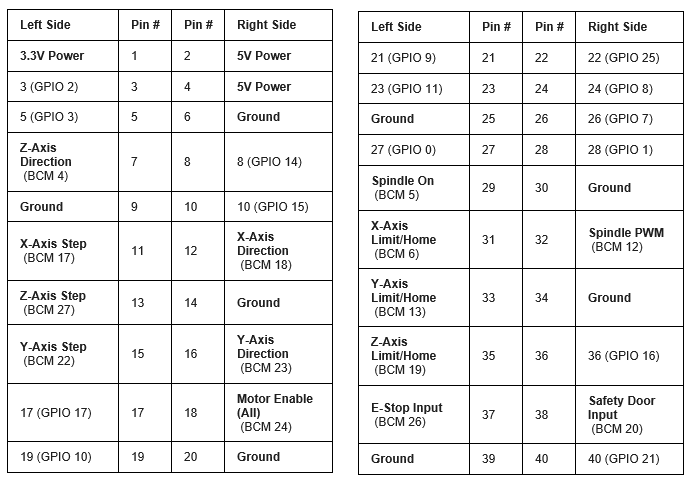
The demo .hal file using hal_pi_gpio:
The instructions I translated into english to learn how to configure .hal file:
My personal .hal and .ini file:
My pinout:
- NickH
07 Jan 2026 19:49
Replied by NickH on topic Installing ethercat repositories
I stand corrected, and somewhat outdated!
- tommylight
-
07 Jan 2026 19:47
Replied by tommylight on topic New and Working RTAI debs for 2.9
From your error report:
And the subsequent "segfault" (segmentation fault), both pointing at something wrong with memory or memory subsystem, but from experience, RTAI can and will report that sometimes on some hardware despite memory being OK.
Some tips:
-if the PC has more than one memory module, yank all but one out and test them one by one, see if it crashes
-if you have another PC, yank the HDD from this one and plug it on the other one, see if it crashes.
Code:
malloc(): unsorted double linked list corrupted
Some tips:
-if the PC has more than one memory module, yank all but one out and test them one by one, see if it crashes
-if you have another PC, yank the HDD from this one and plug it on the other one, see if it crashes.
- tommylight
-
07 Jan 2026 19:41
forum.linuxcnc.org/ethercat/45336-etherc...-how-to-step-by-step
Replied by tommylight on topic Installing ethercat repositories
It does work, RodW did a lot of work for that to workIt will not work from the downloaded ISO file.
forum.linuxcnc.org/ethercat/45336-etherc...-how-to-step-by-step
- NickH
07 Jan 2026 19:33 - 07 Jan 2026 19:34
Replied by NickH on topic Installing ethercat repositories
Tntmold: I think you have to build LinuxCNC from source for an Ethercat install, then build Ethercat master. It will not work from the downloaded ISO file.
Build from a Debian13 Netinstall(or full) image.
Build from a Debian13 Netinstall(or full) image.
- cnbbom
07 Jan 2026 19:07
Replied by cnbbom on topic New and Working RTAI debs for 2.9
Happy 2026 to all.
Please inform me what kind of error this is when starting linuxcnc Rtai debian13
Print file information:
RUN_IN_PLACE=no
LINUXCNC_DIR=
LINUXCNC_BIN_DIR=/usr/bin
LINUXCNC_TCL_DIR=/usr/lib/tcltk/linuxcnc
LINUXCNC_SCRIPT_DIR=
LINUXCNC_RTLIB_DIR=/usr/realtime-5.4.290-rtai-amd64/modules/linuxcnc
LINUXCNC_CONFIG_DIR=
LINUXCNC_LANG_DIR=/usr/lib/tcltk/linuxcnc/msgs
INIVAR=inivar
HALCMD=halcmd
LINUXCNC_EMCSH=/usr/bin/wish8.6
LINUXCNC - 2.9.8
Machine configuration directory is '/home/cnc3axis/linuxcnc/configs/my-mill'
Machine configuration file is 'my-mill.ini'
INIFILE=/home/cnc3axis/linuxcnc/configs/my-mill/my-mill.ini
VERSION=1.1
PARAMETER_FILE=linuxcnc.var
TPMOD=
HOMEMOD=
TASK=milltask
HALUI=
DISPLAY=axis
COORDINATES=X Y Z
KINEMATICS=trivkins coordinates=XYZ
Starting LinuxCNC...
Starting LinuxCNC server program: linuxcncsvr
Loading Real Time OS, RTAPI, and HAL_LIB modules
Starting LinuxCNC IO program: io
linuxcnc TPMOD=tpmod HOMEMOD=homemod EMCMOT=motmod
Found file(REL): ./my-mill.hal
Found file(REL): ./custom.hal
Starting TASK program: milltask
Starting DISPLAY program: axis
Shutting down and cleaning up LinuxCNC...
task: 173 cycles, min=0.000004, max=0.013482, avg=0.009198, 0 latency excursions (> 10x expected cycle time of 0.010000s)
Removing HAL_LIB, RTAPI, and Real Time OS modules
Removing NML shared memory segments
Debug file information:
note: MAXV max: 137.000 units/sec 8220.000 units/min
note: LJOG max: 137.000 units/sec 8220.000 units/min
note: LJOG default: 13.700 units/sec 822.000 units/min
note: jog_order='XYZ'
note: jog_invert=set()
2950
malloc(): unsorted double linked list corrupted
3020
Stopping realtime threads
Unloading hal components
Kernel message information:
[ 402.698255] I-pipe: head domain RTAI registered.
[ 402.698257] RTAI[hal]: mounted. ISOL_CPUS_MASK: 0.
[ 402.698259] SYSINFO - # CPUs: 4, TIMER NAME: 'lapic-deadline', TIMER IRQ: 4355, TIMER FREQ: 424048632, CLOCK NAME: 'tsc', CLOCK FREQ: 3392293000, CPU FREQ: 3392293000, LINUX TIMER IRQ: 4355.
[ 402.702297] RTAI[malloc]: global heap size = 2097152 bytes, <BSD>.
[ 402.702324] kstacks pool size = 524288 bytes
[ 402.702325] RTAI[sched]: hard timer type/freq = lapic-deadline/424048632(Hz)
[ 402.702325] linear timed lists.
[ 402.702326] RTAI[sched]: Linux timer freq = 250 (Hz), TimeBase freq = 3392293000 hz.
[ 402.702326] RTAI[sched]: timer setup = 90 ns, resched latency = 0 ns.
[ 402.715421] USERMODE CHECK: OK.
[ 402.715422] USERMODE CHECK PROVIDED (ns): KernelLatency 1165, UserLatency 1867.
[ 402.715423] FINAL CALIBRATION SUMMARY (ns): KernelLatency 1165, UserLatency 1867.
[ 402.719591] RTAI[math]: loaded integrated musl libm version 1.2.3.
[ 402.760494] config string '0 out'
image missing /media/kunena/emoticons/ermm.png=====>> [ 403.068800] xfdesktop[871]: segfault at 18 ip 00007fe8f41d7dd7 sp 00007ffd5fbed7e0 error 4 in libc.so.6[7fe8f4161000+165000]
[ 403.068814] Code: dd 07 00 48 83 ec 08 48 8b 4f 08 48 89 c8 48 83 e0 f8 48 3b 04 07 0f 85 a9 00 00 00 f3 0f 6f 47 10 48 8b 57 18 66 48 0f 7e c0 <48> 3b 78 18 75 7b 48 3b 7a 10 75 75 48 8b 77 10 48 89 50 18 66 0f
image missing /media/kunena/emoticons/ermm.png =======>> [ 404.365328] axis[3055]: segfault at 0 ip 0000000000530730 sp 00007fff6a8ab700 error 6 in python3.13[420000+31f000]
[ 404.365333] Code: 41 54 55 48 89 fd 53 48 83 ec 18 48 8b 57 f0 48 85 d2 0f 84 32 02 00 00 48 8b 4f f8 48 8b 42 08 48 83 e1 fc 83 e0 03 48 09 c8 <48> 89 11 48 89 42 08 48 c7 47 f0 00 00 00 00 48 83 67 f8 01 64 4c
[ 406.905822] RTAI[math]: unloaded.
[ 406.960250] SCHED releases registered named ALIEN PEDV$D
[ 406.961994] RTAI[malloc]: unloaded.
[ 407.068242] RTAI[sched]: unloaded (forced hard/soft/hard transitions: traps 0, syscalls 0).
[ 407.086079] I-pipe: head domain RTAI unregistered.
[ 407.086083] RTAI[hal]: unmounted.
Please inform me what kind of error this is when starting linuxcnc Rtai debian13
Print file information:
RUN_IN_PLACE=no
LINUXCNC_DIR=
LINUXCNC_BIN_DIR=/usr/bin
LINUXCNC_TCL_DIR=/usr/lib/tcltk/linuxcnc
LINUXCNC_SCRIPT_DIR=
LINUXCNC_RTLIB_DIR=/usr/realtime-5.4.290-rtai-amd64/modules/linuxcnc
LINUXCNC_CONFIG_DIR=
LINUXCNC_LANG_DIR=/usr/lib/tcltk/linuxcnc/msgs
INIVAR=inivar
HALCMD=halcmd
LINUXCNC_EMCSH=/usr/bin/wish8.6
LINUXCNC - 2.9.8
Machine configuration directory is '/home/cnc3axis/linuxcnc/configs/my-mill'
Machine configuration file is 'my-mill.ini'
INIFILE=/home/cnc3axis/linuxcnc/configs/my-mill/my-mill.ini
VERSION=1.1
PARAMETER_FILE=linuxcnc.var
TPMOD=
HOMEMOD=
TASK=milltask
HALUI=
DISPLAY=axis
COORDINATES=X Y Z
KINEMATICS=trivkins coordinates=XYZ
Starting LinuxCNC...
Starting LinuxCNC server program: linuxcncsvr
Loading Real Time OS, RTAPI, and HAL_LIB modules
Starting LinuxCNC IO program: io
linuxcnc TPMOD=tpmod HOMEMOD=homemod EMCMOT=motmod
Found file(REL): ./my-mill.hal
Found file(REL): ./custom.hal
Starting TASK program: milltask
Starting DISPLAY program: axis
Shutting down and cleaning up LinuxCNC...
task: 173 cycles, min=0.000004, max=0.013482, avg=0.009198, 0 latency excursions (> 10x expected cycle time of 0.010000s)
Removing HAL_LIB, RTAPI, and Real Time OS modules
Removing NML shared memory segments
Debug file information:
note: MAXV max: 137.000 units/sec 8220.000 units/min
note: LJOG max: 137.000 units/sec 8220.000 units/min
note: LJOG default: 13.700 units/sec 822.000 units/min
note: jog_order='XYZ'
note: jog_invert=set()
2950
malloc(): unsorted double linked list corrupted
3020
Stopping realtime threads
Unloading hal components
Kernel message information:
[ 402.698255] I-pipe: head domain RTAI registered.
[ 402.698257] RTAI[hal]: mounted. ISOL_CPUS_MASK: 0.
[ 402.698259] SYSINFO - # CPUs: 4, TIMER NAME: 'lapic-deadline', TIMER IRQ: 4355, TIMER FREQ: 424048632, CLOCK NAME: 'tsc', CLOCK FREQ: 3392293000, CPU FREQ: 3392293000, LINUX TIMER IRQ: 4355.
[ 402.702297] RTAI[malloc]: global heap size = 2097152 bytes, <BSD>.
[ 402.702324] kstacks pool size = 524288 bytes
[ 402.702325] RTAI[sched]: hard timer type/freq = lapic-deadline/424048632(Hz)
[ 402.702325] linear timed lists.
[ 402.702326] RTAI[sched]: Linux timer freq = 250 (Hz), TimeBase freq = 3392293000 hz.
[ 402.702326] RTAI[sched]: timer setup = 90 ns, resched latency = 0 ns.
[ 402.715421] USERMODE CHECK: OK.
[ 402.715422] USERMODE CHECK PROVIDED (ns): KernelLatency 1165, UserLatency 1867.
[ 402.715423] FINAL CALIBRATION SUMMARY (ns): KernelLatency 1165, UserLatency 1867.
[ 402.719591] RTAI[math]: loaded integrated musl libm version 1.2.3.
[ 402.760494] config string '0 out'
image missing /media/kunena/emoticons/ermm.png=====>> [ 403.068800] xfdesktop[871]: segfault at 18 ip 00007fe8f41d7dd7 sp 00007ffd5fbed7e0 error 4 in libc.so.6[7fe8f4161000+165000]
[ 403.068814] Code: dd 07 00 48 83 ec 08 48 8b 4f 08 48 89 c8 48 83 e0 f8 48 3b 04 07 0f 85 a9 00 00 00 f3 0f 6f 47 10 48 8b 57 18 66 48 0f 7e c0 <48> 3b 78 18 75 7b 48 3b 7a 10 75 75 48 8b 77 10 48 89 50 18 66 0f
image missing /media/kunena/emoticons/ermm.png =======>> [ 404.365328] axis[3055]: segfault at 0 ip 0000000000530730 sp 00007fff6a8ab700 error 6 in python3.13[420000+31f000]
[ 404.365333] Code: 41 54 55 48 89 fd 53 48 83 ec 18 48 8b 57 f0 48 85 d2 0f 84 32 02 00 00 48 8b 4f f8 48 8b 42 08 48 83 e1 fc 83 e0 03 48 09 c8 <48> 89 11 48 89 42 08 48 c7 47 f0 00 00 00 00 48 83 67 f8 01 64 4c
[ 406.905822] RTAI[math]: unloaded.
[ 406.960250] SCHED releases registered named ALIEN PEDV$D
[ 406.961994] RTAI[malloc]: unloaded.
[ 407.068242] RTAI[sched]: unloaded (forced hard/soft/hard transitions: traps 0, syscalls 0).
[ 407.086079] I-pipe: head domain RTAI unregistered.
[ 407.086083] RTAI[hal]: unmounted.
- vibram
07 Jan 2026 18:48
Replied by vibram on topic Spindle Encoder: Float Precision Issues
Hello Daniel,I have exactly the same setup as you.
Do you mind sharing your Hal and ini file for this specific parts please? It would save me a lot of time
Thank you in advance
Do you mind sharing your Hal and ini file for this specific parts please? It would save me a lot of time
Thank you in advance
- strawberry.blondish
07 Jan 2026 17:41
RPi GPIO .hal and .ini from scratch, without hardware, should the GUI open? was created by strawberry.blondish
Hello guys!
I have been trying to switch over from an online system with GRBL Teensy 4.1 with ioSender to a Raspberry Pi 4B LinuxCNC configuration for an 3-axis milling machine. The tricky part is that I am trying to make a configuration that uses the GPIO pins from the RPi instead of using a parallel port hat or a Mesa board. I am an absolute noob, with this being my first post.
Going based off some instructional files I found online and demos for the few who have done this, I have gotten to where I am today. The PDF is in Italian but can be easily inserted into Google Translate. The .hal was the demo I referenced for setting up my .hal.
My version, rpi-4-debian-bookworm-6.12.11-arm64-ext4-2025-01-27-0404.img.xz, should have PREEMPT-RT. These are my .ini and .hal files that I have made for my 3-axis CNC machine.
The problem is that when I run cd ~/linuxcnc/configs/my-rpigpio/ linuxcnc my-rpigpio.ini linuxcnc will tease me with the bootup screen, and then in the terminal I get this:
LINUXCNC - 2.9.4 Machine configuration directory is '/home/cnc/linuxcnc/configs/my-rpigpio' Machine configuration file is 'my-rpigpio.ini' Starting LinuxCNC... linuxcnc TPMOD=tpmod HOMEMOD=homemod EMCMOT=motmod Note: Using POSIX realtime Found file(REL): ./my-rpigpio.hal motion: dlopen: /usr/lib/linuxcnc/modules/motion.so: cannot open shared object file: No such file or directory ./my-rpigpio.hal:7: waitpid failed /usr/bin/rtapi_app motion ./my-rpigpio.hal:7: /usr/bin/rtapi_app exited without becoming ready ./my-rpigpio.hal:7: insmod for motion failed, returned -1 Shutting down and cleaning up LinuxCNC... Note: Using POSIX realtime LinuxCNC terminated with an error. You can find more information in the log: /home/cnc/linuxcnc_debug.txt and /home/cnc/linuxcnc_print.txt as well as in the output of the shell command 'dmesg' and in the terminal
With none of my hardware connected, should I even be expecting the LinuxCNC GUI to open? I feel I have too much stuff in my .hal file and it may be looking for components that don't exist, and that is why my LinuxCNC GUI is not opening.
I have been trying to switch over from an online system with GRBL Teensy 4.1 with ioSender to a Raspberry Pi 4B LinuxCNC configuration for an 3-axis milling machine. The tricky part is that I am trying to make a configuration that uses the GPIO pins from the RPi instead of using a parallel port hat or a Mesa board. I am an absolute noob, with this being my first post.
Going based off some instructional files I found online and demos for the few who have done this, I have gotten to where I am today. The PDF is in Italian but can be easily inserted into Google Translate. The .hal was the demo I referenced for setting up my .hal.
Attachment not found
Attachment not found
My version, rpi-4-debian-bookworm-6.12.11-arm64-ext4-2025-01-27-0404.img.xz, should have PREEMPT-RT. These are my .ini and .hal files that I have made for my 3-axis CNC machine.
Attachment not found
Attachment not found
Attachment not found
The problem is that when I run cd ~/linuxcnc/configs/my-rpigpio/ linuxcnc my-rpigpio.ini linuxcnc will tease me with the bootup screen, and then in the terminal I get this:
LINUXCNC - 2.9.4 Machine configuration directory is '/home/cnc/linuxcnc/configs/my-rpigpio' Machine configuration file is 'my-rpigpio.ini' Starting LinuxCNC... linuxcnc TPMOD=tpmod HOMEMOD=homemod EMCMOT=motmod Note: Using POSIX realtime Found file(REL): ./my-rpigpio.hal motion: dlopen: /usr/lib/linuxcnc/modules/motion.so: cannot open shared object file: No such file or directory ./my-rpigpio.hal:7: waitpid failed /usr/bin/rtapi_app motion ./my-rpigpio.hal:7: /usr/bin/rtapi_app exited without becoming ready ./my-rpigpio.hal:7: insmod for motion failed, returned -1 Shutting down and cleaning up LinuxCNC... Note: Using POSIX realtime LinuxCNC terminated with an error. You can find more information in the log: /home/cnc/linuxcnc_debug.txt and /home/cnc/linuxcnc_print.txt as well as in the output of the shell command 'dmesg' and in the terminal
With none of my hardware connected, should I even be expecting the LinuxCNC GUI to open? I feel I have too much stuff in my .hal file and it may be looking for components that don't exist, and that is why my LinuxCNC GUI is not opening.
Time to create page: 0.286 seconds