
- Configuring LinuxCNC
- Basic Configuration
- RPi GPIO .hal and .ini from scratch, without hardware, should the GUI open?
RPi GPIO .hal and .ini from scratch, without hardware, should the GUI open?
- strawberry.blondish
- Offline
- New Member
-

Less
More
- Posts: 2
- Thank you received: 0
07 Jan 2026 17:41 #341136
by strawberry.blondish
RPi GPIO .hal and .ini from scratch, without hardware, should the GUI open? was created by strawberry.blondish
Hello guys!
I have been trying to switch over from an online system with GRBL Teensy 4.1 with ioSender to a Raspberry Pi 4B LinuxCNC configuration for an 3-axis milling machine. The tricky part is that I am trying to make a configuration that uses the GPIO pins from the RPi instead of using a parallel port hat or a Mesa board. I am an absolute noob, with this being my first post.
Going based off some instructional files I found online and demos for the few who have done this, I have gotten to where I am today. The PDF is in Italian but can be easily inserted into Google Translate. The .hal was the demo I referenced for setting up my .hal.
My version, rpi-4-debian-bookworm-6.12.11-arm64-ext4-2025-01-27-0404.img.xz, should have PREEMPT-RT. These are my .ini and .hal files that I have made for my 3-axis CNC machine.
The problem is that when I run cd ~/linuxcnc/configs/my-rpigpio/ linuxcnc my-rpigpio.ini linuxcnc will tease me with the bootup screen, and then in the terminal I get this:
LINUXCNC - 2.9.4 Machine configuration directory is '/home/cnc/linuxcnc/configs/my-rpigpio' Machine configuration file is 'my-rpigpio.ini' Starting LinuxCNC... linuxcnc TPMOD=tpmod HOMEMOD=homemod EMCMOT=motmod Note: Using POSIX realtime Found file(REL): ./my-rpigpio.hal motion: dlopen: /usr/lib/linuxcnc/modules/motion.so: cannot open shared object file: No such file or directory ./my-rpigpio.hal:7: waitpid failed /usr/bin/rtapi_app motion ./my-rpigpio.hal:7: /usr/bin/rtapi_app exited without becoming ready ./my-rpigpio.hal:7: insmod for motion failed, returned -1 Shutting down and cleaning up LinuxCNC... Note: Using POSIX realtime LinuxCNC terminated with an error. You can find more information in the log: /home/cnc/linuxcnc_debug.txt and /home/cnc/linuxcnc_print.txt as well as in the output of the shell command 'dmesg' and in the terminal
With none of my hardware connected, should I even be expecting the LinuxCNC GUI to open? I feel I have too much stuff in my .hal file and it may be looking for components that don't exist, and that is why my LinuxCNC GUI is not opening.
I have been trying to switch over from an online system with GRBL Teensy 4.1 with ioSender to a Raspberry Pi 4B LinuxCNC configuration for an 3-axis milling machine. The tricky part is that I am trying to make a configuration that uses the GPIO pins from the RPi instead of using a parallel port hat or a Mesa board. I am an absolute noob, with this being my first post.
Going based off some instructional files I found online and demos for the few who have done this, I have gotten to where I am today. The PDF is in Italian but can be easily inserted into Google Translate. The .hal was the demo I referenced for setting up my .hal.
Attachment not found
Attachment not found
My version, rpi-4-debian-bookworm-6.12.11-arm64-ext4-2025-01-27-0404.img.xz, should have PREEMPT-RT. These are my .ini and .hal files that I have made for my 3-axis CNC machine.
Attachment not found
Attachment not found
Attachment not found
The problem is that when I run cd ~/linuxcnc/configs/my-rpigpio/ linuxcnc my-rpigpio.ini linuxcnc will tease me with the bootup screen, and then in the terminal I get this:
LINUXCNC - 2.9.4 Machine configuration directory is '/home/cnc/linuxcnc/configs/my-rpigpio' Machine configuration file is 'my-rpigpio.ini' Starting LinuxCNC... linuxcnc TPMOD=tpmod HOMEMOD=homemod EMCMOT=motmod Note: Using POSIX realtime Found file(REL): ./my-rpigpio.hal motion: dlopen: /usr/lib/linuxcnc/modules/motion.so: cannot open shared object file: No such file or directory ./my-rpigpio.hal:7: waitpid failed /usr/bin/rtapi_app motion ./my-rpigpio.hal:7: /usr/bin/rtapi_app exited without becoming ready ./my-rpigpio.hal:7: insmod for motion failed, returned -1 Shutting down and cleaning up LinuxCNC... Note: Using POSIX realtime LinuxCNC terminated with an error. You can find more information in the log: /home/cnc/linuxcnc_debug.txt and /home/cnc/linuxcnc_print.txt as well as in the output of the shell command 'dmesg' and in the terminal
With none of my hardware connected, should I even be expecting the LinuxCNC GUI to open? I feel I have too much stuff in my .hal file and it may be looking for components that don't exist, and that is why my LinuxCNC GUI is not opening.
Please Log in or Create an account to join the conversation.
- strawberry.blondish
- Offline
- New Member
-
Less
More
- Posts: 2
- Thank you received: 0
07 Jan 2026 20:52 #341143
by strawberry.blondish
Replied by strawberry.blondish on topic RPi GPIO .hal and .ini from scratch, without hardware, should the GUI open?
Forgive me, these are my files that were supposed to be attached to my thread.
The demo .hal file using hal_pi_gpio:
The instructions I translated into english to learn how to configure .hal file:
My personal .hal and .ini file:
My pinout:
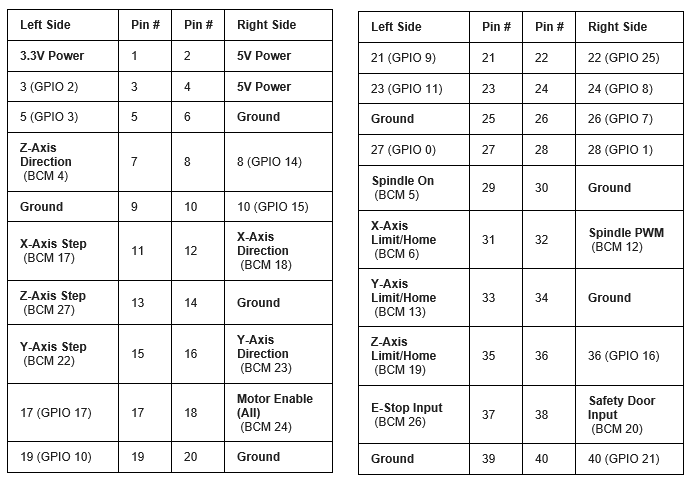
The demo .hal file using hal_pi_gpio:
The instructions I translated into english to learn how to configure .hal file:
My personal .hal and .ini file:
My pinout:

Please Log in or Create an account to join the conversation.
- unknown
- Offline
- Platinum Member
-

Less
More
- Posts: 887
- Thank you received: 323
07 Jan 2026 21:51 #341145
by unknown
Replied by unknown on topic RPi GPIO .hal and .ini from scratch, without hardware, should the GUI open?
First thing I'd do is disable SPi if you haven't already.
Qtdragon and software step generation may not be the best combination, the RPi4 is not the most powerful.
For some reason you are missing a library as per "can not open shared library".
WORKINGDIRECTORY may not be correct either.
If you go to the big thread regarding the image, it's a sticky, there is a basic working config, that uses axis as the GUI. I would try working with that to begin with.
This a link to an index to the big thread.
forum.linuxcnc.org/38-general-linuxcnc-q...official-images-only
Qtdragon and software step generation may not be the best combination, the RPi4 is not the most powerful.
For some reason you are missing a library as per "can not open shared library".
WORKINGDIRECTORY may not be correct either.
If you go to the big thread regarding the image, it's a sticky, there is a basic working config, that uses axis as the GUI. I would try working with that to begin with.
This a link to an index to the big thread.
forum.linuxcnc.org/38-general-linuxcnc-q...official-images-only
Please Log in or Create an account to join the conversation.
- Configuring LinuxCNC
- Basic Configuration
- RPi GPIO .hal and .ini from scratch, without hardware, should the GUI open?
Time to create page: 3.027 seconds