
5 Axis ParPort Stepper Setup with RTCP
- andypugh
-

- Offline
- Moderator
-

- Posts: 19899
- Thank you received: 4655
Some stepper systems use PID. PnCConf sets up Mesa steppers with a PID because it works a bit better.Thing is i am running Pulse Sign Configuration so PID Tuning in EMC make any difference ?
"DEFAULT_ACCELERATION = 2.0 - In machines with nontrivial kinematics, the acceleration used for "teleop" (Cartesian space) jogs, in machine units per second per second. "
So isn't it effective for jog move only ? While in my setup jog move it does same as MDI command.
Surely it is worth testing the change at least? It takes moments.
Any help regarding tool offset ? I have Er25 Collet dircet drive spindle so changing all time tools. not the holder so i cant measure tool length all time.
forum.linuxcnc.org/10-advanced-configura...-off?start=90#103477
Please Log in or Create an account to join the conversation.
- marq_torque
-
 Topic Author
- Offline
- Elite Member
-

- Posts: 171
- Thank you received: 3
It was Mistake to disable step gen fb line in hal file. So I was getting swinging movement. It's solved now
Now I am stuck at tool Length offset and tool height sensor. And M code.
I tried g38.2 it ends movement as soon as it touches the sensor. But not retracting and not slowly reversing to cutoff the signal.
Also how to get tool length offset in tool table from DRO ? Is there any reference to start from ?
And all after that .. is it possible to shoot just one m code to perform all this ?
Regards
Ankit
Please Log in or Create an account to join the conversation.
- marq_torque
-
Topic Author
- Offline
- Elite Member
-
- Posts: 171
- Thank you received: 3
This modification was really helpful in last machine I made. I'm now trying to achieve similar but Linuxcnc has changed a alot. Also changed a lot in kinematics. I tried to modify kinematics as per this thread but as expected it's failing with errors.
I want to use XZ and B axis with TCP along with tool length probing. Setup in this thread is working in older version.. I'm struggling to getit worli with Debian 13 rt 2.9.8 Any help or suggestions would be appreciated,
Thanks
Please Log in or Create an account to join the conversation.
- grandixximo
-

- Offline
- Platinum Member
-

- Posts: 350
- Thank you received: 410
Be more specific about what you are struggling with.
Please Log in or Create an account to join the conversation.
- marq_torque
-
Topic Author
- Offline
- Elite Member
-
- Posts: 171
- Thank you received: 3
Here is detail
I'm trying to compile this kinematics file "5axiskinsN.c" and getting this error
cnc@cnc:~/linuxcnc/configs$ sudo halcompile --install 5axiskinsN.c
Compiling realtime 5axiskinsN.c
Linking 5axiskinsN.so
objdump: section '.rtapi_export' mentioned in a -j option, but not found in any input file
/usr/bin/ld:5axiskinsN.ver:2: syntax error in VERSION script
collect2: error: ld returned 1 exit status
make: *** [/usr/share/linuxcnc/Makefile.modinc:124: 5axiskinsN.so] Error 1
Please Log in or Create an account to join the conversation.
- marq_torque
-
Topic Author
- Offline
- Elite Member
-
- Posts: 171
- Thank you received: 3
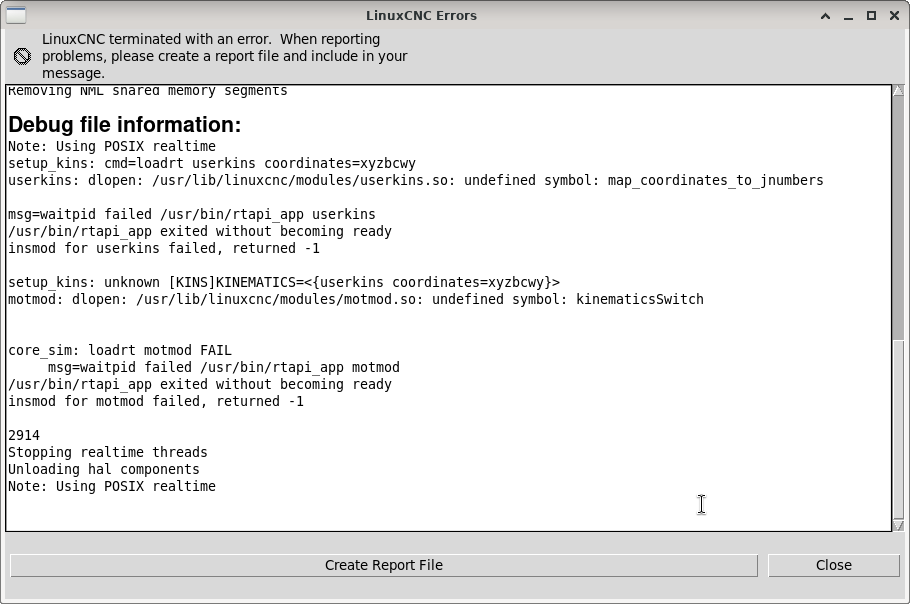
Attachments:
Please Log in or Create an account to join the conversation.
- Aciera
-

- Offline
- Administrator
-

- Posts: 4819
- Thank you received: 2177
2. .comp files have their own syntax, so you cannot simply copy-paste the code from a .c file into a .comp file.
Please Log in or Create an account to join the conversation.
- marq_torque
-
Topic Author
- Offline
- Elite Member
-
- Posts: 171
- Thank you received: 3
Can you help modifying this Kinematics which I can compile as .comp file, I'm Total noob to understand RIP installation.
Any documentation or guide, for RIP in 2.9.8.
Thanks in advance
Please Log in or Create an account to join the conversation.
- Aciera
-
- Offline
- Administrator
-
- Posts: 4819
- Thank you received: 2177
github.com/LinuxCNC/linuxcnc/blob/master...onents/millturn.comp
This is the kinematics used in the simulation config at 'configs/sim/axis/vismach/millturn'
For a more complex but fully documented example that might even cover your use case this might be of interest:
forum.linuxcnc.org/show-your-stuff/49103...-head?start=0#271334
The two kinematic models presented in the zip folder attached to the above post can do a fair bit more than what you need but together with the documentation it will give you an in depth introduction on how to build your own kinematic components.
For documentation on building linuxcnc on your local machine (RIP):
linuxcnc.org/docs/html/code/building-linuxcnc.html
Please Log in or Create an account to join the conversation.