
- Posts: 19899
- Thank you received: 4655
Include rotation from A in G0
- andypugh
- Offline
- Moderator
-

Less
More
6 years 10 months ago #152181
by andypugh
It isn't very hard if you run through the G-code line-by-line in an input filter.
Basically before every G1 put in a G0 to the tangent of the G1 section.
Additionally, for a G2 or G3 append an A move to the new angle.
Replied by andypugh on topic Include rotation from A in G0
anpoit00 wrote: I doubt that it is work because unknowing angle for the next movement (for G1 yes but G2, G3 ..)
It isn't very hard if you run through the G-code line-by-line in an input filter.
Basically before every G1 put in a G0 to the tangent of the G1 section.
Additionally, for a G2 or G3 append an A move to the new angle.
Please Log in or Create an account to join the conversation.
- Badger
- Offline
- Senior Member
-

Less
More
- Posts: 44
- Thank you received: 21
6 years 10 months ago #152184
by Badger
Replied by Badger on topic Include rotation from A in G0
I did a quick test with gcodetools using the tangent knife tool and it may do what you need. This is using the settings from my Rugbot which of course will be different from you machine.
Please Log in or Create an account to join the conversation.
- andypugh
- Offline
- Moderator
-
Less
More
- Posts: 19899
- Thank you received: 4655
6 years 10 months ago #152275
by andypugh
Replied by andypugh on topic Include rotation from A in G0
Here is a partial solution. It is an input filter that converts this input:
To this output
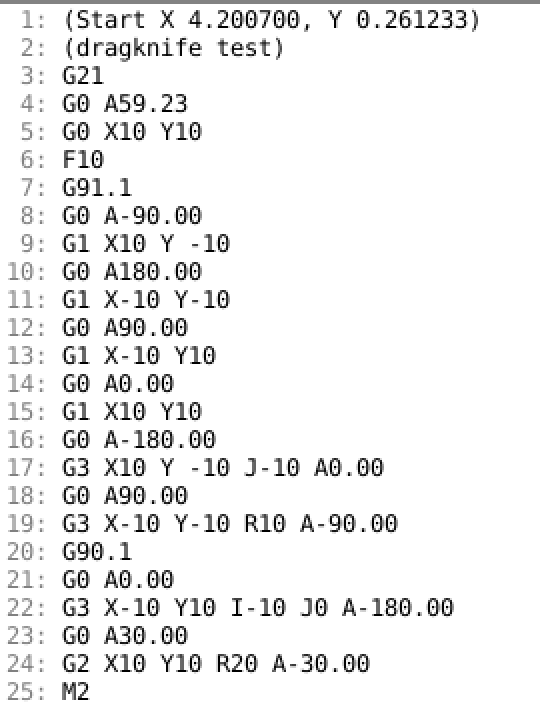
Which almost, but not quite, does what is needed.
The problem I am seeing is that whilst he angles of the starts and ends of arcs are correct, the tool won't necessarily turn the right direction to cut properly.
But I am going away for a week, so thought that it might be best to hand it over, in case you want to try to make the required changes.
It uses the normal atan2 convention where the +X direction is 0, +Y = 90, -X = 180/-180 and -Y = -90. Your A axis would need t change that.
A variable defined near the top allows for changing to use C for the tool rotation.
Edit the INI file [FILTER] section:
Then save this code as "dragknife", make it executable and put it in the path defined above.
Code:
(dragknife test)
G21
G0 X10 Y10
F10
G91.1
G1 X10 Y -10
G1 X-10 Y-10
G1 X-10 Y10
G1 X10 Y10
G3 X10 Y -10 J-10
G3 X-10 Y-10 R10
G90.1
G3 X-10 Y10 I-10 J0
G2 X10 Y10 R20
M2
To this output
Which almost, but not quite, does what is needed.
The problem I am seeing is that whilst he angles of the starts and ends of arcs are correct, the tool won't necessarily turn the right direction to cut properly.
But I am going away for a week, so thought that it might be best to hand it over, in case you want to try to make the required changes.
It uses the normal atan2 convention where the +X direction is 0, +Y = 90, -X = 180/-180 and -Y = -90. Your A axis would need t change that.
A variable defined near the top allows for changing to use C for the tool rotation.
Edit the INI file [FILTER] section:
Code:
[FILTER]
PROGRAM_EXTENSION = .ngc G-code
ngc = /home/andypugh/linuxcnc/dragknife
Then save this code as "dragknife", make it executable and put it in the path defined above.
Code:
#! /usr/bin/python
import re
import sys
from math import *
import linuxcnc
# Change this to alter the rotary axis letter
L = "A"
infile = sys.argv[1]
f = open(infile, 'r')
G = -99999.0
X = 0.0
Y = 0.0
oldA = -99999.0
A = 0
A2 = 0
s = linuxcnc.stat()
s.poll()
if 901 in s.gcodes:
abs_centre = True
else:
abs_centre = False
oldX = X = s.position[0] + s.g92_offset[0] + s.g5x_offset[0]
oldY = Y = s.position[1] + s.g92_offset[1] + s.g5x_offset[1]
print("(Start X %f, Y %f)" %(oldX, oldY))
for line in f:
Xf = re.match(r".*X\s*([\d\.,\+\-]+)", line)
Yf = re.match(r".*Y\s*([\d\.,\+\-]+)", line)
If = re.match(r".*I\s*([\d\.,\+\-]+)", line)
Jf = re.match(r".*J\s*([\d\.,\+\-]+)", line)
Rf = re.match(r".*R\s*([\d\.,\+\-]+)", line)
Gf = re.match(r".*G\s*([\d\.,\+\-]+)", line)
I = 0
J = 0
if Xf:
oldX = X
X = float(Xf.group(1))
if Yf:
oldY = Y
Y = float(Yf.group(1))
if If:
I = float(If.group(1))
if Jf:
J = float(Jf.group(1))
if Rf:
R = float(Rf.group(1))
if Gf:
G = float(Gf.group(1))
if G == 90.1:
abs_centre = True
if G == 91.1:
abs_centre = False
if G == 0.0 or G == 1.0:
A = atan2(Y - oldY, X - oldX) * 180/pi
elif G == 2.0 or G == 3.0:
if Rf:
mid_x = (X + oldX) / 2.0;
mid_y = (Y + oldY) / 2.0;
l2 = sqrt((mid_x - X)**2 + (mid_y - Y)**2);
if ((G == 2) and (R > 0)) or ((G == 3) and (R < 0)):
theta = atan2((Y - oldY), (X - oldX)) - pi/2;
else:
theta = atan2((Y - oldY), (X - oldX)) + pi/2;
turn2 = asin(l2 / abs(R));
offset = abs(R) * cos(turn2);
X0 = mid_x + (offset * cos(theta));
Y0 = mid_y + (offset * sin(theta));
elif abs_centre:
X0 = I
Y0 = J
else:
X0 = oldX + I
Y0 = oldY + J
A = atan2(Y0 - oldY, X0 - oldX) * 180/pi
alpha = atan2(Y0 - Y, X0 - X) * 180/pi - A
if G == 2.0:
A = A + 90
A2 = A + alpha
else:
A = A - 90
A2 = A + alpha
if (Xf or Yf) and G == 0.0:
print("G0 %s%.2f" % (L, A))
print(line),
oldA = A
elif (Xf or Yf) and G == 1.0:
if oldA != A:
print("G0 %s%.2f" % (L, A))
if not Gf:
line = "G1 %s" % line
print(line),
oldA = A
elif (Xf or Yf) and G == 2 or G == 3:
if oldA != A:
print("G0 %s%.2f" % (L, A))
line = re.sub("\n", " %s%.2f" % (L, A2), line)
print(line)
oldA = A2
else:
print(line),
The following user(s) said Thank You: jo_key, anpoit00, tiagounderground
Please Log in or Create an account to join the conversation.
Time to create page: 0.117 seconds