
- Configuring LinuxCNC
- Advanced Configuration
- M1xx: Controlling Relays (solenoids) from within axis MDI
M1xx: Controlling Relays (solenoids) from within axis MDI
- seuchato
- Offline
- Platinum Member
-

- Posts: 381
- Thank you received: 126
I was looking for a way to control my vacuum table's vacuum pump from within axis. After reading the manual, searching linuxcnc's forums, I realised others were probably struggling with similar tasks (myst, dust extraction, ...), too. I could not find a proof cooked recipe. Below, you'll find what I am ready to go with. It is a proof of concept at the time. However, and since I use same/similar components the same/similar way in home automation, I am positive, it works in the real harsh world. Teaser wanted?
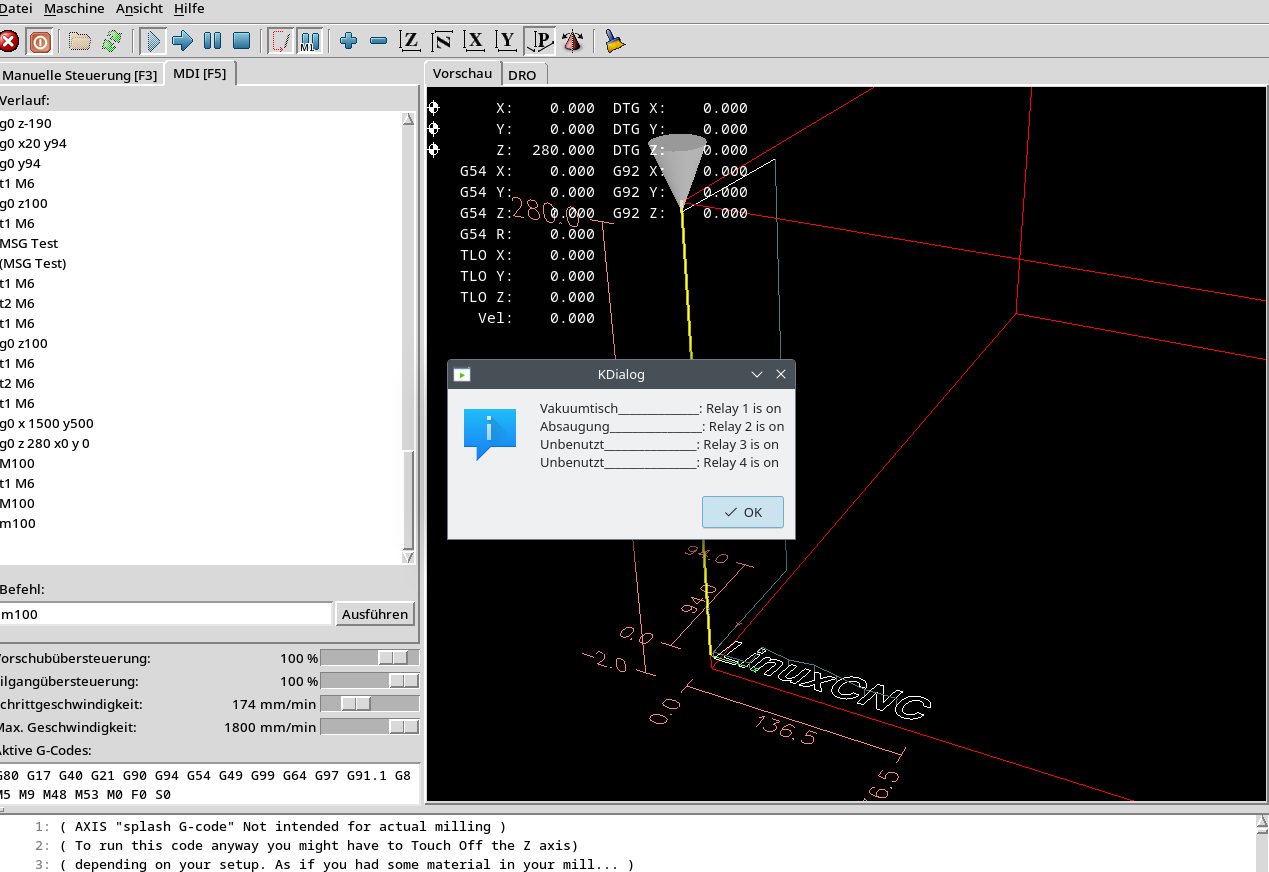
The KDialog message box is being called by M100, this reads the relays statii and displays as shown
So: let's go, just a remark: the editor seems to be disfunct, so I use my own marking:
Ingredients:
=====================================================
* github.com/ondrej1024/crelay
* a crelay compatible USB relay controller card, I used this one:
* some time
Setting stuff up:
=====================================================
* follow the installation intructions of ondrej, should you fail (like me) at the first step (git clone git://github.com/signal11/hidapi.git), do this instead:
git clone github.com/signal11/hidapi.git
* If you'd like to have access to your relays over LAN. you can set it up as follows:cat /etc/crelay.conf which crelay
/usr/local/bin/crelay
sudo echo "user ALL=(ALL) NOPASSWD:/path/to/other/comands, /usr/local/bin/crelay" > user
Replace "user" with the very username you run linuxcnc, check itcrelay 1
crelay 1 is on
That was a success, now get familiar with crelay:crelay -i
Detected relay cards:
#
#1 Conrad USB 4-channel relay card (serial 00633CF4)
crelay 1 on
crelay 1
crelay 1 is on
I guess there is no comment needed, ondrej's work is just perfect, isn't it?
So we can set relays from command line, as user "user" (cnc in my case) and read their status. Howto do it from within g-code?
M1xx comes handy:
=====================================================
Place a script similar to attached M100 into the directory specified in the .ini file's [DISPLAY] section under PROGRAM_PREFIX = /home/cnc/linuxcnc/configs/cnc0/macros
My path above needs to be changed to your definition.
Maybe, there is some rebooting and logging in/out/in required. I did not make notes on this.
Things to consider:
=====================================================
This approach is not for real time requiring tasks. However, I think, for these tasks:
* clamping stock via vacuum
* starting dust extraction
* and mybe even myst
real time is not required
Hope that helps someone else, too
greez
chris
Attachments:
Please Log in or Create an account to join the conversation.
- seuchato
- Offline
- Platinum Member
-
- Posts: 381
- Thank you received: 126
Thx for you pointing this out and your hint on 5V relay.
I do have a parport based router. All pins are used, and still I want my vacuum clamping, dust extraction, myst (maybe) etc. to be operable from within axis (in my case).
greez
chris
Please Log in or Create an account to join the conversation.
- tommylight
-

- Away
- Moderator
-

- Posts: 21899
- Thank you received: 7465
To late, but:I was looking for a way to control my vacuum table's vacuum pump from within axis.
Axis (and probably other GUI's) already have built in control for Mist and Flood so you could have just used those as that would also make it possible to use the M7/M8/M9 codes to control them directly, more info here
linuxcnc.org/docs/html/gcode/m-code.html#mcode:m7-m8-m9
For more outputs/stuff, you would have to go with what you did, and there are probably many ways of doing it, and you can use PyVCP panel to show info about it at all times:
linuxcnc.org/docs/html/gui/pyvcp.html
I use PyVCP panels a lot with Axis GUI, a lot, even for showing all Mesa IO and everything else, on industrial machines.

forum.linuxcnc.org/30-cnc-machines/31792...ofit?start=100#88523
See the right side, all is added as PyVCP panels.
P.S.
I was just searching for a retrofit i did to post the link here, bumped into my video from youtube posted by some russian company on rutube !!! And they wonder why the whole world hates them!
Please Log in or Create an account to join the conversation.
- seuchato
- Offline
- Platinum Member
-
- Posts: 381
- Thank you received: 126
I'll check on all available pins later today. Thx a ton for the hints. If I can do it over the parport, I 'd definetly be better off.A parallel port has 12 output pins, that's a lot to work with.
But in case more than 12 outputs are needed, this method is great for non-latency-sensitive stuff.
greez
chris
Please Log in or Create an account to join the conversation.
- seuchato
- Offline
- Platinum Member
-
- Posts: 381
- Thank you received: 126
Tommy
I was looking for a way to control my vacuum table's vacuum pump from within axis.
To late, but:
Axis (and probably other GUI's) already have built in control for Mist and Flood so you could have just used those as that would also make it possible to use the M7/M8/M9 codes to control them directly, more info here
linuxcnc.org/docs/html/gcode/m-code.html#mcode:m7-m8-m9
For more outputs/stuff, you would have to go with what you did, and there are probably many ways of doing it, and you can use PyVCP panel to show info about it at all times:
linuxcnc.org/docs/html/gui/pyvcp.html
I use PyVCP panels a lot with Axis GUI, a lot, even for showing all Mesa IO and everything else, on industrial machines.
forum.linuxcnc.org/30-cnc-machines/31792...ofit?start=100#88523
See the right side, all is added as PyVCP panels.
P.S.
I was just searching for a retrofit i did to post the link here, bumped into my video from youtube posted by some russian company on rutube !!! And they wonder why the whole world hates them!
you're never too late
I'll check on the possibilities to use Mist and Flood and M7/M8/M9 codes. Looks handy to me. Thanks for pointing this out, was not aware of this stuff.
Counts for PyVCP panel too. I had a camalign tab in axis up. Still there, but defunct now, as the camera got brocken in a stupid action by myself. I'll check out the sims, I think I remember having seen Mist and Flood buttons just below the spindle control buttons. That's really where I'd love to have them, eventually with a status led on the vacuum clamping, too. I would prefer a tab thought for stuff to set up before a running job, as that leaves more screen for real time animation. Not sure how to kinda move a panel into a tab. Tried that with the manual tool change panel and failed.
Greez
chris
Please Log in or Create an account to join the conversation.
- seuchato
- Offline
- Platinum Member
-
- Posts: 381
- Thank you received: 126
my parport pin usage:
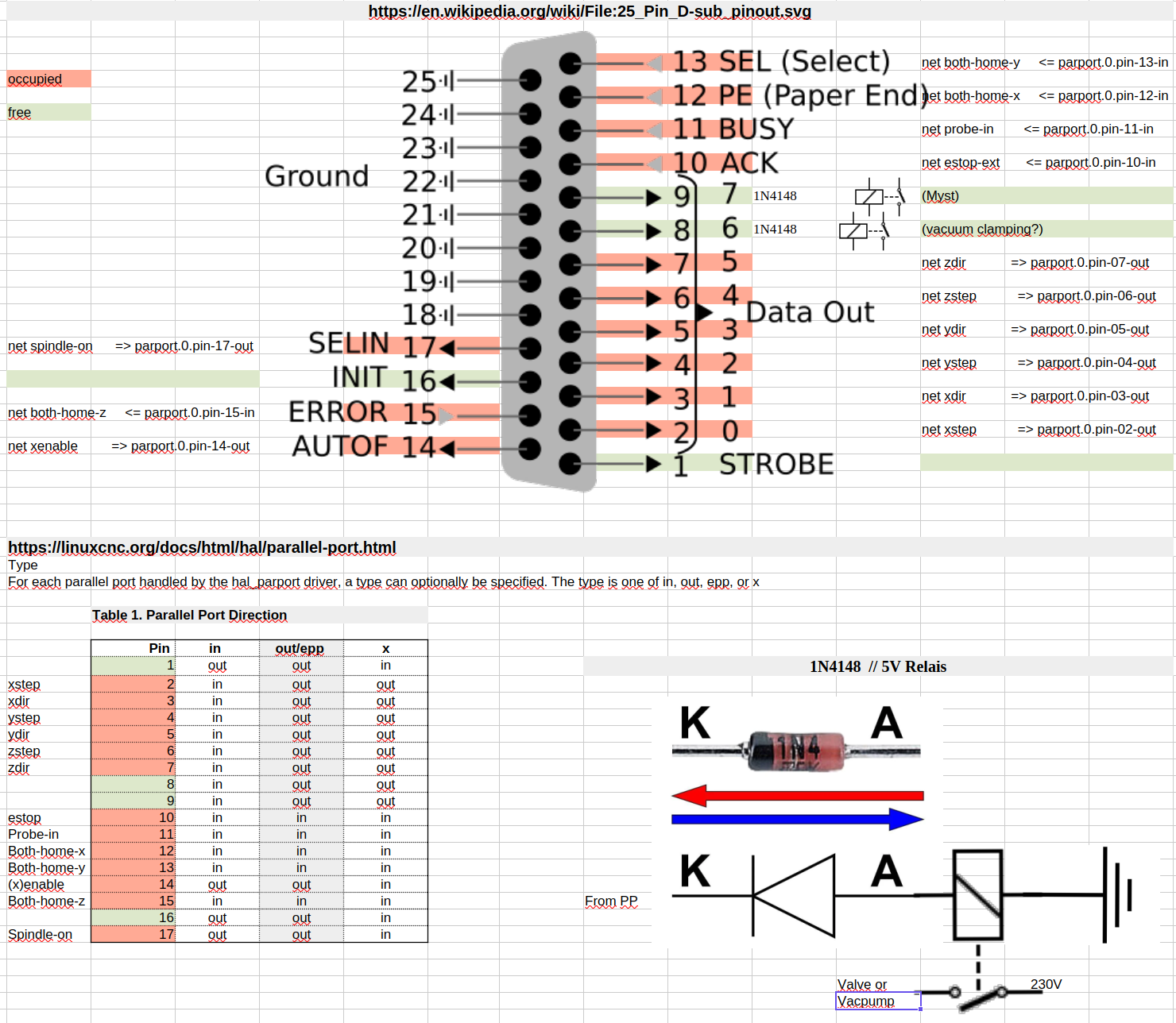
So, it turns out langdons was right about some pins still being unused. I my case, pins 1, 8, 9 and 16 wait to be used. Hope I got the connection diagram of said 1N4148 diode and relays right, (I lack electronics knowledge). I am about to order this board:
www.conrad.com/en/p/tru-components-tc-99...-1-pc-s-2481804.html
I have a feeling, it has some sort of protection built in. The manual is not clear on this however. Anyway, some 1N4148 never seem to be unnecessary, so I order these:
www.conrad.com/en/p/tru-components-ultra...-150-ma-1581846.html
Are these OK?
greez
chris
Attachments:
Please Log in or Create an account to join the conversation.
- seuchato
- Offline
- Platinum Member
-
- Posts: 381
- Thank you received: 126
I see there is a "sim.pyvcp.demo" "pyvcp.embed.tab" Which fits my bill quite closely. What I'd really would love is something added on the "F3" panel of axis:
....
For more outputs/stuff, you would have to go with what you did, and there are probably many ways of doing it, and you can use PyVCP panel to show info about it at all times:
linuxcnc.org/docs/html/gui/pyvcp.html
I use PyVCP panels a lot with Axis GUI, a lot, even for showing all Mesa IO and everything else, on industrial machines.
forum.linuxcnc.org/30-cnc-machines/31792...ofit?start=100#88523
See the right side, all is added as PyVCP panels.
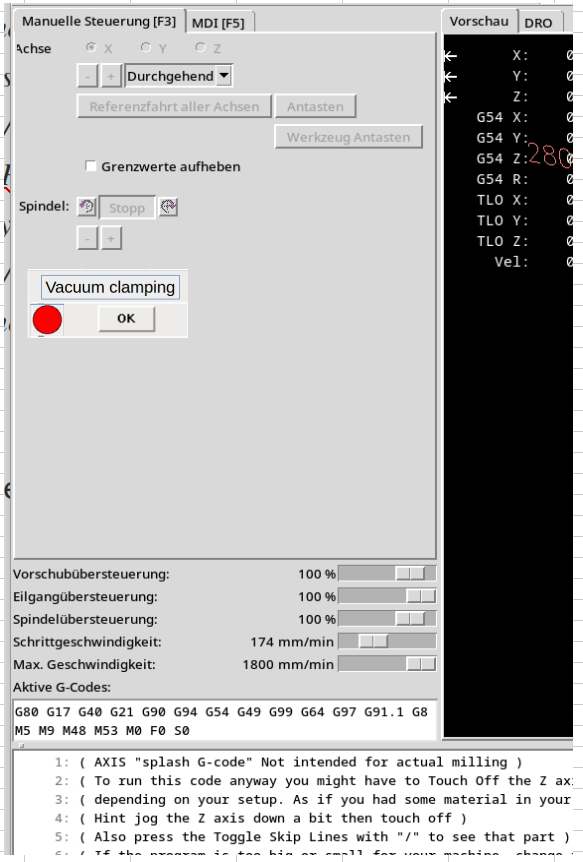
I have no idea how to do that.
But also, maybe that is another thread in axis and at the wrong place here. Pls let know and I'd open a new thread there, leaving a hint here.
greez
chris
Attachments:
Please Log in or Create an account to join the conversation.
- meister
- Offline
- Platinum Member
-
- Posts: 804
- Thank you received: 501
Please Log in or Create an account to join the conversation.
- seuchato
- Offline
- Platinum Member
-
- Posts: 381
- Thank you received: 126
That's what I like, on my way later today.
Thx a ton
greez
chris
Please Log in or Create an account to join the conversation.
- tommylight
-
- Away
- Moderator
-
- Posts: 21899
- Thank you received: 7465
www.youtube.com/shorts/ciVcxrlmMIA
This is Axis with PyVCP modified by me for a Mazak lathe
Please Log in or Create an account to join the conversation.
- Configuring LinuxCNC
- Advanced Configuration
- M1xx: Controlling Relays (solenoids) from within axis MDI