
- Posts: 19
- Thank you received: 2
Reducing latency on multicore pc's - Success!
- awallin
- Offline
- New Member
-

Less
More
13 years 10 months ago #27737
by awallin
Replied by awallin on topic Reducing latency on multicore pc's - Success!
I have now tried this without seeing much changes to the jitter histogram:
www.anderswallin.net/2012/12/real-time-tuning/
can you post the output of your watchirqs?
Any ideas why I am not seeing improvements?
Anders
www.anderswallin.net/2012/12/real-time-tuning/
can you post the output of your watchirqs?
Any ideas why I am not seeing improvements?
Anders
- ArcEye
- Offline
- Junior Member
-

Less
More
- Posts: 22
- Thank you received: 240
13 years 10 months ago - 13 years 10 months ago #27759
by ArcEye
Replied by ArcEye on topic Reducing latency on multicore pc's - Success!
I am wondering if the improvement on Spainmans machine actually came from these?
I don't actually have them in my bios, although I have disabled similar functions regards power management, temperature control.
I think virtualisation is turned off in the kernel in the rtai .config anyway
CPU
- disable Vanderpool Technology (cpu vitualization stuff for vm's)
- disable C1E support
I don't actually have them in my bios, although I have disabled similar functions regards power management, temperature control.
I think virtualisation is turned off in the kernel in the rtai .config anyway
Last edit: 13 years 10 months ago by ArcEye.
- RGH
- Offline
- Junior Member
-
Less
More
- Posts: 35
- Thank you received: 13
13 years 10 months ago #27768
by RGH
Replied by RGH on topic Reducing latency on multicore pc's - Success!
Okay - I never said that this would magically solve all high latency problems or something. That it does not change anything on your machine just means that the latency was not induced by the handling of an IRQ, right?
The low latency values I get are NOT because I changed something in the BIOS by accident like C1E or something!!! That's not me. Maybe I should elaborate a bit more on my testing and optimization process. I spend days with it running different old machines I had collecting dust and looking for the best one for linuxcnc.
Initial test to get a picture was with bios default settings which gave me a regular jitter of around 15000ns with peaks of 30000+ (no isolcpus). Next was changing all obvious values in the bios like c1e, SpeedStep ect. and suspicious values like hardware monitoring, temperature regulation of the cpu fan and others and setting isolcpus. After further tests, re-enabling ACPI 2.0 and fixing the sleep mode to S3 (instead of AUTO) resulted in <4000ns jitter nearly all the time with irregular peaks of up to 10000ns that happened during really heavy testing for the period of an hour. The next step was changing back "not so obvious" values in the bios to see which had an influence and which not (keeping all cpu settings but TM and disable bit off!), trying other vga-cards and more and more tests that revealed that reserving irqs in the pnp configuration changed the rate at which the 10000ns peaks happened. That lead me to the irq stuff. Observing the cpu usage showed that the second cpu irregularly jumped to 2% load although it was isolated. Watching the irq handling revealed that the second cpu was doing a lot of the handling, changed that with the attached scripts and the peak 10000ns values were gone! Changing the affinity mask to F still shows the peak ~10000ns values after running the machine under heavy load for a longer period of time.
So NO! This is not wishful thinking but a measure with reproducible effects on two core2duo machines!
Actually I think that it is quiet obvious that unloading the cpu on which the realtime stuff happens CAN have an impact. At least if the max jitter on a machine happens while handling an interrupt request and is not induced by something else.
Cheers,
Ruben
PS: In the meantime I installed the software opengl drivers in order to be able to start linuxcnc in a remote NX session. I will have to do dedicated testing to see what is going on but when using the remote session (normal "administration work", browsing and doing this and that) the jitter is even lower now at around 1800ns :huh:
The low latency values I get are NOT because I changed something in the BIOS by accident like C1E or something!!! That's not me. Maybe I should elaborate a bit more on my testing and optimization process. I spend days with it running different old machines I had collecting dust and looking for the best one for linuxcnc.
Initial test to get a picture was with bios default settings which gave me a regular jitter of around 15000ns with peaks of 30000+ (no isolcpus). Next was changing all obvious values in the bios like c1e, SpeedStep ect. and suspicious values like hardware monitoring, temperature regulation of the cpu fan and others and setting isolcpus. After further tests, re-enabling ACPI 2.0 and fixing the sleep mode to S3 (instead of AUTO) resulted in <4000ns jitter nearly all the time with irregular peaks of up to 10000ns that happened during really heavy testing for the period of an hour. The next step was changing back "not so obvious" values in the bios to see which had an influence and which not (keeping all cpu settings but TM and disable bit off!), trying other vga-cards and more and more tests that revealed that reserving irqs in the pnp configuration changed the rate at which the 10000ns peaks happened. That lead me to the irq stuff. Observing the cpu usage showed that the second cpu irregularly jumped to 2% load although it was isolated. Watching the irq handling revealed that the second cpu was doing a lot of the handling, changed that with the attached scripts and the peak 10000ns values were gone! Changing the affinity mask to F still shows the peak ~10000ns values after running the machine under heavy load for a longer period of time.
So NO! This is not wishful thinking but a measure with reproducible effects on two core2duo machines!
Actually I think that it is quiet obvious that unloading the cpu on which the realtime stuff happens CAN have an impact. At least if the max jitter on a machine happens while handling an interrupt request and is not induced by something else.
Cheers,
Ruben
PS: In the meantime I installed the software opengl drivers in order to be able to start linuxcnc in a remote NX session. I will have to do dedicated testing to see what is going on but when using the remote session (normal "administration work", browsing and doing this and that) the jitter is even lower now at around 1800ns :huh:
- RGH
- Offline
- Junior Member
-
Less
More
- Posts: 35
- Thank you received: 13
13 years 10 months ago - 13 years 10 months ago #27769
by RGH
Replied by RGH on topic Reducing latency on multicore pc's - Success!
@Anders
I will make a screenshot and post it.
How do you create that histograms? Are the jitter values logged and I don't even know?
Thanks,
Ruben
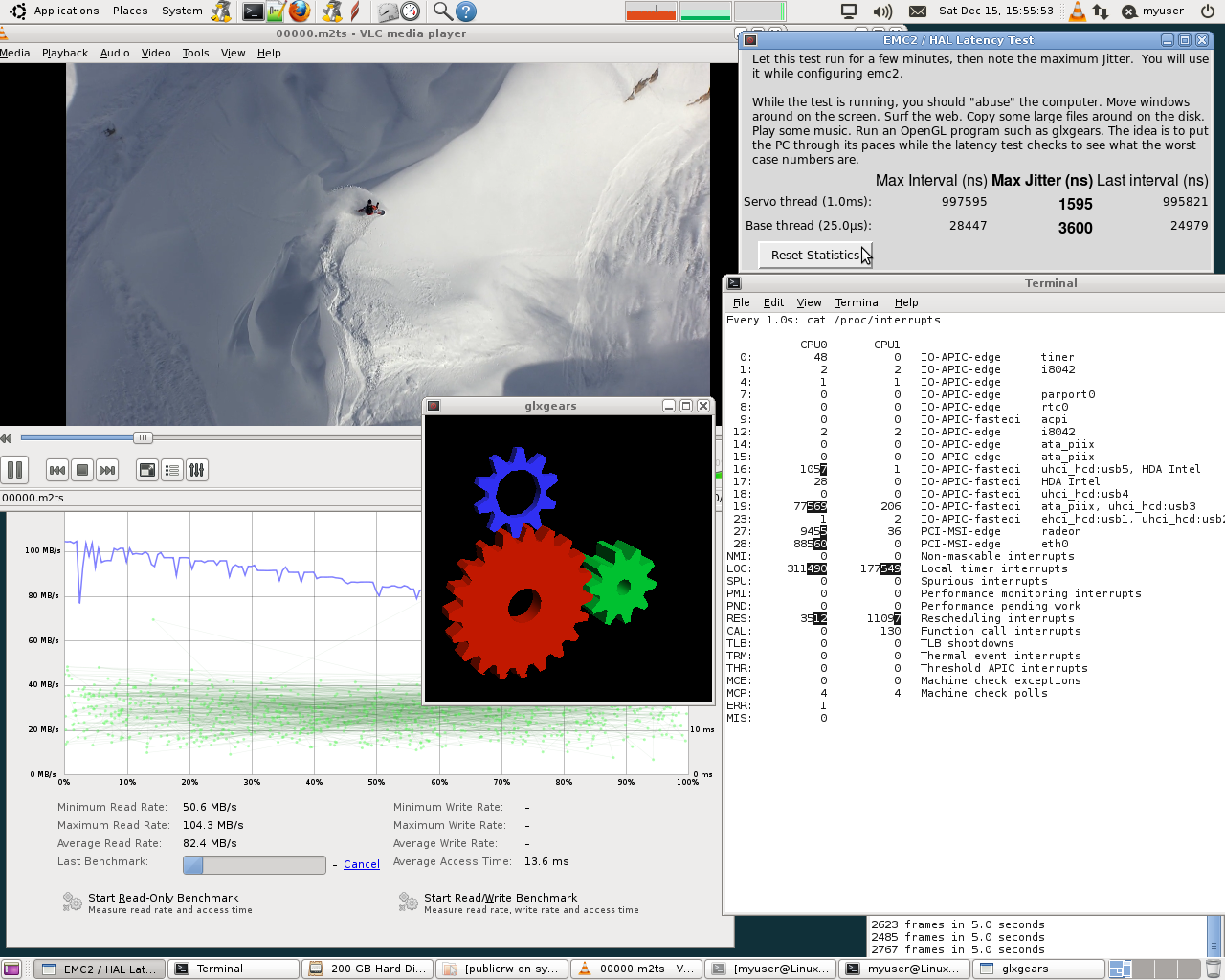
I will make a screenshot and post it.
How do you create that histograms? Are the jitter values logged and I don't even know?
Thanks,
Ruben
Last edit: 13 years 10 months ago by RGH. Reason: added attachment
The following user(s) said Thank You: tensor
- awallin
- Offline
- New Member
-
Less
More
- Posts: 19
- Thank you received: 2
13 years 10 months ago #27780
by awallin
The histogram is a recent hack:
www.anderswallin.net/2012/12/latency-histogram/
creating the graph is a manual process for now:
- run the appropriate file with halcmd -f
- stop it with halcmd stop after a while (e.g. output file is 1M in size)
- plot with the python script
If there was an easy programmatic way to access the sampler/halsampler FIFO then it would be straightforward to plot a "live" latency-histogram. I may be inspired to look into this at some point.
AW
Replied by awallin on topic Reducing latency on multicore pc's - Success!
Spainman wrote: @Anders
I will make a screenshot and post it.
How do you create that histograms? Are the jitter values logged and I don't even know?
The histogram is a recent hack:
www.anderswallin.net/2012/12/latency-histogram/
creating the graph is a manual process for now:
- run the appropriate file with halcmd -f
- stop it with halcmd stop after a while (e.g. output file is 1M in size)
- plot with the python script
If there was an easy programmatic way to access the sampler/halsampler FIFO then it would be straightforward to plot a "live" latency-histogram. I may be inspired to look into this at some point.
AW
- ArcEye
- Offline
- Junior Member
-
Less
More
- Posts: 22
- Thank you received: 240
13 years 10 months ago - 13 years 10 months ago #27784
by ArcEye
Don't forget to put the data about the machines into the latency database.
wiki.linuxcnc.org/cgi-bin/wiki.pl?Latency-Test
3600 max jitter is a pipe dream for most people, they will want to know precisely which boards you tested
regards
Replied by ArcEye on topic Reducing latency on multicore pc's - Success!
This is not wishful thinking but a measure with reproducible effects on two core2duo machines!
Don't forget to put the data about the machines into the latency database.
wiki.linuxcnc.org/cgi-bin/wiki.pl?Latency-Test
3600 max jitter is a pipe dream for most people, they will want to know precisely which boards you tested
regards
Last edit: 13 years 10 months ago by ArcEye.
Time to create page: 0.554 seconds