
- Posts: 2
- Thank you received: 0
Reducing latency on multicore pc's - Success!
- green751
- Visitor
-

12 years 10 months ago #42243
by green751
Replied by green751 on topic Reducing latency on multicore pc's - Success!
Sure.
PC Hard disks are quite a bit slower than memory, and depending on the hardware involved in controlling them there may be a big burst of lag when you access them, like when any program starts.
Possible sources of delay include slow I/O hardware, disk controllers on the other side of a slow bus, a slow disk or a disk in a slow access mode (3 Gb instead of 6 Gb SATA, for instance) or even a failing hard disk that's generating errors.
You can test whether the disk is the problem by moving your program somewhere else to run it, like a RAMdisk if you have enough memory.
PC Hard disks are quite a bit slower than memory, and depending on the hardware involved in controlling them there may be a big burst of lag when you access them, like when any program starts.
Possible sources of delay include slow I/O hardware, disk controllers on the other side of a slow bus, a slow disk or a disk in a slow access mode (3 Gb instead of 6 Gb SATA, for instance) or even a failing hard disk that's generating errors.
You can test whether the disk is the problem by moving your program somewhere else to run it, like a RAMdisk if you have enough memory.
- kivig
- Offline
- New Member
-

Less
More
12 years 9 months ago #42265
by kivig
Happy new year!
Replied by kivig on topic Reducing latency on multicore pc's - Success!
Thanks, will check that. Didn't thought hdd might be a "blocking function".green751 wrote: Sure.
PC Hard disks are quite a bit slower than memory, and depending on the hardware involved in controlling them there may be a big burst of lag when you access them, like when any program starts.
Possible sources of delay include slow I/O hardware, disk controllers on the other side of a slow bus, a slow disk or a disk in a slow access mode (3 Gb instead of 6 Gb SATA, for instance) or even a failing hard disk that's generating errors.
You can test whether the disk is the problem by moving your program somewhere else to run it, like a RAMdisk if you have enough memory.
Happy new year!
- qthree
- Visitor
-
12 years 2 months ago - 12 years 2 months ago #49619
by qthree
Replied by qthree on topic Reducing latency on multicore pc's - Success!
What about Debian 7 with linuxcnc 2.6.1? I installed it from binary.hybrid.iso and same method doesn't work, still 8000ns to 10000ns
Ubuntu 10.04 works well: 1300ns to 4800ns
Ubuntu 10.04 works well: 1300ns to 4800ns
Last edit: 12 years 2 months ago by qthree.
- Doc Alex
- Offline
- New Member
-
Less
More
- Posts: 1
- Thank you received: 0
11 years 7 months ago #56957
by Doc Alex
Replied by Doc Alex on topic Reducing latency on multicore pc's - Success!
Hello
I am completely new to this.
I managed everything of this description except the grub modification:
The Max Jitters are down to 4764 (1ms) and 8522 (25ms).
I use the standard configuration of linux CNC including debian linux.
I added the following two lines to grub
isolcpus=1
acpi_irq_nobalance noirqbalance
I tried to call update-grub afterwards. I receive the error message that update-grub cannot be found.
therefore I called it directly:
sudo /usr/sbin/update-grub
the response is:
/usr/sbin/grub-mkonfig:35/etc/default/grub: acpi_irq_nobalance not found.
What do I do wrong?
Furthermore the provided debian version has no software center. How do i figure out if irqbalance is running?
best wishes
Doc Alex.
I am completely new to this.
I managed everything of this description except the grub modification:
The Max Jitters are down to 4764 (1ms) and 8522 (25ms).
I use the standard configuration of linux CNC including debian linux.
I added the following two lines to grub
isolcpus=1
acpi_irq_nobalance noirqbalance
I tried to call update-grub afterwards. I receive the error message that update-grub cannot be found.
therefore I called it directly:
sudo /usr/sbin/update-grub
the response is:
/usr/sbin/grub-mkonfig:35/etc/default/grub: acpi_irq_nobalance not found.
What do I do wrong?
Furthermore the provided debian version has no software center. How do i figure out if irqbalance is running?
best wishes
Doc Alex.
- steinbeisser
- Offline
- New Member
-
Less
More
- Posts: 4
- Thank you received: 0
10 years 11 months ago - 10 years 11 months ago #65930
by steinbeisser
Replied by steinbeisser on topic Reducing latency on multicore pc's - Success!
I tried Spainman's scripts on my machine and they seem to improve my latency.
My machine:
Club3D ATI Radeon X300 256MB PCI-E Silent
Gigabyte GA-P35-DS4 rev1.0
Intel Core2Duo E8400
4x1GB Ram
WD IDE HDD
BIOS settings:
All peripherals set to OFF, except LAN and LPT
Every setting that seems to alter the clock for power saving or performance: OFF
Kernel parameters copied from Spainman's first post in this thread:
"isolcpus=1 acpi_irq_nobalance noirqbalance"
In the attached picture, you can see
- latency-plot
- 3x gxlgears
- 1080p Big Buck Bunny
It seems like the upstart script provided by Spainman doesn't work with debian, so i called his set-irq-affinity script manually.
In the plot, i highlighted the point in time when i called "set-irq-affinity 1"
As you can see the latency spikes are reduced after this.
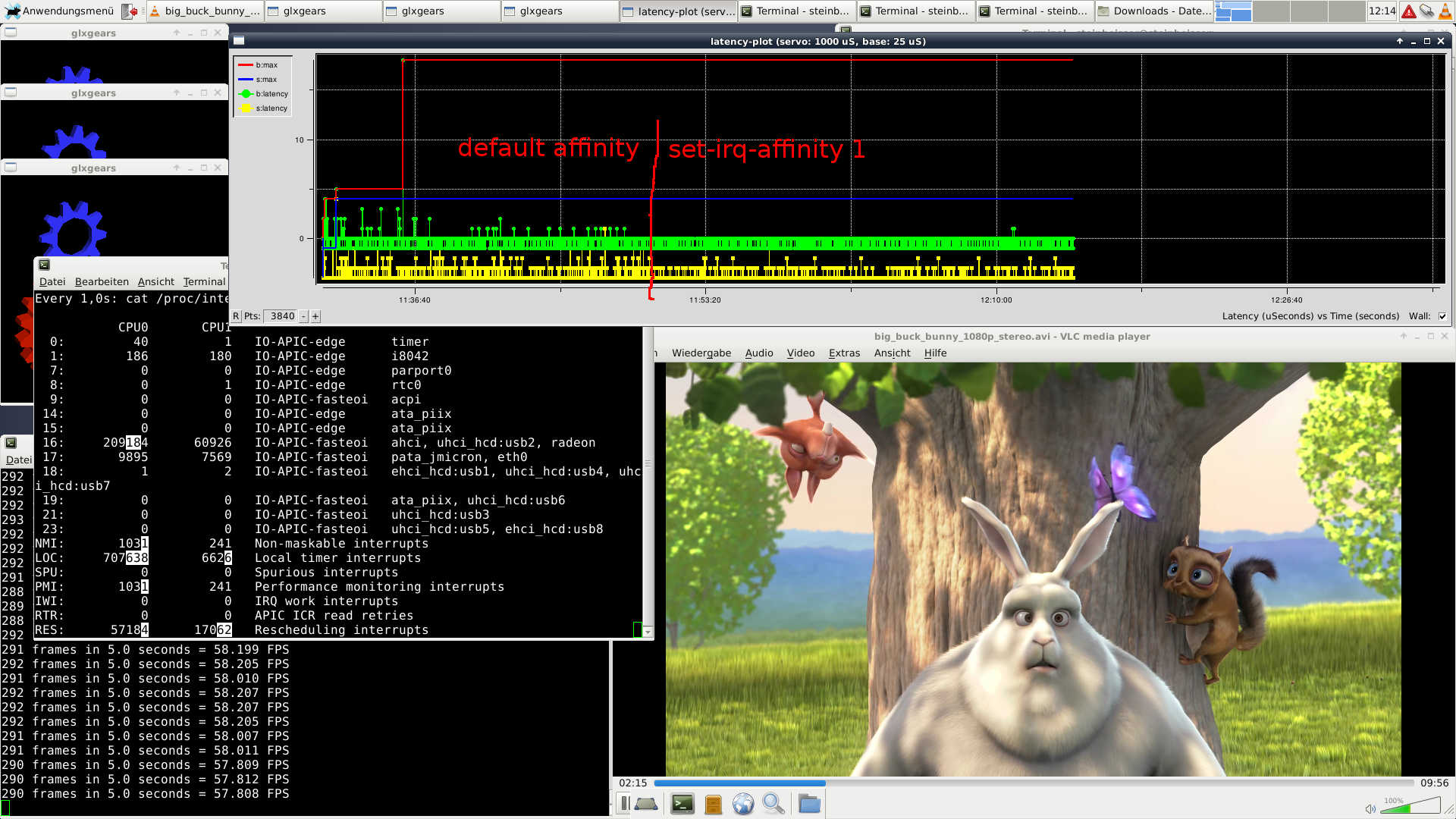
Edit:
It seems like i was a bit lucky taking this screenshot. It is true, that setting irq-affinity 1 calms down the small spikes, but sadly the huge spikes of ~17k are still happening, even with irq-affinity 1.
My machine:
Club3D ATI Radeon X300 256MB PCI-E Silent
Gigabyte GA-P35-DS4 rev1.0
Intel Core2Duo E8400
4x1GB Ram
WD IDE HDD
BIOS settings:
All peripherals set to OFF, except LAN and LPT
Every setting that seems to alter the clock for power saving or performance: OFF
Kernel parameters copied from Spainman's first post in this thread:
"isolcpus=1 acpi_irq_nobalance noirqbalance"
In the attached picture, you can see
- latency-plot
- 3x gxlgears
- 1080p Big Buck Bunny
It seems like the upstart script provided by Spainman doesn't work with debian, so i called his set-irq-affinity script manually.
In the plot, i highlighted the point in time when i called "set-irq-affinity 1"
As you can see the latency spikes are reduced after this.
Edit:
It seems like i was a bit lucky taking this screenshot. It is true, that setting irq-affinity 1 calms down the small spikes, but sadly the huge spikes of ~17k are still happening, even with irq-affinity 1.
Last edit: 10 years 11 months ago by steinbeisser.
- steinbeisser
- Offline
- New Member
-
Less
More
- Posts: 4
- Thank you received: 0
10 years 11 months ago - 10 years 11 months ago #65931
by steinbeisser
Replied by steinbeisser on topic Reducing latency on multicore pc's - Success!
@Doc Alex:
I think this has to be one line. you have to add it to the line you already have.
For example:
GRUB_CMDLINE_LINUX_DEFAULT="isolcpus=1 acpi_irq_nobalance noirqbalance lapic quiet rootdelay=5"
@qthree:
The reason might be, that the upstart script doesn't work on debian (at least it doesn't work on my machine)
I have no idea how this upstart stuff works, so i hope someone here can help us with this
I added the following two lines to grub
isolcpus=1
acpi_irq_nobalance noirqbalance
I think this has to be one line. you have to add it to the line you already have.
For example:
GRUB_CMDLINE_LINUX_DEFAULT="isolcpus=1 acpi_irq_nobalance noirqbalance lapic quiet rootdelay=5"
@qthree:
The reason might be, that the upstart script doesn't work on debian (at least it doesn't work on my machine)
I have no idea how this upstart stuff works, so i hope someone here can help us with this
Last edit: 10 years 11 months ago by steinbeisser.
Time to create page: 0.545 seconds