Topic Author

Please Log in or Create an account to join the conversation.

Please Log in or Create an account to join the conversation.
Topic Author
Please Log in or Create an account to join the conversation.
If you lookup this thread, you will find some entries of my 980s. I am running one of these using parport just fine. See here for example. Kindly checkout my other posts for these dell 980s. There is some finetuning ahead, but I guess the results speak for themselves.tommylight Thank you for your reply.
I recently got this computer. I have used it with OPTIPLEX 760 with parallel port connection. However, I am worried about when it will not start, so I am thinking about replacing it with this OPTIPLEX 980.
But does this mean there is a fatal delay?
Should I forgo using it on a parallel port?
Please Log in or Create an account to join the conversation.
Please Log in or Create an account to join the conversation.
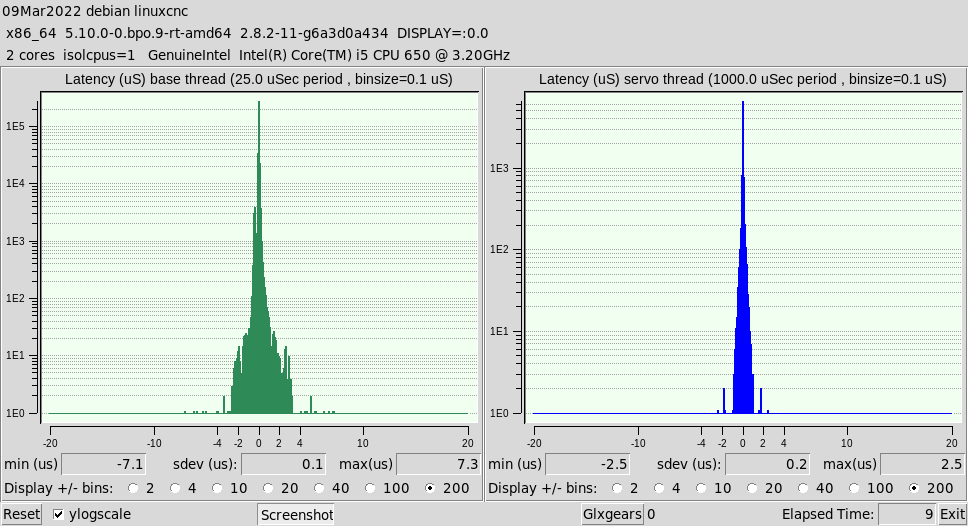
I saw the thread here and bought "Optiplex 980" for $ 60.I have installed LinuxCNC 2.8.2 Debian10.It seems to have improved a little. I wish there was a better way.
LinuxCNC pc tests, version 20200930, started 09.03.2022 00:03:53
...
Desktop environment : gnome
Windowmanager : Xfwm4
Displaymanager : lightdm
================================================================================
Kernel related data:
Kernel 5.10.0-0.bpo.9-rt-amd64
GRUB_CMDLINE_LINUX_DEFAULT="quiet isolcpus=1"
Cpu idle driver: intel_idle
================================================================================
Kernel modules data:
Check if pcspkr is loaded: Yes, may cause bigger latency.
can be eliminated using:
sudo echo "install pcspkr /bin/true" >/etc/modprobe.d/pcspkr.conf
Check if snd modules are loaded: No, which is good!
================================================================================
...
================================================================================
Command for latency test is:
su linuxcnc -c "latency-histogram --bbinsize 1000 --base 25000 --sbinsize 1000 --nox 2>&1 | tee -a 1646751829.lat &"
...
>>>Unexpected realtime delay on task 0 with period 25000<<<
[/spoiler]
Hmmm. I don't know how to attach the result.
How do you paste it in a gray window?
Further, run the test again, but increase base to say 50'000. 50'000 is actually what I am using on my 980. Also check out my GRUB_CMDLINE_LINUX_DEFAULT (dig in this thread to find the last, best one. Further, doHow do you paste it in a gray window? use Block quote in advanced editor ( [ quote ] and [ / quote ] without the blanks)
It made some difference on my machine. In addition check out the colored parts in your output and compare them to what I have used. Ie.sudo echo "install pcspkr /bin/true" >/etc/modprobe.d/pcspkr.conf
Please Log in or Create an account to join the conversation.