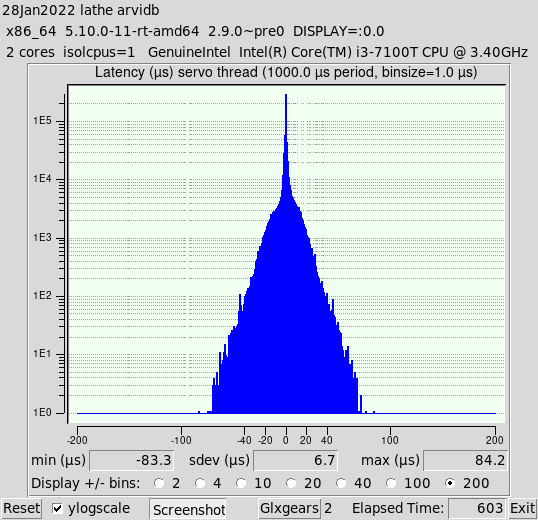
Hi ,I am currently testing my Intel NUC7i5BNH which I plan to use with a MESA 7i76E.
First, I needed to change from nm-tray to network manager as I got a long list of icons on the top right:
sudo apt remove nm-tray
sudo apt install network-manager-gnome
Subsequently, I tried everything under the sun to get the latency down:
I disabled pretty much everything in the BIOS such as CPU related options (power saving, hyper-threading, turbo boost, 1 core only), any devices that are not needed (bluetooth, audio, microphone) and set the energy management to max performance. The only thing that I did not disabled (which I believe may affect latency according to other posts) is cooling, LAN and wireless which I intend to use during operations. But even when I switched them off they didn't seem to have a great impact on the latency.
I also added a long list of grub commands:
GRUB_CMDLINE_LINUX_DEFAULT="quiet transparent_hugepage=never splash mitigations=off isolcpus=1 acpi_irq_nobalance noirqbalance lapic nohlt idle=poll radeon.modeset=0 intel_idle.max_cstate=0 processor.max_cstate=0 ipv6.disable=1 pci=routeirq"
I added 'vm.swappiness=0' to /etc/sysctl.conf
I added 'hardware−irq−coalesce−rx−usecs 0' to /etc/network/interfaces
I used the following command to avoid any sleep modes:
'sudo systemctl mask sleep.target suspend.target hibernate.target hybrid-sleep.target'
My latest latency data is below!
If anybody has some suggestions to further improve the latency that would be very much appreciated?!
I was also wondering if the below latency numbers are good enough to use the MESA 7i76E board?
In retrospect (considering the results I have seen in this thread), I should have gone for a Dell Optiplex 980 (i5) which would have been a 'hassle-free' to setup with superb latency performance. However, I really like the form factor of the NUC.
Thank you!
Code:
LinuxCNC pc tests, version 20200930, started 02.02.2022 13:32:31
********************************************************************************
General info:
Intel Corporation, NUC7i5BNH
Bios version BNKBL357.86A.0087.2021.1210.1903, dated 12/10/2021
Chipset: Harddisk is non-rotational, ie. SSD
The amount of swap currently used is 0
================================================================================
CPU related data:
model name : Intel(R) Core(TM) i5-7260U CPU @ 2.20GHz
cpu cores : 1
stepping : 9
cache size : 4096 KB
================================================================================
RAM related data:
Maximum Capacity: 32 GB
Maximum Voltage: 1.2 V
Maximum Voltage: 1.2 V
Size: 8192 MB
Size: 8192 MB
================================================================================
GPU related data:
product: Intel Corporation
configuration: driver=i915 latency=0
================================================================================
Parallel port related data:
number of parallel ports is 0
================================================================================
Os and desktop related data:
PRETTY_NAME="Debian GNU/Linux 10 (buster)"
Should the info below not match with your machine,
kindly post the output of pstree here, including a brief
desciption of your desktop environment, window manager and
display manager. Tia
https://forum.linuxcnc.org/18-computer/39370-script-for-automated-testing-of-computer-latency
Desktop environment : xfce4
Windowmanager : Xfwm4
Displaymanager : lightdm
================================================================================
Kernel related data:
Kernel 4.19.0-18-rt-amd64
GRUB_CMDLINE_LINUX_DEFAULT="quiet transparent_hugepage=never splash mitigations=off isolcpus=1 acpi_irq_nobalance noirqbalance lapic nohlt idle=poll radeon.modeset=0 intel_idle.max_cstate=0 processor.max_cstate=0 ipv6.disable=1 pci=routeirq"
Cpu idle driver: none
================================================================================
Kernel modules data:
Check if pcspkr is loaded: No, which is good!
Check if snd modules are loaded: No, which is good!
================================================================================
Keyboard & Mouse related data:
Number of mice: 1
Mouse 0 : HP HP USB 1000dpi Laser Mouse
Mice attached to USB:
HP, Inc HID-compliant mouse
Keyboards attached to USB:
================================================================================
LinuxCNC related data:
LinuxCNC version is: 2.8.2.11.g6a3d0a434
================================================================================
Preparing for latency test:
Started glxgears No. 1, 2, 3, 4, 5
..........
Started firefox with 'https://vimeo.com/150574260', WID 50331651
================================================================================
Command for latency test is:
su cnc -c "latency-histogram --nobase --sbinsize 1000 --nox 2>&1 | tee -a 1643779951.lat &"
Latency testing loop started Wed 2 Feb 13:32:44 AWST 2022,
should end after Wed 2 Feb 15:32:44 AWST 2022
================================================================================
Swap useage: prerun: 0, running: 0
================================================================================
CPU core temperatures:
Core 0: Tmin: 49.0°C, Tmax: 55.0°C, (high = +100.0°C, crit = +100.0°C)
================================================================================
last latency data is as follows:.
7204 secs servo min: -83.700 uS max: 86.400 uS sdev: 4.800 uS
7205 secs servo min: -83.700 uS max: 86.400 uS sdev: 4.800 uS