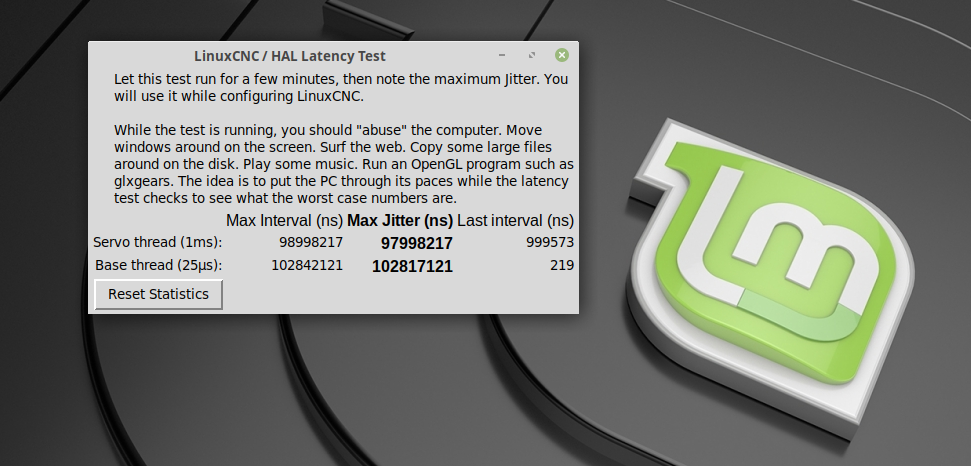
Results of latency test, list of computers tested for use with LinuxCNC

More
5 years 8 months ago #197489 by makermark
Hi everyone,

First time poster here. I wanted my first post to resemble a contribution because I know I'll be asking for help from y'all in the near future. Here's the results of a 2 hour test on my recently acquired Dell Optiplex 7010 SFF (SSD, 8GB RAM, onboard graphics) using Debian Buster 10.7 with RTAI kernel. BIOS modifications are:
  • Using only one core
  • Disabled SpeedStep
  • Disabled C States Control
  • Blocked sleep
  • Disabled all virtualization support options
I also tried disabling fan control, TurboBoost, USB wake, and audio individually without much performance gain so they were re-enabled. If anyone else is considering using the Dell 7010, I'd suggest starting with Debian as I was getting over 1000us servo thread latency without even using this test script on Mint 20.1 with PREEMPT_RT kernel. Debian with PREEMPT_RT dropped that to around 65us running this test script for 2 hours. Finally, switching to RTAI dropped the latency to around 20us as shown here.

Thanks to my1987toyota for describing their similar experience in this thread, as I may have given up on the 7010 without reading about his switch to Debian.

Since I'm trying to keep costs down, I'm hoping to try parallel port software stepping on a basic 3-axis small vertical mill closed loop stepper setup (still deciding on which mill). I'm hoping someone here can tell me if this latency should be sufficient or if I should consider a FPGA board setup instead. Ultra fast feedrates aren't a requirement for my uses, mainly prototyping small parts with softer materials.

Thanks to everyone on this forum for all the useful info and I can't wait till I'm finally making chips!

- Mark


Code:
LinuxCNC pc tests, version 20200930, started 02.02.2021 09:37:00 ******************************************************************************** General info: Dell Inc., OptiPlex 7010 Bios version A29, dated 06/28/2018 Chipset: Intel Corporation 7 Series/C216 Harddisk is non-rotational, ie. SSD The amount of swap currently used is 0 ================================================================================ CPU related data: model name : Intel(R) Core(TM) i5-3470 CPU @ 3.20GHz cpu cores : 1 stepping : 9 cache size : 6144 KB ================================================================================ RAM related data: Maximum Capacity: 32 GB Size: No Module Installed Size: 4096 MB Size: No Module Installed Size: 4096 MB ================================================================================ GPU related data: product: Xeon E3-1200 v2/3rd Gen Core processor Graphics Controller configuration: driver=i915 latency=0 ================================================================================ Parallel port related data: number of parallel ports is 0 ================================================================================ Os and desktop related data: PRETTY_NAME="Debian GNU/Linux 10 (buster)" Should the info below not match with your machine, kindly post the output of pstree here, including a brief desciption of your desktop environment, window manager and display manager. Tia https://forum.linuxcnc.org/18-computer/39370-script-for-automated-testing-of-computer-latency Desktop environment : gnome Windowmanager : Metacity (Marco) Displaymanager : lightdm ================================================================================ Kernel related data: Kernel 4.14.174-rtai-amd64 GRUB_CMDLINE_LINUX_DEFAULT="quiet splash resume=UUID=c1b3a866-389a-48fa-8427-972a3ab4953d" Cpu idle driver: ================================================================================ Kernel modules data: Check if pcspkr is loaded: Yes, may cause bigger latency. can be eliminated using: sudo echo "install pcspkr /bin/true" >/etc/modprobe.d/pcspkr.conf Check if snd modules are loaded: Yes, may cause bigger latency. can probably be disabled in bios, alternatively, you can run "./block-snd-modules" which has just now been created for your convenience. ================================================================================ Keyboard & Mouse related data: Number of mice: 1 Mouse 0 : PixArt Dell MS116 USB Optical Mouse Mice attached to USB: Keyboards attached to USB: ================================================================================ LinuxCNC related data: LinuxCNC version is: ================================================================================ Preparing for latency test: Started glxgears No. 1, 2, 3, 4, 5 .......... Started firefox with 'https://vimeo.com/150574260', WID 58720259 ================================================================================ Command for latency test is: su cnc -c "latency-histogram --nobase --sbinsize 1000 --nox 2>&1 | tee -a 1612283819.lat &" Latency testing loop started Tue 02 Feb 2021 09:37:14 AM MST, should end after Tue 02 Feb 2021 11:37:14 AM MST ================================================================================ Swap useage: prerun: 0, running: 0 ================================================================================ CPU core temperatures: Core 0: Tmin: 40.0°C, Tmax: 53.0°C, (high = +85.0°C, crit = +105.0°C) ================================================================================ last latency data is as follows:. 7204 secs servo min: -18.600 uS max: 20.200 uS sdev: 2.000 uS 7205 secs servo min: -18.600 uS max: 20.200 uS sdev: 2.000 uS

The following user(s) said Thank You: seuchato

Please Log in or Create an account to join the conversation.

More
5 years 8 months ago #197534 by seuchato
makermark
Thanks a ton. I'll give RTAI another try. The values you obtained, indicate it is a good candidate for soft stepping. My dell 980s do well with similar values.

greez
chris
The following user(s) said Thank You: makermark

Please Log in or Create an account to join the conversation.

More
5 years 8 months ago - 5 years 8 months ago #198736 by TobiWanCNC
Hi,

just got a Lenovo M93p and gave it a try. I've disabled some power management stuff in the BIOS, before the latency results were quite bad on buster.
Code:
LinuxCNC pc tests, version 20200930, started 13.02.2021 20:50:15 ******************************************************************************** General info: LENOVO, 10AAS3VA00 Bios version FBKTD8AUS, dated 09/17/2019 Chipset: Intel Corporation 8 Series/C220 Series Harddisk is non-rotational, ie. SSD The amount of swap currently used is 0 ================================================================================ CPU related data: model name : Intel(R) Core(TM) i5-4590T CPU @ 2.00GHz cpu cores : 4 stepping : 3 cache size : 6144 KB ================================================================================ RAM related data: Maximum Capacity: 16 GB Maximum Voltage: 1.5 V Maximum Voltage: 1.5 V Size: 4096 MB Size: 4096 MB ================================================================================ GPU related data: product: Xeon E3-1200 v3/4th Gen Core Processor Integrated Graphics Controller configuration: driver=i915 latency=0 ================================================================================ Parallel port related data: number of parallel ports is 0 ================================================================================ Os and desktop related data: PRETTY_NAME="Debian GNU/Linux 10 (buster)" Should the info below not match with your machine, kindly post the output of pstree here, including a brief desciption of your desktop environment, window manager and display manager. Tia https://forum.linuxcnc.org/18-computer/39370-script-for-automated-testing-of-computer-latency Desktop environment : xfce4 Windowmanager : Xfwm4 Displaymanager : lightdm ================================================================================ Kernel related data: Kernel 4.19.0-14-rt-amd64 GRUB_CMDLINE_LINUX_DEFAULT="quiet" Cpu idle driver: intel_idle ================================================================================ Kernel modules data: Check if pcspkr is loaded: Yes, may cause bigger latency. can be eliminated using: sudo echo "install pcspkr /bin/true" >/etc/modprobe.d/pcspkr.conf Check if snd modules are loaded: Yes, may cause bigger latency. can probably be disabled in bios, alternatively, you can run "./block-snd-modules" which has just now been created for your convenience. ================================================================================ Keyboard & Mouse related data: Number of mice: 1 Mouse 0 : RAPOO ÿÿÿÿÿÿÿÿÿÿÿÿÿÿÿÿÿÿÿÿÿÿÿÿÿÿÿÿÿÿÿÿ Mouse Mice attached to USB: Keyboards attached to USB: ================================================================================ LinuxCNC related data: LinuxCNC version is: 2.9.0~pre0.3532.gf6440b18b ================================================================================ Preparing for latency test: Started glxgears No. 1, 2, 3, 4, 5 .......... Started firefox with 'https://vimeo.com/150574260', WID 44040195 ================================================================================ Command for latency test is: su cnc -c "latency-histogram --nobase --sbinsize 1000 --nox 2>&1 | tee -a 1613245811.lat &" Latency testing loop started Sa 13. Feb 20:50:27 CET 2021, should end after Sa 13. Feb 22:50:27 CET 2021 ================================================================================ Swap useage: prerun: 0, running: 0 ================================================================================ CPU core temperatures: Core 0: Tmin: 55.0°C, Tmax: 71.0°C, (high = +69.0°C, crit = +75.0°C) Core 1: Tmin: 55.0°C, Tmax: 69.0°C, (high = +69.0°C, crit = +75.0°C) Core 2: Tmin: 52.0°C, Tmax: 68.0°C, (high = +69.0°C, crit = +75.0°C) Core 3: Tmin: 55.0°C, Tmax: 69.0°C, (high = +69.0°C, crit = +75.0°C) ================================================================================ last latency data is as follows:. 7200 secs servo min: -45.700 uS max: 47.600 uS sdev: 3.700 uS 7201 secs servo min: -45.700 uS max: 47.600 uS sdev: 3.700 uS

Best regards,
Tobi
Last edit: 5 years 8 months ago by TobiWanCNC. Reason: typo
The following user(s) said Thank You: seuchato, tommylight

Please Log in or Create an account to join the conversation.

More
5 years 8 months ago #198754 by tommylight
Those are nice, had one used it daily with a Mesa 6i25 and a 7i92, worked perfectly for nearly two years. It still works, just gave it to my niece!
The following user(s) said Thank You: TobiWanCNC

Please Log in or Create an account to join the conversation.

More
5 years 6 months ago #205152 by stefan63
Is this the worst result ever?
Planing to test my Thinkpad T420s with a MESA ethernet card is it worth it?

Please Log in or Create an account to join the conversation.

More
5 years 6 months ago #205162 by tommylight
Pretty much the worst result ! :)
T420S is unusable for machine control, i still have one. It will drop the link to Mesa board in 1 to 30 seconds always on batteries, much longer on AC power, but never reliable.
At any rate the latency is much better than what you posted, but probably using the wrong kernel.
What does
uname -a
in a terminal say?

Please Log in or Create an account to join the conversation.

Time to create page: 0.230 seconds
Powered by Kunena Forum