
- Posts: 170
- Thank you received: 54
linuxcnc-esp32 Software Stepping over Ethernet Using ESP32
- BeagleBrainz
- Visitor
-

5 years 5 months ago - 5 years 5 months ago #210658
by BeagleBrainz
Replied by BeagleBrainz on topic linuxcnc-esp32 Software Stepping over Ethernet Using ESP32
With UDP or even TCP/IP there is convention with port numbers.
Even tho http uses port 80, if both the server and client agree to use 5666 there is no issue.
I think just for the sake of keeping everything easy to begin with keeping the developers choice of 5000 should be kept.
If you do install a 2nd NIC do not give it an IP address on the same network as your primary one.
Eg
If eth0 is 192.168.1 ( remember the first 3 numbers are the network and the 4 is the host)
Put eth1 on a different network. 192.168.2 will be fine, but your ESP32 should be on this one as well.
Now remember to record the MAC of your original NIC as the kernel may decide that your add in NIC is eth0. The MAC is unique to the physical card, no 2 cards ever made should have the same MAC.
Oh yes to complicate matters, the MAC you give your ESP32 should not be the same as any other on your network.
Yes it may seem confusing, but a bit of further reading will make sense of it all.
Maybe this analogy may help.
The MAC is equivalent to your vehicle's chassis number or VIN, this comes from the manufacturer. And is unique to all NICs produced.
The name eg eth0 is equivalent to your rego plate number, given out by the Motor Registry (the kernel). When you turn the computer off it is like deregistering your vehicle and handing the rego plate back. Turning it back on is similar to re-registering your vehicle and getting the plate back. Luckily with your computer it keeps the same name (rego plate), unless a new card is put in and get to the counter before the original one.
The IP address (network part & host part) is what your refer to the car yourself. Dad's car, mum's car etc.
The network part & host part don't have an equivalence in the above. Unless Dad has a blue & a red car, then Dad could be the network part and the colour could be the host part. eg Dad's red car, Dad's blue car. Then if Mum also had a red & blue car they would be Mum's blue car & Mum's red car. But each red car would be a separate car as each blue car is.
Even tho http uses port 80, if both the server and client agree to use 5666 there is no issue.
I think just for the sake of keeping everything easy to begin with keeping the developers choice of 5000 should be kept.
If you do install a 2nd NIC do not give it an IP address on the same network as your primary one.
Eg
If eth0 is 192.168.1 ( remember the first 3 numbers are the network and the 4 is the host)
Put eth1 on a different network. 192.168.2 will be fine, but your ESP32 should be on this one as well.
Now remember to record the MAC of your original NIC as the kernel may decide that your add in NIC is eth0. The MAC is unique to the physical card, no 2 cards ever made should have the same MAC.
Oh yes to complicate matters, the MAC you give your ESP32 should not be the same as any other on your network.
Yes it may seem confusing, but a bit of further reading will make sense of it all.
Maybe this analogy may help.
The MAC is equivalent to your vehicle's chassis number or VIN, this comes from the manufacturer. And is unique to all NICs produced.
The name eg eth0 is equivalent to your rego plate number, given out by the Motor Registry (the kernel). When you turn the computer off it is like deregistering your vehicle and handing the rego plate back. Turning it back on is similar to re-registering your vehicle and getting the plate back. Luckily with your computer it keeps the same name (rego plate), unless a new card is put in and get to the counter before the original one.
The IP address (network part & host part) is what your refer to the car yourself. Dad's car, mum's car etc.
The network part & host part don't have an equivalence in the above. Unless Dad has a blue & a red car, then Dad could be the network part and the colour could be the host part. eg Dad's red car, Dad's blue car. Then if Mum also had a red & blue car they would be Mum's blue car & Mum's red car. But each red car would be a separate car as each blue car is.
Last edit: 5 years 5 months ago by BeagleBrainz.
- tjtr33
- Offline
- Elite Member
-

Less
More
5 years 5 months ago #210671
by tjtr33
Replied by tjtr33 on topic linuxcnc-esp32 Software Stepping over Ethernet Using ESP32
I will order pci nic online, not available here in stores.
Do you get "Unexpected RealTime Delay" on startup of linuxcnc?
(using dlhenke's ini and hal )
Thanks Tomp
Do you get "Unexpected RealTime Delay" on startup of linuxcnc?
(using dlhenke's ini and hal )
Thanks Tomp
- BeagleBrainz
- Visitor
-
5 years 5 months ago #210676
by BeagleBrainz
Replied by BeagleBrainz on topic linuxcnc-esp32 Software Stepping over Ethernet Using ESP32
No.
Does your machine pass the latency test ?
Does your machine pass the latency test ?
- tjtr33
- Offline
- Elite Member
-
Less
More
- Posts: 170
- Thank you received: 54
5 years 5 months ago - 5 years 5 months ago #210692
by tjtr33
Replied by tjtr33 on topic linuxcnc-esp32 Software Stepping over Ethernet Using ESP32
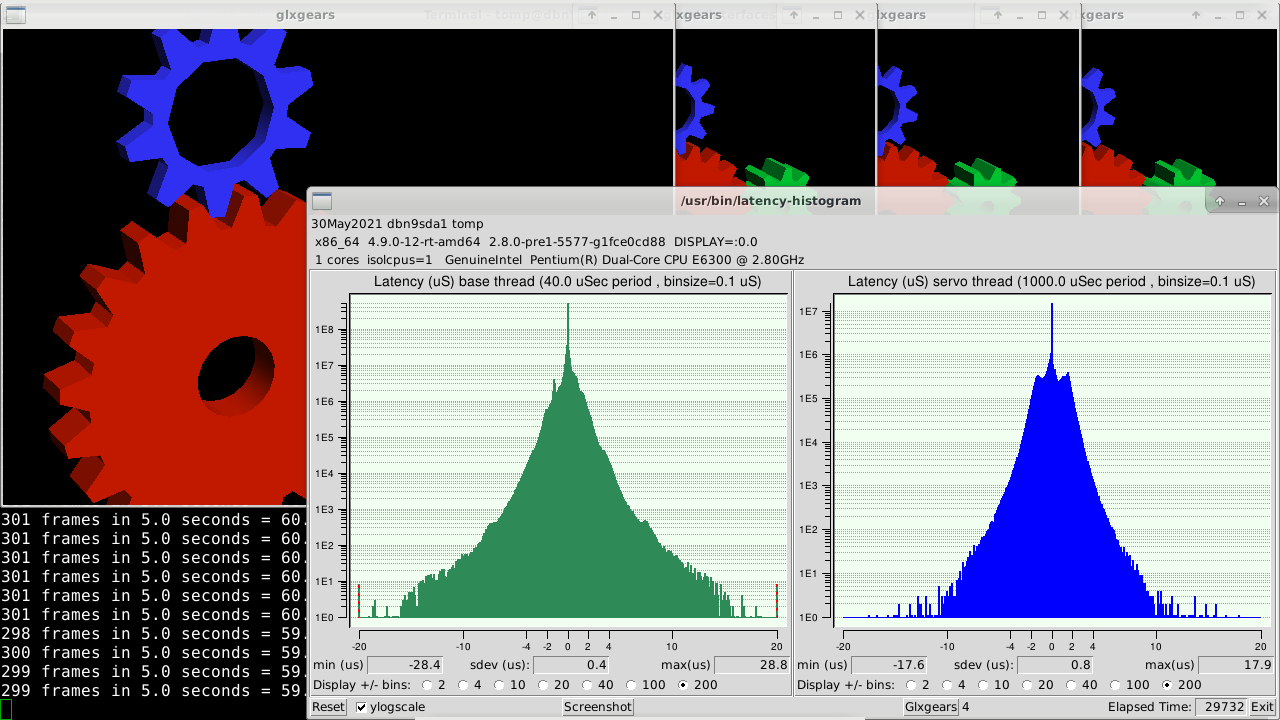
yes
latency-histogram tests were done --base 40000 --servo 1000000
with 4 glxgears
booted on dual core pentium with isolcpus=1 idle=poll
ran overnight
i'd have to dig up the screen shots
or just wait till next morning here
i'll run another now
i can run other configs ( parport and mesa 5i10 w/o errs )
thx tomp
latency-histogram tests were done --base 40000 --servo 1000000
with 4 glxgears
booted on dual core pentium with isolcpus=1 idle=poll
ran overnight
i'd have to dig up the screen shots
or just wait till next morning here
i'll run another now
i can run other configs ( parport and mesa 5i10 w/o errs )
thx tomp
Last edit: 5 years 5 months ago by tjtr33. Reason: added screenshot
- tjtr33
- Offline
- Elite Member
-
Less
More
- Posts: 170
- Thank you received: 54
5 years 4 months ago #211626
by tjtr33
Replied by tjtr33 on topic linuxcnc-esp32 Software Stepping over Ethernet Using ESP32
I have the ports correct now
and I can see the packets using tcpdump
It looks like there are xyz positions passed from eth1 to the esp32/w5500 40 bytes
and 4 encoder data passed back 32 bytes
There are no real motors or encoders on my system, no hardware at all for these early tests.
Does it require encoders connected to motors?
I go thru my router with no problems, this may be an advantage for long distance users.
( my network is 192.168.1.X and i use 192.168.2.177 for W5500 and 192.168.2.178 for my new eth1 card)
I see pulses on the step pins
but not what i expect
My step size is .0075mm ( 1.5pitch and 200 steps/rev nema17s)
For 1mm jog , i expect to see 133 pulses.( 133.333333 to be exact )
I do not see that,
I do not get repeatable traces on the scope.
I have not understood how the pulses are calculated,
but i think i should see the same trace for each 1mm jog .
Is that correct?
thanks TomP
and I can see the packets using tcpdump
Code:
sudo tcpdump -i any -n udp port 5000
...snip...
22:00:41.020871 IP 192.168.2.178.40206 > 192.168.2.177.5000: UDP, length 40
22:00:41.021237 IP 192.168.2.177.5000 > 192.168.2.178.40206: UDP, length 32
22:00:41.021882 IP 192.168.2.178.59440 > 192.168.2.177.5000: UDP, length 40
22:00:41.022238 IP 192.168.2.177.5000 > 192.168.2.178.59440: UDP, length 32
22:00:41.022888 IP 192.168.2.178.57804 > 192.168.2.177.5000: UDP, length 40
22:00:41.023241 IP 192.168.2.177.5000 > 192.168.2.178.57804: UDP, length 32
^C
3272 packets captured
3290 packets received by filter
0 packets dropped by kernel
It looks like there are xyz positions passed from eth1 to the esp32/w5500 40 bytes
and 4 encoder data passed back 32 bytes
There are no real motors or encoders on my system, no hardware at all for these early tests.
Does it require encoders connected to motors?
I go thru my router with no problems, this may be an advantage for long distance users.
( my network is 192.168.1.X and i use 192.168.2.177 for W5500 and 192.168.2.178 for my new eth1 card)
I see pulses on the step pins
but not what i expect
My step size is .0075mm ( 1.5pitch and 200 steps/rev nema17s)
For 1mm jog , i expect to see 133 pulses.( 133.333333 to be exact )
I do not see that,
I do not get repeatable traces on the scope.
I have not understood how the pulses are calculated,
but i think i should see the same trace for each 1mm jog .
Is that correct?
thanks TomP
- BeagleBrainz
- Visitor
-
5 years 4 months ago #211644
by BeagleBrainz
Replied by BeagleBrainz on topic linuxcnc-esp32 Software Stepping over Ethernet Using ESP32
The scale scale is hardcoded in udp.comp.
Spend some time reading the code to work out how it works and your development will go ahead faster.
As this is experimental code some of the features that would be set when loading the linuxcnc component are hardcoded.
Ignore the RTAPI line as this is an experimental piece of code to set the IP address when loading the module.There are a few lines of code that needed modifying to use the current socket functions rather than some of the deprecated functions as used in the code. I've also been working on setting the scale as a parameter.
Spend some time reading the code to work out how it works and your development will go ahead faster.
As this is experimental code some of the features that would be set when loading the linuxcnc component are hardcoded.
Code:
char *ipaddress;
RTAPI_MP_STRING(ipaddress,"ESP IP Address");
// Driver code
FUNCTION(update)
{
motor_pos.pos0=posx*xscale;
motor_pos.pos1=posy*yscale;
motor_pos.pos2=posz*zscale;
motor_pos.pos3=posu*uscale;
Ignore the RTAPI line as this is an experimental piece of code to set the IP address when loading the module.There are a few lines of code that needed modifying to use the current socket functions rather than some of the deprecated functions as used in the code. I've also been working on setting the scale as a parameter.
Time to create page: 0.454 seconds