A Teensy -> Python Interface Manualmatic MPG/pendant

More
4 years 9 months ago #231878 by fletch
The MPG can generate jog instructions far, far faster than the CNC machine can move (I suspect this is the case for all MPGs?) so if the MPG quickly sends a single or multiple instruction(s) to jog (say) 25mm, that may take the machine a couple of seconds to complete the move, especially if you have the jog velocity set low.

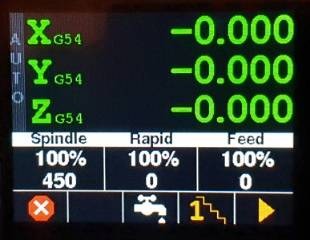
The axes on the pendant display and the gmoccapy display show the same values at the same time (well, within 0.2 seconds, which is the refresh rate I have set for the pendant display).

Short answer: No, there is no delay from the MPG - although it is not real time, as operates in the linuxcnc userspace like all the other GUIs. :-)

Please Log in or Create an account to join the conversation.
More
4 years 9 months ago #231879 by fletch
Addendum: The 'lossless' bit of the EncoderButton library enables me to send a single instruction to the LinuxCNC Python Interface for multiple jog instructions, so avoids swamping the userspace component with both serial and jog instructions to linuxcnc. This should, in practice, make the pendant more responsive than a touchscreen or keyboard. Eg, if you whizz the MPG around 50 steps of 0.1mm, the pendant will send a single instruction to jog 5mm rather than 50 x 0.1mm instructions.

Please Log in or Create an account to join the conversation.
More
4 years 9 months ago #231891 by tuzki
Very nice, thank you.I'm going to try
The following user(s) said Thank You: fletch

Please Log in or Create an account to join the conversation.
More
4 years 9 months ago - 4 years 9 months ago #232421 by fletch
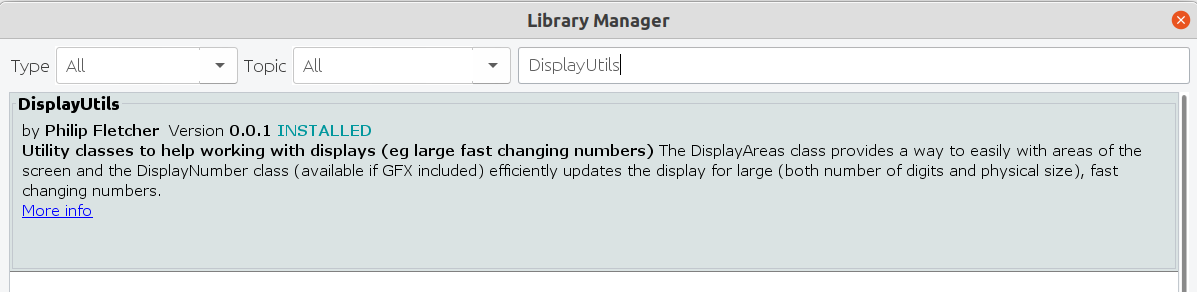
Another step fowards, this is a new (as in written for this project) Arduino utility library to help work with the various display areas and the flicker free drawing of the large rapidly changing X, Y, Z & A axes.

Available on github and as DiplayUtils in the Arduino Library Manager:


The rest of the Manuamatic code is nearly there - all the manual and auto functionality is now in place - just needs a fair bit of tidying up though. Refactoring FTW...
Last edit: 4 years 9 months ago by fletch.
The following user(s) said Thank You: phillc54, tommylight, tuzki, flyingbrick

Please Log in or Create an account to join the conversation.

More
4 years 9 months ago #232977 by fletch
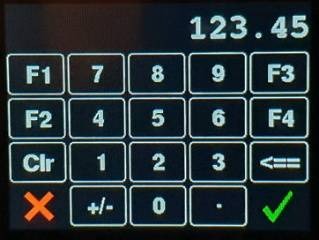
OK, OK, I'm getting there! One final (?) Arduino Library to handle the touch screen offset entry and so the displayed button labels displayed will now respond when touched. Available now on github and should be in the Arduino Library Manager VSN.

Which means we can now have this:


And this:


Oh yes, and we have icons!

It's getting there but it is proving challenging to keep it within the capability Arduino IDE (and me). May have to move to PlatformIO at some point - but not yet.
 
The following user(s) said Thank You: tommylight, Pro_El

Please Log in or Create an account to join the conversation.

More
4 years 9 months ago #232980 by tommylight
Very nice, thank you.
The following user(s) said Thank You: fletch

Please Log in or Create an account to join the conversation.

Time to create page: 0.406 seconds
Powered by Kunena Forum
