
- Posts: 927
- Thank you received: 280
Remora - ethernet NVEM / EC300 / EC500 cnc board
- cakeslob
- Offline
- Platinum Member
-

Less
More
4 years 6 months ago #239483
by cakeslob
Replied by cakeslob on topic Remora - ethernet NVEM / EC300 / EC500 cnc board
If you are following along with the previous post and are understanding some of the basics of hal and what it is, we can streamline your configuration process by using the stepconf. stepconf is used for making easy parallel port configurations. Different hardware, but the core concepts are the same, being we need to link hardware pins to software pins
linuxcnc.org/docs/stable/html/config/stepconf.html
If you generate a file for the parallel port, you can open up the hal file it created, and use that as reference. for example
you would replace the hal pin for parport, with the pin for remora hal. and would become this.
This is all probably more involved than you were expecting, but remora for nvem is pretty new
linuxcnc.org/docs/stable/html/config/stepconf.html
If you generate a file for the parallel port, you can open up the hal file it created, and use that as reference. for example
Code:
net X-neg-limit parport.0.pin-11-in => joint.0.neg-lim-sw-in
Code:
net X-neg-limit remora.input.2 => joint.0.neg-lim-sw-in
This is all probably more involved than you were expecting, but remora for nvem is pretty new
The following user(s) said Thank You: Domi
Please Log in or Create an account to join the conversation.
- scotta
- Offline
- Platinum Member
-
Less
More
- Posts: 959
- Thank you received: 489
4 years 6 months ago - 4 years 6 months ago #239615
by scotta
Replied by scotta on topic Remora - ethernet NVEM / EC300 / EC500 cnc board
Thanks cakeslob for helping out. I've started on an "example" 3 axis config which hopefully get people going quicker. As we add functionality I'll update the example.
I've remapped the IO and updated the bin file in the repo. The reason for remapping is to align with the physical layout of the controller.
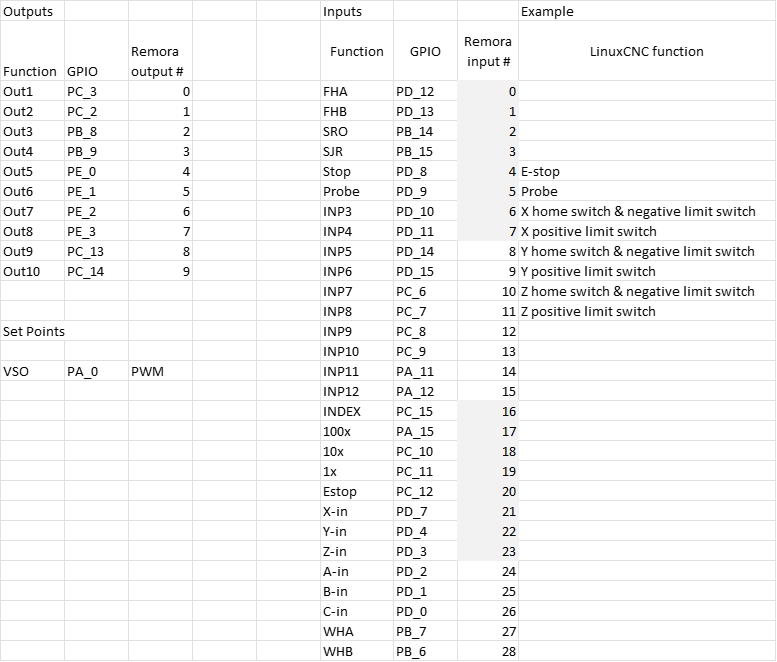
The example has been aligned to this IO mapping: github.com/scottalford75/Remora/tree/fea...igSamples/remora-eth
I've remapped the IO and updated the bin file in the repo. The reason for remapping is to align with the physical layout of the controller.
The example has been aligned to this IO mapping: github.com/scottalford75/Remora/tree/fea...igSamples/remora-eth
Last edit: 4 years 6 months ago by scotta.
Please Log in or Create an account to join the conversation.
- Domi
- Offline
- Senior Member
-

Less
More
- Posts: 64
- Thank you received: 0
4 years 6 months ago #239714
by Domi
Replied by Domi on topic Remora - ethernet NVEM / EC300 / EC500 cnc board
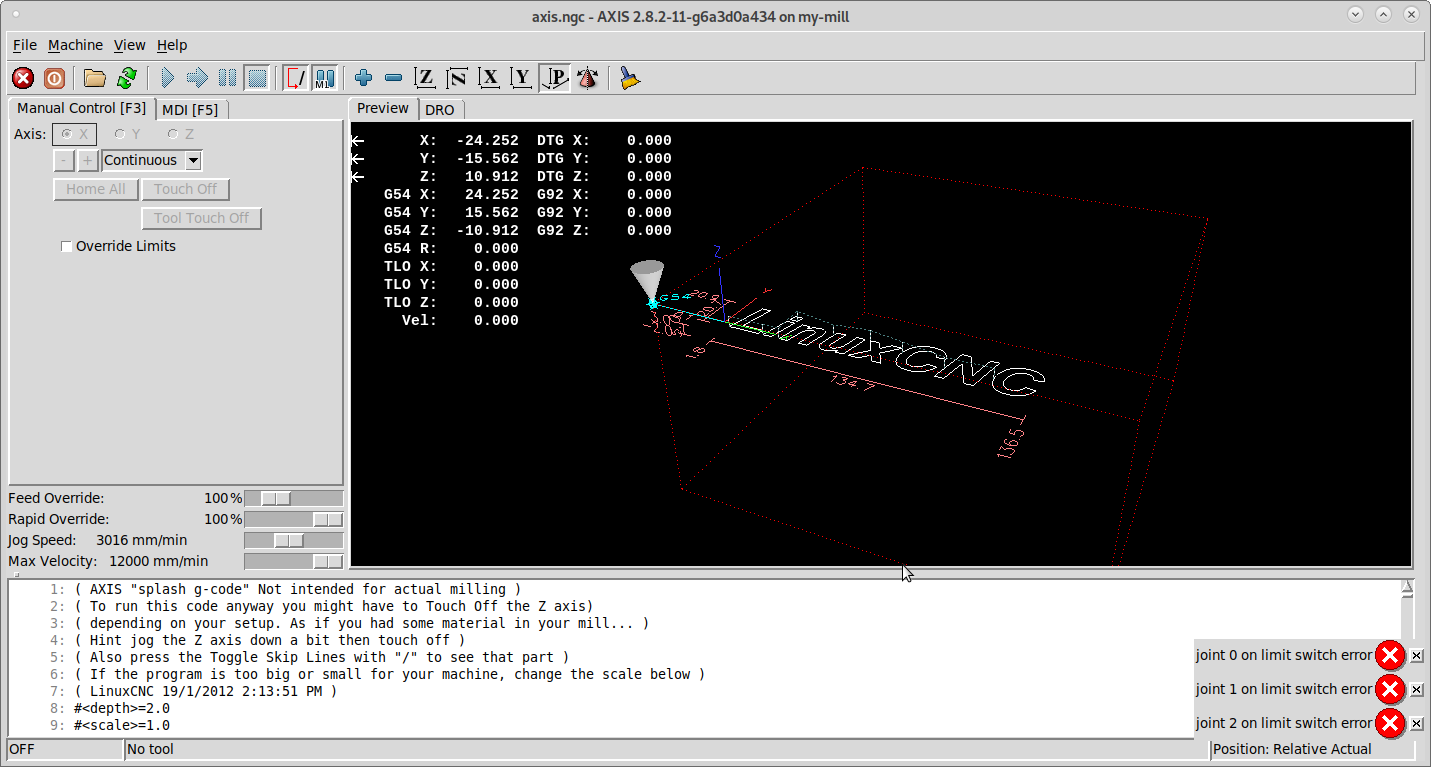
Hi cakeslob: I tried the limit switches according to my instructions. I see them but it shows them on and when I attach the metal so off. All input pins on NVEM are FALSE without connection. I read and tried a lot. But I can't reverse it. I use PNP NC and it looks like the signal is the opposite. I exchanged arrows. He tried data in and out and other different things according to the instructions. I also read the forum but nothing helped. Won't it be that NVEM has Unconnected pins like FALSE? I also tried to use the procedure for realtime but without point. Well thank you.
Please Log in or Create an account to join the conversation.
- Domi
- Offline
- Senior Member
-
Less
More
- Posts: 64
- Thank you received: 0
4 years 6 months ago #239715
by Domi
Replied by Domi on topic Remora - ethernet NVEM / EC300 / EC500 cnc board
Please Log in or Create an account to join the conversation.
- Domi
- Offline
- Senior Member
-
Less
More
- Posts: 64
- Thank you received: 0
4 years 6 months ago #239729
by Domi
Replied by Domi on topic Remora - ethernet NVEM / EC300 / EC500 cnc board
scotta: now I have to download the file Remora-NVEM bin to NVEM again via STlink? Or some other files? And where to place the modified remora-eth file? Or will I use only hal and others from the remora-eth file? and what to do with the file py? Well thank you
Please Log in or Create an account to join the conversation.
- cakeslob
- Offline
- Platinum Member
-
Less
More
- Posts: 927
- Thank you received: 280
4 years 6 months ago #239747
by cakeslob
Replied by cakeslob on topic Remora - ethernet NVEM / EC300 / EC500 cnc board
Ok, thats good domi, if you can see the pins changing state that is progress. If you want to use the new sample config posted by scott, you will need to load the new firmware bin file to the nvem with st link like you did before. the new firmware changes the pin layout , so the new firmware matches the new hal. With the new firmware, you need to change the remo-eth.hal, but to keep things simple , just download the whole folder and keep them both in separate config folders.
The upload config .py file is something new that I am excited for, dont know how it works yet.
Back to the limit switch. if your limit switches change state, that is good. Now we just need to invert the state. Try adding this to the hal part
The upload config .py file is something new that I am excited for, dont know how it works yet.
Back to the limit switch. if your limit switches change state, that is good. Now we just need to invert the state. Try adding this to the hal part
Code:
net X-neg-limit remora.input.2 => joint.0.neg-lim-sw-in-not
Please Log in or Create an account to join the conversation.
Time to create page: 3.365 seconds