
- Posts: 383
- Thank you received: 135
Can the OPI5 be Configured to Run LCNC?
- royka
- Offline
- Platinum Member
-

Less
More
3 years 4 months ago #273766
by royka
Replied by royka on topic Can the OPI5 be Configured to Run LCNC?
Not if you use the image, but you could choose to only install the kernel on your existing installation. The header deb file you'll only need if you want to compile a kernel module, so not needed for testing anyway.
The following user(s) said Thank You: buzzFab
- buzzFab
- Offline
- Junior Member
-

Less
More
- Posts: 28
- Thank you received: 7
3 years 4 months ago - 3 years 4 months ago #273767
by buzzFab
Replied by buzzFab on topic Can the OPI5 be Configured to Run LCNC?
@royka, I appreciate the time and effort you have put into this, the image boots and seems to run as it should, I tried to build linuxcnc from these instructions
linuxcnc.org/docs/2.9/html/code/building-linuxcnc.html
. I got an error when running
due to some unfound dependencies.
I am not familiar with arm chips at all. I have been using openbox on a #! distro for years (continued on by cb++ ) on my HTPC and love the minimal interface. I have never been a fan of ubuntu or gnome really and feel it to flashy for an OS that is just going to be running LinuxCNC pretty much exclusively. I have a working version of linuxcnc 2.9 amd64 on Debian Bookwork, XFCE and ethercat. I would like to migrate over to the OPi5+ for several reasons. If you don't mind could you explain the steps you did with the commands it took to build this image like you did in these posts here and here . It would help to educate me and others so maybe I could replicate your steps with a different distribution and not be do reliant on others.
I thank you in advance you have been a real help.
Eric
Code:
./configure --with-realtime=uspace
I am not familiar with arm chips at all. I have been using openbox on a #! distro for years (continued on by cb++ ) on my HTPC and love the minimal interface. I have never been a fan of ubuntu or gnome really and feel it to flashy for an OS that is just going to be running LinuxCNC pretty much exclusively. I have a working version of linuxcnc 2.9 amd64 on Debian Bookwork, XFCE and ethercat. I would like to migrate over to the OPi5+ for several reasons. If you don't mind could you explain the steps you did with the commands it took to build this image like you did in these posts here and here . It would help to educate me and others so maybe I could replicate your steps with a different distribution and not be do reliant on others.
I thank you in advance you have been a real help.
Eric
Last edit: 3 years 4 months ago by buzzFab. Reason: links
The following user(s) said Thank You: royka
- royka
- Offline
- Platinum Member
-
Less
More
- Posts: 383
- Thank you received: 135
3 years 4 months ago - 3 years 4 months ago #273768
by royka
Replied by royka on topic Can the OPI5 be Configured to Run LCNC?
Most if not all dependencies you'll see when you follow step 4 of the manual. Then search/install them with apt search and apt install.
Bookworm image is now in the same folder as the Jammy image. In Bookworm you could install LinuxCNC with:
sudo apt install linuxcnc-uspace
For Jammy you could install the deb package from:
mega.nz/file/ChwzHZiL#1ItFvunImetNeGEaZu...HPr1BxgGxswiw8_WtTJE
You only need to install the biggest file with sudo apt install ./linuxcnc-uspace.....
And if you didn't already first run sudo apt update
Bookworm image is now in the same folder as the Jammy image. In Bookworm you could install LinuxCNC with:
sudo apt install linuxcnc-uspace
For Jammy you could install the deb package from:
mega.nz/file/ChwzHZiL#1ItFvunImetNeGEaZu...HPr1BxgGxswiw8_WtTJE
You only need to install the biggest file with sudo apt install ./linuxcnc-uspace.....
And if you didn't already first run sudo apt update
Last edit: 3 years 4 months ago by royka. Reason: Bookworm image
The following user(s) said Thank You: buzzFab
- royka
- Offline
- Platinum Member
-
Less
More
- Posts: 383
- Thank you received: 135
3 years 4 months ago #273770
by royka
Replied by royka on topic Can the OPI5 be Configured to Run LCNC?
Here is the new config, this one could be used for the OPi5 and OPi5+
The kernel source has changed to:
github.com/orangepi-xunlong/linux-orange...range-pi-5.10-rk3588
The patch is a much cleaner single file, just the rt-patches. This patch should be the only file in the destination directory
The kernel source has changed to:
github.com/orangepi-xunlong/linux-orange...range-pi-5.10-rk3588
The patch is a much cleaner single file, just the rt-patches. This patch should be the only file in the destination directory
The following user(s) said Thank You: buzzFab
- buzzFab
- Offline
- Junior Member
-
Less
More
- Posts: 28
- Thank you received: 7
3 years 4 months ago - 3 years 4 months ago #273771
by buzzFab

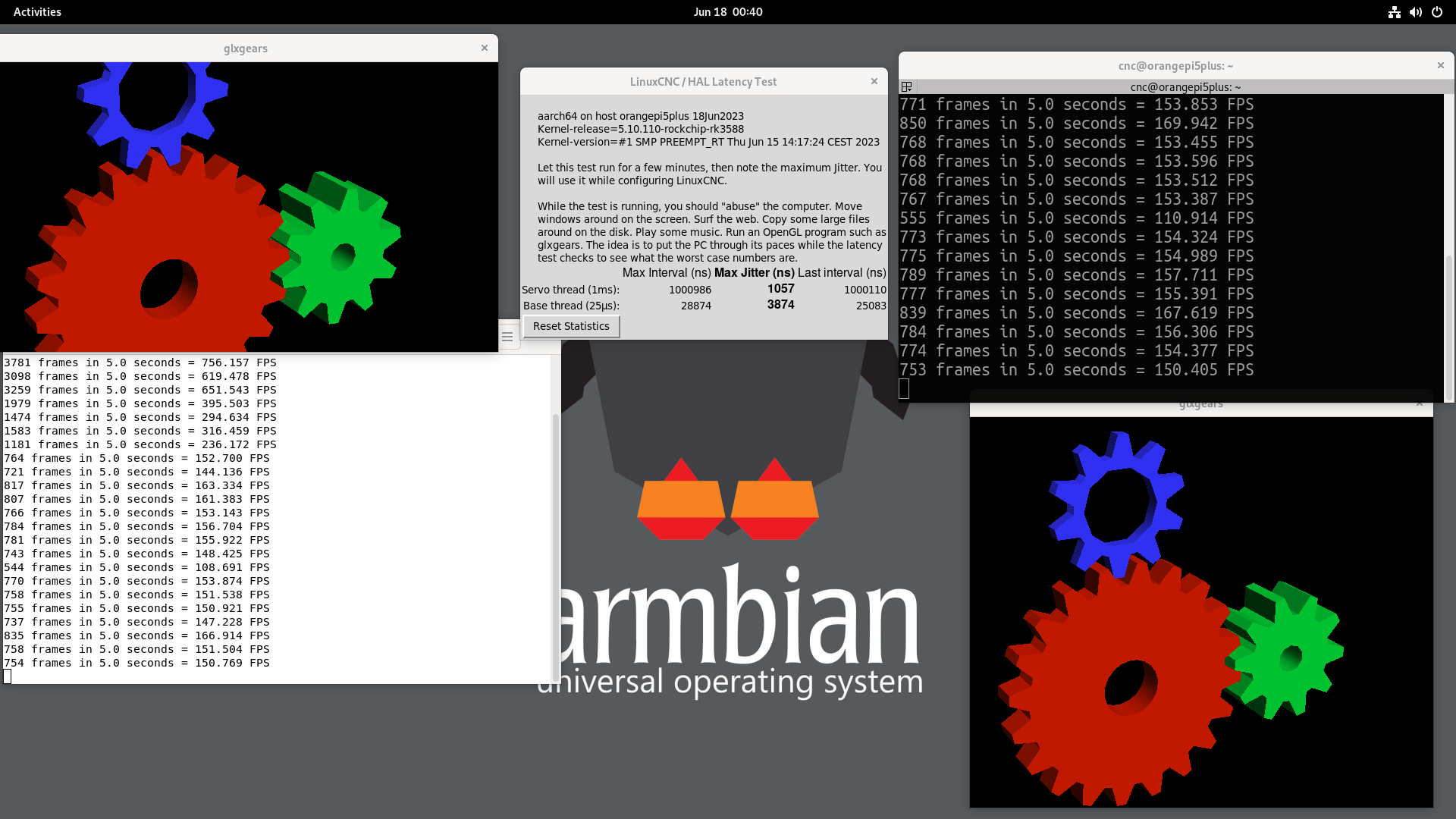
Well this is looking good. I flashed your bookworm image, was getting about 11-12 uS like you said but then I added extraargs=isolcpus=5,7 to /boot/armbianEnv.txt and now its like 5uS. much better.
Replied by buzzFab on topic Can the OPI5 be Configured to Run LCNC?
Well this is looking good. I flashed your bookworm image, was getting about 11-12 uS like you said but then I added extraargs=isolcpus=5,7 to /boot/armbianEnv.txt and now its like 5uS. much better.
Last edit: 3 years 4 months ago by buzzFab. Reason: screenshot
The following user(s) said Thank You: royka
- buzzFab
- Offline
- Junior Member
-
Less
More
- Posts: 28
- Thank you received: 7
3 years 4 months ago #273806
by buzzFab
Replied by buzzFab on topic Can the OPI5 be Configured to Run LCNC?
@royka The .deb header file in your deb folder... I am trying to follow a
guide from Rodw
for getting ethercat to work and i am having trouble installing the headers. first i did this
Rod suggested this
So I figured I would try the header file you supplied in the DEB folder like this...
But as you can see it failed to install, is there a different file I need to use?
Eric
Code:
cnc@orangepi5plus:~$ sudo apt install -y linux-headers-$(uname -r)
Reading package lists... Done
Building dependency tree... Done
Reading state information... Done
E: Unable to locate package linux-headers-5.10.110-rockchip-rk3588
E: Couldn't find any package by glob 'linux-headers-5.10.110-rockchip-rk3588'
cnc@orangepi5plus:~$ sudo apt install -y linux-headers
Reading package lists... Done
Building dependency tree... Done
Reading state information... Done
Package linux-headers is a virtual package provided by:
linux-headers-legacy-sun50iw9 23.02.2
linux-headers-legacy-rockchip-rk3588 23.02.2
linux-headers-legacy-media 23.02.2
linux-headers-edge-sunxi64 23.02.2
linux-headers-edge-rockchip64 23.02.2
linux-headers-edge-rockchip-rk3588 23.02.2
linux-headers-edge-rk35xx 23.02.2
linux-headers-edge-rk3568-odroid 23.02.2
linux-headers-edge-mvebu64 23.02.2
linux-headers-edge-meson64 23.02.2
linux-headers-edge-media 23.02.2
linux-headers-edge-bcm2711 23.02.2
linux-headers-edge-arm64 23.02.2
linux-headers-current-virtual 23.02.2
linux-headers-current-sunxi64 23.02.2
linux-headers-current-rockchip64 23.02.2
linux-headers-current-mvebu64 23.02.2
linux-headers-current-meson64 23.02.2
linux-headers-current-media 23.02.2
linux-headers-current-bcm2711 23.02.2
linux-headers-current-arm64 23.02.2
You should explicitly select one to install.
E: Package 'linux-headers' has no installation candidate
Rod suggested this
I've been watching your progress. In the armbian environment, the headers should be built as part of the process so I'm surprised you could not just install linux-headers
My suggestion would be to change your armbian build parameters to just build a kernel (instead of an image) and the headers and the image will be created in the output folder. Install with dpkg -i linux-headers-xxxxx.deb
So I figured I would try the header file you supplied in the DEB folder like this...
Code:
cnc@orangepi5plus:~$ cd Downloads
cnc@orangepi5plus:~/Downloads$ ls
linux-headers-legacy-rockchip-rk3588_23.05.0-trunk--5.10.110-S7639-De8b2-P2ca6-C5f57Hfe66-Vc222-Be9aa_arm64.deb
cnc@orangepi5plus:~/Downloads$ sudo dpkg -i linux-headers-legacy-rockchip-rk3588_23.05.0-trunk--5.10.110-S7639-De8b2-P2ca6-C5f57Hfe66-Vc222-Be9aa_arm64.deb
[sudo] password for cnc:
(Reading database ... 133643 files and directories currently installed.)
Preparing to unpack linux-headers-legacy-rockchip-rk3588_23.05.0-trunk--5.10.110-S7639-De8b2-P2ca6-C5f57Hfe66-Vc222-Be9aa_arm64.deb ...
Armbian 'linux-headers-legacy-rockchip-rk3588' for '5.10.110-rockchip-rk3588': 'prerm' starting.
+ [[ -d /usr/src/linux-headers-5.10.110-rockchip-rk3588 ]]
+ echo 'Cleaning directory /usr/src/linux-headers-5.10.110-rockchip-rk3588 ...'
Cleaning directory /usr/src/linux-headers-5.10.110-rockchip-rk3588 ...
+ rm -rf /usr/src/linux-headers-5.10.110-rockchip-rk3588
+ set +x
Armbian 'linux-headers-legacy-rockchip-rk3588' for '5.10.110-rockchip-rk3588': 'prerm' finishing.
Armbian 'linux-headers-legacy-rockchip-rk3588' for '5.10.110-rockchip-rk3588': 'preinst' starting.
+ [[ -d /usr/src/linux-headers-5.10.110-rockchip-rk3588 ]]
+ set +x
Armbian 'linux-headers-legacy-rockchip-rk3588' for '5.10.110-rockchip-rk3588': 'preinst' finishing.
Unpacking linux-headers-legacy-rockchip-rk3588 (23.05.0-trunk--5.10.110-S7639-De8b2-P2ca6-C5f57Hfe66-Vc222-Be9aa) over (23.05.0-trunk--5.10.110-S7639-De8b2-P2ca6-C5f57Hfe66-Vc222-Be9aa) ...
Setting up linux-headers-legacy-rockchip-rk3588 (23.05.0-trunk--5.10.110-S7639-De8b2-P2ca6-C5f57Hfe66-Vc222-Be9aa) ...
Armbian 'linux-headers-legacy-rockchip-rk3588' for '5.10.110-rockchip-rk3588': 'postinst' starting.
+ cd /usr/src/linux-headers-5.10.110-rockchip-rk3588
++ grep -c processor /proc/cpuinfo
+ NCPU=8
+ echo 'Compiling kernel-headers tools (5.10.110-rockchip-rk3588) using 8 CPUs - please wait ...'
Compiling kernel-headers tools (5.10.110-rockchip-rk3588) using 8 CPUs - please wait ...
+ yes ''
+ make ARCH=arm64 oldconfig
HOSTCC scripts/basic/fixdep
HOSTCC scripts/kconfig/conf.o
HOSTCC scripts/kconfig/confdata.o
HOSTCC scripts/kconfig/expr.o
LEX scripts/kconfig/lexer.lex.c
YACC scripts/kconfig/parser.tab.[ch]
HOSTCC scripts/kconfig/lexer.lex.o
HOSTCC scripts/kconfig/parser.tab.o
HOSTCC scripts/kconfig/preprocess.o
HOSTCC scripts/kconfig/symbol.o
HOSTCC scripts/kconfig/util.o
HOSTLD scripts/kconfig/conf
/usr/bin/env: ‘python’: No such file or directory
/usr/bin/env: ‘python’: No such file or directory
/usr/bin/env: ‘python’: No such file or directory
/usr/bin/env: ‘python’: No such file or directory
/usr/bin/env: ‘python’: No such file or directory
init/Kconfig:33:warning: 'GCC_VERSION': number is invalid
#
# configuration written to .config
#
+ make ARCH=arm64 -j8 scripts
/usr/bin/env: ‘python’: No such file or directory
SYNC include/config/auto.conf.cmd
/usr/bin/env: ‘python’: No such file or directory
/usr/bin/env: ‘python’: No such file or directory
/usr/bin/env: ‘python’: No such file or directory
/usr/bin/env: ‘python’: No such file or directory
/usr/bin/env: ‘python’: No such file or directory
init/Kconfig:33:warning: 'GCC_VERSION': number is invalid
arch/arm64/Makefile:44: Detected assembler with broken .inst; disassembly will be unreliable
/usr/bin/env: ‘python’: No such file or directory
HOSTCC scripts/dtc/dtc.o
HOSTCC scripts/dtc/flattree.o
HOSTCC scripts/dtc/fstree.o
HOSTCC scripts/dtc/data.o
HOSTCC scripts/dtc/livetree.o
HOSTCC scripts/dtc/treesource.o
HOSTCC scripts/dtc/srcpos.o
HOSTCC scripts/dtc/checks.o
HOSTCC scripts/dtc/util.o
LEX scripts/dtc/dtc-lexer.lex.c
YACC scripts/dtc/dtc-parser.tab.[ch]
HOSTCC scripts/dtc/dtc-lexer.lex.o
HOSTCC scripts/dtc/dtc-parser.tab.o
HOSTLD scripts/dtc/dtc
HOSTCC scripts/kallsyms
HOSTCC scripts/recordmcount
HOSTCC scripts/resource_tool
HOSTCC scripts/sorttable
HOSTCC scripts/asn1_compiler
HOSTCC scripts/extract-cert
scripts/extract-cert.c: In function ‘display_openssl_errors’:
scripts/extract-cert.c:46:9: warning: ‘ERR_get_error_line’ is deprecated: Since OpenSSL 3.0 [-Wdeprecated-declarations]
46 | while ((e = ERR_get_error_line(&file, &line))) {
| ^~~~~
In file included from scripts/extract-cert.c:23:
/usr/include/openssl/err.h:423:15: note: declared here
423 | unsigned long ERR_get_error_line(const char **file, int *line);
| ^~~~~~~~~~~~~~~~~~
scripts/extract-cert.c: In function ‘drain_openssl_errors’:
scripts/extract-cert.c:60:9: warning: ‘ERR_get_error_line’ is deprecated: Since OpenSSL 3.0 [-Wdeprecated-declarations]
60 | while (ERR_get_error_line(&file, &line)) {}
| ^~~~~
/usr/include/openssl/err.h:423:15: note: declared here
423 | unsigned long ERR_get_error_line(const char **file, int *line);
| ^~~~~~~~~~~~~~~~~~
scripts/extract-cert.c: In function ‘main’:
scripts/extract-cert.c:130:17: warning: ‘ENGINE_load_builtin_engines’ is deprecated: Since OpenSSL 3.0 [-Wdeprecated-declarations]
130 | ENGINE_load_builtin_engines();
| ^~~~~~~~~~~~~~~~~~~~~~~~~~~
In file included from scripts/extract-cert.c:24:
/usr/include/openssl/engine.h:358:28: note: declared here
358 | OSSL_DEPRECATEDIN_3_0 void ENGINE_load_builtin_engines(void);
| ^~~~~~~~~~~~~~~~~~~~~~~~~~~
scripts/extract-cert.c:132:17: warning: ‘ENGINE_by_id’ is deprecated: Since OpenSSL 3.0 [-Wdeprecated-declarations]
132 | e = ENGINE_by_id("pkcs11");
| ^
/usr/include/openssl/engine.h:336:31: note: declared here
336 | OSSL_DEPRECATEDIN_3_0 ENGINE *ENGINE_by_id(const char *id);
| ^~~~~~~~~~~~
scripts/extract-cert.c:134:17: warning: ‘ENGINE_init’ is deprecated: Since OpenSSL 3.0 [-Wdeprecated-declarations]
134 | if (ENGINE_init(e))
| ^~
/usr/include/openssl/engine.h:620:27: note: declared here
620 | OSSL_DEPRECATEDIN_3_0 int ENGINE_init(ENGINE *e);
| ^~~~~~~~~~~
scripts/extract-cert.c:139:25: warning: ‘ENGINE_ctrl_cmd_string’ is deprecated: Since OpenSSL 3.0 [-Wdeprecated-declarations]
139 | ERR(!ENGINE_ctrl_cmd_string(e, "PIN", key_pass, 0), "Set PKCS#11 PIN");
| ^~~
/usr/include/openssl/engine.h:479:5: note: declared here
479 | int ENGINE_ctrl_cmd_string(ENGINE *e, const char *cmd_name, const char *arg,
| ^~~~~~~~~~~~~~~~~~~~~~
scripts/extract-cert.c:140:17: warning: ‘ENGINE_ctrl_cmd’ is deprecated: Since OpenSSL 3.0 [-Wdeprecated-declarations]
140 | ENGINE_ctrl_cmd(e, "LOAD_CERT_CTRL", 0, &parms, NULL, 1);
| ^~~~~~~~~~~~~~~
/usr/include/openssl/engine.h:450:27: note: declared here
450 | OSSL_DEPRECATEDIN_3_0 int ENGINE_ctrl_cmd(ENGINE *e, const char *cmd_name,
| ^~~~~~~~~~~~~~~
+ make ARCH=arm64 -j8 M=scripts/mod/
arch/arm64/Makefile:44: Detected assembler with broken .inst; disassembly will be unreliable
/usr/bin/env: ‘python’: No such file or directory
CC scripts/mod//empty.o
HOSTCC scripts/mod//mk_elfconfig
CC scripts/mod//devicetable-offsets.s
/usr/bin/env: ‘python’: No such file or directory
make[1]: *** [scripts/Makefile.build:273: scripts/mod//empty.o] Error 127
make[1]: *** Waiting for unfinished jobs....
/usr/bin/env: ‘python’: No such file or directory
make[1]: *** [scripts/Makefile.build:117: scripts/mod//devicetable-offsets.s] Error 127
make: *** [Makefile:1920: scripts/mod/] Error 2
dpkg: error processing package linux-headers-legacy-rockchip-rk3588 (--install):
installed linux-headers-legacy-rockchip-rk3588 package post-installation script subprocess returned error exit status 2
Errors were encountered while processing:
linux-headers-legacy-rockchip-rk3588
cnc@orangepi5plus:~/Downloads$
But as you can see it failed to install, is there a different file I need to use?
Eric
Time to create page: 3.147 seconds