Changing the openGL colors in the Axis GUI

  • KPA
  • New Member
  • New Member
More
14 years 9 months ago - 14 years 9 months ago #16787 by KPA
cmorley wrote:

The max velocity setting is for limiting Rapids during testing of programs.
I was toying with the idea of having the max velocity as a percentage and tie it to feed override when in single block mode.


Yes I see it now. Feedrate Override controls feedrate only, Max Velocity controls Rapids and Feedrate. As you said, handy during prove out. Some controllers break out the rapid function on the panel, but I see the usefulness of having it combined.

In an ideal world we have individual feed rate and rapid rates defined for each axis. In the ini I see max velocities for each axis, but no max feedrate. Not sure if I'm reading it right.

On another thought, the sliders could all be percentages:

Feed Override 0-120% (or whatever the max is set to in the ini)
Spindle Override 0-120%
Rapid Override 0-120%
Jog Override 0-120%

I guess there's more than one way to skin a cat.

Jay
Last edit: 14 years 9 months ago by KPA.

Please Log in or Create an account to join the conversation.

More
14 years 9 months ago #16790 by andypugh
KPA wrote:

In an ideal world we have individual feed rate and rapid rates defined for each axis. In the ini I see max velocities for each axis, but no max feedrate. Not sure if I'm reading it right.

The [AXIS_N] sections of the INI should really be called [JOINT_N], they describe the physical limitations of each actuator. In most machines the two are almost interchangeable, but consider a robot arm or something like this: wiki.linuxcnc.org/emcinfo.pl?Koppi's_Toy where, depending on the position of the "controlled point" the distance that the actuator needs to move for a given movement in space is variable.

Even with a simple Cartesian machine, with X and Y both moving at the same time the feed rate is sqrt(2) times as big as if only one is moving.

Please Log in or Create an account to join the conversation.

More
14 years 9 months ago - 14 years 9 months ago #16874 by loboy
To change the live plotter colors in Axis you have to copy the contents of the file:

/usr/share/doc/emc2/axis_light_background

into the file

~user/.Xresources

I had trouble with this because the file .Xresources is hidden and I had to create it. Simple, but I was confused as it is something that is not related to Axis at all.
Last edit: 14 years 9 months ago by loboy.

Please Log in or Create an account to join the conversation.
More
14 years 9 months ago - 14 years 9 months ago #16876 by loboy
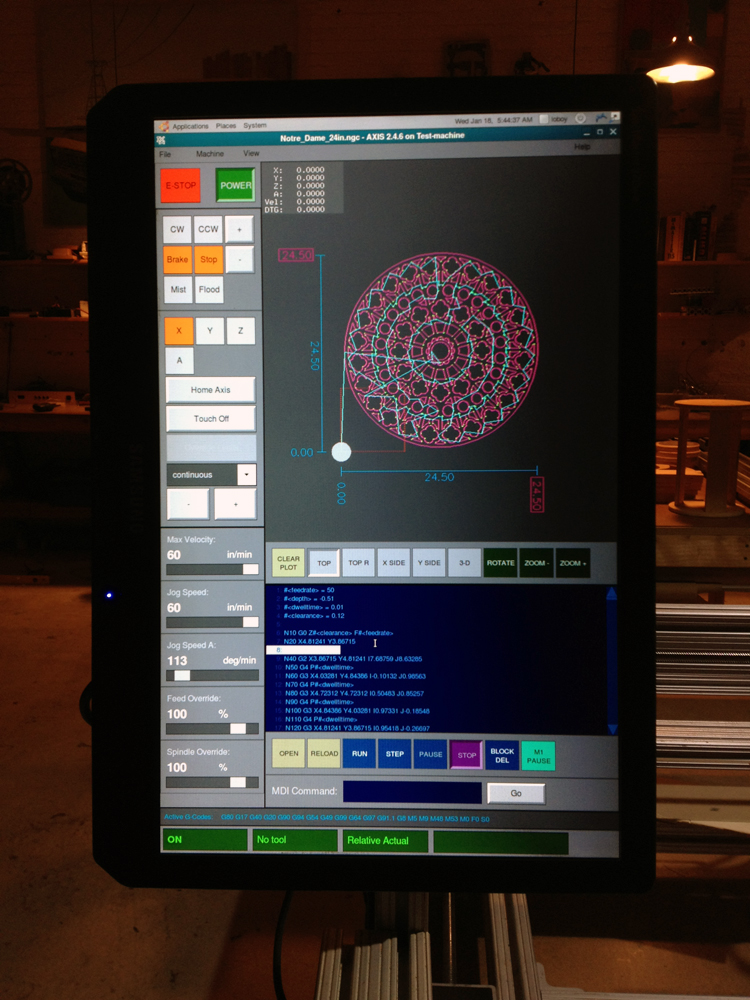
So, here is my new rearrangement of the interface.

image missing http://linuxcnc.org/media/kunena/attachments/legacy/images/new_axis_interface.jpg

I decided on designing it for a portrait mode. All the elements just laid out cleaner and I actually prefer the monitor this way.
Last edit: 14 years 9 months ago by loboy.
The following user(s) said Thank You: hoffb77, Soccer Kid

Please Log in or Create an account to join the conversation.

More
14 years 9 months ago #16880 by dab77
very neat and readable.
Compliments!!

Please Log in or Create an account to join the conversation.

More
14 years 9 months ago #16882 by BigJohnT
Very Nice indeed!

John

Please Log in or Create an account to join the conversation.

Time to create page: 0.238 seconds
Powered by Kunena Forum
