Changing the openGL colors in the Axis GUI

  • KPA
  • New Member
  • New Member
More
14 years 9 months ago #16884 by KPA
I got to hand it to you, GUI design is in your blood! Now to see if we can get a touchscreen that will fit this configuration.

Jay

Please Log in or Create an account to join the conversation.

More
14 years 9 months ago #16885 by loboy
Thanks all.

I am a designer by trade, and have designed quite a few websites interfaces.

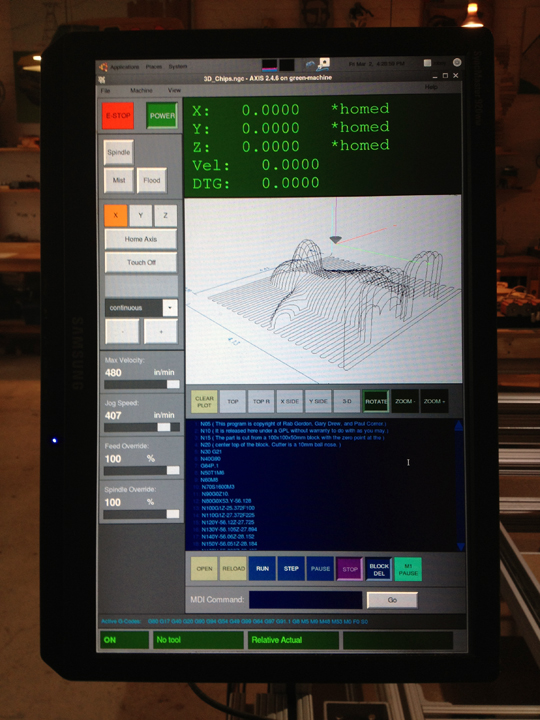
Next up, I am tackling some openGL lighting issues and such. Fattening up some of the lines for readability and enlarging the little DRO in the corner.

I am also now getting into the guts of the pop-up windows, and cleaning those up as well.

The mechanics of the interface are also much better, as when a file is running everything is much easier to see from across the room, and the button and scale bar interaction is much more satisfying.

I dropped the tabbed DRO, and I dropped the history frame as well. I just started to test this out in a production environment, so I'll see how fluid the motions are when in full swing. I may want the history section back...

Please Log in or Create an account to join the conversation.

More
14 years 9 months ago #16900 by toplakd
Where can I make a donation?

Dejan
The following user(s) said Thank You: flyingbrick

Please Log in or Create an account to join the conversation.

  • KPA
  • New Member
  • New Member
More
14 years 9 months ago #16914 by KPA
Loboy,
Couple of quick questions.. is the middle separator bar dragable? Also it would be nice to have spindle speed on the display.

Great work!

Jay

Please Log in or Create an account to join the conversation.

More
14 years 9 months ago #16920 by loboy
Jay,

Nothing as of now is draggable. On window expansion, the right hand column expands, and the preview and gcode readout expand, as with their toolbars.

The code is now modular enough, that moving panel blocks around in the layout is simple. I prefer to keep all machine controls left justified. However, shifting the machine controls to the right is easy. This is a personal preference, and has more to do with where your monitor is situated in relation to your machine and your workflow.

I could throw spindle speed on there as well. I don't currently have digital spindle speed control on my machine. One of these days...

The monitor I have is 1440 x 900, which is 16:9 widescreen. So the overall layout is a little less than 900 pixels wide. This layout won't work on a 4:3 monitor, or a monitor with any less of a resolution. Getting Ubuntu to rotate 90 degrees was a little difficult.

Also, this layout wouldn't be right for the use of a lathe, I would think. As I don't have a lathe, I am not quite sure what the work flow preference is.

The workflow of this layout is top to bottom, instead of left to right.

Please Log in or Create an account to join the conversation.

More
14 years 7 months ago - 13 years 5 months ago #18401 by loboy
Here is how I implemented the DRO. I also removed the tiny digital readout from the live plotter preview.


So I have been using this interface for about a month now, and everything has been smooth as silk. An interesting quirk I found that when using the MDI, when I arrow down in the MDI command input box, the history is actually still there. So I don't need the large box containing all the history of MDI commands. Just a quirk in my code that I found is pretty handy.

I think I am going to implement an XY grid in the live plotter preview. Has anyone done this?
Last edit: 13 years 5 months ago by loboy.

Please Log in or Create an account to join the conversation.

Time to create page: 0.180 seconds
Powered by Kunena Forum