
Clearpath HLFB amp.joint.delay
- Fastfred
- Offline
- Senior Member
-

Less
More
- Posts: 61
- Thank you received: 1
12 Dec 2025 19:22 #340012
by Fastfred
Replied by Fastfred on topic Clearpath HLFB amp.joint.delay
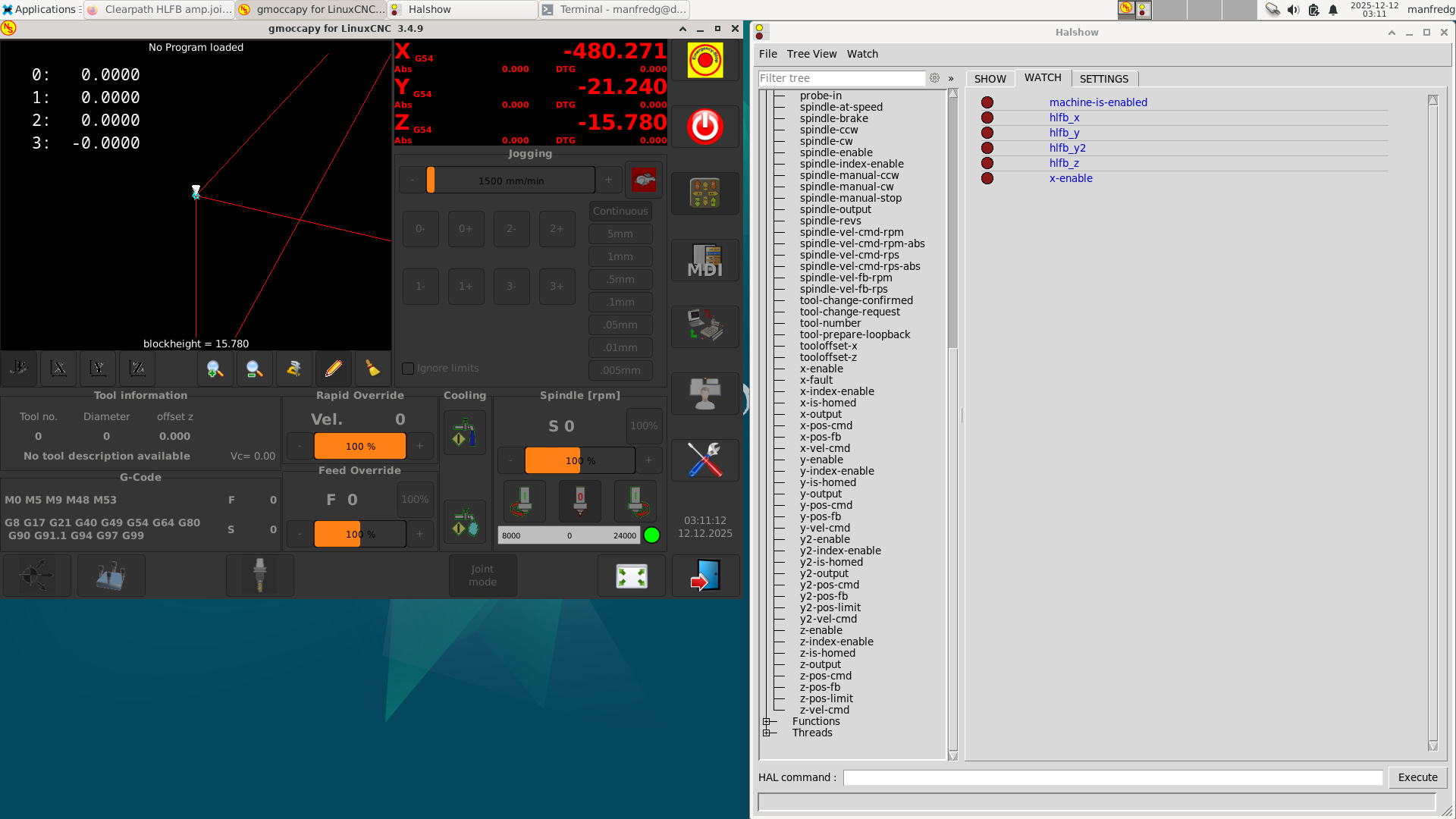
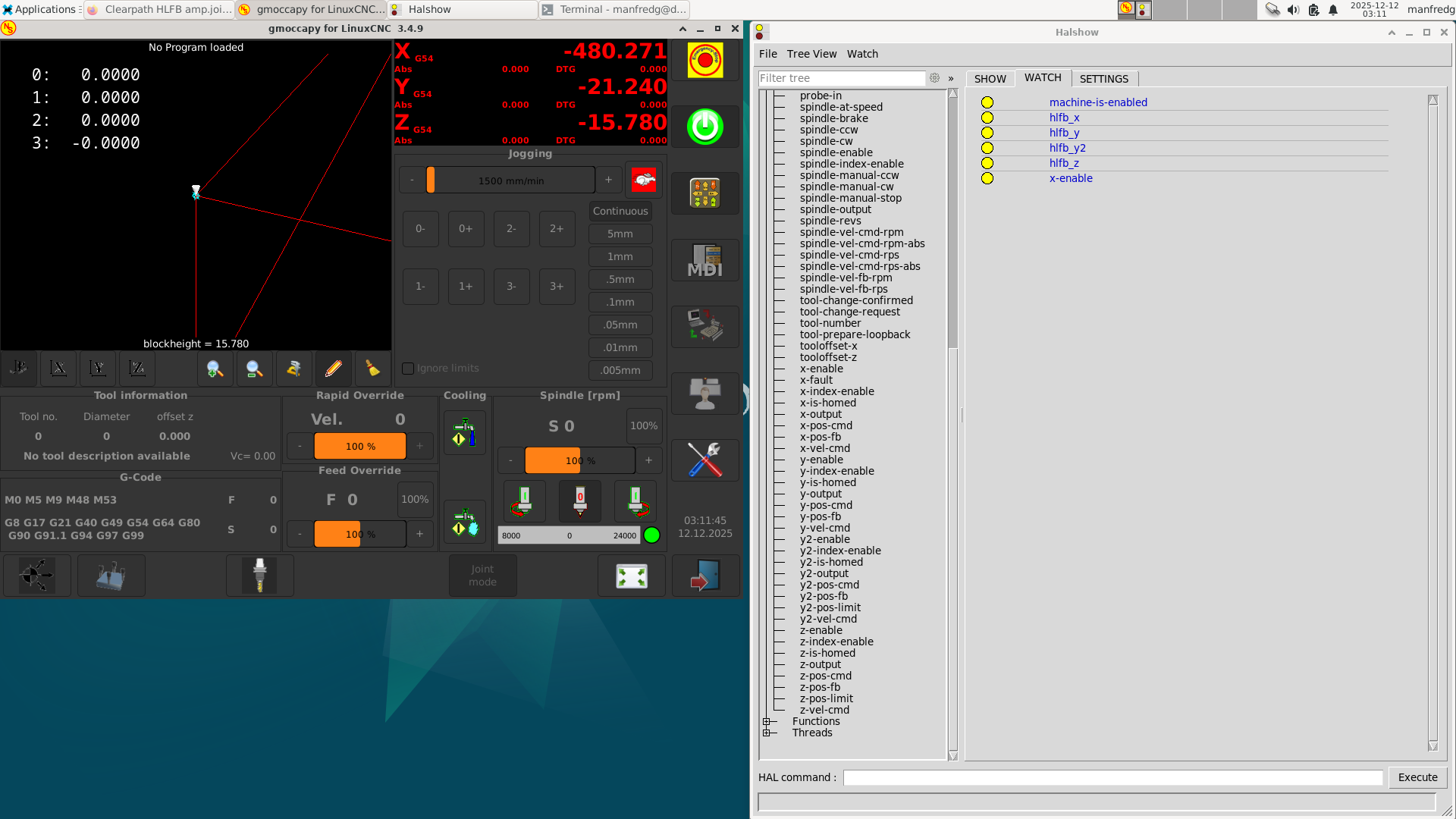
Just got back to it, have screen shots showing HLFB input pins inactive and active with machine enable ( think I did this correct) Two things only have the x axis active everything else commented out. Wasn't sure how to configure the output portion at the moment i have one output to enable the drives and the second thing was should the x axis fault with this config when i disconnect it at the moment it does not.
Attachments:
Please Log in or Create an account to join the conversation.
- Fastfred
- Offline
- Senior Member
-
Less
More
- Posts: 61
- Thank you received: 1
12 Dec 2025 21:34 #340019
by Fastfred
Replied by Fastfred on topic Clearpath HLFB amp.joint.delay
I think I need (joint.X.amp-fault-in) but not sure correct spot to insert.
Please Log in or Create an account to join the conversation.
- tommylight
-

- Away
- Moderator
-

Less
More
- Posts: 21898
- Thank you received: 7465
12 Dec 2025 22:54 #340022
by tommylight
Replied by tommylight on topic Clearpath HLFB amp.joint.delay
net joint.X.amp-fault-in whatever_input_pin
That is all you need to add to hal file for each joint.
That is all you need to add to hal file for each joint.
Please Log in or Create an account to join the conversation.
- Fastfred
- Offline
- Senior Member
-
Less
More
- Posts: 61
- Thank you received: 1
12 Dec 2025 23:12 #340025
by Fastfred
Replied by Fastfred on topic Clearpath HLFB amp.joint.delay
Do U replace this section
# HLFB is true when enabled *and* following
net hlfb_x hm2_7i76e.0.7i76.0.0.input-16-not
net hlfb_y hm2_7i76e.0.7i76.0.0.input-17-not
net hlfb_y2 hm2_7i76e.0.7i76.0.0.input-18-not
net hlfb_z hm2_7i76e.0.7i76.0.0.input-19-not
net hlfb-a hm2_7i76e.0.7i76.0.0.input-20-not
With net joint.X.amp-fault-in whatever_input_pin
? Thanks
# HLFB is true when enabled *and* following
net hlfb_x hm2_7i76e.0.7i76.0.0.input-16-not
net hlfb_y hm2_7i76e.0.7i76.0.0.input-17-not
net hlfb_y2 hm2_7i76e.0.7i76.0.0.input-18-not
net hlfb_z hm2_7i76e.0.7i76.0.0.input-19-not
net hlfb-a hm2_7i76e.0.7i76.0.0.input-20-not
With net joint.X.amp-fault-in whatever_input_pin
? Thanks
Please Log in or Create an account to join the conversation.
- tommylight
-
- Away
- Moderator
-
Less
More
- Posts: 21898
- Thank you received: 7465
12 Dec 2025 23:55 #340026
by tommylight
Replied by tommylight on topic Clearpath HLFB amp.joint.delay
net joint.X.amp-fault-in hm2_7i76e.0.7i76.0.0.input-16-not
etc...
etc...
Please Log in or Create an account to join the conversation.
- Fastfred
- Offline
- Senior Member
-
Less
More
- Posts: 61
- Thank you received: 1
13 Dec 2025 00:45 #340032
by Fastfred
Replied by Fastfred on topic Clearpath HLFB amp.joint.delay
made the changes but errors
Debug file information:
Note: Using POSIX realtime
HAL: ERROR: function 'and2.4' not found
./custom.hal:5: addf failed
18633
Stopping realtime threads
Unloading hal components
Note: Using POSIX realtime
Debug file information:
Note: Using POSIX realtime
HAL: ERROR: function 'and2.4' not found
./custom.hal:5: addf failed
18633
Stopping realtime threads
Unloading hal components
Note: Using POSIX realtime
Attachments:
Please Log in or Create an account to join the conversation.
- tommylight
-
- Away
- Moderator
-
Less
More
- Posts: 21898
- Thank you received: 7465
13 Dec 2025 00:48 #340033
by tommylight
Replied by tommylight on topic Clearpath HLFB amp.joint.delay
and2.n should be ranged from 0, not from 3, so
and2.0
and2.1
and2.2
and2.3
and2.0
and2.1
and2.2
and2.3
Please Log in or Create an account to join the conversation.
- Fastfred
- Offline
- Senior Member
-
Less
More
- Posts: 61
- Thank you received: 1
13 Dec 2025 01:10 #340034
by Fastfred
Replied by Fastfred on topic Clearpath HLFB amp.joint.delay
Thank You for that looks like the .hal file is correct now I am assuming I dont have correct settings in the motors thought it would fault if power/loss of com .
or am I missing a config for that?
Thanks
or am I missing a config for that?
Thanks
Please Log in or Create an account to join the conversation.
- tommylight
-
- Away
- Moderator
-
Less
More
- Posts: 21898
- Thank you received: 7465
13 Dec 2025 11:40 #340042
by tommylight
Replied by tommylight on topic Clearpath HLFB amp.joint.delay
Remove everything except timedelay and fault inputs.
-
I still have no idea what your issue is, i am replying to your queries as they come.
Such errors should not be triggered when drives are enabled, so that might well be drive issue.
-
I still have no idea what your issue is, i am replying to your queries as they come.
Such errors should not be triggered when drives are enabled, so that might well be drive issue.
Please Log in or Create an account to join the conversation.
- spumco
- Offline
- Platinum Member
-

Less
More
- Posts: 2169
- Thank you received: 896
13 Dec 2025 14:26 #340049
by spumco
You cannot successfully edit/adjust HAL unless you know exactly what the motor(s) HLFB output is doing under various conditions.
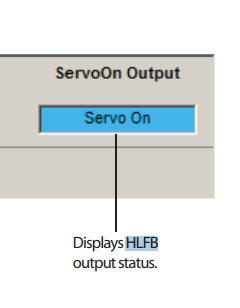
Power up the motors - no need to enable in LCNC - connect a Windows computer to the motors and open the Clearpath software. Verify that all motors' HLFB output is set to 'Servo On.'
Check your LCNC input pins are working correctly. You can enable/disable the motors using the Clearpath software (overriding LCNC's output).
While you enable/disable the motors via Clearpath software, two things should happen:
@tommylight - Clearpath motors have no separate drives. The motors are supplied with DC power and all programming/control stuff is mounted internally in the motor itself. They have three inputs (enable + A + , and a single output (HLFB) that can be programmed to do different things.
Replied by spumco on topic Clearpath HLFB amp.joint.delay
This is why I suggested the FIRST thing was to verify/edit the motor programming using the Clearpath software.Thank You for that looks like the .hal file is correct now I am assuming I dont have correct settings in the motors thought it would fault if power/loss of com .
or am I missing a config for that?
Thanks
You cannot successfully edit/adjust HAL unless you know exactly what the motor(s) HLFB output is doing under various conditions.
Power up the motors - no need to enable in LCNC - connect a Windows computer to the motors and open the Clearpath software. Verify that all motors' HLFB output is set to 'Servo On.'
Check your LCNC input pins are working correctly. You can enable/disable the motors using the Clearpath software (overriding LCNC's output).
While you enable/disable the motors via Clearpath software, two things should happen:
- The Clearpath software display should show 'servo on' in the output monitor
- LCNC halshow input pins should be high/yellow when enable is true, and low/dark when the motor is not enabled
@tommylight - Clearpath motors have no separate drives. The motors are supplied with DC power and all programming/control stuff is mounted internally in the motor itself. They have three inputs (enable + A +
, and a single output (HLFB) that can be programmed to do different things. Attachments:
The following user(s) said Thank You: tommylight
Please Log in or Create an account to join the conversation.
Time to create page: 0.495 seconds