Install parallel port

More
5 years 7 months ago #201629 by guido-52
Replied by guido-52 on topic Install parallel port
Of course it could, but then it seems to me to be a bug in linuxcnc because when the process is interrupted at startup, for graphical reasons and only the port is reported as an error.
And why is it not listed as a warning or note, but as an error.
For me the botomline remains why does the machine not boot, if this is for graphical reasons how do I fix that.
The graphics card is also a plugged-in version, as recommended.
On the system, other graphics applications, with a much higher resolution than that required by linuxcnc, will run fine.

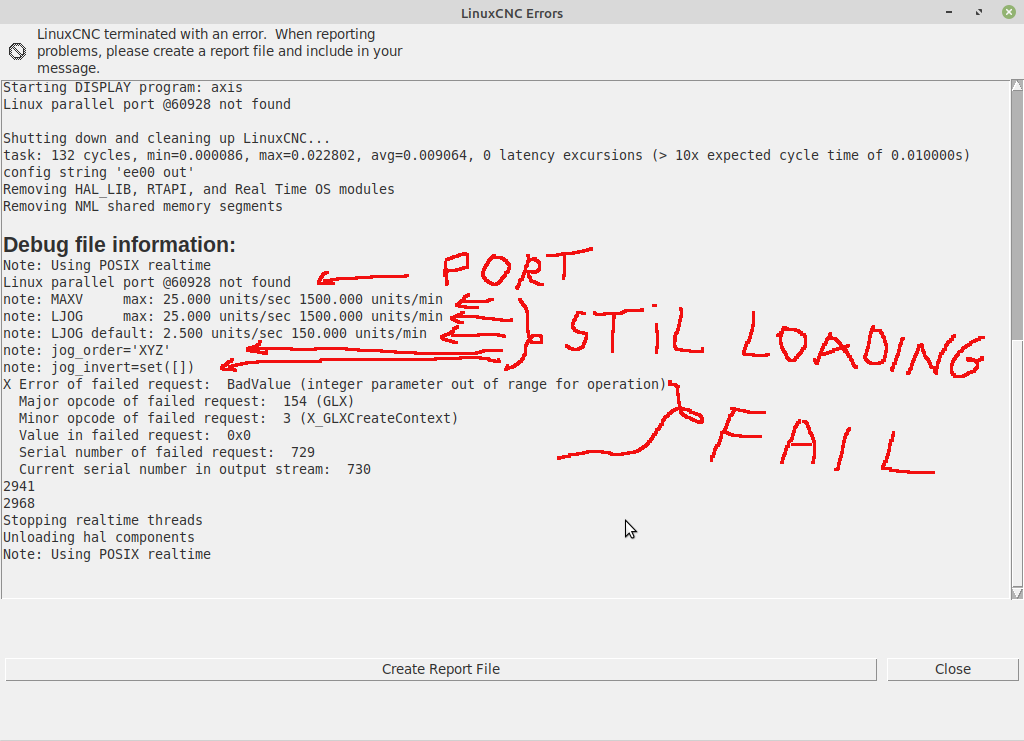
When viewing the error report, you see
It is reported that the graphical environment is starting up, then the port error is determined and immediately afterwards the shutdown is done.

So the case is stopped not after starting the graphical environment but only after the port error has been determined.

I am a novice in linuxcnc and linux, but I am quite familiar with computers. I am open to explore both avenues.

Please Log in or Create an account to join the conversation.

More
5 years 7 months ago #201633 by tommylight
Replied by tommylight on topic Install parallel port
Blaming everything does not help you,

LinuxCNC versions 2.8 and above will start even if there is no parallel port in most cases and report not finding it, so move on to fixing the things that need to be fixed.
The errors related to graphic are due to GL extensions not working, most probably a very old graphic card or one that uses proprietary drivers.
What PC and graphic ?

Please Log in or Create an account to join the conversation.
More
5 years 7 months ago #201638 by guido-52
Replied by guido-52 on topic Install parallel port
Sorry you think I blame everything.
I just found that the software could not find the port and thought that it would cause the machine to fail.

But apparently that is not always the case, so it could be that the port would still work .....
If I am correct there is also another problem probably the graphics card.
The computer is an HP pavilion m9000 and the graphics card is an HP Asus Nvidia GeForce 8400GS

Please Log in or Create an account to join the conversation.

More
5 years 7 months ago #201639 by tommylight
Replied by tommylight on topic Install parallel port
Does the PC have a built in graphic?
If yes, use that and remove the NVIDIA as they do cause issues with latency also.

Please Log in or Create an account to join the conversation.

More
5 years 7 months ago #201668 by guido-52
Replied by guido-52 on topic Install parallel port
I have removed the NVIDA, unfortunately the result is just the same.

Please Log in or Create an account to join the conversation.

More
5 years 7 months ago #201677 by tommylight
Replied by tommylight on topic Install parallel port
Still reporting the GL errors ?
Try booting from the USB drive in Live session and run the config you made, see if that works.

Please Log in or Create an account to join the conversation.

Moderators: PCW, jmelson
Time to create page: 0.148 seconds
Powered by Kunena Forum