Install parallel port

More
5 years 7 months ago #201762 by andypugh
Replied by andypugh on topic Install parallel port
You could try DISPLAY=tklinuxcnc in the INI file.
That's a low-graphics GUI. If that works then it would indicate that the problem definitely is graphics.

Actually DISPLAY=touchy might work too.

I get the errors that you show if I try to start Axis from an SSH session. But Touchy works fine running remotely.

Please Log in or Create an account to join the conversation.
More
5 years 7 months ago #201772 by jmelson
Replied by jmelson on topic Install parallel port
If running Axis from an ssh login, you need to use ssh -X (that's a capital X) to set up export of the X-windows display. This could have sluggish response of the 3D preview window, but it SHOULD work.

Setting DISPLAY to touchy or other non-graphics GUI would avoid the GL support issues. My test is to try to run glxgears. If that works, then some kind of GL support or emulation is working. If glxgears just bombs with an error message, then you can be pretty sure that either GL or GL emulation is not available. If glxgears is just not installed, then you need to get it from the mesa utilities package. mesa (not to be confused with the motion interface supplier Mesa) is a software emulation package for GL. But, you really don't want to run mesa for software emulation of GL graphics.

Jon

Please Log in or Create an account to join the conversation.

More
5 years 7 months ago #201800 by guido-52
Replied by guido-52 on topic Install parallel port
Booting from USB gives the same error.
DISPLAY=tklinuxcnc works, DISPLAY=touchy not.

I'm not starting from a SSH location so haven't tried.

But, as mentioned before, I have found another computer.
This one is slightly faster and has a parallel port on board.

I have installed linuxcnc on this. Now my configuration starts up.
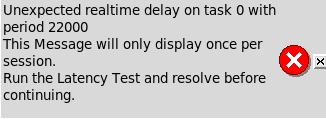
Only I get this message when starting up

But it looks like the CNC works.
I have tried with the vga on board and with an asus external card. I think the asus is slightly faster .....

The latency test gives;
I will now proceed with this configuration.
Thanks to everyone for thinking and tips.

Please Log in or Create an account to join the conversation.

Moderators: PCW, jmelson
Time to create page: 0.368 seconds
Powered by Kunena Forum
