
MAC address not retrieved (after 2 years stop)
- Jocman
- Offline
- Premium Member
-

Less
More
- Posts: 111
- Thank you received: 11
24 Jan 2026 09:03 #341842
by Jocman
Replied by Jocman on topic MAC address not retrieved (after 2 years stop)
Now the linuxcnc error is once again about the mac address (as in my first post)
Then, I tried to install the drivers for the lan card as you suggest, but this is what I get:
and trying to follow your tutorial on youtube, as soon as I try to install grub-customizer (at the very beginning of the tutorial) I get this:
Then, I tried to install the drivers for the lan card as you suggest, but this is what I get:
joccnc@JocCnc:~$ sudo apt install r8168-dkms
[sudo] password for joccnc:
Reading package lists... Done
Building dependency tree
Reading state information... Done
E: Unable to locate package r8168-dkms
and trying to follow your tutorial on youtube, as soon as I try to install grub-customizer (at the very beginning of the tutorial) I get this:
joccnc@JocCnc:~$ sudo apt install grub-customizer geany
[sudo] password for joccnc:
Reading package lists... Done
Building dependency tree
Reading state information... Done
E: Unable to locate package grub-customizer
joccnc@JocCnc:~$
Please Log in or Create an account to join the conversation.
- rodw
-

- Offline
- Platinum Member
-

Less
More
- Posts: 12134
- Thank you received: 4140
24 Jan 2026 09:18 #341844
by rodw
Replied by rodw on topic MAC address not retrieved (after 2 years stop)
this is a bit tricky because you need non-free in your sources. This is included in our ISO
skip geub-customizer for now
skip geub-customizer for now
Please Log in or Create an account to join the conversation.
- tommylight
-

- Away
- Moderator
-

Less
More
- Posts: 21895
- Thank you received: 7465
24 Jan 2026 13:30 #341858
by tommylight
Replied by tommylight on topic MAC address not retrieved (after 2 years stop)
Do abefore trying to install something, then
sudo apt updatesudo apt install r8168-dkmsPlease Log in or Create an account to join the conversation.
- Jocman
- Offline
- Premium Member
-
Less
More
- Posts: 111
- Thank you received: 11
26 Jan 2026 09:06 #341922
by Jocman
Replied by Jocman on topic MAC address not retrieved (after 2 years stop)
I've tried to update the system, but I get this:
As I can understand, there's something wrong (it seems almost...impossible to not find anything. Windows maybe, but Linux.....): too old version (2.7.14)???.
Anyway, I'm a little bit demoralized...
2 years ago I made the last job (a double sided PCB) and everything was perfect, then shutdown the system.
I can't understand what happened.
Before keeping going on with making you waste your time (I don't want it), as per your experience my problems can be related to:
1) software (linuxcnc) failure?
2) Mesa board failure?
3) MB failure?
In case 1), if I install the last linuxcnc release, will it be any chance to retrieve my current setup and customization (hoping it can fix the current problem)? 4 years ago I've spent almost 4-5 months to set linuxcnc (and with your needfull support, by myself I can't do anything....) and customize my axis with the function I normally use, so lose everything is something I don't want to....
Anyway, please tell me your opinion, I'll follow your suggestions.
joccnc@JocCnc:~$ sudo apt update
[sudo] password for joccnc:
Sorry, try again.
[sudo] password for joccnc:
Ign:1 http://linuxcnc.org stretch InRelease
Err:2 http://linuxcnc.org stretch Release
Cannot initiate the connection to linuxcnc.org:80 (69.163.143.134). - connect (101: Network is unreachable)
Ign:3 http://security.debian.org/debian-security stretch/updates InRelease
Err:4 http://security.debian.org/debian-security stretch/updates Release
404 Not Found [IP: 151.101.2.132 80]
Ign:5 http://ftp.debian.org/debian stretch InRelease
Err:6 http://ftp.debian.org/debian stretch Release
404 Not Found [IP: 146.75.62.132 80]
Reading package lists... Done
E: The repository 'http://linuxcnc.org stretch Release' does no longer have a Release file.
N: Updating from such a repository can't be done securely, and is therefore disabled by default.
N: See apt-secure(8) manpage for repository creation and user configuration details.
E: The repository 'http://security.debian.org/debian-security stretch/updates Release' does no longer have a Release file.
N: Updating from such a repository can't be done securely, and is therefore disabled by default.
N: See apt-secure(8) manpage for repository creation and user configuration details.
E: The repository 'http://ftp.debian.org/debian stretch Release' does no longer have a Release file.
N: Updating from such a repository can't be done securely, and is therefore disabled by default.
N: See apt-secure(8) manpage for repository creation and user configuration details.
As I can understand, there's something wrong (it seems almost...impossible to not find anything. Windows maybe, but Linux.....): too old version (2.7.14)???.
Anyway, I'm a little bit demoralized...
2 years ago I made the last job (a double sided PCB) and everything was perfect, then shutdown the system.
I can't understand what happened.
Before keeping going on with making you waste your time (I don't want it), as per your experience my problems can be related to:
1) software (linuxcnc) failure?
2) Mesa board failure?
3) MB failure?
In case 1), if I install the last linuxcnc release, will it be any chance to retrieve my current setup and customization (hoping it can fix the current problem)? 4 years ago I've spent almost 4-5 months to set linuxcnc (and with your needfull support, by myself I can't do anything....) and customize my axis with the function I normally use, so lose everything is something I don't want to....
Anyway, please tell me your opinion, I'll follow your suggestions.
Please Log in or Create an account to join the conversation.
- rodw
-
- Offline
- Platinum Member
-
Less
More
- Posts: 12134
- Thank you received: 4140
26 Jan 2026 10:06 #341925
by rodw
Replied by rodw on topic MAC address not retrieved (after 2 years stop)
Looks like you've lost your network. what does ip a say?
Look to make sure you have an IP address on your network side
can you ping your router?
Look to make sure you have an IP address on your network side
can you ping your router?
Please Log in or Create an account to join the conversation.
- Jocman
- Offline
- Premium Member
-
Less
More
- Posts: 111
- Thank you received: 11
26 Jan 2026 16:40 #341958
by Jocman
Replied by Jocman on topic MAC address not retrieved (after 2 years stop)
I don't think I've lost the network.
I've selected the pci card to connect to my network (in fact, I can normally access internet).
BTW, this evening (here's almost 6 pm) I hope to make another try (if my wife allow me
 )
)
I've selected the pci card to connect to my network (in fact, I can normally access internet).
BTW, this evening (here's almost 6 pm) I hope to make another try (if my wife allow me
Please Log in or Create an account to join the conversation.
- tommylight
-
- Away
- Moderator
-
Less
More
- Posts: 21895
- Thank you received: 7465
26 Jan 2026 16:45 #341960
by tommylight
Replied by tommylight on topic MAC address not retrieved (after 2 years stop)
Rod asked you to post the result ofin a terminal.
ip aPlease Log in or Create an account to join the conversation.
- Jocman
- Offline
- Premium Member
-
Less
More
- Posts: 111
- Thank you received: 11
27 Jan 2026 18:32 #342013
by Jocman
Replied by Jocman on topic MAC address not retrieved (after 2 years stop)
As I've 2 lan cards (the onboard and a second PCI board), I tried to launchwhen connected to both, and this is what I get:
connected to Mesa (onboard card):and pinging my router:
connected to WEB:and pinging my router:
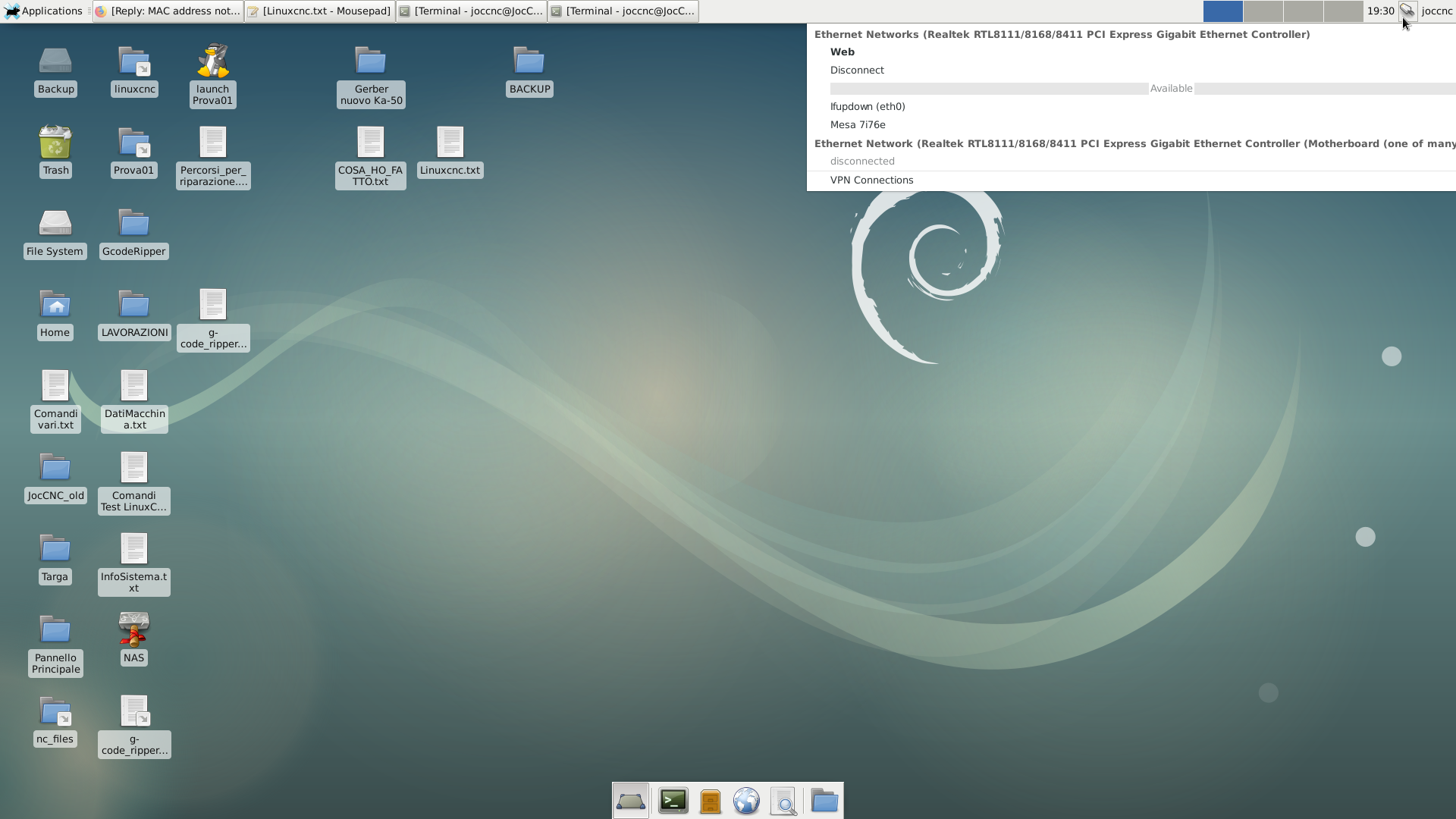
I've attached a screenshot of my desktop showing the lan connection window
ip aconnected to Mesa (onboard card):
joccnc@JocCnc:~$ ip a
1: lo: <LOOPBACK,UP,LOWER_UP> mtu 65536 qdisc noqueue state UNKNOWN group default qlen 1
    link/loopback 00:00:00:00:00:00 brd 00:00:00:00:00:00
    inet 127.0.0.1/8 scope host lo
       valid_lft forever preferred_lft forever
    inet6 ::1/128 scope host
       valid_lft forever preferred_lft forever
2: eth0: <BROADCAST,MULTICAST,UP,LOWER_UP> mtu 1500 qdisc pfifo_fast state UP group default qlen 1000
    link/ether e8:4e:06:84:dc:c9 brd ff:ff:ff:ff:ff:ff
    inet 10.10.10.11/8 brd 10.255.255.255 scope global eth0
       valid_lft forever preferred_lft forever
    inet6 fd59:b8bd:be6f:0:377f:d68c:ef9e:9227/64 scope global noprefixroute dynamic
       valid_lft 7154sec preferred_lft 3554sec
    inet6 fe80::8bdd:424d:f6d4:7ea2/64 scope link
       valid_lft forever preferred_lft forever
3: eth1: <NO-CARRIER,BROADCAST,MULTICAST,UP> mtu 1500 qdisc pfifo_fast state DOWN group default qlen 1000
    link/ether 70:85:c2:6a:f0:3d brd ff:ff:ff:ff:ff:ff
joccnc@JocCnc:~$joccnc@JocCnc:~$ ping 192.168.1.1
PING 192.168.1.1 (192.168.1.1): 56 data bytes
ping: sending packet: Network is unreachableconnected to WEB:
joccnc@JocCnc:~$ ip a
1: lo: <LOOPBACK,UP,LOWER_UP> mtu 65536 qdisc noqueue state UNKNOWN group default qlen 1
    link/loopback 00:00:00:00:00:00 brd 00:00:00:00:00:00
    inet 127.0.0.1/8 scope host lo
       valid_lft forever preferred_lft forever
    inet6 ::1/128 scope host
       valid_lft forever preferred_lft forever
2: eth0: <BROADCAST,MULTICAST,UP,LOWER_UP> mtu 1500 qdisc pfifo_fast state UP group default qlen 1000
    link/ether e8:4e:06:84:dc:c9 brd ff:ff:ff:ff:ff:ff
    inet 192.168.1.245/24 brd 192.168.1.255 scope global dynamic eth0
       valid_lft 863814sec preferred_lft 863814sec
    inet6 fd59:b8bd:be6f:0:6bdd:2ca7:6e73:aa7b/64 scope global noprefixroute dynamic
       valid_lft 7016sec preferred_lft 3416sec
    inet6 fe80::6ed6:c856:a0cb:2db8/64 scope link
       valid_lft forever preferred_lft forever
3: eth1: <NO-CARRIER,BROADCAST,MULTICAST,UP> mtu 1500 qdisc pfifo_fast state DOWN group default qlen 1000
    link/ether 70:85:c2:6a:f0:3d brd ff:ff:ff:ff:ff:ff
joccnc@JocCnc:~$joccnc@JocCnc:~$ ping 192.168.1.1
PING 192.168.1.1 (192.168.1.1): 56 data bytes
64 bytes from 192.168.1.1: icmp_seq=0 ttl=64 time=0.651 ms
64 bytes from 192.168.1.1: icmp_seq=1 ttl=64 time=0.488 ms
64 bytes from 192.168.1.1: icmp_seq=2 ttl=64 time=0.479 ms
64 bytes from 192.168.1.1: icmp_seq=3 ttl=64 time=0.522 ms
64 bytes from 192.168.1.1: icmp_seq=4 ttl=64 time=0.479 ms
64 bytes from 192.168.1.1: icmp_seq=5 ttl=64 time=0.461 ms
64 bytes from 192.168.1.1: icmp_seq=6 ttl=64 time=0.479 ms
64 bytes from 192.168.1.1: icmp_seq=7 ttl=64 time=0.478 ms
64 bytes from 192.168.1.1: icmp_seq=8 ttl=64 time=0.483 ms
64 bytes from 192.168.1.1: icmp_seq=9 ttl=64 time=0.486 ms
64 bytes from 192.168.1.1: icmp_seq=10 ttl=64 time=0.398 msI've attached a screenshot of my desktop showing the lan connection window
Please Log in or Create an account to join the conversation.
- tommylight
-
- Away
- Moderator
-
Less
More
- Posts: 21895
- Thank you received: 7465
27 Jan 2026 22:19 #342033
by tommylight
Replied by tommylight on topic MAC address not retrieved (after 2 years stop)
You have setup 2 networks on the same 1'st physical network card, the 2'nd network card has nothing set.
WHY????
That will not work, so start new and use this:
forum.linuxcnc.org/27-driver-boards/3559...ethernet-mesa-boards
WHY????
That will not work, so start new and use this:
forum.linuxcnc.org/27-driver-boards/3559...ethernet-mesa-boards
Please Log in or Create an account to join the conversation.
- NWE
-

- Offline
- Elite Member
-

Less
More
- Posts: 259
- Thank you received: 80
28 Jan 2026 03:26 #342060
by NWE
You will likely get better performance connecting one network cable directly from Mesa card to the first network port on the pc, then another network cable from your router to the second network port on the pc. Then you can choose eth1 for your web connection.
Replied by NWE on topic MAC address not retrieved (after 2 years stop)
Just to clarify, do you have everything connected to the router? Or did you have just the Mesa card plugged in the first time, then just the router, the second time?
[/code][/code][/code][code]2: eth0: <BROADCAST,MULTICAST,UP,LOWER_UP> mtu 1500 qdisc pfifo_fast state UP group default qlen 1000 link/ether e8:4e:06:84:dc:c9 brd ff:ff:ff:ff:ff:ff inet 10.10.10.11/8 brd 10.255.255.255 scope global eth0 and: [code][code]2: eth0: <BROADCAST,MULTICAST,UP,LOWER_UP> mtu 1500 qdisc pfifo_fast state UP group default qlen 1000 link/ether e8:4e:06:84:dc:c9 brd ff:ff:ff:ff:ff:ff inet 192.168.1.245/24 brd 192.168.1.255 scope global dynamic eth0
You will likely get better performance connecting one network cable directly from Mesa card to the first network port on the pc, then another network cable from your router to the second network port on the pc. Then you can choose eth1 for your web connection.
Please Log in or Create an account to join the conversation.
Moderators: PCW, jmelson
Time to create page: 0.280 seconds