
MAC address not retrieved (after 2 years stop)
- Jocman
- Offline
- Premium Member
-

- Posts: 111
- Thank you received: 11
Anyeway, to give an answer to tommilight and nwe.
I've 2 phisical lan cards. The 1st (let say A) is the MB's onboard lan card, the 2nd (let say B ) is a separate PCI card.
A is connected directly to mesa card. B is connected to my domestic LAN (then to my router). 2 different phisical cables. This because, if I remember, mesa cards don't love to be connected via router.
Untill 2 years ago, when I worked with my cnc, I used to connect to A (I don t remember if eth0 or eth1), that case my cnc worked perfecly, but i didn't have any access to the web or to my nas.
Then, if I connected to B (in case I need to access the web or my Nas) obviusly the cnc wasn't available.
But I remember I hade 2 different networks (eth0 and eth1).
This year something happened (I didn't do anything but start the pc), so if I connect to the web, i can access internet,but if I connect to mesa (and linux tell me "you're connected to mesa 7i76e) linuxcnc gives me errors.
Now, ok i can try to setup again the network as tommylight suggests, but could it be better to phisically remove the PCI card (B )? I do not need internet or access to my nas whe I use my cnc (that pc is exclusively dedicated to the cnc machine), I can easily use a normal usb pendrive to transfer the cnc files (I design and program my jobs on another pc),I just care about having my cnc working......
Please Log in or Create an account to join the conversation.
- NWE
-

- Offline
- Elite Member
-

- Posts: 259
- Thank you received: 80
Going by your most recent answer I interpret the above:Jocman post=342013 userid=24026
As I've 2 lan cards (the onboard and a second PCI board), I tried to launch
ip a
when connected to both, and this is what I get:
connected to Mesa (onboard card):
joccnc@JocCnc:~$ ip a
1: lo: <LOOPBACK,UP,LOWER_UP> mtu 65536 qdisc noqueue state UNKNOWN group default qlen 1
-- snip --
2: eth0: <BROADCAST,MULTICAST,UP,LOWER_UP> mtu 1500 qdisc pfifo_fast state UP group default qlen 1000
link/ether e8:4e:06:84:dc:c9 brd ff:ff:ff:ff:ff:ff
inet 10.10.10.11/8 brd 10.255.255.255 scope global eth0
-- snip --
3: eth1: <NO-CARRIER,BROADCAST,MULTICAST,UP> mtu 1500 qdisc pfifo_fast state DOWN group default qlen 1000
link/ether 70:85:c2:6a:f0:3d brd ff:ff:ff:ff:ff:ff
joccnc@JocCnc:~$
and pinging my router:
joccnc@JocCnc:~$ ping 192.168.1.1
PING 192.168.1.1 (192.168.1.1): 56 data bytes
ping: sending packet: Network is unreachable
connected to WEB:
joccnc@JocCnc:~$ ip a
1: lo: <LOOPBACK,UP,LOWER_UP> mtu 65536 qdisc noqueue state UNKNOWN group default qlen 1
-- snip --
2: eth0: <BROADCAST,MULTICAST,UP,LOWER_UP> mtu 1500 qdisc pfifo_fast state UP group default qlen 1000
link/ether e8:4e:06:84:dc:c9 brd ff:ff:ff:ff:ff:ff
inet 192.168.1.245/24 brd 192.168.1.255 scope global dynamic eth0
-- snip --
3: eth1: <NO-CARRIER,BROADCAST,MULTICAST,UP> mtu 1500 qdisc pfifo_fast state DOWN group default qlen 1000
link/ether 70:85:c2:6a:f0:3d brd ff:ff:ff:ff:ff:ff
joccnc@JocCnc:~$
and pinging my router:
joccnc@JocCnc:~$ ping 192.168.1.1
PING 192.168.1.1 (192.168.1.1): 56 data bytes
64 bytes from 192.168.1.1: icmp_seq=0 ttl=64 time=0.651 ms
64 bytes from 192.168.1.1: icmp_seq=1 ttl=64 time=0.488 ms
[\quote]
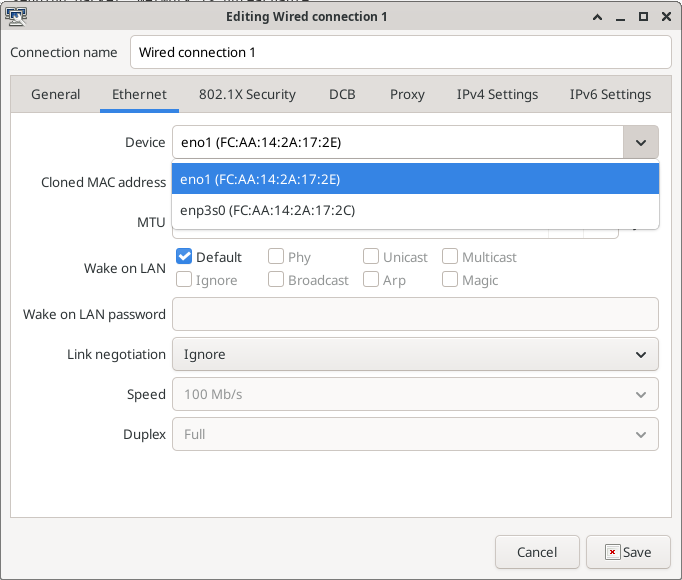
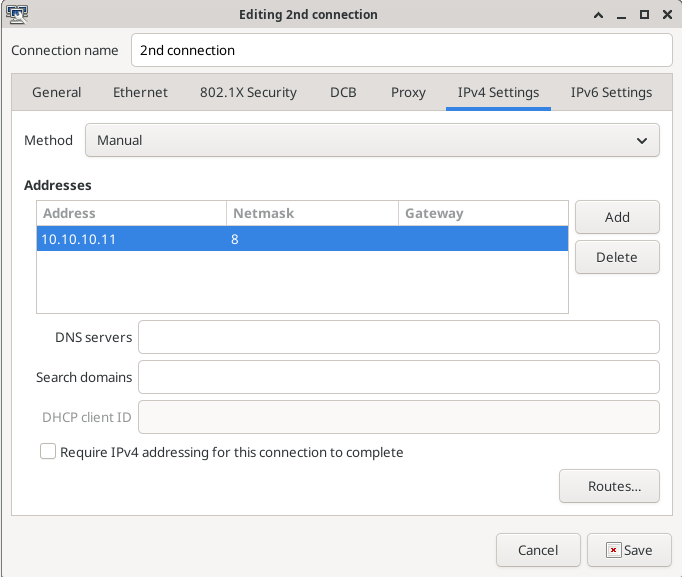
It appears to me you have two network configurations "Web" and "Mesa 7i76e" In both configurations you appear to have the first network port selected. This means, when you click on the "Mesa 7i76e" network, the pc tries to connect to the Mesa card via the network port that is connected to your LAN.
To fix, right-click on the network icon, click "edit connections", click on "Mesa 7i76e", click on the little gear at bottom "edit the selected connection", click on the "Device" dropdown, and select the correct device, click on "IPv4 Settings" tab, make sure the "Gateway" field is empty. click "Save", close the network edit window, and try reconnecting to both networks. On my system, I have both networks connected at the same time.
Don't change settings for the "Web" connection, from what I see, that one is likely configured correctly.
Please Log in or Create an account to join the conversation.
- Jocman
- Offline
- Premium Member
-
- Posts: 111
- Thank you received: 11
After restarting the system 5 times (yes, 5), finally linuxcnc "sees" the mesa card, and axys is revived.
I'll do some test in the next days, and see what happen.
If needed, I could try to reinstall the PCI card and re-connect to my LAN.
Please Log in or Create an account to join the conversation.
- tommylight
-

- Away
- Moderator
-

- Posts: 21905
- Thank you received: 7465
That is a sure sign something is still not set correctly, it only requires reseting the network from the network manager by clicking on the icon and clicking on the active network from the list.After restarting the system 5 times (yes, 5), finally linuxcnc "sees" the mesa card, and axys is revived.
I set networks for Mesa at least once a week, and it never ever fails to work correctly, but that howto has to be followed to a tee, especially when using two or more network interfaces.
Please Log in or Create an account to join the conversation.