Mesa 7I96 + Renishaw LP2 probe

More
5 years 9 months ago #196388 by chimeno
Hello @andypuig,
you are really good, thanks for the help you offer in the forum.

Greeting
Chimeno
The following user(s) said Thank You: tommylight

Please Log in or Create an account to join the conversation.

More
5 years 9 months ago - 5 years 9 months ago #196956 by BastianMC
Ok guys the results are in.

It turns out that i actually have an attachement to my LP2 probe that does the job of the MI8 unit, so that was a redundant purchase.
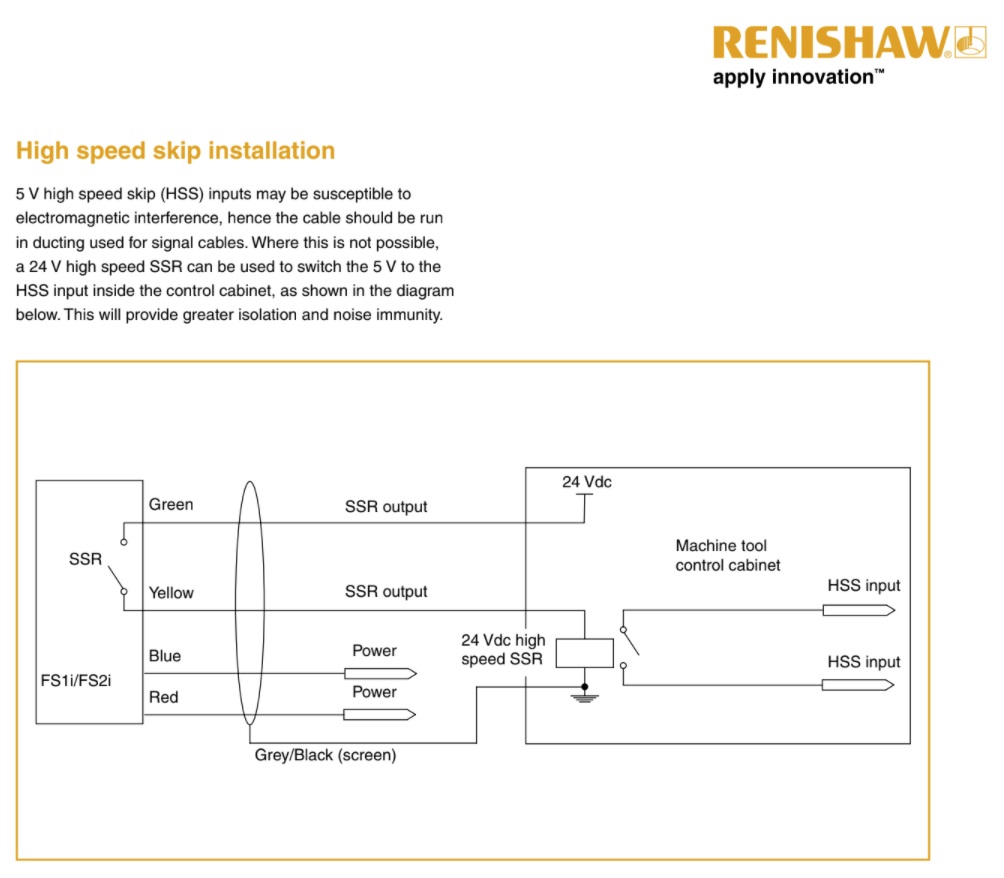
The unit i have after my probe is called FS1i or FS2i socket.

I got the probe working sending a signal to the Mesa board, the trick was to wore the red wire to 24vdc, the blue wire to 0 and the yellow and green wires are contact wires.
I wired the yellow wire to the Mesa board and the green wire to 0vdc. Sucess the board now has a signal on input pin and the diode is activated one the probe is pressed.

Now i just have to figure out how to change my toolprobe input in my .hal file to make the pressing of the probe register during my toolprobing rutine. The signal goes through the software on pin 9 and registers, but the tool change rutine doesn't react top the probing.

Im using this tool change rutine if anybody can help?

forum.linuxcnc.org/10-advanced-configura...fEUjqsZnzBqyus#48235
Last edit: 5 years 9 months ago by BastianMC.

Please Log in or Create an account to join the conversation.
More
5 years 9 months ago #197039 by BastianMC
Ok news again, I got the probing to work and it seems fine expect for after a tool change.
I only had to opportunity to do a short test run last night but it throws this error (see attached picture) as soon as the probing is done after the 2nd probing has been done (after tool has been changed).

See attached picture.
I don't know why, the Gcode is asking for position Z15 but I don't see why that should be out of machine limits?

Please Log in or Create an account to join the conversation.

More
5 years 9 months ago #197101 by andypugh
No attached picture, but check the tool table for an existing Z offset that is too large.
The following user(s) said Thank You: BastianMC

Please Log in or Create an account to join the conversation.

More
5 years 9 months ago #197127 by BastianMC
Again thank you andy for your contribution to this comminity and topic.
I read up some more and realised that what i needed to du was remove the G43 line from my Gcode cutting files, after this the offset works!

I guess sometimes the answer is simpler than you think:)

Please Log in or Create an account to join the conversation.

More
5 years 9 months ago #197158 by andypugh

BastianMC wrote: what i needed to du was remove the G43 line from my Gcode cutting files,


Alternatively (and possibly safer) you can use the probe to set the tool length rather than the axis position, and keep the G43.
The following user(s) said Thank You: BastianMC

Please Log in or Create an account to join the conversation.

Time to create page: 0.167 seconds
Powered by Kunena Forum
