
- Posts: 508
- Thank you received: 94
DeskProto releases free CAM software for Linux.
- Reinhard
- Offline
- Platinum Member
-

Less
More
6 years 1 month ago #183844
by Reinhard
Replied by Reinhard on topic DeskProto releases free CAM software for Linux.
continue evaluation of first model ...
I hope, that simulation for 4-axis works in next release. Actual shown toolpaths don't allow to check, whether cam does a good job.
.
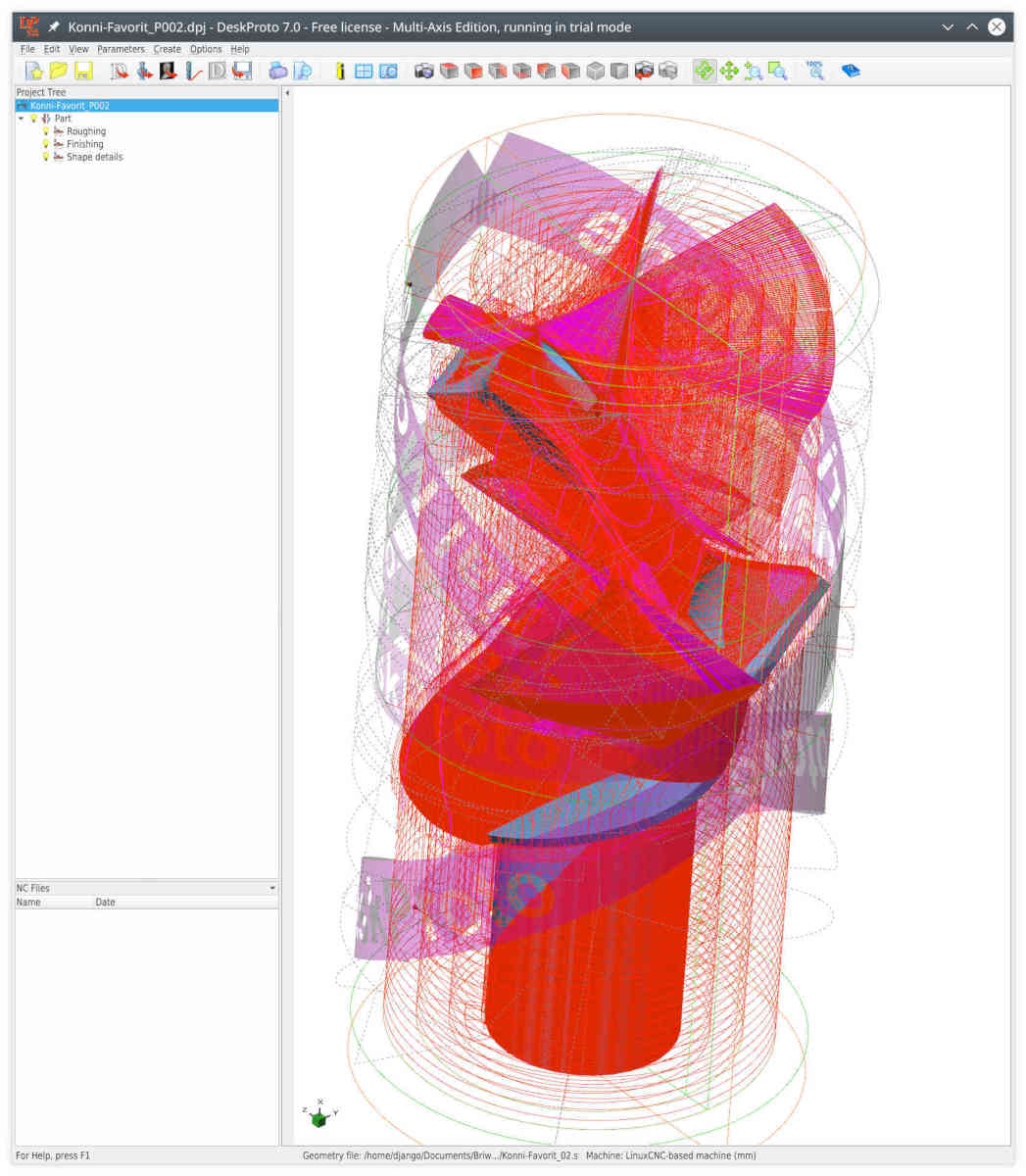
Compare the picture above with the second picture from last post. On that picture, you can identify the fault of cam at first sight.
I used a big cutter (10mm) for roughing and a big ballnose cutter for finishing (8mm).
But that leaves the details hidden.
So I looked for a way to reduce milling area for a small detail cutter.
The only way I found was "custom rectangular". Isolating toolpaths of that operation looks like
.
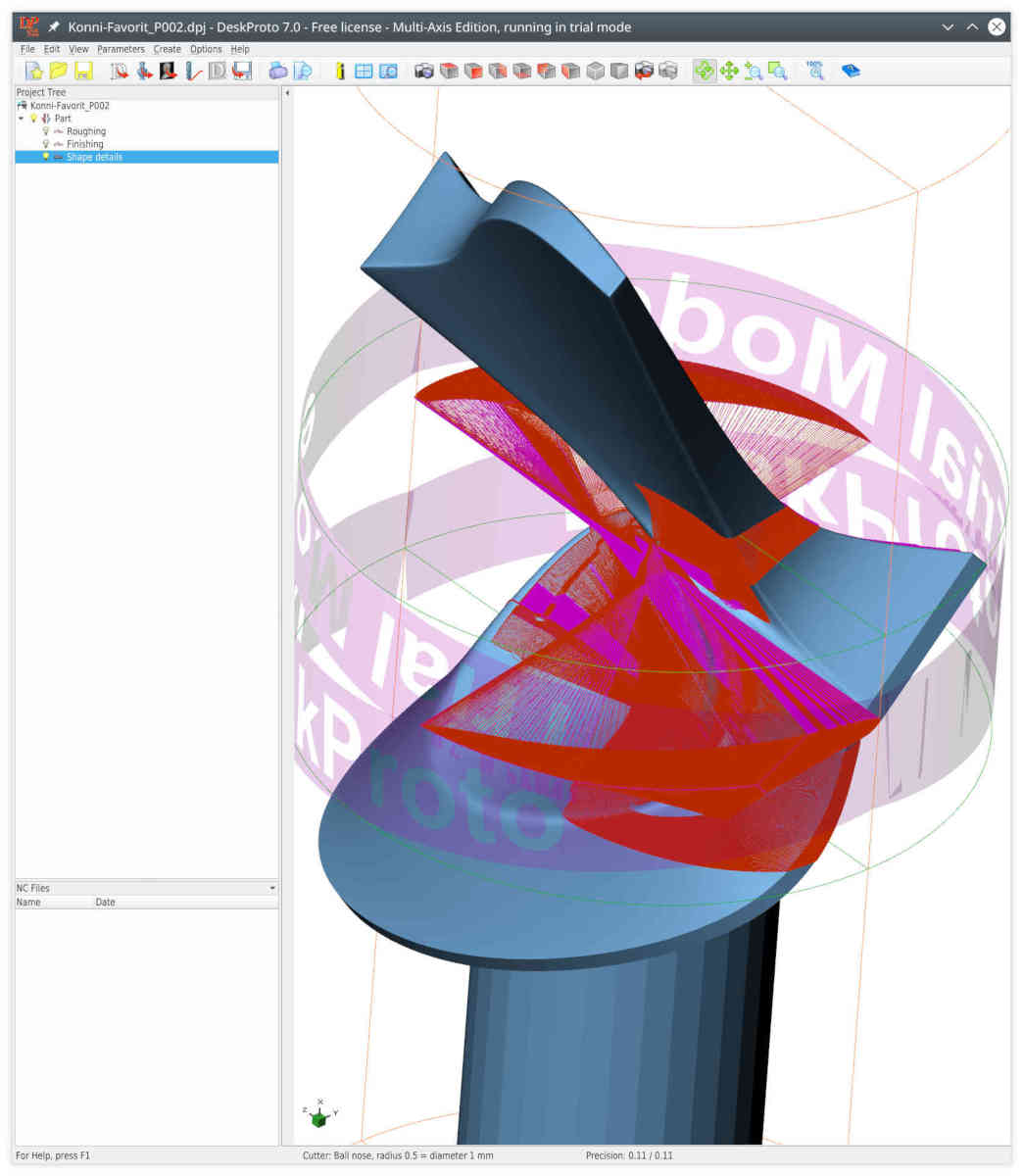
Not what I expected.
So I very hope, that simulation will be available in next release.
Better choice for details processing would be, if parts of the surface could be selected (like in edit-mode of blender with circle selection "C". Size of selection circle can be changed by using scroll-wheel of the mouse ):
):
.
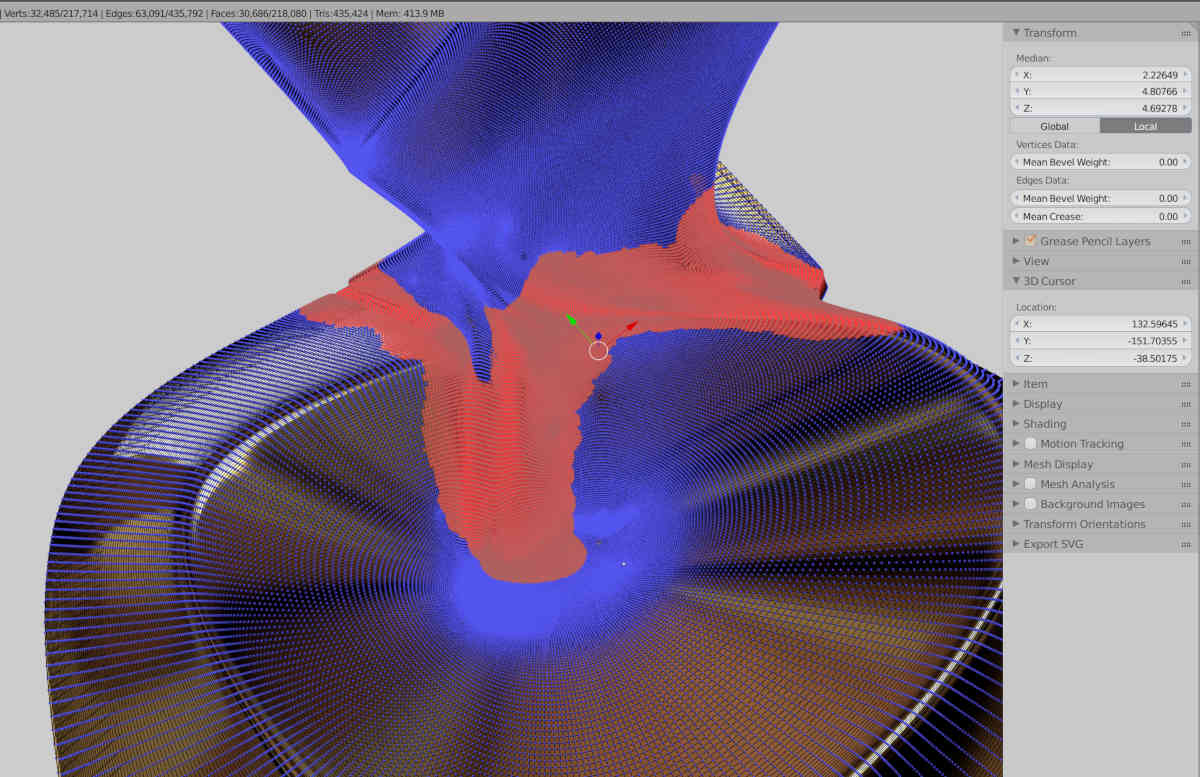
Imagine that you have a bigger surface with a small relief. Then you don't want to waste time on the big surface that don't contain details. Instead you like to limit processing area for small tools, that need finegrained toolpaths that take long runtime.
I think, that being able to select parts of the model surface would be the most efficient way for detail processing.
I hope, that simulation for 4-axis works in next release. Actual shown toolpaths don't allow to check, whether cam does a good job.
.
Compare the picture above with the second picture from last post. On that picture, you can identify the fault of cam at first sight.
I used a big cutter (10mm) for roughing and a big ballnose cutter for finishing (8mm).
But that leaves the details hidden.
So I looked for a way to reduce milling area for a small detail cutter.
The only way I found was "custom rectangular". Isolating toolpaths of that operation looks like
.
Not what I expected.
So I very hope, that simulation will be available in next release.
Better choice for details processing would be, if parts of the surface could be selected (like in edit-mode of blender with circle selection "C". Size of selection circle can be changed by using scroll-wheel of the mouse
):.
Imagine that you have a bigger surface with a small relief. Then you don't want to waste time on the big surface that don't contain details. Instead you like to limit processing area for small tools, that need finegrained toolpaths that take long runtime.
I think, that being able to select parts of the model surface would be the most efficient way for detail processing.
- LexLen
- Offline
- New Member
-

Less
More
- Posts: 10
- Thank you received: 8
6 years 1 month ago #184122
by LexLen
Replied by LexLen on topic DeskProto releases free CAM software for Linux.
Hi Reinhard,
My question about the source indeed was not very clear.
What I meant was if you want me to mention your name as source of the image.
It could be "Reinhard", "Reinhard from ..." (I do not know in which country you live), "a DeskProto user from ...", perhaps with a link to your website or your own page on Facebook or Instagram.
Machining has been done very accurately, as it looks very smooth.
Do you know which type of wood was used ?
Lex.
My question about the source indeed was not very clear.
What I meant was if you want me to mention your name as source of the image.
It could be "Reinhard", "Reinhard from ..." (I do not know in which country you live), "a DeskProto user from ...", perhaps with a link to your website or your own page on Facebook or Instagram.
Machining has been done very accurately, as it looks very smooth.
Do you know which type of wood was used ?
Lex.
- LexLen
- Offline
- New Member
-
Less
More
- Posts: 10
- Thank you received: 8
6 years 1 month ago #184143
by LexLen
Replied by LexLen on topic DeskProto releases free CAM software for Linux.
The above post was a reply to your post of 25 Sep 2020 14:12.
Now my reaction to the CamBam comparison (your post of 25 Sep 2020 15:57):
I do not understand why you want to use more than one part: it would be a lot easier to use a number of operations in one part. You then can use the Operation area of each operation to limit the Zmin and Zmax for that operation. And you can create a simulation.
That CamBam can generate curves from an STL file indeed is a nice feature, on that DeskProto does not offer. Still when using the Waterline strategy it should be possible to get similar results.
I do not understand what happens at the holes below the part boundary that you mention.
Lex.
Now my reaction to the CamBam comparison (your post of 25 Sep 2020 15:57):
I do not understand why you want to use more than one part: it would be a lot easier to use a number of operations in one part. You then can use the Operation area of each operation to limit the Zmin and Zmax for that operation. And you can create a simulation.
That CamBam can generate curves from an STL file indeed is a nice feature, on that DeskProto does not offer. Still when using the Waterline strategy it should be possible to get similar results.
I do not understand what happens at the holes below the part boundary that you mention.
Lex.
- LexLen
- Offline
- New Member
-
Less
More
- Posts: 10
- Thank you received: 8
6 years 1 month ago #184148
by LexLen
Replied by LexLen on topic DeskProto releases free CAM software for Linux.
And here my reply to your post of 26 Sep 2020 13:01.
DeskProto V7.1 will include a simulation for rotation axis machining !
I cannot yet give an estimated release date, sorry (such promises in practice are impossible to keep).
Selecting a certain area to be machined indeed is a great tool. In DeskProto that is done by setting min and max limits (or for XYZ machining by seting a freeform boundary). Selecting on STL level (by "painting" triangles) would indeed be a nice addition, however not easy for us to implement I am afraid. We will away store the idea.
DeskProto V7.1 will include a simulation for rotation axis machining !
I cannot yet give an estimated release date, sorry (such promises in practice are impossible to keep).
Selecting a certain area to be machined indeed is a great tool. In DeskProto that is done by setting min and max limits (or for XYZ machining by seting a freeform boundary). Selecting on STL level (by "painting" triangles) would indeed be a nice addition, however not easy for us to implement I am afraid. We will away store the idea.
- Reinhard
- Offline
- Platinum Member
-
Less
More
- Posts: 508
- Thank you received: 94
6 years 1 month ago #184180
by Reinhard
I live in germany and the friend, that milled the figure is german.
.
The figure is maple and the stand is walnut.
.
I did it that way, as I did not find a way to limit machining with using "custom rectangular".
May be I have to extend testing (but it's so time consuming ... ).
.
It saves a lot of time. I tried to achieve similar result with DP, but toolpath calculations needs hours! That's inacceptable.
Calculation of 3D-toolpath for the model from previous post took less time.
... CamBam needs few minutes for the same challenge.
When I look at my work, most of things I mill are technical things. So using a CAM should save my time and not waste it. Therefore CamBam is the one to beat.
Creating 3D-figures is fun (for me), but it makes less than 10% of my doing.
I don't have a screenshot for the next description, DP took to much time to recalculate, so I aborted calculation. I created several geometry operations to get a similar output than from CamBam.
On first operation I used waterlines with fill plane option. And I used custom rectangle with max z limited to a value below lowest stage (to get a circle right out of the rectangle).
Next operation was custom rectangle limited min Z to lower stage surface and max Z to a value below next stage. Again waterline with fill plane option.
That generated toolpath was not as expected. Each open pocket was milled as if it was a closed pocket.
Manually coded would lower the endmill to Z of that plane outside of existing material and than workout paths from outside to inside (possibly parallel to pocket contour). That strategy is faster and leads less stress to the endmill - as the chips can fly away and don't fill the closed pocket.
That open pockets are perfect candidates for trochoidal milling
.
And I don't want you to promise any release date. Promising release date is unprofessional. I like the debian way: its ready, when it is ready
.
If you don't try to select triangles, but select nodes - than the triangles come into play without extra calculations. Work with what you have
cheers Reinhard
Replied by Reinhard on topic DeskProto releases free CAM software for Linux.
you could write: Reinhard from linuxcnc-forum... mention your name as source of the image.
I live in germany and the friend, that milled the figure is german.
.
Sure. The wood type was my choice.Do you know which type of wood was used ?
The figure is maple and the stand is walnut.
.
You can't understand that, as I don't want it.I do not understand why you want to use more than one part
I did it that way, as I did not find a way to limit machining with using "custom rectangular".
May be I have to extend testing (but it's so time consuming ... ).
.
Its not only nice (to have).That CamBam can generate curves from an STL file indeed is a nice feature, on that DeskProto does not offer. Still when using the Waterline strategy it should be possible to get similar results.
It saves a lot of time. I tried to achieve similar result with DP, but toolpath calculations needs hours! That's inacceptable.
Calculation of 3D-toolpath for the model from previous post took less time.
... CamBam needs few minutes for the same challenge.
When I look at my work, most of things I mill are technical things. So using a CAM should save my time and not waste it. Therefore CamBam is the one to beat.
Creating 3D-figures is fun (for me), but it makes less than 10% of my doing.
I don't have a screenshot for the next description, DP took to much time to recalculate, so I aborted calculation. I created several geometry operations to get a similar output than from CamBam.
On first operation I used waterlines with fill plane option. And I used custom rectangle with max z limited to a value below lowest stage (to get a circle right out of the rectangle).
Next operation was custom rectangle limited min Z to lower stage surface and max Z to a value below next stage. Again waterline with fill plane option.
That generated toolpath was not as expected. Each open pocket was milled as if it was a closed pocket.
Manually coded would lower the endmill to Z of that plane outside of existing material and than workout paths from outside to inside (possibly parallel to pocket contour). That strategy is faster and leads less stress to the endmill - as the chips can fly away and don't fill the closed pocket.
That open pockets are perfect candidates for trochoidal milling
.
Great! Thanks.DeskProto V7.1 will include a simulation for rotation axis machining !
And I don't want you to promise any release date. Promising release date is unprofessional. I like the debian way: its ready, when it is ready
.
Well, I don't know, how you paint the stl-import. The mesh consists of nodes, so you'll need to store some kind of node.Selecting on STL level (by "painting" triangles) would indeed be a nice addition, however not easy for us to implement I am afraid. We will away store the idea.
If you don't try to select triangles, but select nodes - than the triangles come into play without extra calculations. Work with what you have
cheers Reinhard
- LexLen
- Offline
- New Member
-
Less
More
- Posts: 10
- Thank you received: 8
6 years 1 month ago #184260
by LexLen
Replied by LexLen on topic DeskProto releases free CAM software for Linux.
Hi Reinhard,
I will post the image of your maple wood part later today, on the DeskProto Instagram page and the DeskProto Facebook page. Thanks for sharing !
The part that you showed is a good example: a few 2D curves are sufficient CAD data. Vector machining in this case can be done with much lower calculation times and more efficient toolpaths. Most CAD program can export such curves as DXF file, unfortunately Blender cannot do this. CamBam as said has found a good solution by offering an option to extract curves from STL data.
Something to put on our internal wish list for future versions.
So many issues that can be added to this list, like the trochoidal milling that you mentioned. And the selection of facets and/or of nodes using a paint-like functionality.
We have to balance this with the need to keep the program simple: DeskProto should be about "CNC machining for non-machinists". And the more options, the less easy to use....
Anyway: thanks for your constructive criticism.
Lex.
I will post the image of your maple wood part later today, on the DeskProto Instagram page and the DeskProto Facebook page. Thanks for sharing !
DeskProto originally was created purely for (wildly curved) 3D geometries. We were late in realizing that indeed most parts to be machined are much simpler, and can be machined from a 2D drawing, at various Z-levels (2.5D machining). The current DeskProto V7 is the first version to really support this type of machining, so this still is fresh technology for us.Creating 3D-figures is fun (for me), but it makes less than 10% of my doing.
The part that you showed is a good example: a few 2D curves are sufficient CAD data. Vector machining in this case can be done with much lower calculation times and more efficient toolpaths. Most CAD program can export such curves as DXF file, unfortunately Blender cannot do this. CamBam as said has found a good solution by offering an option to extract curves from STL data.
Something to put on our internal wish list for future versions.
So many issues that can be added to this list, like the trochoidal milling that you mentioned. And the selection of facets and/or of nodes using a paint-like functionality.
We have to balance this with the need to keep the program simple: DeskProto should be about "CNC machining for non-machinists". And the more options, the less easy to use....
Anyway: thanks for your constructive criticism.
Lex.
Time to create page: 0.771 seconds