
- Posts: 1943
- Thank you received: 338
Biesse Rover 346 Retrofit
9 years 8 months ago #87941
by bevins
Replied by bevins on topic Biesse Rover 346 Retrofit
I'll use the rising edge one way and trailing edge the other so it will never get mixed up.
Please Log in or Create an account to join the conversation.
- Todd Zuercher
- Offline
- Platinum Member
-

Less
More
- Posts: 4737
- Thank you received: 1480
9 years 8 months ago #87961
by Todd Zuercher
Replied by Todd Zuercher on topic Biesse Rover 346 Retrofit
As to doing this in software, the pin axis.N.joint-pos-cmd, looks like the one to use, and should work very well.
Please Log in or Create an account to join the conversation.
9 years 8 months ago #87962
by bevins
That's commanded position.....
Would this be better as this is actual position, so it is absolute and where the joint is actually.
axis.N.motor-pos-fb
Replied by bevins on topic Biesse Rover 346 Retrofit
Todd Zuercher wrote: As to doing this in software, the pin axis.N.joint-pos-cmd, looks like the one to use, and should work very well.
That's commanded position.....
Would this be better as this is actual position, so it is absolute and where the joint is actually.
axis.N.motor-pos-fb
Please Log in or Create an account to join the conversation.
- Todd Zuercher
- Offline
- Platinum Member
-
Less
More
- Posts: 4737
- Thank you received: 1480
9 years 8 months ago #87963
by Todd Zuercher
Replied by Todd Zuercher on topic Biesse Rover 346 Retrofit
axis.N.motor-pos-fb and axis.N.motor-pos-cmd, are kind of goofy. They can end up being odd numbers that vary from one Linuxcnc session to the next depending on where the machine was parked when it whas shut down and restarted and how the machine gets homed. They are set to 0 when Linuxcnc is first started and don't change for the entirety of that session. Unless you can guarantee the machine will always be in the same position when Linuxcnc is started or if you are using absolute encoders, I'd suggest not using them.
The axis.N.joint-pos-fb and axis.N.joint-pos-cmd, are absolute numbers and equivalent to the G53 position numbers on a Cartesian machine.
The axis.N.joint-pos-fb and axis.N.joint-pos-cmd, are absolute numbers and equivalent to the G53 position numbers on a Cartesian machine.
Please Log in or Create an account to join the conversation.
9 years 8 months ago #87964
by bevins
In other words, when you home the machine, these do not get zeroed. Linuxcnc references the machine zero everytime you startup to whatever value these pins are. So if I pick an number, if the axis has moved when power was off my point will be different.
Thats unfortunate. There are ways to get this via software but I think I'd rather have a switch at the point of my reference....
Thanks for all your responses and help Todd. It is really appreciated.....
Replied by bevins on topic Biesse Rover 346 Retrofit
Todd Zuercher wrote: axis.N.motor-pos-fb and axis.N.motor-pos-cmd, are kind of goofy. They can end up being odd numbers that vary from one Linuxcnc session to the next depending on where the machine was parked when it whas shut down and restarted and how the machine gets homed. They are set to 0 when Linuxcnc is first started and don't change for the entirety of that session. Unless you can guarantee the machine will always be in the same position when Linuxcnc is started or if you are using absolute encoders, I'd suggest not using them.
The axis.N.joint-pos-fb and axis.N.joint-pos-cmd, are absolute numbers and equivalent to the G53 position numbers on a Cartesian machine.
In other words, when you home the machine, these do not get zeroed. Linuxcnc references the machine zero everytime you startup to whatever value these pins are. So if I pick an number, if the axis has moved when power was off my point will be different.
Thats unfortunate. There are ways to get this via software but I think I'd rather have a switch at the point of my reference....
Thanks for all your responses and help Todd. It is really appreciated.....
Please Log in or Create an account to join the conversation.
9 years 8 months ago #87970
by bevins
Replied by bevins on topic Biesse Rover 346 Retrofit
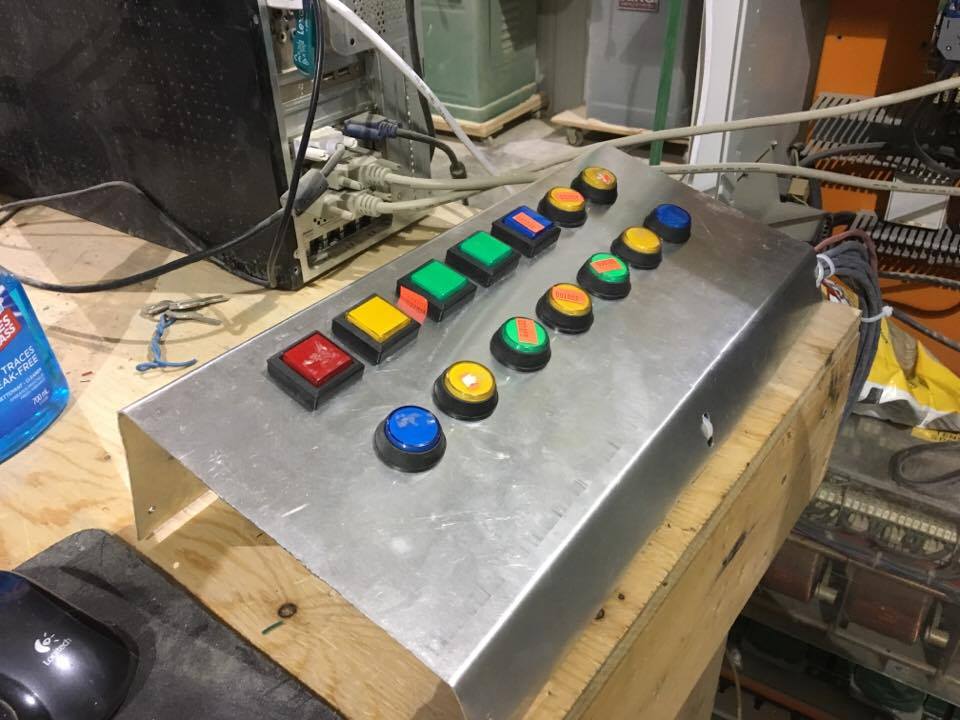
Test panel. Got tired of messing with one physical button. Now I have 14 and 14 output lites.
Please Log in or Create an account to join the conversation.
Time to create page: 0.163 seconds