
- Posts: 2419
- Thank you received: 2349
LinuxCNC S-Curve Accelerations
- Grotius
- Offline
- Platinum Member
-

Less
More
5 years 6 months ago - 5 years 6 months ago #206786
by Grotius
Replied by Grotius on topic LinuxCNC S-Curve Accelerations
Hi,
For information.
A example program to calculate (preprocess) a s-curve with visual output.
Without the visual output, it's quite impossible to know if every bit of c++ code is written correctly.
It can deal with :
Waypoints = 3d waypoint buffer ( path points )
Vo = initial velocity (pos or neg)
Ve = velocity at end (pos or neg)
Vel = max velocity (sampled to best fit when vel cannot be reached within path lenght)
Acc = acceleration
github.com/grotius-cnc/S-curve-motion-pl...g/releases/tag/1.0.1


My personal goal is to strip down this example program and compile it to a shared library .so file to use with
a motion planner as preprocess function for path planning.
The code can output x,y,z coordinates for every ms.
But you can also interpolate a x,y,z coordinate at a certain time point.
There are various options.
For information.
A example program to calculate (preprocess) a s-curve with visual output.
Without the visual output, it's quite impossible to know if every bit of c++ code is written correctly.
It can deal with :
Waypoints = 3d waypoint buffer ( path points )
Vo = initial velocity (pos or neg)
Ve = velocity at end (pos or neg)
Vel = max velocity (sampled to best fit when vel cannot be reached within path lenght)
Acc = acceleration
github.com/grotius-cnc/S-curve-motion-pl...g/releases/tag/1.0.1
My personal goal is to strip down this example program and compile it to a shared library .so file to use with
a motion planner as preprocess function for path planning.
The code can output x,y,z coordinates for every ms.
But you can also interpolate a x,y,z coordinate at a certain time point.
There are various options.
Last edit: 5 years 6 months ago by Grotius.
Please Log in or Create an account to join the conversation.
- arvidb
- Offline
- Platinum Member
-
Less
More
- Posts: 459
- Thank you received: 158
5 years 6 months ago #206805
by arvidb
Replied by arvidb on topic LinuxCNC S-Curve Accelerations
Nice - it's an interesting problem to work on!
What is it that we're seeing in the diagrams? I'm guessing the black curve is acceleration? Red/white velocity? But I can't figure out the grey one - if it's position then the start and end slopes seem wrong (horizontal although endpoint velocities are nonzero in the first image). And there's the discontinuity in the slope in the middle.
Also note that you will have to handle initial acceleration that's nonzero too, if it's to be usable for jogging. That should not be necessary for the "coordinated motion" planner though.
What is it that we're seeing in the diagrams? I'm guessing the black curve is acceleration? Red/white velocity? But I can't figure out the grey one - if it's position then the start and end slopes seem wrong (horizontal although endpoint velocities are nonzero in the first image). And there's the discontinuity in the slope in the middle.
Also note that you will have to handle initial acceleration that's nonzero too, if it's to be usable for jogging. That should not be necessary for the "coordinated motion" planner though.
Please Log in or Create an account to join the conversation.
- Grotius
- Offline
- Platinum Member
-
Less
More
- Posts: 2419
- Thank you received: 2349
5 years 6 months ago - 5 years 6 months ago #206823
by Grotius
Replied by Grotius on topic LinuxCNC S-Curve Accelerations
Hi,
Grey is S (distance) versus T (time). This grey line starts at xy:0,0
The grey line is scaled on the y-axis back to fit into the screen.
It's a quite unusual display. But it show's more or less how much distance is produced over time.
Cyan and red is the actual s-curve, cyan and red separates the convex and concave period's on both sides of the curve.
Where the color's change in the curve, we have the inflection point where the acceleration of the curve = 2* linair acceleration.
The color is not inline with convace or convex, it's just a separator color.
Black is the acceleration.
Nice - it's an interesting problem to work on!
Yeahh. It's quite boring to code math. But after 2 day's it works better then my previous attempt.
I really like the velocity sampling solution. My first solution was to find the intersection of 2 curves, but sampling
is much easyer.
Now working on the realtime buffer. The ingredients are :
2 buffers of 3000ms.
1 chrono high resolution clock
5 textfiles with each 3000 motion command lines to give the buffer meat.
1 portion off luck.

Grey is S (distance) versus T (time). This grey line starts at xy:0,0
The grey line is scaled on the y-axis back to fit into the screen.
It's a quite unusual display. But it show's more or less how much distance is produced over time.
Cyan and red is the actual s-curve, cyan and red separates the convex and concave period's on both sides of the curve.
Where the color's change in the curve, we have the inflection point where the acceleration of the curve = 2* linair acceleration.
The color is not inline with convace or convex, it's just a separator color.
Black is the acceleration.
Nice - it's an interesting problem to work on!
Yeahh. It's quite boring to code math. But after 2 day's it works better then my previous attempt.
I really like the velocity sampling solution. My first solution was to find the intersection of 2 curves, but sampling
is much easyer.
Now working on the realtime buffer. The ingredients are :
2 buffers of 3000ms.
1 chrono high resolution clock
5 textfiles with each 3000 motion command lines to give the buffer meat.
1 portion off luck.
Last edit: 5 years 6 months ago by Grotius.
Please Log in or Create an account to join the conversation.
- Grotius
- Offline
- Platinum Member
-
Less
More
- Posts: 2419
- Thank you received: 2349
5 years 6 months ago - 5 years 6 months ago #206833
by Grotius
Replied by Grotius on topic LinuxCNC S-Curve Accelerations
Today i started coding a buffer example to send xyz position's within a 1ms period.
I ended up with 6 buffers, each buffer containing 1000 lines, every line represents a interpolated motion command of 1ms.
I ended up using 2 main period's, acting together.
In each main period 3 buffers are loaded, time shifted, to prevent memory shocks.
In the main period the 3 buffers of the other main period are cleared time shifted and 3 new buffers are loaded into memory
also time shifted.
The result where within 1ms.
The process in a nutshell :
1. Load a sequence of textfile's from /tmp/ containing 1000 motion commands, each command (line) represents 1ms.
2. Loads the textfile into a vector line buffer of 1000 lines.
- The process of loading a textfile and loading it into a buffer takes about ~ 0.6 ~ 0.7 ms.
3. Then the mainloop is carrying out executing of the current active buffer, it empty's old buffers, and load's upcoming buffers.
4. In this case the s-curve, kinematics, etc are pre-processed. This makes it easyer to go ultra fast realtime.
5. The textfile is considered as fixed memory. I have to test what a robot program of 30 minutes will take on filesize.
1000 lines of motioncommands in a texfile is : 32.1 Kib every second. (0.03125 Mib)
= 60 sec * 60 min * 0.03125 Mib = 112 MiB for one hour of robot pleasure.
So far so good.
I ended up with 6 buffers, each buffer containing 1000 lines, every line represents a interpolated motion command of 1ms.
I ended up using 2 main period's, acting together.
In each main period 3 buffers are loaded, time shifted, to prevent memory shocks.
In the main period the 3 buffers of the other main period are cleared time shifted and 3 new buffers are loaded into memory
also time shifted.
The result where within 1ms.
The process in a nutshell :
1. Load a sequence of textfile's from /tmp/ containing 1000 motion commands, each command (line) represents 1ms.
2. Loads the textfile into a vector line buffer of 1000 lines.
- The process of loading a textfile and loading it into a buffer takes about ~ 0.6 ~ 0.7 ms.
3. Then the mainloop is carrying out executing of the current active buffer, it empty's old buffers, and load's upcoming buffers.
4. In this case the s-curve, kinematics, etc are pre-processed. This makes it easyer to go ultra fast realtime.
5. The textfile is considered as fixed memory. I have to test what a robot program of 30 minutes will take on filesize.
1000 lines of motioncommands in a texfile is : 32.1 Kib every second. (0.03125 Mib)
= 60 sec * 60 min * 0.03125 Mib = 112 MiB for one hour of robot pleasure.
So far so good.
Last edit: 5 years 6 months ago by Grotius.
Please Log in or Create an account to join the conversation.
- arvidb
- Offline
- Platinum Member
-
Less
More
- Posts: 459
- Thank you received: 158
5 years 5 months ago #208320
by arvidb
Replied by arvidb on topic LinuxCNC S-Curve Accelerations
Slowly getting there! Below is the first test using axis_mm simulation:
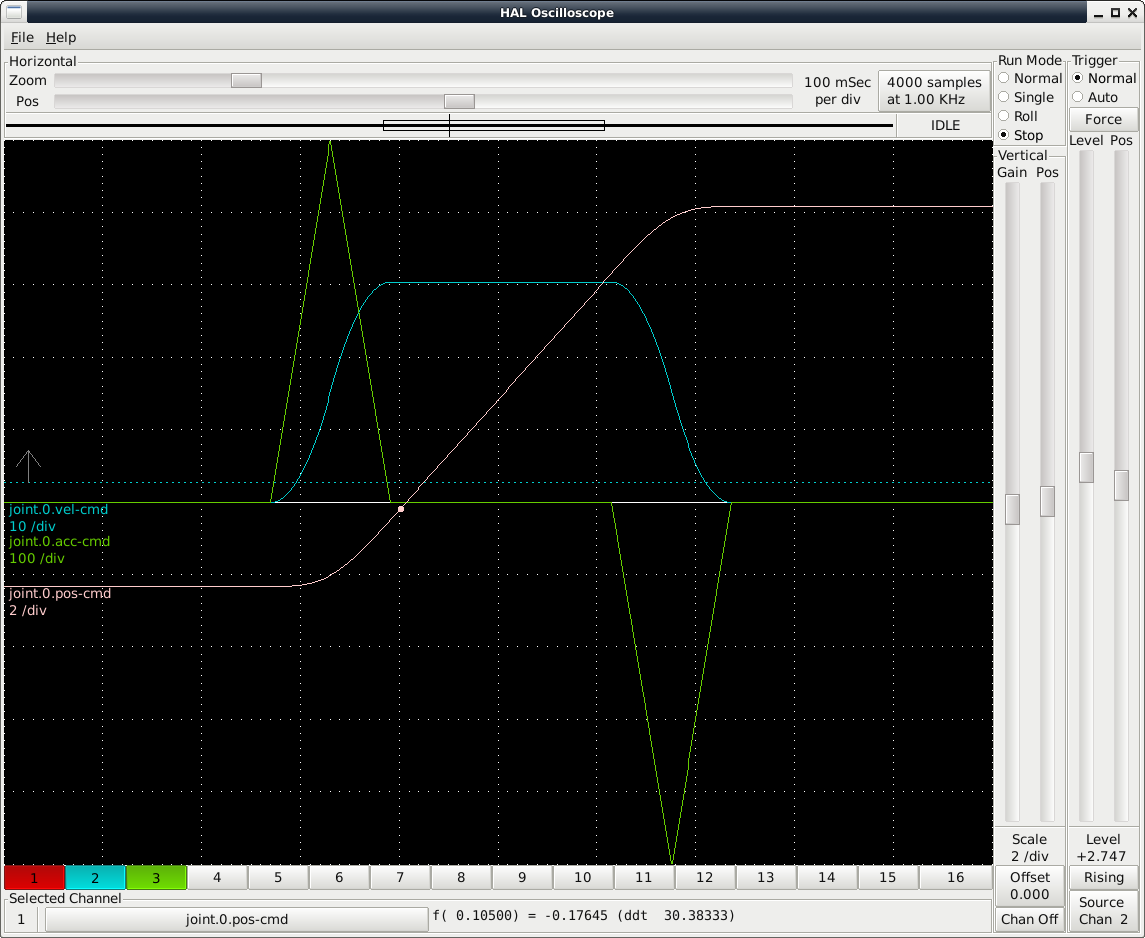
The build and linking for this test was very crude: I built the planner object file separately (as a static library), copied into the linuxcnc object directory manually, and crudely hacked it into the linuxcnc linking.
I haven't been able to fully understand the linuxcnc build system yet. Look at the linking rule in src/Makefile : if I understand this correctly, object files are linked into "normal" object files (with a .tmp file name), then only some symbols - those marked with .rtapi_export - are exported/extracted into .sym files, and then, well, the two last lines I haven't been able to decipher yet. Anyone versed in the build system, please explain what's happening here.
The build and linking for this test was very crude: I built the planner object file separately (as a static library), copied into the linuxcnc object directory manually, and crudely hacked it into the linuxcnc linking.
I haven't been able to fully understand the linuxcnc build system yet. Look at the linking rule in src/Makefile : if I understand this correctly, object files are linked into "normal" object files (with a .tmp file name), then only some symbols - those marked with .rtapi_export - are exported/extracted into .sym files, and then, well, the two last lines I haven't been able to decipher yet. Anyone versed in the build system, please explain what's happening here.
Please Log in or Create an account to join the conversation.
- rodw
- Offline
- Platinum Member
-
Less
More
- Posts: 12170
- Thank you received: 4153
5 years 5 months ago #208336
by rodw
Replied by rodw on topic LinuxCNC S-Curve Accelerations
Great work. I did play once making a different task module. If you have a look under the folders under /src/emc, each folder has a Submake file in it.
I made a copy of the src/emc/iotask folder to another folder and called it plasmatask.
I just had to tell the system to look in the new folder here
github.com/LinuxCNC/linuxcnc/blob/master/src/Makefile#L136
Because task is not statically linked, thats all I had to do.
It only took half an hour to get this working so I could change my ini file to load the new task module
You may find if the object files are copied into the right folder by your submakefile, the system will look after itself. There seems to be a lot of wildcards for the file names in that linker section.
Hope that helps..
I made a copy of the src/emc/iotask folder to another folder and called it plasmatask.
I just had to tell the system to look in the new folder here
github.com/LinuxCNC/linuxcnc/blob/master/src/Makefile#L136
Because task is not statically linked, thats all I had to do.
It only took half an hour to get this working so I could change my ini file to load the new task module
You may find if the object files are copied into the right folder by your submakefile, the system will look after itself. There seems to be a lot of wildcards for the file names in that linker section.
Hope that helps..
Please Log in or Create an account to join the conversation.
Time to create page: 5.423 seconds