
- Posts: 12170
- Thank you received: 4153
LinuxCNC S-Curve Accelerations
- rodw
- Offline
- Platinum Member
-

Less
More
3 years 7 months ago #267393
by rodw
x 2
Replied by rodw on topic LinuxCNC S-Curve Accelerations
Grotius = T1000 Terminator
He does not give up, ever.
x 2
No we need you around lurking in the shadows to keep the T1000 Terminator on track...rodw: I didn't intend to sound negative. back to lurk mode for now.
The following user(s) said Thank You: tommylight, Grotius, Darium
Please Log in or Create an account to join the conversation.
- Grotius
- Offline
- Platinum Member
-
Less
More
- Posts: 2419
- Thank you received: 2349
3 years 7 months ago - 3 years 7 months ago #267408
by Grotius
Replied by Grotius on topic LinuxCNC S-Curve Accelerations
Hi,
He does not give up, ever.
Have to confess sometimes it's better to give up in sometimes
for your own health and mental state.
Otherwise you can make your own live very hard,
and you can become angry on yourself, because things do not
succeed.
the algo of cavalier contours & auto nesting was going to far for me.
Cavalier contours is like magic. Really hard to design such a algo.
A nesting algo idem dito. Also magic, haha.
I guess we are lucky today.
I tested the planner with the optimizer attached, cq look ahead function. It looks ahead 20 lines.
If user is at program line 50, the optimizer takes 50 as start & 50+20 as end range.
So far so good.
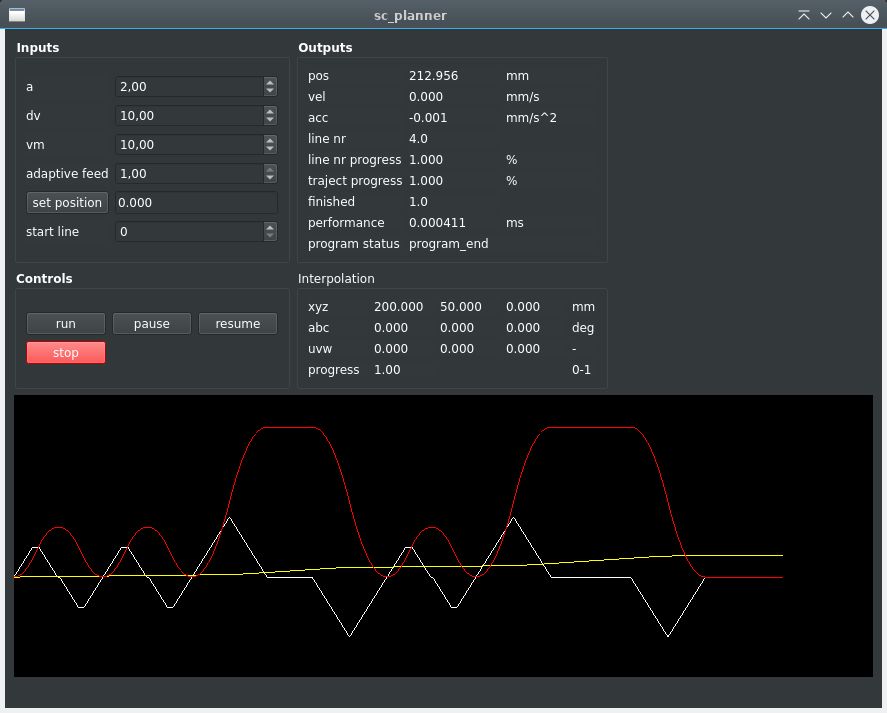
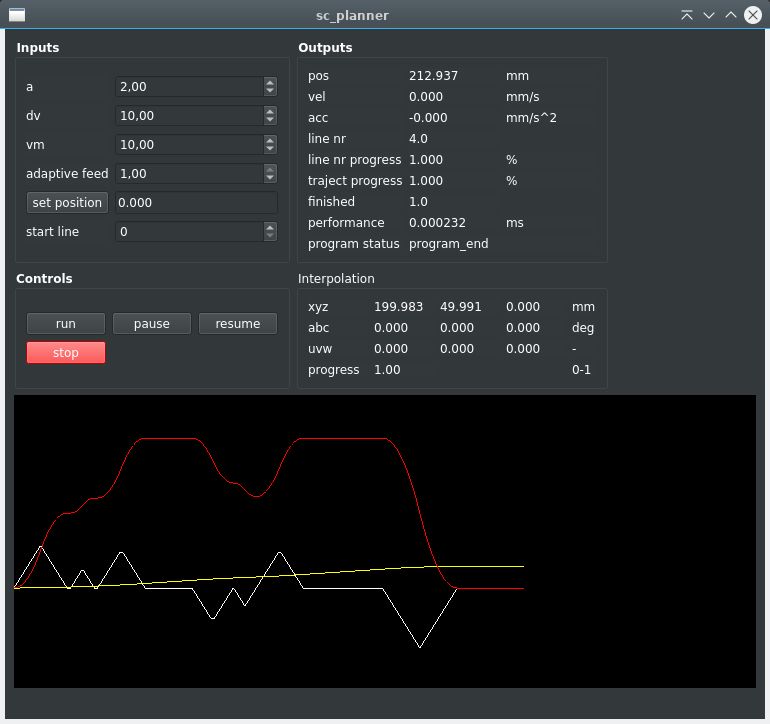
The testcase was done with multiple short lines after each other.
The motion:
Example without sc_optimizer :
Example with sc_optimizer :
Mention:
Half way the motion, the red curve has a dip. This is because there is a corner angle at that point. The last motion has
a y-value of 50.
You can also mention the first 4 motion's are fused together, because they are of type G1.
Without the path optimizer, the machine would stop every motion line.
He does not give up, ever.
Have to confess sometimes it's better to give up in sometimes
for your own health and mental state.
Otherwise you can make your own live very hard,
and you can become angry on yourself, because things do not
succeed.
the algo of cavalier contours & auto nesting was going to far for me.
Cavalier contours is like magic. Really hard to design such a algo.
A nesting algo idem dito. Also magic, haha.
I guess we are lucky today.
I tested the planner with the optimizer attached, cq look ahead function. It looks ahead 20 lines.
If user is at program line 50, the optimizer takes 50 as start & 50+20 as end range.
So far so good.
The testcase was done with multiple short lines after each other.
The motion:
Warning: Spoiler!
Code:
vo=0, ve=0;
planner->sc_add_line_motion(vo,ve,acs,ace,{0,0,0},{10,0,0},sc_type::sc_G1);
vo=0, ve=0;
planner->sc_add_line_motion(vo,ve,acs,ace,{10,0,0},{20,0,0},sc_type::sc_G1);
vo=0, ve=0;
planner->sc_add_line_motion(vo,ve,acs,ace,{20,0,0},{100,0,0},sc_type::sc_G1);
vo=0, ve=0;
planner->sc_add_line_motion(vo,ve,acs,ace,{100,0,0},{110,0,0},sc_type::sc_G1);
vo=0, ve=0;
planner->sc_add_line_motion(vo,ve,acs,ace,{110,0,0},{200,50,0},sc_type::sc_G1);
Example without sc_optimizer :
Example with sc_optimizer :
Mention:
Half way the motion, the red curve has a dip. This is because there is a corner angle at that point. The last motion has
a y-value of 50.
You can also mention the first 4 motion's are fused together, because they are of type G1.
Without the path optimizer, the machine would stop every motion line.
Last edit: 3 years 7 months ago by Grotius.
The following user(s) said Thank You: tommylight, Darium
Please Log in or Create an account to join the conversation.
- Grotius
- Offline
- Platinum Member
-
Less
More
- Posts: 2419
- Thank you received: 2349
3 years 7 months ago #267420
by Grotius
Replied by Grotius on topic LinuxCNC S-Curve Accelerations
Hi,
I first looked into the comments of Mr Garret this evening. Its on page 30 of this topic.
Was able to halcompile a custom tp.comp and was able to replace a tp.c file for a copy named sc_tp.c
Lcnc started and loaded the sc_tp.so succesfully. Jogging was ok.
Now the next thing i want to try is play a little bit around with the function list in the sc_tp.c file.
What happens if we empty the pause function? I must get an idea how the tp.c works and reacts.
Here are my notes, how the procedure went exactly :
I first looked into the comments of Mr Garret this evening. Its on page 30 of this topic.
Was able to halcompile a custom tp.comp and was able to replace a tp.c file for a copy named sc_tp.c
Lcnc started and loaded the sc_tp.so succesfully. Jogging was ok.
Now the next thing i want to try is play a little bit around with the function list in the sc_tp.c file.
What happens if we empty the pause function? I must get an idea how the tp.c works and reacts.
Here are my notes, how the procedure went exactly :
Warning: Spoiler!
Code:
- Renamed tpcomp.comp to sc_tp.comp.
- Edit sc_tp.comp file, at first line:
component sc_tp "Trajectory Planning (tp) module skeleton";
- In file sc_tp.comp, line 51, set path to your lcnc dir.
#define TOPDIR /home/user/linuxcnc-dev
- Copy and rename file:
~/home/user/linuxcnc-dev/src/emc/tp/tp.c
into
~/home/user/linuxcnc-dev/src/emc/tp/sc_tp.c
- In sc_tp.comp outcomment : // #include USE_TOPDIR(src/emc/tp/tp.c)
- In sc_tp.comp add : #include "/home/user/linuxcnc-dev/src/emc/tp/sc_tp.c"
- ~/linuxcnc-dev/scripts/$ . ./rip-environment
- ~/linuxcnc-dev/scripts/$ halcompile --install /home/user/linuxcnc-dev/src/hal/components/sc_tp.comp
/components/sc_tp.comp
Compiling realtime sc_tp.c
Linking sc_tp.so
cp sc_tp.so /home/user/linuxcnc-dev/rtlib/
//! This did not load the sc_tp.
- ~/home/user/linuxcnc-dev/configs/sim/axis/axis_mm.ini
# Trajectory planner section --------------------------------------------------
[TRAJ]
TPMOD=sc_tp
//! This worked.
- ~/linuxcnc-dev/scripts/$ linuxcnc -t sc_tp /home/user/linuxcnc-dev/configs/sim/axis/axis_mm.ini
linuxcnc -t sc_tp /home/user/linuxcnc-dev/configs/sim/axis/axis_mm.ini
LINUXCNC - 2.10.0~pre0
Machine configuration directory is '/home/user/linuxcnc-dev/configs/sim/axis'
Machine configuration file is 'axis_mm.ini'
Starting LinuxCNC...
linuxcnc TPMOD=sc_tp HOMEMOD=homemod EMCMOT=motmod
Lcnc started ok, jogging ok.
At this stage, we have a tp componenent, and a custom tp.c file wich we can try to edit and see what happens.
The following user(s) said Thank You: tommylight, Darium
Please Log in or Create an account to join the conversation.
- Grotius
- Offline
- Platinum Member
-
Less
More
- Posts: 2419
- Thank you received: 2349
3 years 7 months ago #267510
by Grotius
Replied by Grotius on topic LinuxCNC S-Curve Accelerations
Hi,
Today i worked on mr. Garrets comments.
I emptied all functions in the tp.c file. The file was around 3000 lines. I lost overview.
After compiling with empty functions, lcnc would startup slowly, but no errors.
Then i pasted function's back into the code, that i found relevant for now.
After that, lcnc started up nice. Jogging and homing are working all the time,
it seems the tp.c file is only active when program run is pressed. I did'nt know that.
Then tested to get the lcnc tool moving on the screen. This worked !
I noticed a slow delay of about 5 sec. when motion would start to move, but no problem for now. I think it could
be something with the gcode list (Queue), wich is empty for now.
I started to getting the idea i know how it works. That's a good sign.
The next thing i am programming now is loading the gcode list, "Queue". This is the list of gcode coordinates to do.
So from here on, i think we can integrate the scurve lib quite easy into the tp.c file.
I have good feelings about this.
For testing i have lcnc repository with cmake build system. We have bird eye view, works perfect :
lcnc repository
This is the component that is starting with lcnc with the command:
$ . ./rip-environment
$ linuxcnc -t sc_tp /home/user/linuxcnc/configs/sim/axis/axis_mm.ini
The component that mr. Garret has provided as example, i have created a .c file component wich is a little simpler in the end:
theComponent
This is the modified tp.c file wich does the realtime motion planning, in progress :
TheScurveTp
Today i worked on mr. Garrets comments.
I emptied all functions in the tp.c file. The file was around 3000 lines. I lost overview.
After compiling with empty functions, lcnc would startup slowly, but no errors.
Then i pasted function's back into the code, that i found relevant for now.
After that, lcnc started up nice. Jogging and homing are working all the time,
it seems the tp.c file is only active when program run is pressed. I did'nt know that.
Then tested to get the lcnc tool moving on the screen. This worked !
I noticed a slow delay of about 5 sec. when motion would start to move, but no problem for now. I think it could
be something with the gcode list (Queue), wich is empty for now.
I started to getting the idea i know how it works. That's a good sign.
The next thing i am programming now is loading the gcode list, "Queue". This is the list of gcode coordinates to do.
So from here on, i think we can integrate the scurve lib quite easy into the tp.c file.
I have good feelings about this.
For testing i have lcnc repository with cmake build system. We have bird eye view, works perfect :
lcnc repository
This is the component that is starting with lcnc with the command:
$ . ./rip-environment
$ linuxcnc -t sc_tp /home/user/linuxcnc/configs/sim/axis/axis_mm.ini
The component that mr. Garret has provided as example, i have created a .c file component wich is a little simpler in the end:
theComponent
This is the modified tp.c file wich does the realtime motion planning, in progress :
TheScurveTp
The following user(s) said Thank You: zack, Darium
Please Log in or Create an account to join the conversation.
- Grotius
- Offline
- Platinum Member
-
Less
More
- Posts: 2419
- Thank you received: 2349
3 years 7 months ago - 3 years 7 months ago #267599
by Grotius
Replied by Grotius on topic LinuxCNC S-Curve Accelerations
Hi,
I have question.
Yesterday tried to find out how tp->done exactly works.
What happens to me is:
1. I want to recieve a new gcode line, so i set : tp->done=1
- Then from somewhere the function tpaddline or tpaddarc is triggered and i recieve one line of gcode.
- I could not see in the project wich module or code is sending this signal to activate the function.
2. If i want to recieve another line of gcode, i repeat 1.
- Then the whole gcode is dumped at once.
How could we recieve one line of gcode each time?
Or better, recieve a gcode from a given line nr on request.
Currently converting the sc_engine c++ code into pure c, to be used in realtime.
In the mean time, i hope someone know more about this fenomen.
The attached file is just for info.
The question is related to this code : scurve_tp.c
I have question.
Yesterday tried to find out how tp->done exactly works.
What happens to me is:
1. I want to recieve a new gcode line, so i set : tp->done=1
- Then from somewhere the function tpaddline or tpaddarc is triggered and i recieve one line of gcode.
- I could not see in the project wich module or code is sending this signal to activate the function.
2. If i want to recieve another line of gcode, i repeat 1.
- Then the whole gcode is dumped at once.
How could we recieve one line of gcode each time?
Or better, recieve a gcode from a given line nr on request.
Currently converting the sc_engine c++ code into pure c, to be used in realtime.
In the mean time, i hope someone know more about this fenomen.
The attached file is just for info.
The question is related to this code : scurve_tp.c
Last edit: 3 years 7 months ago by Grotius.
The following user(s) said Thank You: Darium
Please Log in or Create an account to join the conversation.
- spumco
- Offline
- Platinum Member
-
Less
More
- Posts: 2180
- Thank you received: 905
3 years 7 months ago #267626
by spumco
Replied by spumco on topic LinuxCNC S-Curve Accelerations
@Grotius:
I've been trying to follow this from the sidelines for quite some time - understanding perhaps 5% of the discussion. I've had nothing to contribute other than a belated 'thank you.'
Your latest post discussing 'one line of gcode' prompted me me to respond, however. I don't understand how 'everything' in LCNC works, but I do know there is an issue - or at least I and some others perceive it as such - with how LCNC works regarding execution of of g-code lines.
Forgive me if I get this wildly wrong, but I believe individual lines of g-code are not passed to (or from?) the trajectory planner. Rather, it's been explained to me that messages are sent which contain a 'bundle' of instructions. If a single line of g-code has movement, then that is all that's passed in the message.
However, if there are non-movement lines - G4's, M7/M8/M9, etc - those get 'bundled' in a single message with the next movement line. I'm quite sure I'm being dense or inexact (at best) in the terminology.
The end result is that LCNC's single-step function doesn't work like industrial CNC controls. In other controls there is a single-block mode, and when enabled that mode results in a single line of g-code being executed for each cycle-start command (or MFGR's equivalent). Doesn't matter if the line has motion or not... only one line is executed.
In LCNC a single step will blow through (execute) all lines of g-code until the next motion line. And there is no built-in single-block 'mode' - LCNC's step function is just another 'cycle-start' button. Somewhat disconcerting coming from other control systems.
I don't know if not having a single-block 'mode' has anything to do with the non-movement commands being 'bundled' with the next movement line. They may be related - or not. I've no clue, but both are a significant deviation from 'standard' CNC control behavior.
I mention all this because I'm hoping you can keep it in mind while you work on the s-curve TP project. If you have the chance to change how LCNC behaves regarding lines of g-code being 'bundled' I would urge you to see if it's possible without derailing the core project of a working s-curve tp.
Again, thank you for your efforts.
I've been trying to follow this from the sidelines for quite some time - understanding perhaps 5% of the discussion. I've had nothing to contribute other than a belated 'thank you.'
Your latest post discussing 'one line of gcode' prompted me me to respond, however. I don't understand how 'everything' in LCNC works, but I do know there is an issue - or at least I and some others perceive it as such - with how LCNC works regarding execution of of g-code lines.
Forgive me if I get this wildly wrong, but I believe individual lines of g-code are not passed to (or from?) the trajectory planner. Rather, it's been explained to me that messages are sent which contain a 'bundle' of instructions. If a single line of g-code has movement, then that is all that's passed in the message.
However, if there are non-movement lines - G4's, M7/M8/M9, etc - those get 'bundled' in a single message with the next movement line. I'm quite sure I'm being dense or inexact (at best) in the terminology.
The end result is that LCNC's single-step function doesn't work like industrial CNC controls. In other controls there is a single-block mode, and when enabled that mode results in a single line of g-code being executed for each cycle-start command (or MFGR's equivalent). Doesn't matter if the line has motion or not... only one line is executed.
In LCNC a single step will blow through (execute) all lines of g-code until the next motion line. And there is no built-in single-block 'mode' - LCNC's step function is just another 'cycle-start' button. Somewhat disconcerting coming from other control systems.
I don't know if not having a single-block 'mode' has anything to do with the non-movement commands being 'bundled' with the next movement line. They may be related - or not. I've no clue, but both are a significant deviation from 'standard' CNC control behavior.
I mention all this because I'm hoping you can keep it in mind while you work on the s-curve TP project. If you have the chance to change how LCNC behaves regarding lines of g-code being 'bundled' I would urge you to see if it's possible without derailing the core project of a working s-curve tp.
Again, thank you for your efforts.
The following user(s) said Thank You: Grotius
Please Log in or Create an account to join the conversation.
Time to create page: 0.180 seconds