
- Posts: 245
- Thank you received: 37
Successfully configured with stepconf: but +Y-axis "stutters" running G-code
- clunc
- Topic Author
- Offline
- Elite Member
-

Less
More
4 years 7 months ago #237599
by clunc
Successfully configured with stepconf: but +Y-axis "stutters" running G-code was created by clunc
Shortest: Why is my machine "stuttering" in the +Y direction when running G-code, but not when jogging?
I've had to replace one old HP pc with an old Dell pc when the former's motherboard failed.
So far I've managed to install a RT-PREEMPT version of Ubuntu/Linux Mint 20.4 and have compiled LinuxCNC pre2.9 for that, and it runs, in the sense that LinuxCNC can jog my gantry router around in all 3 axes.
I decided to run the LinuxCNC-logo demo/splash demo program, after making some safety edits, like settting feed limits, and an odd noise during the run was traced to executions of Y-axis moves in the positive direction.
The machine sounds like it's "stuttering", and in fact is visually "backing up" after every move of about 1/4".
I should say that:
* the old machine was running lxcnc 2.8, the config files of which have been copied over
* had two parallel-port PCI cards, which have been moved over
* the machine jogs perfectly happily in all six directions
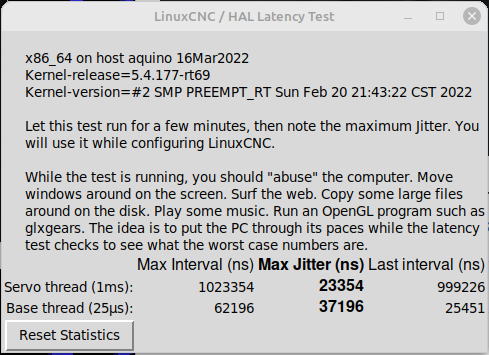
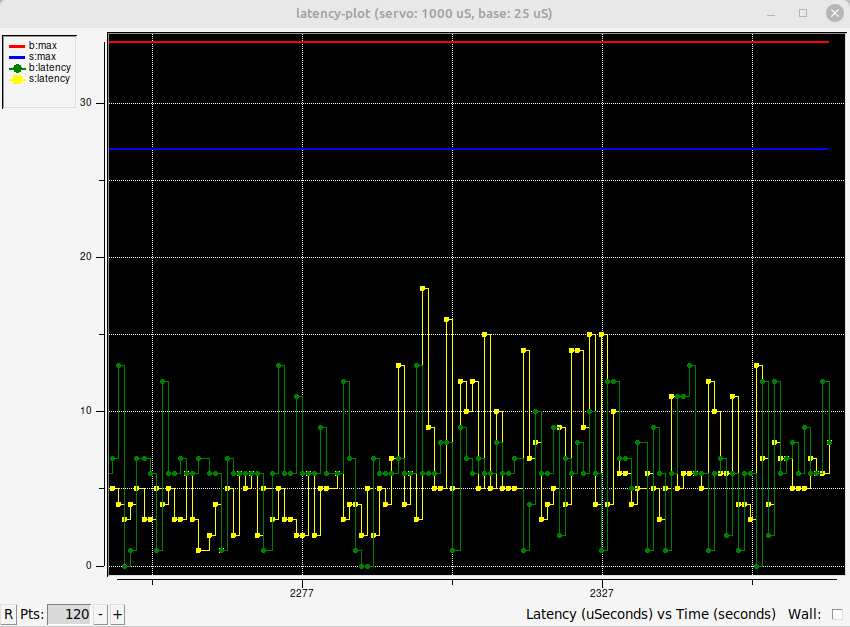
* latency seems acceptable, and tests of all 3 axes showed no surprising behavior in stepconf
* commanded MDI/F5 moves of e.g., G90 G55 G1 F50 +Y2 execute normally without the noisy behavior
* a copy/paste of a susceptible line in the G-code to the command line also runs without the behavior
* the LinuxCNC logo demo G-code was run in G21/mm mode because I had not noticed it to change it
Is this type of "stuttering" a known symptom of something?
Thank you.
I've had to replace one old HP pc with an old Dell pc when the former's motherboard failed.
So far I've managed to install a RT-PREEMPT version of Ubuntu/Linux Mint 20.4 and have compiled LinuxCNC pre2.9 for that, and it runs, in the sense that LinuxCNC can jog my gantry router around in all 3 axes.
I decided to run the LinuxCNC-logo demo/splash demo program, after making some safety edits, like settting feed limits, and an odd noise during the run was traced to executions of Y-axis moves in the positive direction.
The machine sounds like it's "stuttering", and in fact is visually "backing up" after every move of about 1/4".
I should say that:
* the old machine was running lxcnc 2.8, the config files of which have been copied over
* had two parallel-port PCI cards, which have been moved over
* the machine jogs perfectly happily in all six directions
* latency seems acceptable, and tests of all 3 axes showed no surprising behavior in stepconf
* commanded MDI/F5 moves of e.g., G90 G55 G1 F50 +Y2 execute normally without the noisy behavior
* a copy/paste of a susceptible line in the G-code to the command line also runs without the behavior
* the LinuxCNC logo demo G-code was run in G21/mm mode because I had not noticed it to change it
Is this type of "stuttering" a known symptom of something?
Thank you.
Please Log in or Create an account to join the conversation.
- tommylight
-

- Away
- Moderator
-

4 years 7 months ago #237601
by tommylight
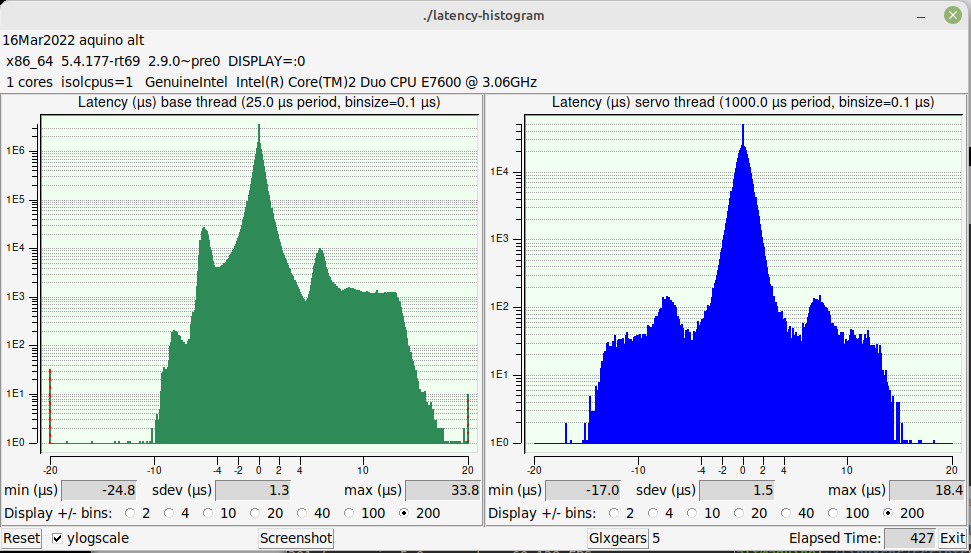
There are striped lines on the base period side, this will show the value.
Replied by tommylight on topic Successfully configured with stepconf: but +Y-axis "stutters" running G-code
Code:
latency-histogram --show
Please Log in or Create an account to join the conversation.
- clunc
- Topic Author
- Offline
- Elite Member
-
Less
More
- Posts: 245
- Thank you received: 37
4 years 7 months ago #237820
by clunc
Secondly, thank you for your help.
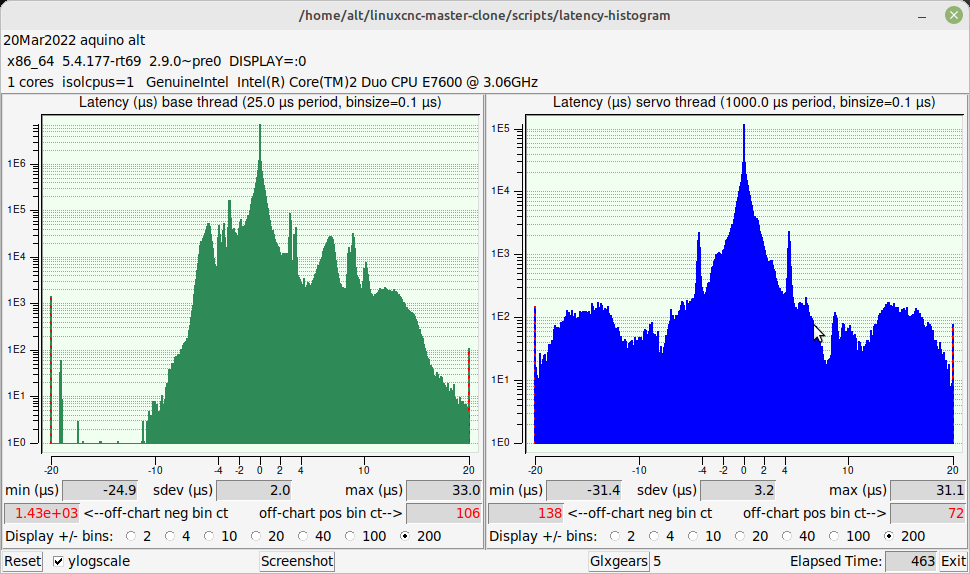
I've attached the latest latency-histogram with an even heavier torture test going on.
I see three ways forward for meJ: 1. continue on the path of trying to find and fix the sources of latency, 2. dial back performance settings to avoid being hit by latency problems, or 3. start over. Of course, I'm partial to #1 because it would be better to have a better understanding of my setup.
I can add now that the original problem I mentioned did not recur, after simply editing the LinuxCNC logo G-code program to change G21 to G20 (and adjusting the scale accordingly), mm to inch mode. It ran without incident in inch.
What caused me to throw in the towel last night was this: after experiencing a Z/joint-2 following error when jogging (at under 200 IPM) and losing position information and having to restart LinuxCNC, I had actually been able to face the workpiece (w/a program of simple back-and-forth passes). However, as I was jogging to set the zeroes for the first roughing pass of a model, it lost position again, this time in the Y-axis. While I suspect the rough pass might have run successfully, I couldn't be sure and I still have the more complicated finish pass to run (which actually might run fine owing to the much fewer and shorter rapids).
To recap:
1. I have copied the config/ directory from the old machine to the new, and have edited only the parport/io addresses,
2. move the PCI (not PCIe) parallel-port cards from the old machine to the new.
3. run stepconf and tested all 3 axes in the back-and-forth mode, confirming I thought the acceleration entries were acceptable.
4. the machine stops abruptly, but not predictably, when jogging (at least in Y and Z so far) with a "joint-following error."
Replied by clunc on topic Successfully configured with stepconf: but +Y-axis "stutters" running G-code
Firstly, I apologize for disappearing for several days. I thought I noticed something that let me proceed to try vainly to meet a deadline yesterday. I had partial success, but ultimately called it quits late last night.
FirstlyCode:latency-histogram --show There are striped lines on the base period side, this will show the value.
Secondly, thank you for your help.
I've attached the latest latency-histogram with an even heavier torture test going on.
I see three ways forward for meJ: 1. continue on the path of trying to find and fix the sources of latency, 2. dial back performance settings to avoid being hit by latency problems, or 3. start over. Of course, I'm partial to #1 because it would be better to have a better understanding of my setup.
I can add now that the original problem I mentioned did not recur, after simply editing the LinuxCNC logo G-code program to change G21 to G20 (and adjusting the scale accordingly), mm to inch mode. It ran without incident in inch.
What caused me to throw in the towel last night was this: after experiencing a Z/joint-2 following error when jogging (at under 200 IPM) and losing position information and having to restart LinuxCNC, I had actually been able to face the workpiece (w/a program of simple back-and-forth passes). However, as I was jogging to set the zeroes for the first roughing pass of a model, it lost position again, this time in the Y-axis. While I suspect the rough pass might have run successfully, I couldn't be sure and I still have the more complicated finish pass to run (which actually might run fine owing to the much fewer and shorter rapids).
To recap:
1. I have copied the config/ directory from the old machine to the new, and have edited only the parport/io addresses,
2. move the PCI (not PCIe) parallel-port cards from the old machine to the new.
3. run stepconf and tested all 3 axes in the back-and-forth mode, confirming I thought the acceleration entries were acceptable.
4. the machine stops abruptly, but not predictably, when jogging (at least in Y and Z so far) with a "joint-following error."
Please Log in or Create an account to join the conversation.
- clunc
- Topic Author
- Offline
- Elite Member
-
Less
More
- Posts: 245
- Thank you received: 37
4 years 7 months ago - 4 years 7 months ago #237821
by clunc
Replied by clunc on topic Successfully configured with stepconf: but +Y-axis "stutters" running G-code
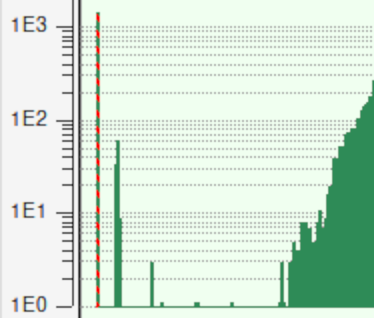
Oh, I see, finally, the striped lines you mentioned (attached).
(I then did a websearch for +linuxcnc +histogram +"striped lines" and... found only this post. :^\ )
(I then did a websearch for +linuxcnc +histogram +"striped lines" and... found only this post. :^\ )
Last edit: 4 years 7 months ago by clunc. Reason: correct
The following user(s) said Thank You: tommylight
Please Log in or Create an account to join the conversation.
- tommylight
-
- Away
- Moderator
-
4 years 7 months ago #237822
by tommylight
Replied by tommylight on topic Successfully configured with stepconf: but +Y-axis "stutters" running G-code
Yeah that is bad, see the red numbers in the histogram, those are huge latency excursions so it will be useless for anything except testing.
That will cause random stalls, wrong dimensions, low motor torque...
If you can:
-remove all memory sticks and test them one by one
-change the power supply
-check the processor for heat or failed fan, repasting it might help a lot
-test the latency from a live USB session
Also remove cpu isolation, some insist it works, for me it never made any reasonable difference with RT kernel, it does work with RTAI.... Thinking of it there is a RTAI kernel that works with the official ISO, so try that, chances are it will work.
linuxcnc.org/docs/2.8/html/getting-start...#cha:Installing-RTAI
That will cause random stalls, wrong dimensions, low motor torque...
If you can:
-remove all memory sticks and test them one by one
-change the power supply
-check the processor for heat or failed fan, repasting it might help a lot
-test the latency from a live USB session
Also remove cpu isolation, some insist it works, for me it never made any reasonable difference with RT kernel, it does work with RTAI.... Thinking of it there is a RTAI kernel that works with the official ISO, so try that, chances are it will work.
linuxcnc.org/docs/2.8/html/getting-start...#cha:Installing-RTAI
The following user(s) said Thank You: clunc
Please Log in or Create an account to join the conversation.
- clunc
- Topic Author
- Offline
- Elite Member
-
Less
More
- Posts: 245
- Thank you received: 37
4 years 7 months ago #237824
by clunc
Replied by clunc on topic Successfully configured with stepconf: but +Y-axis "stutters" running G-code
Oh, yes! I was staring at the figure for clues, but agree, even if I missed the significance of "all-red" numbers, four "off-charts" ought to have made an impression on me.
I'll try, in this order:
* resetting isocpus (to elimate the other one, and then neither)
* test the memory sticks
* CPU processor heat
* latency from a LiveDVD session (it's what I have)
I know I won't change the power supply. I'll get another box from the friend.
The same goes for an RTAI kernel. I'll first try to replicate what I've got on the other box which should tell me if it's the hardware that's responsible.
Thank you for a Way Forward.
BTW, I also found Rod's post regarding "Latency" . In my opinion, it is definitive and ought to be a Sticky.
I'll try, in this order:
* resetting isocpus (to elimate the other one, and then neither)
* test the memory sticks
* CPU processor heat
* latency from a LiveDVD session (it's what I have)
I know I won't change the power supply. I'll get another box from the friend.
The same goes for an RTAI kernel. I'll first try to replicate what I've got on the other box which should tell me if it's the hardware that's responsible.
Thank you for a Way Forward.
BTW, I also found Rod's post regarding "Latency" . In my opinion, it is definitive and ought to be a Sticky.
The following user(s) said Thank You: tommylight, rodw
Please Log in or Create an account to join the conversation.
- clunc
- Topic Author
- Offline
- Elite Member
-
Less
More
- Posts: 245
- Thank you received: 37
4 years 7 months ago - 4 years 7 months ago #237855
by clunc
Replied by clunc on topic Successfully configured with stepconf: but +Y-axis "stutters" running G-code
So far I've only experimented with isolcpus settings with no noticed difference.
I remembered another option I recalled seeing and have a pre-owned 2G Radeon card on-order as it was reported to be "recommended by Dell for the Optiplex series." Right now I'm using motherboard VGA, but my monitor and the card are capable of DVI. I'm betting I'll see improvement with that change.
Edit: Update: Ordered a full-height video card through ebay. Received half-height... Well, it might have shown a difference if it had arrived. ;^/ Now we do the ebay two-step.
I remembered another option I recalled seeing and have a pre-owned 2G Radeon card on-order as it was reported to be "recommended by Dell for the Optiplex series." Right now I'm using motherboard VGA, but my monitor and the card are capable of DVI. I'm betting I'll see improvement with that change.
Edit: Update: Ordered a full-height video card through ebay. Received half-height... Well, it might have shown a difference if it had arrived. ;^/ Now we do the ebay two-step.
Last edit: 4 years 7 months ago by clunc. Reason: update
Please Log in or Create an account to join the conversation.
- clunc
- Topic Author
- Offline
- Elite Member
-
Less
More
- Posts: 245
- Thank you received: 37
4 years 7 months ago - 4 years 7 months ago #238409
by clunc
Replied by clunc on topic Successfully configured with stepconf: but +Y-axis "stutters" running G-code
While I'm awaiting a new-used video card, two questions occurred to me:
1. Is there a way I could "dial back" performance settings in the configuration to something that, while not optimal, would execute programs reliably?
2. Alternatively, without changing anything in the current performance settings, would switching to a Mesa card result in reliable performance at the past relatively high level of performance? [1]
Thank you for your help.
[1] I am not averse to ponying up some hundreds to make my system more portable across PCs, but I also saw Andy's post
about there being a Mesa option for some twenties.
[2] ...and I have now found Rod's explanation of how a Mesa card relaxes the latency requirements by relieving the CPU of
high-frequency step-generation. (That notion of the CPU just signaling a step frequency to the Mesa reminds me a little of the telegraph key "bug" used by Morse-code enthusiasts to relieve their fingers of having to tap multiple dots or dashes. For that matter it would not surprise me at all to find a host of amateur radio types in this group.)
1. Is there a way I could "dial back" performance settings in the configuration to something that, while not optimal, would execute programs reliably?
2. Alternatively, without changing anything in the current performance settings, would switching to a Mesa card result in reliable performance at the past relatively high level of performance? [1]
Thank you for your help.
[1] I am not averse to ponying up some hundreds to make my system more portable across PCs, but I also saw Andy's post
about there being a Mesa option for some twenties.
[2] ...and I have now found Rod's explanation of how a Mesa card relaxes the latency requirements by relieving the CPU of
high-frequency step-generation. (That notion of the CPU just signaling a step frequency to the Mesa reminds me a little of the telegraph key "bug" used by Morse-code enthusiasts to relieve their fingers of having to tap multiple dots or dashes. For that matter it would not surprise me at all to find a host of amateur radio types in this group.)
Last edit: 4 years 7 months ago by clunc. Reason: update. clarify.
Please Log in or Create an account to join the conversation.
- RGH
- Offline
- Junior Member
-

Less
More
- Posts: 35
- Thank you received: 13
4 years 7 months ago #238414
by RGH
Replied by RGH on topic Successfully configured with stepconf: but +Y-axis "stutters" running G-code
Did you optimize the bios settings?
In a nutshell: Deactivate every power management feature you can find and disable every feature and onboard device you don't need. Stuff like speedstep etc.
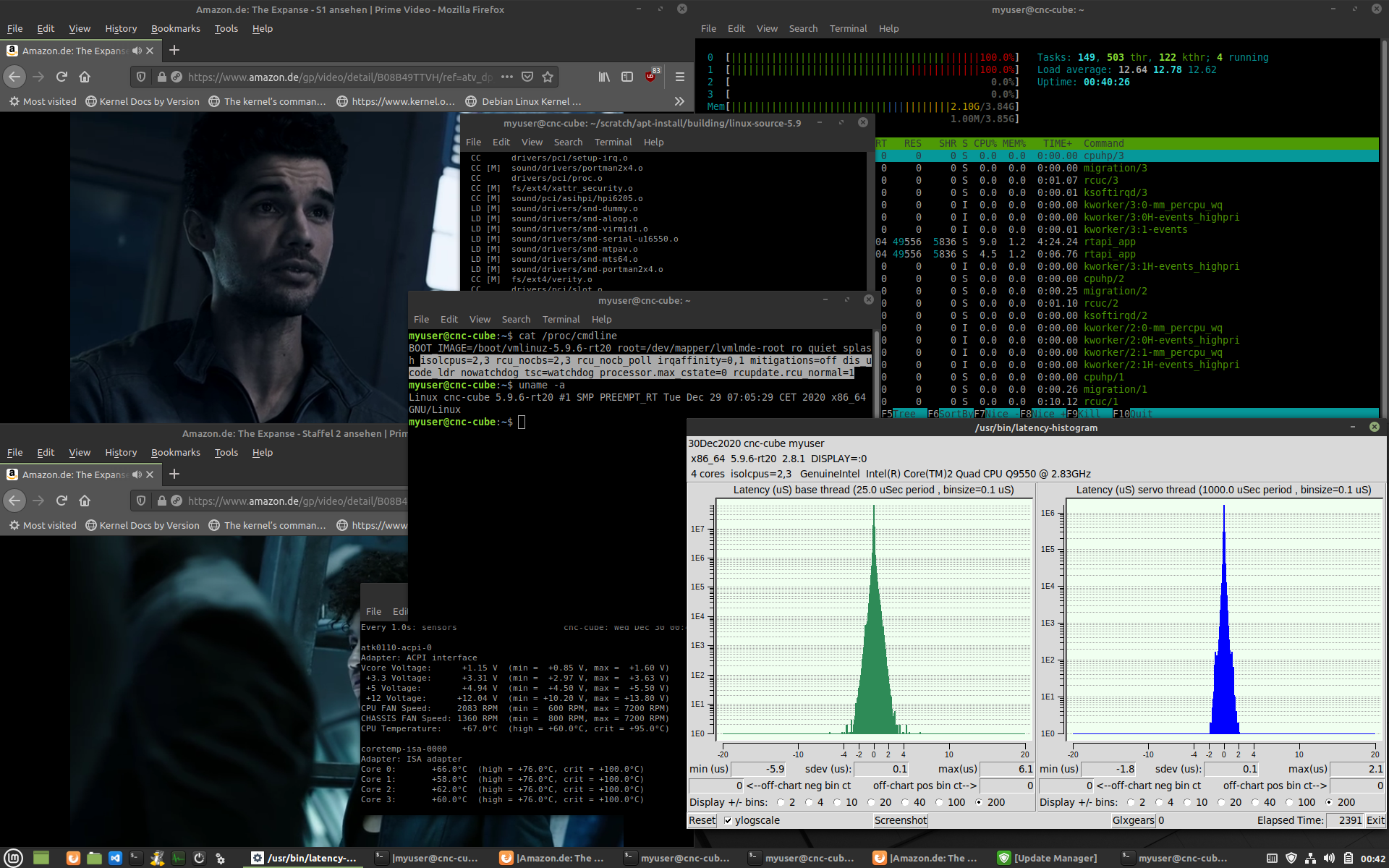
I spent some time months ago playing with preempt-rt, different machines, vga, core isolation, interrupt routing... yada yada to squeeze 'more rt' out of machines. There is quite a lot of stuff that can be done... see attachment for a nice result while torture testing.
But a 'clean' bios is a good initial step. If suitable bios options to get power / clock management under control aren't available, kernel params can be used to get things under control. The kernel documentation contains all the info required.
Isolcpus isn't worthless btw. It won't turn a lemon into something brilliant but depending on how intertwined the cores are (e.g. cache layout can require to sacrifice more than one core) it can be combined with a proper irq routing to keep a core 'clean' and reduce an 'acceptable' latency by an order of magnitude.
Also my experience on old intel machines has been that onboard vga produced the least noise in terms of latency artifacts.
What CPU and kernel version are you running exactly? I might have dealt with a similar machine and have more concrete tips or 'kernel spells' I could share
In a nutshell: Deactivate every power management feature you can find and disable every feature and onboard device you don't need. Stuff like speedstep etc.
I spent some time months ago playing with preempt-rt, different machines, vga, core isolation, interrupt routing... yada yada to squeeze 'more rt' out of machines. There is quite a lot of stuff that can be done... see attachment for a nice result while torture testing.
But a 'clean' bios is a good initial step. If suitable bios options to get power / clock management under control aren't available, kernel params can be used to get things under control. The kernel documentation contains all the info required.
Isolcpus isn't worthless btw. It won't turn a lemon into something brilliant but depending on how intertwined the cores are (e.g. cache layout can require to sacrifice more than one core) it can be combined with a proper irq routing to keep a core 'clean' and reduce an 'acceptable' latency by an order of magnitude.
Also my experience on old intel machines has been that onboard vga produced the least noise in terms of latency artifacts.
What CPU and kernel version are you running exactly? I might have dealt with a similar machine and have more concrete tips or 'kernel spells' I could share
Please Log in or Create an account to join the conversation.
- tommylight
-
- Away
- Moderator
-
4 years 7 months ago #238425
by tommylight
Replied by tommylight on topic Successfully configured with stepconf: but +Y-axis "stutters" running G-code
@Clunc,
I have not done amateur radio since i went to army.
@Nebur,
Those are some nice numbers.
I have not done amateur radio since i went to army.
@Nebur,
Those are some nice numbers.
Please Log in or Create an account to join the conversation.
Time to create page: 0.075 seconds