Can't eek out that last bit of jitter

More
1 year 7 months ago #323770 by webbyguy
Thanks royka,
Do you happen to know, in the rtai kernel, would I move the processes with priority listed as rt?

Please Log in or Create an account to join the conversation.

More
1 year 7 months ago #323772 by webbyguy
Because I couldn't figure out how to disable smt for my fx 8350 cpu with the rtai kernel.  I tried switching to an X6 1090T.  I also disabled the thermal limits in bios.  My max jitter reduces to +/-14.4us (with all points within +/-5us except the ones right at +/-14.4us.  I wish I had taken a picture.)  I then turned the thermal limits back on, and I got about the same result I was getting for the fx 8350.  So, I turned the thermal limits back of again, but it didn't go back to the +/-14.4us max jitter.  It still looked the same as the fx 8350.  I tried resetting and messing with some other settings, and I can't get back to that +/-14.4us or better.  With some systems, is there some random timing at startup that causes different latency results even though there were no settings changes?

Please Log in or Create an account to join the conversation.

More
1 year 7 months ago #323804 by royka
I've never used rtai, but run latency-history and htop, sort by priority (F6?) and you'll see. I think you could use the same script.
Bad RAM memory could be a cause, usually using 2 ram modules (of the same) is better so it can use DDR. But if one of the two is bad removing one or the other might give a better result.
HDD can also be a cause, if you still use that buy a cheap SSD.
Disconnect any CD/DVD drives, SD-reader units.

Please Log in or Create an account to join the conversation.

More
1 year 7 months ago - 1 year 7 months ago #323950 by royka
I think that you should enable HPC (High Performance Computing) to prevent it from lowering the cpu frequency. Possibly also core performance boost. And to see if the kernel parameter works: cat /sys/devices/system/cpu/smt/active
Last edit: 1 year 7 months ago by royka.

Please Log in or Create an account to join the conversation.

More
1 year 7 months ago #324074 by webbyguy
Thanks royka,
Do you happen to know the names of the base and servo processes? I see migration/0 through migration/5 and rtkit-daemon listed as RT in htop. They don't seem to increase in time though, so I'd guess they aren't being used. There are some -20 priority processes too.

I tried removing each ram module, and it seemed to work for a bit, but I'd restart the latency-histogram (without restarting anything else), and it would stop helping, so I guess really some other random thing was happening that I can't find.

I am using a cheap SSD. I tried playing around with bios settings for it, and it seems to make no difference. I don't have any CD/DVD or SD-readers.

Please Log in or Create an account to join the conversation.

More
1 year 7 months ago - 1 year 7 months ago #324075 by webbyguy
I no longer have the HPC option in my bios settings.  I'm guessing it went away when I switched to the X6 1090T processor (instead of the fx 8350).  The 1090T didn't have hyperthreading, so I'm not using it.  With the real time kernel, for some reason /sys/devices/system/cpu/smt/active isn't there, but I'm sure I don't have hyperthreading now.

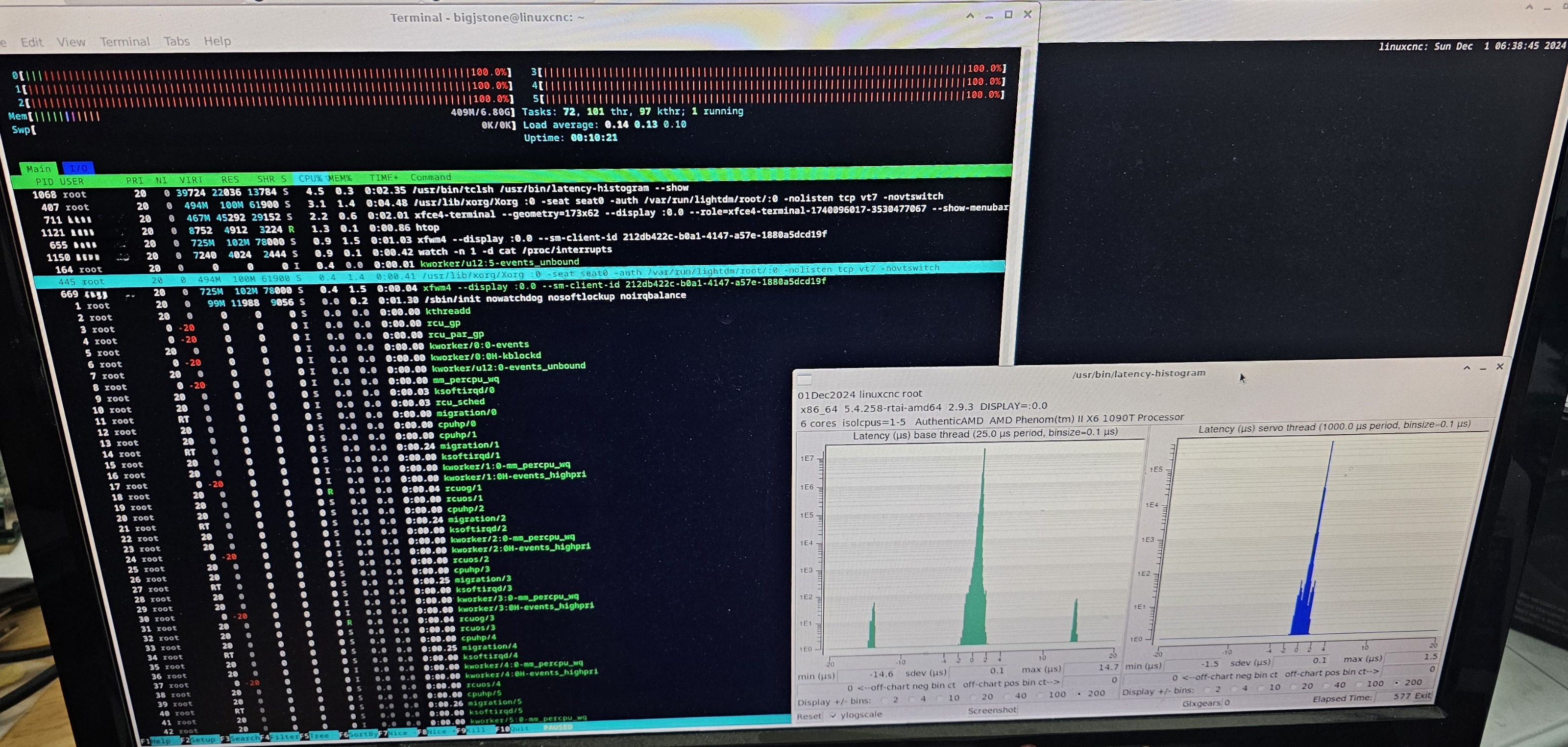
I tried the core performance boost.  It seemed to work for a bit, but restarting without changing settings made it go away.  I seem to have some random really good performance every once in a while, but it isn't repeatable.  Even restarting just the latency-histogram makes it go away sometimes.

Here's one of the times it looked pretty good for awhile.
 

I also tried adding the following commands to try to help things, but it is hard to tell if they really did anything.

swap off --all
systemctl --user stop pulseaudio.socket
systemctl --user stop pulseaudio.service


I also moved the rcu_sched to processor affinity 1,2,3,4,5.  That helped until I started firefox, and I could never get it back.


I think I'm gonna just try to move foreward without getting that last bit of jitter out.  I'm consistently below 40us, which sounds like it is good enough.  (I'll come back to it if I get some motors moving.) 

Oh, and for completeness, I tried the blocking of sound modules described here:
forum.linuxcnc.org/18-computer/39371-res...th-linuxcnc?start=90
Last edit: 1 year 7 months ago by webbyguy.

Please Log in or Create an account to join the conversation.

Time to create page: 0.506 seconds
Powered by Kunena Forum