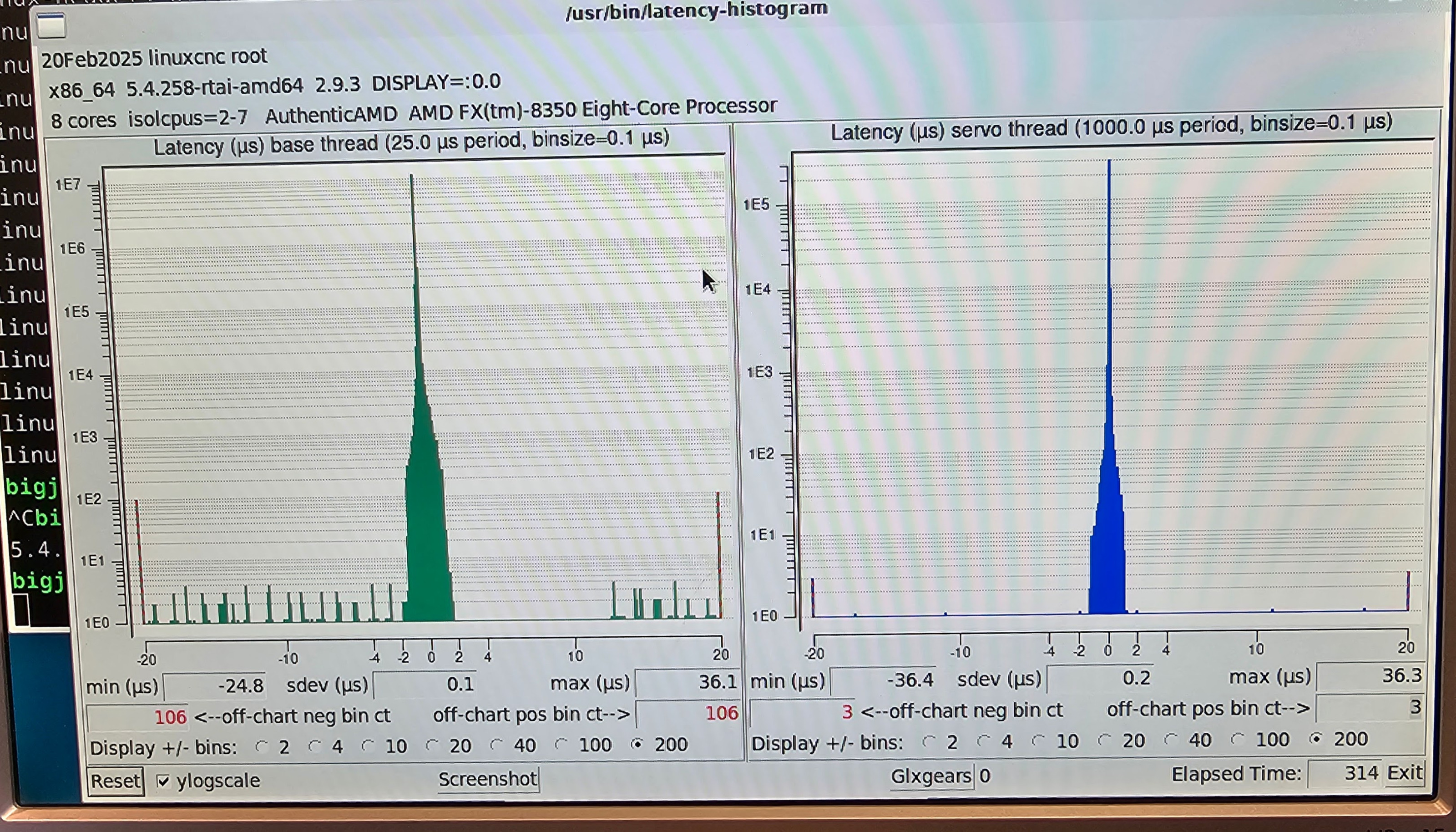
Can't eek out that last bit of jitter

More
1 year 8 months ago #321933 by webbyguy
Thank you for the reply. I had done 7.2.3 and 7.2.4.

I'll start over and try again., but let me see if I have the correct steps, because I think I'm either doing something extra, or leaving something out.

linuxcnc.org/docs/html/getting-started/g..._installing_linuxcnc

I do the following:
*All of step 1 (Download the image)
*All of step 2 (Write the image to a bootable device)
*All of step 4 (Installing LinuxCNC)
(This all worked to here, as I can boot from my hard drive.)
* Do I do 7.1.3? (There are 2 7.1.3, so this is the first one with apt update and dist-upgrade)
*I assume I skip 7.1.1, as I don't want the rt kernel anyway. (sudo apt-get install linux-image-rt-amd64) Correct?
*uname -v shows the preempt-rt at this point.
*Do 7.1.3. Remove the original non-rt linux-image. (Or should this come after installing linuxcnc from 7.2.3 and 7.2.4?)
*Do 7.1.4 (Linux Archive Signing Key) - This seems to create problems with apt later on for me.
*I assume I go to 7.2.2 next, but I'm not sure what it is telling me to do. I think I haven't installed the RTAI kernel yet, but here it says if RTAI is detected it will stop before installing any packages. Thus, I'm not sure what I'm doing with this step.
*Do 7.2.3. (apt-get update)
*Do 7.2.4 (install linuxcnc) This is where i was getting "conflicting values" if I had run the linuxcnc-install.sh script and not removed its changes from the sources list.

Please Log in or Create an account to join the conversation.

More
1 year 8 months ago #321936 by tommylight
I would try up to 4 as usual then skip directly to 7.2.3 and 7.2.4.

Please Log in or Create an account to join the conversation.

More
1 year 8 months ago #321942 by webbyguy
Thank you again.

I'm on 7.1.3. There is no "non-rt" "linux-image". I have
linux_image-6.1.0-30-rt-amd6 6.1.124-1
linux_image-6.1.0-30-rt-amd6 6.1.128-1
linux-image-rt-amd64 6.1.128-1

Should I remove one of these, or just go to 7.1.4 (linuxcnc-install.sh)?

Please Log in or Create an account to join the conversation.

More
1 year 8 months ago - 1 year 8 months ago #321947 by webbyguy
I tried without removing any of the "rt" "linux_image" s . Again, there was no "non-rt" linux-images.

Also, I tried without linuxcnc-install.sh first (you'll see why later).

When I ran sudo apt-get update, it ran fine, but when I ran sudo apt-get install linuxcnc, it gives the error:

Package linuxcnc is not available, but is referred to by another pacakge. This may mean that the package is missing, has been obsoleted, or is only availabe from another source.

E: Package 'linuxcnc has no installation candidate.


So then I went back and did sudo ./linuxcnc-install.sh

I got the error:

E: Conflicting values set for option Signed-by regarding source httyps://www.linuxcnc.or/ bookworm: /etc/apt/trusted.gpg.d/linuxcnc.gpg.key.binary.gpg != /usr/share/keyrings/linuxcnc.gpg
E: The list of sources could not be read.
Installing LinuxCNC
E: Conflicting values set for option Signed-by regarding source httyps://www.linuxcnc.or/ bookworm: /etc/apt/trusted.gpg.d/linuxcnc.gpg.key.binary.gpg != /usr/share/keyrings/linuxcnc.gpg
E: The list of sources could not be read.

You might want to consider installating the docs package for your language
And also the linux-cnc-uspace-dev package
sudo apt-get install linuxcnc-doc-[en/'fr/de/ja/es/ru/da/hu/s1]
sudo apt-get install linux-dev


Next I ran sudo apt-get update and I get the following error again:

E: Conflicting values set for option Signed-by regarding source httyps://www.linuxcnc.or/ bookworm: /etc/apt/trusted.gpg.d/linuxcnc.gpg.key.binary.gpg != /usr/share/keyrings/linuxcnc.gpg


I can clear this error by commenting out both lines in /etc/apt/sources.list.d/linuxcnc.list . (I think this basically partially undoes the linuxcnc-install.sh . )

After that I'm back to having no install canidate for linuxcnc.

So, I did skip 7.1.3, which may be my problem, but none of the packages I have installed are "non-rt", so I don't know which to remove.

Also, I don't know if there is a step that tells the system where to get "linuxcnc". I suspect the linuxcnc-install.sh is supposed to provide it, but it just causes problems with apt.
Last edit: 1 year 8 months ago by webbyguy.

Please Log in or Create an account to join the conversation.

More
1 year 8 months ago #321948 by webbyguy
Also, I considered using the directions at: forum.linuxcnc.org/9-installing-linuxcnc...tall-rtai-got-errors

but when I look at the directory  linuxcnc.org/dists/bookworm/2.9-rt/binary-amd64/

I don't see a 2.9.4 version, so I wonder if that is the source of the problems (or maybe just completely unrelated).

Please Log in or Create an account to join the conversation.

More
1 year 8 months ago #322131 by webbyguy
Okay, I finally have the rtai version running, but I seem to only be able to run the latency-histogram as sudo.  Is that the way you're supposed to use the rtai version?

Some notes on the install, as the directions leave out specifics of a lot of steps.  (Half the words in 7.2.4 are separate steps without spelled out commands.)  Hopefully this helps some others.  I followed a lot of forum.linuxcnc.org/9-installing-linuxcnc...tall-rtai-got-errors

Also, I'm not sure if these were done in the correct order.

After installing from the live cd and booting into the new os, I ran

Code:
sudo apt-get update sudo apt-get dist-upgrade

I'm not sure if I did this next, or it was somewhere else on the way.

sudo apt-get purge linuxcnc-uspace
sudo apt-get purge linuxcnc-doc*

Next I updated /etc/apt/sources.list.d/linuxcnc-uspace.list adding 2.9_rt to

deb [arch=amd64,arm64 signed-by=/etc/apt/trusted.gpg.d/linuxcnc.gpg.key.binary.gpg] www.linuxcnc.org/ bookworm base 2.9_uspace 2.9-rt
deb-src [arch=amd64,arm64 signed-by=/etc/apt/trusted.gpg.d/linuxcnc.gpg.key.binary.gpg] www.linuxcnc.org/ bookworm base 2.9_uspace 2.9-rt

(Note I think this is what the linuxcnc-install.sh script called out in the directions is supposed to do, but instead it adds a linuxcnc.list to the sources.list.d, which causes a conflict with what is in linuxcnc-uspace.list and means that apt and the Synaptic Manager stop working.)

Next I did another:

sudo apt-get update

Next I installed the real time kernel:

sudo apt-get linux-image-5.4.258-rtai-amd64

Note: You have to put in the version number. You can tab to find the right one to finish the line. It should have rtai.

REBOOT!!!! Here you have to reboot into the rtai kernel (I think). When the blue screen comes up press down to the second option to choose the rtai kernel.

Next I installed the modules and linuxcnc:

sudo apt-get install rtai-modules
sudo apt-get install linuxcnc

Here I don't think I needed the version number, but if you get an error you can try that.

I also installed headers at some point. I don't know if that was necessary:

sudo apt-get install linux-headers-5.4.258-rtai-amd64


I think I ran the linuxcnc install again after, but I don't know if it was necessary.

sudo apt-get install linuxcnc

The reward for all this... It looks like my min/max base thread latency is about the same as the preempt_rt version. :-(
 
Any other ideas what to try?

Please Log in or Create an account to join the conversation.

Time to create page: 0.396 seconds
Powered by Kunena Forum