

- Posts: 20
- Thank you received: 5
Can't eek out that last bit of jitter
1 year 8 months ago #321605
by webbyguy
Can't eek out that last bit of jitter was created by webbyguy
How can I track down the remaining sources of jitter?
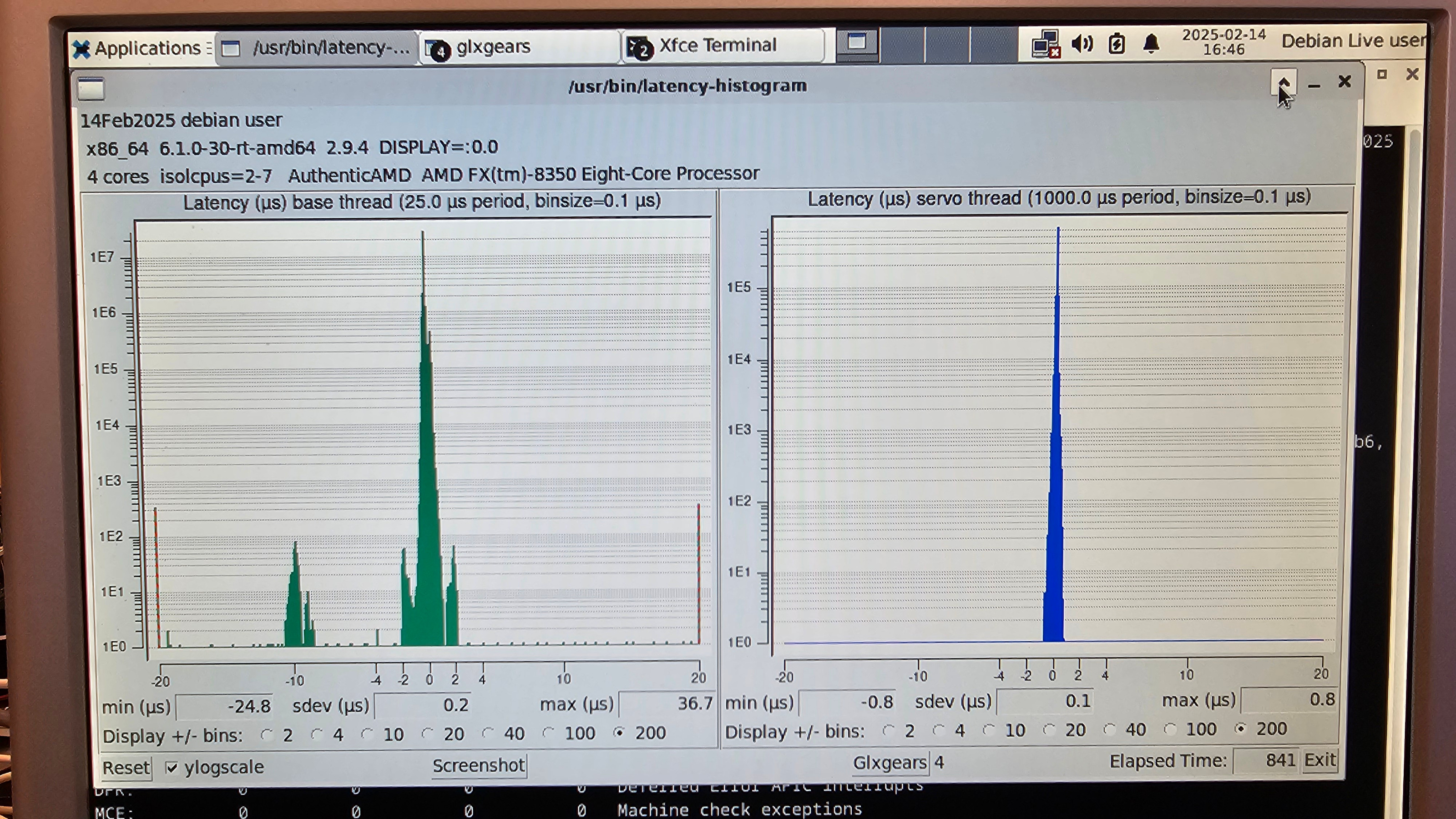
I have reduced the jitter a lot, but there are still some odd areas of jitter in my base histogram that I can't track down. On my base thread, you can see a few spikes out at -20us and 20us and also some spikes around -10us. (I'm going to use the parallel port for driving my milling machine.)
I'm using an AMD FX-8350 cpus on a biostar A880GZ motherboard. The AMD FX-8350 has 4 cores each with 2 threads, but I set nosmt, so linuxcnc is only using 2 cores. I'm using the integrated graphics card. It is ATI Radeon HD4250 Graphics .
I am running from a live usb drive with the following boot command.
When I run
I think I've disabled everything I can in the bios, but maybe I misunderstood some bios setting, and mistakenly turned something on. Here's all my settings I think apply:
Advanced>PCI Subsystem Settings>
PCI ROM Priority = Legacy ROM
PCI Latency Timer = 32 PCI Bus Clocks
VGA Palette Snoop = Disabled
PERR# Generation = Disabled
SERR# Generation = Disabled
Advanced>PCI Subsystem Settings>PCI Express Settings>
Relaxed Ordering = Disabled
Extended Tag = Disabled
No Snoop = Enabled
Maximum Payload = Auto
Maximum Read Request = Auto
ASPM Support = Disabled
Extended Synch = Disabled
Link Training Retry = 5
Link Traing Timeout (uS) = 100
Unpopulated Links = Keep Link ON
Advanced>ACPI Settings
Enable Hibernation = Disabled
ACPI Sleep State = Suspend Disabled
Lock Legacy Resources = Disabled
Wake System With Fixed Time = Disabled
USB Device Wake Up From S3/S4 = Enabled
PME Wake Up From S5 = Enabled
PS2 Keyboard PowerOn = Any Key
Stroke Key = Wake Key
PS2 Mouse PowerOn = Enabled
Advanced>CPU Configuration
Limit CPUID Maximum = Disabled
PowerNow = Disabled
C1E = Disabled
SVM = Disabled
Core C6 State = Disabled
HPC Mode = Disabled
core performance boost = Disabled
HTC temperature limit = 70
Core Leveling = Auto
(I tried disabling, but it just reduces the amount of cores that I can use.)
Advanced>SATA Configuration
All ports = Not Present
Advanced>USB Configuration
USB Devices: = 1 Drive, 1 Mouse
Legacy USB Support = Auto (I tried Disabled, but then I can't boot from USB at all)
EHCI Hand-off = Disabled
USB transfer time-out = 20 sec
Device reset time-out = 20 sec
Device power-up delay = Auto
Mass Storage Devices: Samsung Flash Drive FIT 1100 = Auto
Advanced>SMART FAN Control
CPU Smart FAN = Disabled
Advanced>Super IO Configuration
Super IO Chip = IT8728
Restore AC Power Loss = Power Off
Advanced>Super IO Configuration> Serial Port 0 Configuration
Serial Port = Disabled
Advanced>Super IO Configuration>Parallel Port Configuration
Parallel Port = Enabled
Device Settings = I0=378h; IRQ=5;
Change Settings = Auto
Device Mode = Standard Parallel ...
Advanced>Super IO Configuration>CIR Controller Configuration
CIR Controller = Disabled
Advanced>Chipset
NB Power Management Features = Disabled
Advanced>Chipset>Internal Graphics Configuration
Internal Graphics Mode = UMA
UMA Frame Buffer Size = 1024MB
GFX Engine Clock Override = Disabled
Surround View = Auto
FB Location = Above 4G
AMD 880 HD Audo = Enabled
Vbios Type = HDMI
Advanced>Chipset>PCI Express Configuration
GPP Slots Power Limit, W = 25
Advanced>Chipset>PCI Express Configuration>Port #02 Features
Gen2 High Speed Mode = Auto
Link ASPM = Disabled
Link Width = Auto
Slot Power Limit, W = 75
Advanced>Chipset>PCI Express Configuration>Port #06 Features
Gen2 High Speed Mode = Auto
Link ASPM = Disabled
Advanced>Chipset>PCI Express Configuration>NB-SB Port Features
NB-SB Link ASPM = L1
NP NB-SB VC1 Traffic Support = Disabled
Link Width = Auto
Advanced>Chipset>South Bridge Configuration
SB CIM Version: 1.1.0.9
SB Clock Spread Spectrum = Disabled
Advanced>Chipset>South Bridge Configuration>SB SATA Configuration
OnChip SATA Channel = Disabled
OnChip IDE mode = Legacy mode
SATA-III Mode = Auto
Advanced>Chipset>South Bridge Configuration>SB USB Configuration
(All enabled)
Advanced>Chipset>South Bridge Configuration>SB HD Azalia Configuration
HD Audio Azalia Device = Disabled
Azalia Snoop = Disabled
Advanced>Chipset>OnBoard Peripherals Configuration
Realtek PCIE NIC = Disabled
MAC ID not find
Under the Performance section I left everything default.
Any ideas where I can further reduce jitter?
I have reduced the jitter a lot, but there are still some odd areas of jitter in my base histogram that I can't track down. On my base thread, you can see a few spikes out at -20us and 20us and also some spikes around -10us. (I'm going to use the parallel port for driving my milling machine.)
I'm using an AMD FX-8350 cpus on a biostar A880GZ motherboard. The AMD FX-8350 has 4 cores each with 2 threads, but I set nosmt, so linuxcnc is only using 2 cores. I'm using the integrated graphics card. It is ATI Radeon HD4250 Graphics .
I am running from a live usb drive with the following boot command.
When booted I also setlinux /live/vmlinuz-6.1.0-30-rt-amd64 boot=live components quiet splash findiso=${iso_path} skew_tick=1 nosmt=force kthread_cpus=0-1 irqaffinity=0-1 rcu_nocb_poll rcu_nocbs=2-7 nohz=on nohz_full=2-7 isolcpus=2-7 intel_pstate=disable amd_pstate=disable idle=poll cpufreq.off=1 cpuidle.off=1 intel_idle.max_cstate=1 amd_idle.max_cstate=1 nowatchdog nosoftlockup
initrd /live/initrd.img-6.1.0-30-rt-amd64
-
Code:sudo sysctl kernel.timer_migration=0
-
Code:sudo sysctl kernel.sched_rt_runtime_us=-1
When I run
I only see LOC (Local timer interrupts) on CPU2, CPU4, and CPU6, until I start the latency-histogram. All other interrupts are on CPU0. After starting the latency histogram I also see IWI (IRQ work interrupts) on CPU6. (Note: I tried not isolating CPU6. Then the IWI interrupts stayed on CPU6, but the histogram looked worse.watch -n 1 -d cat /proc/interrupts
I think I've disabled everything I can in the bios, but maybe I misunderstood some bios setting, and mistakenly turned something on. Here's all my settings I think apply:
Advanced>PCI Subsystem Settings>
PCI ROM Priority = Legacy ROM
PCI Latency Timer = 32 PCI Bus Clocks
VGA Palette Snoop = Disabled
PERR# Generation = Disabled
SERR# Generation = Disabled
Advanced>PCI Subsystem Settings>PCI Express Settings>
Relaxed Ordering = Disabled
Extended Tag = Disabled
No Snoop = Enabled
Maximum Payload = Auto
Maximum Read Request = Auto
ASPM Support = Disabled
Extended Synch = Disabled
Link Training Retry = 5
Link Traing Timeout (uS) = 100
Unpopulated Links = Keep Link ON
Advanced>ACPI Settings
Enable Hibernation = Disabled
ACPI Sleep State = Suspend Disabled
Lock Legacy Resources = Disabled
Wake System With Fixed Time = Disabled
USB Device Wake Up From S3/S4 = Enabled
PME Wake Up From S5 = Enabled
PS2 Keyboard PowerOn = Any Key
Stroke Key = Wake Key
PS2 Mouse PowerOn = Enabled
Advanced>CPU Configuration
Limit CPUID Maximum = Disabled
PowerNow = Disabled
C1E = Disabled
SVM = Disabled
Core C6 State = Disabled
HPC Mode = Disabled
core performance boost = Disabled
HTC temperature limit = 70
Core Leveling = Auto
(I tried disabling, but it just reduces the amount of cores that I can use.)
Advanced>SATA Configuration
All ports = Not Present
Advanced>USB Configuration
USB Devices: = 1 Drive, 1 Mouse
Legacy USB Support = Auto (I tried Disabled, but then I can't boot from USB at all)
EHCI Hand-off = Disabled
USB transfer time-out = 20 sec
Device reset time-out = 20 sec
Device power-up delay = Auto
Mass Storage Devices: Samsung Flash Drive FIT 1100 = Auto
Advanced>SMART FAN Control
CPU Smart FAN = Disabled
Advanced>Super IO Configuration
Super IO Chip = IT8728
Restore AC Power Loss = Power Off
Advanced>Super IO Configuration> Serial Port 0 Configuration
Serial Port = Disabled
Advanced>Super IO Configuration>Parallel Port Configuration
Parallel Port = Enabled
Device Settings = I0=378h; IRQ=5;
Change Settings = Auto
Device Mode = Standard Parallel ...
Advanced>Super IO Configuration>CIR Controller Configuration
CIR Controller = Disabled
Advanced>Chipset
NB Power Management Features = Disabled
Advanced>Chipset>Internal Graphics Configuration
Internal Graphics Mode = UMA
UMA Frame Buffer Size = 1024MB
GFX Engine Clock Override = Disabled
Surround View = Auto
FB Location = Above 4G
AMD 880 HD Audo = Enabled
Vbios Type = HDMI
Advanced>Chipset>PCI Express Configuration
GPP Slots Power Limit, W = 25
Advanced>Chipset>PCI Express Configuration>Port #02 Features
Gen2 High Speed Mode = Auto
Link ASPM = Disabled
Link Width = Auto
Slot Power Limit, W = 75
Advanced>Chipset>PCI Express Configuration>Port #06 Features
Gen2 High Speed Mode = Auto
Link ASPM = Disabled
Advanced>Chipset>PCI Express Configuration>NB-SB Port Features
NB-SB Link ASPM = L1
NP NB-SB VC1 Traffic Support = Disabled
Link Width = Auto
Advanced>Chipset>South Bridge Configuration
SB CIM Version: 1.1.0.9
SB Clock Spread Spectrum = Disabled
Advanced>Chipset>South Bridge Configuration>SB SATA Configuration
OnChip SATA Channel = Disabled
OnChip IDE mode = Legacy mode
SATA-III Mode = Auto
Advanced>Chipset>South Bridge Configuration>SB USB Configuration
(All enabled)
Advanced>Chipset>South Bridge Configuration>SB HD Azalia Configuration
HD Audio Azalia Device = Disabled
Azalia Snoop = Disabled
Advanced>Chipset>OnBoard Peripherals Configuration
Realtek PCIE NIC = Disabled
MAC ID not find
Under the Performance section I left everything default.
Any ideas where I can further reduce jitter?
Please Log in or Create an account to join the conversation.
- tommylight
-

- Away
- Moderator
-

1 year 8 months ago #321610
by tommylight
Replied by tommylight on topic Can't eek out that last bit of jitter
Do you need a parallel port?
If not:
latency-histogram --nobase --sbinsize 1000 --show
If not:
latency-histogram --nobase --sbinsize 1000 --show
Please Log in or Create an account to join the conversation.
1 year 8 months ago #321613
by webbyguy
Replied by webbyguy on topic Can't eek out that last bit of jitter
Yes. I'm using the parallel port to drive my milling machine.
Please Log in or Create an account to join the conversation.
- tommylight
-
- Away
- Moderator
-
1 year 8 months ago #321648
by tommylight
Replied by tommylight on topic Can't eek out that last bit of jitter
See the downloads page on how to install the RTAI kernel and RTAI LinuxCNC version, they should be much better for latency on older hardware.
Also, always use --show for latency histogram, in your screenshot you can see excursions on both sides of the base period plot.
Also, always use --show for latency histogram, in your screenshot you can see excursions on both sides of the base period plot.
Please Log in or Create an account to join the conversation.
1 year 8 months ago #321928
by webbyguy
Replied by webbyguy on topic Can't eek out that last bit of jitter
Thanks tommylight,
I'm trying to install the RTAI version of the kernel, but I'm having no luck. I'm not sure where I'm going wrong.
I installed from the linuxcnc_2.9.4-amd64.hybrid.iso .
So I think I covered Step 1 of 7.2 in the instructions at linuxcnc.org/docs/html/getting-started/g..._installing_linuxcnc
From there I did step 4 of 7.1, but that causes an issue with "Conflicting values".
I tried ( forum.linuxcnc.org/9-installing-linuxcnc...-kernel-on-debian-12 ), but with 2.9.4:
First is there a 2.9.4 version of the RTAI kernel?
If not, should I have tried to install from the 2.9.3 iso instead?
I'm trying to install the RTAI version of the kernel, but I'm having no luck. I'm not sure where I'm going wrong.
I installed from the linuxcnc_2.9.4-amd64.hybrid.iso .
So I think I covered Step 1 of 7.2 in the instructions at linuxcnc.org/docs/html/getting-started/g..._installing_linuxcnc
From there I did step 4 of 7.1, but that causes an issue with "Conflicting values".
I tried ( forum.linuxcnc.org/9-installing-linuxcnc...-kernel-on-debian-12 ), but with 2.9.4:
But, it appears there is no 2.9.4 version. So I tried 2.9.3, but that is giving me all kinds of errors.Try just installing the Linuxcnc package, after removing the docs package
wget linuxcnc.org/dists/bookworm/2.9-rt/binar...xcnc_2.9.2_amd64.deb
sudo apt install ./linuxcnc_2.9.2_amd64.deb
The issue is with the docs package, which isn't really required for a basic install.
First is there a 2.9.4 version of the RTAI kernel?
If not, should I have tried to install from the 2.9.3 iso instead?
Please Log in or Create an account to join the conversation.
- tommylight
-
- Away
- Moderator
-
1 year 8 months ago #321929
by tommylight
Replied by tommylight on topic Can't eek out that last bit of jitter
See section 7.2 on the link you provided, did you try step 3 and 4?
Please Log in or Create an account to join the conversation.
Time to create page: 0.125 seconds