
- LinuxCNC
- General LinuxCNC Questions
- Rotary axis backplot — centre of rotation not following WCS offset
Rotary axis backplot — centre of rotation not following WCS offset
- dredivan
- Offline
- New Member
-

Less
More
- Posts: 16
- Thank you received: 3
07 Apr 2026 08:35 - 08 Apr 2026 14:14 #345259
by dredivan
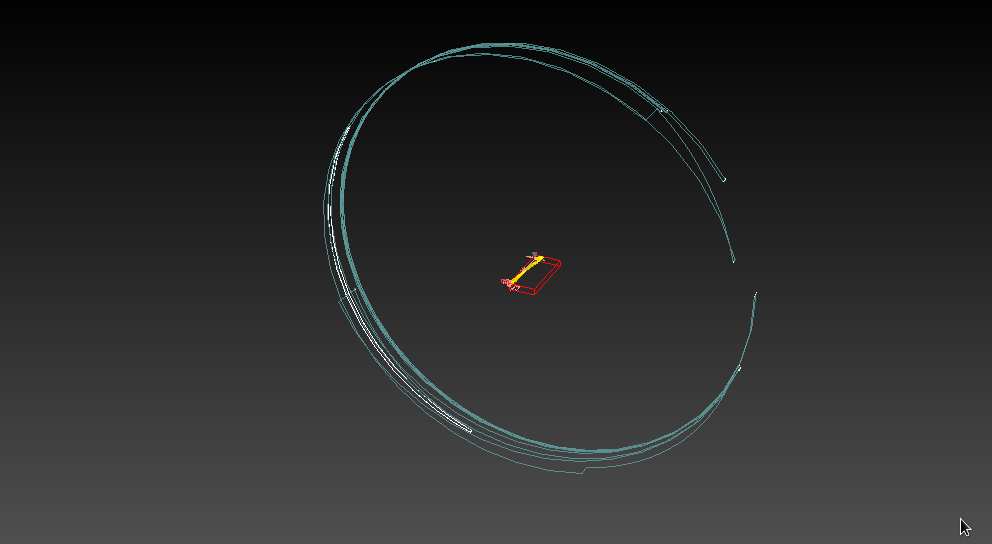
Hi,
I have a 4-axis MPCNC with a rotary B axis mounted at the far end of the Y travel (machine Y=700mm). The rotary axis is fixed — it does not move along Y.
G-code is generated by CAM with program zero at the chuck face, all moves go in Y-.
The problem: the backplotter does not display the toolpath correctly. Instead of showing the wrapped toolpath around the tube near the chuck, it draws a large circle. I believe this happens because the backplotter uses machine zero as the centre of rotation rather than the actual chuck position.
Setup:
- LinuxCNC 2.9.8 stable
- trivkins coordinates=XXYYZB, 6 joints
- qtdragon_hd interface
- GEOMETRY = !-BXYZ
Is there any way to tell the backplotter where the centre of rotation is?
Rotary axis backplot — centre of rotation not following WCS offset was created by dredivan
Hi,
I have a 4-axis MPCNC with a rotary B axis mounted at the far end of the Y travel (machine Y=700mm). The rotary axis is fixed — it does not move along Y.
G-code is generated by CAM with program zero at the chuck face, all moves go in Y-.
The problem: the backplotter does not display the toolpath correctly. Instead of showing the wrapped toolpath around the tube near the chuck, it draws a large circle. I believe this happens because the backplotter uses machine zero as the centre of rotation rather than the actual chuck position.
Setup:
- LinuxCNC 2.9.8 stable
- trivkins coordinates=XXYYZB, 6 joints
- qtdragon_hd interface
- GEOMETRY = !-BXYZ
Is there any way to tell the backplotter where the centre of rotation is?
[DISPLAY]
DISPLAY = qtvcp qtdragon_hd
# qtdragon saves most preference to this file
PREFERENCE_FILE_PATH = WORKINGFOLDER/qtdragon.pref


POSITION_OFFSET = RELATIVE
POSITION_FEEDBACK = ACTUAL
MAX_FEED_OVERRIDE = 2.000000

MAX_SPINDLE_0_OVERRIDE = 1.5
MIN_SPINDLE_0_OVERRIDE = .5
DEFAULT_SPINDLE_0_SPEED   = 12000

# spindle up/down increment in RPM
SPINDLE_INCREMENT = 200

# min max apindle speed manually allowed
MIN_SPINDLE_0_SPEED = 1000
MAX_SPINDLE_0_SPEED = 20000
# max spindle power in Watts
MAX_SPINDLE_POWER = 2000

#MAX_SPINDLE_OVERRIDE = 1.000000
#MIN_SPINDLE_OVERRIDE = 0.500000

INTRO_GRAPHIC = linuxcnc.gif
INTRO_TIME = 5
#PROGRAM_PREFIX = /home/user/linuxcnc/nc_files
PROGRAM_PREFIX = /home/user/cnc-programs
INCREMENTS = 5mm 1mm .5mm .1mm .01mm
ANGULAR_INCREMENTS = 1, 5, 10, 30, 45, 90, 180, 360
POSITION_FEEDBACK = ACTUAL
DEFAULT_LINEAR_VELOCITY = 40.000000
MAX_LINEAR_VELOCITY = 100.000000
MIN_LINEAR_VELOCITY = 0.500000
DEFAULT_ANGULAR_VELOCITY = 12.000000
MAX_ANGULAR_VELOCITY = 180.000000
MIN_ANGULAR_VELOCITY = 1.666667
EDITOR = gedit
GEOMETRY = !-BXYZ
CYCLE_TIME = 100
Last edit: 08 Apr 2026 14:14 by dredivan.
Please Log in or Create an account to join the conversation.
- Aciera
-

- Offline
- Administrator
-

Less
More
- Posts: 4819
- Thank you received: 2176
07 Apr 2026 09:21 #345260
by Aciera
Replied by Aciera on topic Rotary axis backplot — centre of rotation not following WCS offset
Note that the _preview_ does not take offsets into account:
linuxcnc.org/docs/stable/html/config/ini...sub:ini:sec:rs274ngc

linuxcnc.org/docs/stable/html/config/ini...sub:ini:sec:rs274ngc
Attachments:
Please Log in or Create an account to join the conversation.
- dredivan
- Offline
- New Member
-
Less
More
- Posts: 16
- Thank you received: 3
07 Apr 2026 14:10 #345269
by dredivan
Replied by dredivan on topic Rotary axis backplot — centre of rotation not following WCS offset
I am aware of the ! prefix in GEOMETRY — it is already set in my config (GEOMETRY = !-BXYZ).
However, as the documentation states, this provision applies for liveplots only. I am using qtdragon_hd, not AXIS. Does the ! prefix in GEOMETRY have any effect on the qtdragon_hd backplotter, or is it AXIS-specific only?
However, as the documentation states, this provision applies for liveplots only. I am using qtdragon_hd, not AXIS. Does the ! prefix in GEOMETRY have any effect on the qtdragon_hd backplotter, or is it AXIS-specific only?
Please Log in or Create an account to join the conversation.
- tommylight
-

- Offline
- Moderator
-

Less
More
- Posts: 21995
- Thank you received: 7488
07 Apr 2026 16:12 #345277
by tommylight
I have never seen a - used there.
Replied by tommylight on topic Rotary axis backplot — centre of rotation not following WCS offset
Remove the - after the !I am aware of the ! prefix in GEOMETRY — it is already set in my config (GEOMETRY = !-BXYZ).
I have never seen a - used there.
Please Log in or Create an account to join the conversation.
- dredivan
- Offline
- New Member
-
Less
More
- Posts: 16
- Thank you received: 3
- tommylight
-
- Offline
- Moderator
-
Less
More
- Posts: 21995
- Thank you received: 7488
08 Apr 2026 13:45 #345320
by tommylight
Replied by tommylight on topic Rotary axis backplot — centre of rotation not following WCS offset
Yes, for hal scaling and output and encoder count direction, but i do not know if that works for geometry.
Please Log in or Create an account to join the conversation.
- dredivan
- Offline
- New Member
-
Less
More
- Posts: 16
- Thank you received: 3
08 Apr 2026 13:54 #345321
by dredivan
Replied by dredivan on topic Rotary axis backplot — centre of rotation not following WCS offset
But the main question is still open: is there any way to tell the backplotter where the centre of rotation is, when the rotary chuck is not at machine Y=0?
In my case the chuck is fixed at Y=700mm. The backplotter always rotates around Y=0 (machine origin), so the wrapped toolpath displays as a large circle far from the actual machine envelope instead of showing correctly near the chuck.
I have already seen the 2013 thread where andypugh said there is no solution.
Is this still the case in 2.9.8, or has anything changed since then?
In my case the chuck is fixed at Y=700mm. The backplotter always rotates around Y=0 (machine origin), so the wrapped toolpath displays as a large circle far from the actual machine envelope instead of showing correctly near the chuck.
I have already seen the 2013 thread where andypugh said there is no solution.
Is this still the case in 2.9.8, or has anything changed since then?
Please Log in or Create an account to join the conversation.
- LinuxCNC
- General LinuxCNC Questions
- Rotary axis backplot — centre of rotation not following WCS offset
Time to create page: 0.169 seconds